
Movers Office Relocation: Your Secure Atlanta Move


You got the move notice. The lease clock is running, department heads are asking when they need to pack, IT is worried about cutover, and leadership wants the whole thing done without disruption.
That’s the moment when most companies start looking for movers office relocation support as if the job is mainly trucks, labels, and floor plans. It isn’t. In Atlanta, a serious office move touches infrastructure, compliance, procurement, employee communication, and the fate of every retired laptop, server, switch, and drive you no longer want in the new space.
The companies that handle this well don’t treat relocation as a one-week event. They treat it as an operational project with security and sustainability built in from the start.
The Modern Office Relocation Is More Than Just Moving Boxes
A typical office move starts with a simple question. “Who’s handling the movers?” That question sounds practical, but it’s incomplete.
The better question is this. Who’s coordinating the business move, the IT transition, the asset disposition plan, and the documentation trail?

Why office moves now carry more weight
A relocation used to mean desks, files, and a phone system. Today it usually includes cloud-connected workstations, mobile devices, room technology, access control, archived storage, and older equipment that shouldn’t follow you into the next lease.
That’s one reason office moves have become more strategic. Between March 2022 and March 2023, 8.9% of U.S. public companies relocated their headquarters, a 29% increase from the previous year and the highest annual total in seven years, according to corporate relocation data summarized here. More companies are rethinking footprint, talent access, and operating cost.
Atlanta is right in the path of that trend. Companies expand here, consolidate here, and often upgrade space at the same time they shed aging equipment. That’s why a relocation plan should include office operations, facilities, and IT from day one, not after the moving vendor is booked.
For office leaders juggling these details, this kind of office manager guidance is useful because it connects day-to-day workplace management with relocation realities.
What good planning actually protects
A successful move protects three things at once:
- Business continuity: Teams need systems, network access, and room functionality back quickly.
- Data control: Devices in transit still contain company information, regulated records, and credentials.
- Asset discipline: You should know what gets moved, what gets redeployed, and what gets retired.
Practical rule: If your move plan doesn’t include a decision for every device before move week, it’s incomplete.
That’s the core shift in modern movers office relocation work. The move isn’t just about where the desks go. It’s about what the business keeps, what it eliminates, and how it proves those decisions were handled correctly.
Your 9-Month Office Relocation Master Plan
Companies get into trouble when the move timeline lives in one person’s spreadsheet. The better model is a phased plan owned by a cross-functional team.
The risk of skipping that discipline is real. Common pitfalls strike 70% of office relocation projects, with a lack of senior buy-in delaying 40% of timelines and poor employee communication causing a 25% morale drop, according to JK Moving’s office relocation guidance.
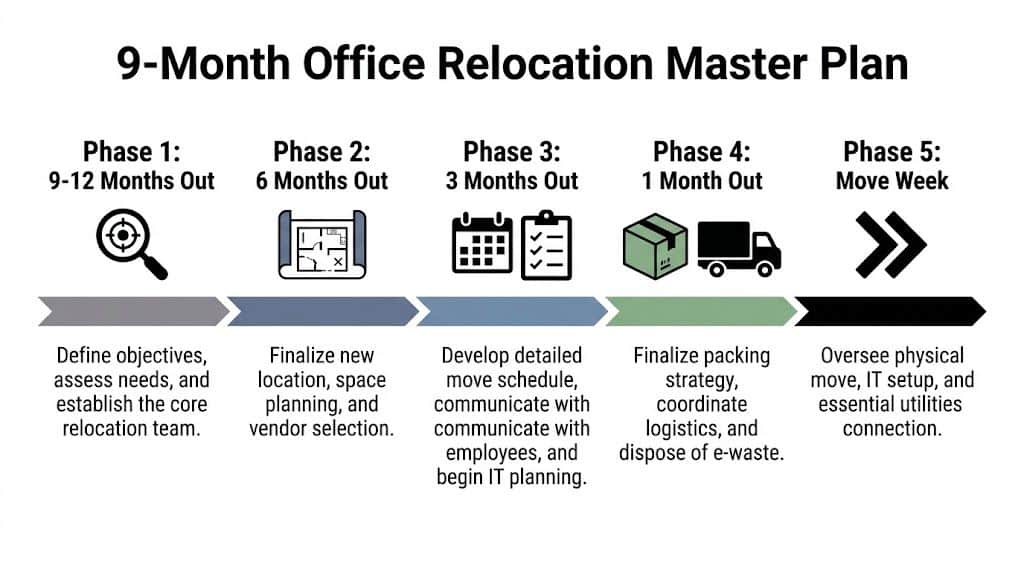
Months 9 to 12
Start with governance, not packing.
Form a relocation committee that includes facilities, IT, HR, finance, procurement, and at least one executive sponsor. If you’re in healthcare, education, government, or legal services, add compliance early. If your office has server rooms, badge systems, specialty printers, lab devices, or records storage, include the people who own them.
Use this phase to answer five blunt questions:
- What must move?
- What should be replaced before move-in?
- What can be redeployed internally?
- What has to be securely retired?
- What documentation will auditors or leadership expect afterward?
This is also when building logistics start. Loading dock rules matter. Elevator reservations matter. Access windows matter. If your new site has delivery restrictions, map them early so your mover, installer, and recycling partner aren’t fighting the same bottleneck on the same day. Teams planning around dock access often benefit from reviewing practical site-readiness concerns like those discussed at this loading dock resource.
Around 6 months out
This phase is about design decisions and vendor alignment.
Finalize floor plans, department sequencing, furniture reuse decisions, and network assumptions. Then issue scoped requests to your moving vendor, IT support providers, cabling team, furniture installers, and any secure asset disposition partner you’ll need.
Don’t wait for move month to sort out technology tasks. A useful external planning reference is Nutmeg Technologies’ Technology Checklist For Relocating Businesses, especially for documenting dependencies between infrastructure, user devices, and service restoration.
Around 3 months out
Now the move becomes operational.
Your asset audit should be in full swing. Every workstation, monitor, dock, printer, server, phone, UPS, and peripheral needs a disposition status. Move. Replace. Recycle. Hold for review.
A good audit usually reveals clutter people stopped seeing years ago. Spare monitors in a closet. Broken conference room gear. Old desktops no one wants to claim. Legacy drives that should never travel loosely in a moving cart.
Use this stage to publish employee communications with real dates and plain instructions:
- Cutoff dates: Tell staff when personal packing must be complete.
- Device rules: State what employees can carry, what IT must handle, and what movers should never touch.
- Department sequence: People tolerate disruption better when they know the order.
Moves go smoother when employees hear the same plan from leadership, facilities, and IT. Mixed instructions create their own downtime.
Final month and move week
The last month is not for major decisions. It’s for rehearsals and confirmation.
Lock the move schedule. Confirm labels and destination codes. Separate retired equipment from active inventory. Verify after-hours access. Test who approves last-minute changes.
During move week, keep command simple:
- One relocation lead owns the schedule.
- One IT lead owns system readiness.
- One facilities lead owns building coordination.
- One asset disposition lead owns retired equipment handling and paperwork.
That structure prevents the most common failure pattern in movers office relocation projects. Too many vendors working hard, but no one controlling handoffs.
Choosing Partners Who Protect Your Assets and Your Data
Price matters. It just shouldn’t be the first filter.
A standard office mover may be excellent at wrapping furniture, staging crates, and sequencing departments. That doesn’t mean the same company should touch decommissioned servers, medical workstations, or storage media with sensitive data still on them.
The biggest blind spot in vendor selection is data security. As noted in this relocation gap analysis, most moving companies treat relocation as a logistics problem, not a compliance problem, and offer no meaningful guidance on HIPAA handling or DoD sanitization expectations for IT assets in transit.
What a serious vendor conversation sounds like
Ask direct questions and listen for direct answers.
If a mover says, “We handle computers all the time,” that’s not a security protocol. If an IT recycler says, “We wipe everything,” that’s not enough either. You need process, chain-of-custody, and documentation.
Here’s the screening table I’d use before approving any Atlanta-area move partner.
Vendor Selection Checklist for a Secure Office Move
| Criteria | What to Look For | Red Flags |
|---|---|---|
| Scope clarity | Written separation between furniture moving, live IT cutover, and retired asset disposition | One vendor claims to “do it all” but can’t define who owns each step |
| Chain of custody | Serialized inventory, documented handoffs, sealed transport procedures where needed | Loose loading of devices, handwritten lists, no custody trail |
| Data destruction process | Clear wiping or shredding workflow, documented sanitization standards, certificates after completion | Vague promises such as “disposed of responsibly” |
| Insurance fit | Proof of coverage that matches equipment handling and sensitive environments | Generic coverage only, no answer on data-related risk |
| Regulated industry readiness | Familiarity with healthcare, education, government, or finance handling requirements | Vendor treats all office contents the same |
| Site logistics | Pre-move walkthrough, building coordination, dock and elevator planning | Pricing without visiting or reviewing access constraints |
| Asset reporting | Itemized pickup records and final disposition documentation | No reporting beyond invoice and truck count |
| Sustainability process | Defined downstream recycling practices and reporting suitable for internal ESG files | “We don’t know where it goes after pickup” |
Where general vendors still help
Not every partner needs to be specialized in everything.
For example, if you’re reconfiguring your new space, a strong commercial office furniture supplier can be valuable for planning what should be reused, replaced, or resized before move-in. That’s separate from secure IT handling, but it affects truck count, floor plan efficiency, and what should be removed before day one.
The mistake is assuming furniture expertise translates into data-security competence. It doesn’t.
Questions worth asking before you sign
Use a short interview list and make vendors answer in writing.
- Who handles devices that contain data? You want names, roles, and procedures.
- How are retired assets separated from assets going live in the new office? Mixed loads create avoidable risk.
- What proof do we receive after pickup or destruction? If there’s no formal documentation, assume you’ll be chasing it later.
- How do you control access at the old and new site? Building security and equipment security overlap. Physical safeguards like Atlanta access control planning belong in the conversation.
- What happens if our move schedule changes? Good vendors have change-order discipline and escalation contacts.
The best move partners make their process boring. No improvisation, no mystery, no vague language.
That’s what you want. Predictable custody. Predictable labeling. Predictable reporting.
In movers office relocation work, the vendors you remember fondly are usually the ones who prevented a problem you never had to see.
Turning E-Waste Into an ESG Win for Your Atlanta Business
Most offices don’t need all their current equipment in the new space.
Some devices are obsolete. Some don’t match the new layout. Some are too expensive to reconnect, relocate, or support. Yet many move plans still treat those items as a cleanup task for later.
That’s backwards.
The stronger approach is to build asset recovery into the relocation itself. As noted in this office moving discussion, most relocation content treats moving and equipment disposal as separate decisions, forcing companies to juggle multiple vendors. An integrated office move plus asset recovery model simplifies logistics, reduces costs, and provides unified compliance documentation for ESG reporting.

Why this matters beyond disposal
When you remove retired technology as part of the move, three good things happen.
First, the new office opens cleaner. Teams don’t inherit dead stock in storage rooms and under desks.
Second, your records improve. The same project timeline can capture pickup dates, serialized inventories, destruction events, and environmental reporting.
Third, the move becomes part of your broader ESG and CSR story. That matters for internal reporting, client questionnaires, procurement reviews, and employee trust.
What an integrated model looks like
A practical relocation-based ITAD workflow usually includes:
- Pre-move sorting: Separate active assets from end-of-life assets before movers arrive.
- Onsite de-installation: Remove retired servers, workstations, network gear, and storage media without mixing them into live move inventory.
- Secure transport and processing: Keep data-bearing equipment in a documented stream.
- Reporting: Close the loop with destruction records and sustainability documentation.
For Atlanta businesses, there’s also a branding opportunity. If your company already talks about community impact, your relocation can support that message instead of becoming a hidden operations story.
A cause-based recycling model makes that easier. “Recycle for a Cause” is the kind of message employees and stakeholders remember because it connects asset retirement with tangible community benefit. In this model, old tech doesn’t just leave the building. It contributes to veteran support and reforestation. That gives the move a social outcome, not just a disposal outcome.
How to use the move in CSR communication
You don’t need to overstate anything. Keep it concrete and documented.
Use the relocation to support:
- Internal communications: Share what equipment was responsibly retired and why.
- Sustainability files: Include impact reports and recycling documentation in ESG records.
- Recognition assets: A digital mark such as a “Recycled with Purpose” badge can support vendor pages or sustainability summaries.
- Seasonal campaigns: Veterans Day, Earth Day, and Arbor Day are natural moments to tie office cleanup and recycling into broader company values.
A move already disrupts routine. Smart companies use that disruption to reset standards.
If your team is replacing old endpoints, clearing a server room, or reducing footprint due to hybrid work, don’t let those assets drift into a side project. Build them into the move plan and route them through a formal IT asset recycling process.
That’s how office relocation stops being a pure expense and starts producing operational, environmental, and reputational value.
Navigating the Budget and Compliance of Your Office Move
The lowest moving quote is rarely the lowest total cost.
In office relocations, IT infrastructure is often the most underestimated cost, comprising 20-25% of the total budget. The same guidance notes that failure to engage IT vendors early can cause 30% budget overruns, while structured planning can lead to 25% cost savings through asset decluttering, according to Bailey’s Allied on office relocation planning mistakes.
Where budgets usually go wrong
Teams budget for crates, trucks, and labor. Then hidden costs show up.
Common examples include after-hours cabling changes, extra disconnect and reconnect work, emergency disposal, duplicate vendor visits, and downtime caused by equipment that should’ve been retired before the move. None of that looks dramatic in isolation. Together, it can wreck the budget.
A tighter budget model separates costs into four buckets:
- Physical move costs: Packing, transport, staging, and setup.
- Technology transition costs: De-installation, reconnect, testing, and cutover support.
- Disposition costs: Secure removal of obsolete devices and media.
- Risk costs: Delay, lost productivity, and compliance exposure if handoffs fail.
Compliance doesn’t pause during a move
Many organizations become exposed at this point.
If a hard drive containing protected information leaves your office without a documented chain-of-custody and a verified destruction outcome, the fact that you were “in the middle of a move” won’t help much in an audit or internal investigation. The same goes for misplaced backup media, untracked laptops, or storage devices left in staging areas.
That’s why documentation matters as much as transport.
Ask for records that close the loop:
- Pickup inventories: What left the site, and when.
- Custody records: Who handled it.
- Destruction verification: What was wiped or shredded.
- Environmental reporting: What was diverted from disposal streams.
If your internal team hasn’t worked with one before, a certificate of destruction is one of the key documents to understand before approving any IT asset disposition vendor.
What works better than a low-ball bid
A strong office move budget isn’t built around the cheapest vendor. It’s built around fewer surprises.
That means earlier IT involvement, cleaner asset decisions, and one documented path for everything that won’t make the trip to the new office. In practice, those choices protect the budget and reduce the chance that your move creates a compliance problem you’ll be untangling long after the furniture is in place.
Your Post-Move Blueprint for Success
The move isn’t done when the last truck leaves.
The first few weeks in the new office tell you whether the relocation worked. This is the time to verify that conference rooms function, printers connect, badges work, shared drives map correctly, retired assets were processed as planned, and department leads can confirm nothing critical disappeared in the transition.
What to review after go-live
Start with a short operational review.
- IT validation: Confirm user devices, network access, room systems, and any specialty equipment are fully functional.
- Asset reconciliation: Match moved inventory and retired inventory against your pre-move audit.
- Vendor closeout: Collect final paperwork while the project is still fresh.
- Team feedback: Ask managers where the process held up and where it broke down.
A post-move review matters because the next relocation, expansion, or consolidation will borrow from these notes. Good teams save floor plans, labeling logic, inventories, certificates, and vendor contact trees in one place.
Don’t waste the story
If your company handled retired technology responsibly during the move, communicate that internally.
Employees notice when a move feels chaotic and when it feels disciplined. They also notice when the company turns an operational task into something with visible community value. If your recycling partner provides impact certificates, veteran support reports, tree-planting acknowledgments, or similar materials, share them. That turns “we cleaned out old tech” into “we made the move count for something.”
The best office moves leave the business leaner, safer, and easier to run than it was before relocation.
That’s the finish line. Not just unpacked boxes. Better controls, less clutter, stronger documentation, and a workplace that reflects how the company wants to operate next.
If you’re planning a secure movers office relocation in Atlanta and need help with compliant IT asset removal, secure data destruction, or mission-driven electronics recycling, Atlanta Green Recycling supports businesses, hospitals, schools, government agencies, and data centers with pickup, de-installation, hard drive wiping, physical shredding, and audit-ready reporting. Their cause-based model also helps companies turn retired technology into measurable community impact through veteran support and reforestation.