
Data Destruction Duluth: Secure Your Data in 2026

Your office move is almost done. The old laptops are stacked in a back room. A few retired servers are still in a rack. Someone asks the familiar question: “Can we just recycle this stuff?”
That’s where many Duluth businesses make a costly mistake.
Old technology rarely looks dangerous. It looks inconvenient. It takes up space, collects dust, and slows down storage cleanouts. But inside those hard drives, SSDs, backup devices, and phones, there may still be employee files, customer records, financial documents, login credentials, or protected health information.
For a business manager, that turns disposal into a security decision, a compliance decision, and an ESG decision all at once. If you handle it casually, you risk a data exposure. If you handle it correctly, you protect the company, document compliance, and keep harmful e-waste out of the wrong place.
Your Duluth Business and the Hidden Risk in Old Tech
Duluth businesses already operate in an environment where every budget decision matters. Local economic pressure shapes practical choices, and that includes how companies retire aging IT equipment. Duluth’s population declined 11% from 1970 to 1990 before stabilizing, and median household income was $35,294 by 2024, according to The Story of Duluth in Data. In a market like that, it’s easy to view old devices as something to clear out cheaply.
That mindset creates risk.
A file server from five years ago may still contain payroll exports. A receptionist’s old desktop may still hold scanned IDs. A copier hard drive may still store document images. Even a “dead” laptop can hold recoverable information if nobody sanitized the storage media correctly.
What business managers often miss
The problem usually starts with a reasonable assumption. If a device no longer works, people assume the data is gone too. If a folder was deleted before storage, they assume the risk is gone. If equipment is being “recycled,” they assume security is built into the process.
Often, none of that is true.
Here’s what tends to sit in the back room:
- Retired office PCs that still contain local files, browser data, and saved credentials
- Old servers holding backups, database fragments, and archived user folders
- Network gear and appliances with stored configurations and administrative access information
- Portable drives used informally by staff for transfers, backups, or temporary storage
For local organizations managing upgrades, moves, or consolidations, secure disposition should sit beside IT planning, not after it. Businesses searching for IT asset disposition in Duluth are often trying to solve two problems at once: data risk and equipment removal.
Old tech is rarely “just junk.” It’s often a record archive hiding in plain sight.
Why this matters beyond compliance
There’s also a sustainability layer. Tossing devices into an undifferentiated disposal stream doesn’t just risk data exposure. It wastes recoverable materials and weakens the business’s environmental story.
Handled well, data destruction Duluth programs can support secure operations and responsible end-of-life management at the same time. That matters for internal governance, customer trust, and community reputation.
What Secure Data Destruction Really Means
Deleting a file is not the same as destroying data.
That’s the first point most nontechnical leaders need to understand. When a user hits delete, the device often removes the file’s listing, not the underlying content in a way that makes it irretrievable. This is similar to wiping the label off a storage box while leaving the contents inside.
Deleting versus sanitizing
A simple delete, quick format, or factory reset may make a device look clean to the next user. It does not automatically make the data unrecoverable.
Secure data destruction means using a method that makes the information inaccessible in a defensible way. Depending on the media and your end goal, that usually means one of two paths:
- Sanitize the media so the data can’t be recovered and the device may be reused.
- Physically destroy the media so reuse and data recovery are no longer possible.
If you want a plain-language background on the broader idea, this overview of what data sanitization means is a useful starting point.
A simple analogy that helps
Use a whiteboard example.
If someone writes customer account details on a whiteboard and erases it lightly, you may still see a faint ghost image under the right light. Data on storage devices behaves similarly. The visible file may be gone, but traces can remain unless a proper sanitization method removes or destroys them.
That’s why “we deleted everything” isn’t a security standard.
Why storage type changes the answer
Not all devices store data the same way. Traditional hard disk drives use magnetic platters. Solid-state drives store data differently. Phones, USB drives, and modern embedded systems can also behave differently from old desktop drives.
That matters because a method that works for one media type may not be the right choice for another.
Here’s the practical takeaway:
| Situation | Risky assumption | Better approach |
|---|---|---|
| Office PC refresh | “IT deleted user folders” | Verify sanitization or destroy the drive |
| Broken laptop | “It won’t boot, so it’s safe” | Treat the storage media as live until processed |
| Recycled server | “Recycler will handle it” | Require documented sanitization and custody |
| Donated equipment | “Factory reset is enough” | Use a validated sanitization method first |
Practical rule: If you can’t prove the data was sanitized, act as if the data is still there.
That’s the mindset behind strong data destruction Duluth programs. The goal isn’t to make a device look empty. The goal is to make the data irrecoverable and prove that you did it.
Data Destruction Regulations for Duluth Businesses
For Duluth companies, secure disposal isn’t just a best practice. It sits inside a compliance framework.
Minnesota requires businesses to use reasonable security measures for data disposal, and the state references NIST SP 800-88 as the standard framework for media sanitization, as explained by Minnesota data destruction compliance guidance. The practical consequence is important. If a device can’t be sanitized to that standard, policy requires physical destruction through a certified provider.
That’s the part many managers miss. Wiping is not always enough. In some final disposition scenarios, destruction becomes mandatory.
The three NIST levels in plain language
NIST SP 800-88 uses a tiered approach. Duluth businesses don’t need to memorize every technical detail, but they do need to know what each level means operationally.
Clear
Clear usually means logical overwriting or similar software-based techniques.
This is the level commonly associated with “data wiping.” It can be appropriate when the media is still functional and you intend to keep using it under controlled conditions.
Use cases often include:
- Internal redeployment of a workstation
- Refresh cycles where equipment stays within the organization
- Controlled reuse after a verified sanitization process
Purge
Purge goes further. It uses methods that render data infeasible to recover with advanced techniques. Depending on the media, this can involve degaussing or cryptographic erasure.
Purge is often used when organizations need a stronger level of assurance before redeployment, transfer, or controlled recycling.
Destroy
Destroy means physical destruction of the media itself.
That includes methods such as shredding or disintegration. For end-of-life devices leaving your control, this is often the most defensible answer, especially for sensitive data or damaged media that can’t be sanitized reliably.
Federal rules still matter
Minnesota’s framework doesn’t replace federal obligations. It works alongside them.
If your organization handles certain regulated data, you may already have legal duties tied to disposal:
- Healthcare organizations must protect HIPAA-regulated information.
- Financial institutions may face GLBA-related record protection duties.
- Schools and universities may need to account for student privacy obligations such as FERPA.
- Government contractors and public entities often have stricter disposal and documentation expectations.
The exact rule set depends on your industry, but the disposal principle stays consistent. You must protect sensitive information when devices leave service.
What this means in practice for a Duluth manager
A useful way to think about compliance is to ask three questions before any device leaves the building:
| Question | Why it matters |
|---|---|
| Can this media be sanitized to the accepted standard? | If not, destruction may be required |
| Are we documenting every handoff and serial number? | Auditors care about traceability |
| Is the final disposition method appropriate for the data sensitivity? | Low-risk and high-risk devices shouldn't be treated the same |
If the answer to the first question is “no” or “not sure,” don’t improvise.
If a drive is damaged, locked, unsupported, or otherwise unreliable to sanitize, treat physical destruction as the safer compliance path.
A common point of confusion
Some teams think compliance only applies to major servers or central storage.
It doesn’t. Risk often sits in overlooked devices. A single executive laptop, HR desktop, or retired external drive can create the same legal headache as a larger server if it contains protected data.
That’s why data destruction Duluth planning should cover the whole asset stream, not just the obvious hardware.
A Breakdown of Secure Destruction Methods
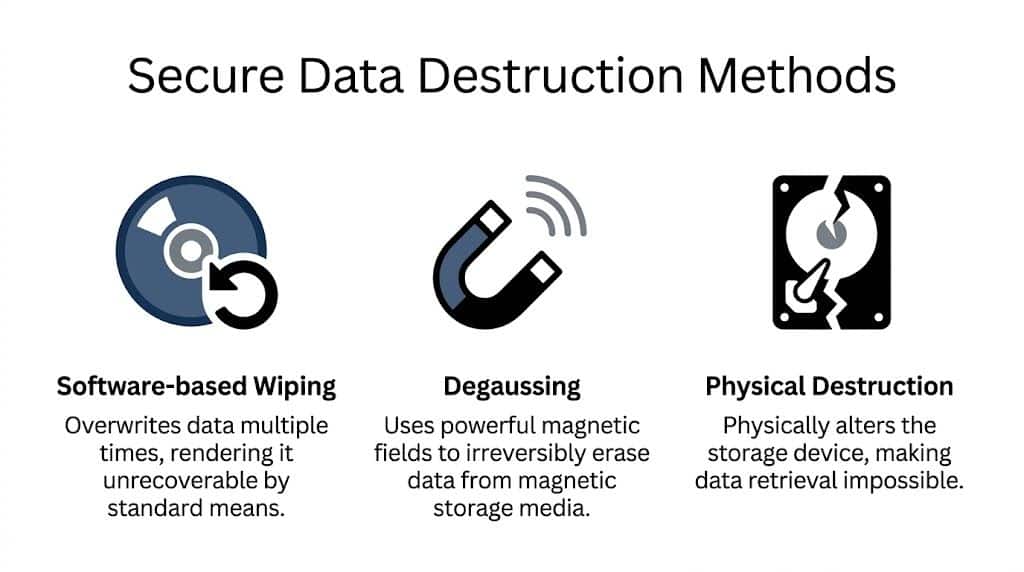
When managers compare data destruction options, they usually hear three terms: software wiping, degaussing, and physical destruction. Each has a place. The right choice depends on the media type, the condition of the device, and whether the asset will be reused or retired permanently.
This comparison helps simplify the decision.
Side by side comparison
| Method | Best for | Main advantage | Main limitation |
|---|---|---|---|
| Software-based wiping | Functional media intended for reuse | Preserves equipment value | Requires working hardware and process validation |
| Degaussing | Magnetic media | Strong erasure for supported media | Doesn’t fit every device type |
| Physical destruction | End-of-life or unsanitizable media | Highest confidence for final disposition | Eliminates reuse |
Software-based wiping
Software wiping overwrites stored data using a controlled process. It’s most useful when you want to preserve the device itself for redeployment or resale.
This can be a strong choice for:
- Employee laptop refreshes where machines stay in circulation
- Desktop standardization projects before reissue
- Server reuse when the drives are healthy and supported
The catch is that the process must be verified. A failed wipe job, unsupported device, or partial overwrite defeats the point.
Software wiping also assumes the media still works. If a hard drive is damaged, inaccessible, or unstable, it may not be a practical option at all.
Degaussing
Degaussing uses a powerful magnetic field to disrupt data on magnetic media.
This is a more specialized method. It’s useful for certain hard drives and magnetic tapes, but it isn’t a universal answer. It won’t apply the same way across all storage types, especially where magnetic storage isn’t the underlying technology.
If you need a plain-language reference on the equipment itself, this explainer on what a degausser does gives helpful context.
Degaussing is often chosen when:
- An organization wants strong erasure of magnetic drives
- Media reuse is not the priority
- The workflow supports specialized handling
A manager’s biggest mistake here is assuming degaussing covers every device with a port or memory chip. It doesn’t.
Physical destruction
Physical destruction is the most direct method. The media is shredded, disintegrated, pulverized, or otherwise destroyed so reuse and data recovery are prevented.
For many organizations, this is the cleanest answer for end-of-life devices.
Minnesota’s Enterprise Security Information Sanitization Standard requires that final disposition prevent reuse and data recovery, and for sensitive data this often means industrial cross-cut shredding that reduces hard drives to specified particle sizes, according to the Minnesota State Colleges and Universities sanitization procedure.
That requirement matters because it separates true data destruction from rough damage.
What physical destruction is not
A few DIY methods sound convincing but fail under scrutiny:
- Drilling a hole through a drive may damage part of the media while leaving other sections intact.
- Smashing a drive with a hammer creates irregular damage, not a documented sanitization method.
- Sending drives to general scrap recycling doesn’t prove secure destruction.
Industrial equipment matters because standards matter.
How to choose the method
Use the end goal as your guide.
Choose wiping when
You want to keep the device in service, the media is functional, and you can validate the process.
Choose degaussing when
You’re working with supported magnetic media and have a process built around that method.
Choose destruction when
The media is at end of life, too sensitive to risk, damaged, or leaving organizational control in a way that calls for the strongest final disposition.
Security level should follow the data and the disposition plan, not convenience.
For most businesses managing data destruction Duluth workflows, the practical pattern is simple. Reusable devices may be sanitized. Final-disposition media often should be physically destroyed.
Your Audit-Proof Shield Chain of Custody and Certification
Secure destruction is only half the job. The other half is proving it.
If an auditor, regulator, insurer, or internal investigator asks what happened to a retired device, “we sent it out” won’t protect you. You need documentation that shows who handled the asset, where it went, when custody changed, and how destruction or sanitization occurred.
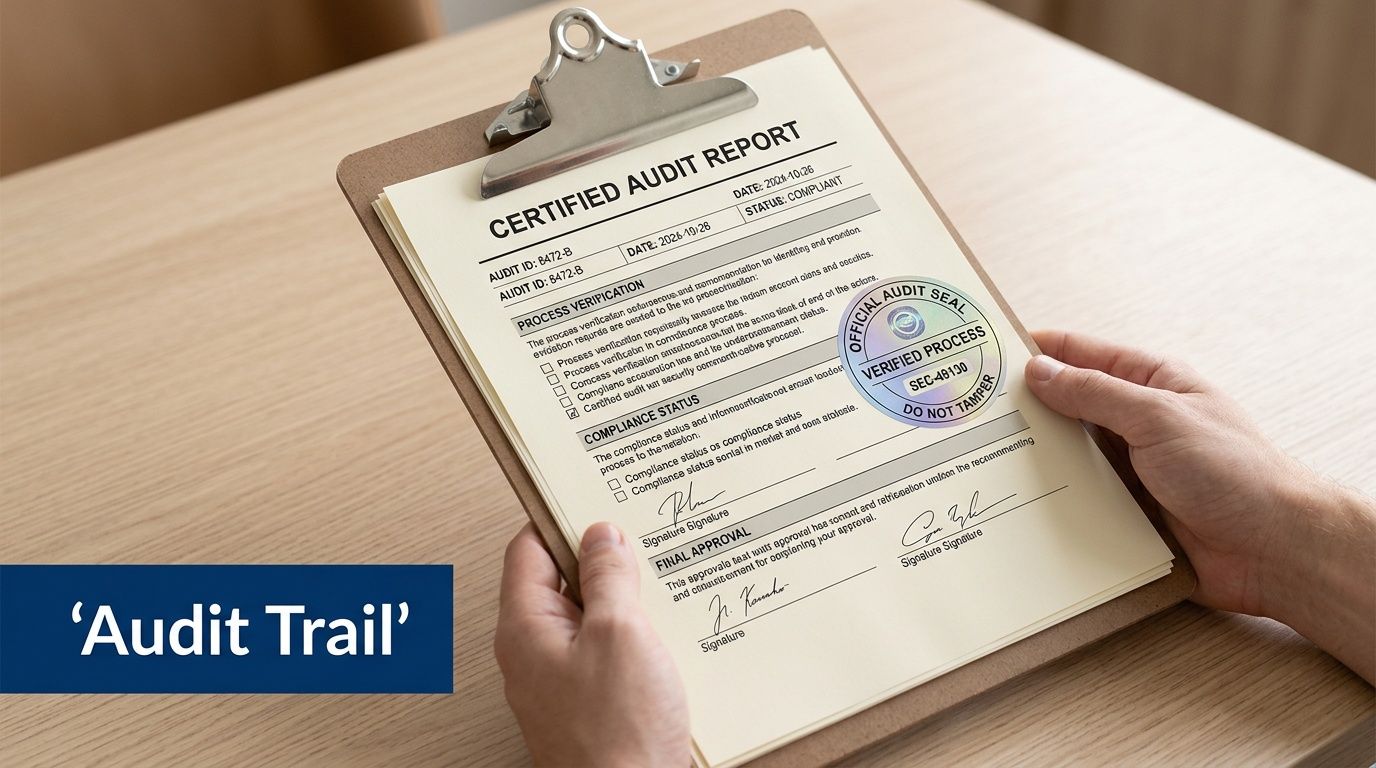
That documented trail is your chain of custody.
What chain of custody actually means
Think of chain of custody as a timeline for every sensitive asset.
From pickup at your Duluth office to final destruction, each transfer should be accounted for. That includes sealed collection, transport, intake, processing, and final disposition. If anything goes missing in that chain, the compliance story weakens immediately.
A defensible chain of custody should show:
- Asset identification such as serial numbers or internal inventory references
- Transfer details including dates, locations, and responsible parties
- Processing records that tie each asset to a sanitization or destruction method
- Final confirmation that the device reached its intended end point
Why timestamps and serials matter
Managers sometimes ask whether a general invoice is enough.
It isn’t. A broad statement that “electronics were recycled” doesn’t prove what happened to a specific hard drive from payroll, a server from radiology, or a laptop from the finance director. Audits usually turn on specifics.
Minnesota guidance tied to NIST-based workflows emphasizes auditable chain-of-custody documentation and Certificates of Destruction that include identifying details and the sanitization method used. That’s why records should connect the physical asset to the final action.
The Certificate of Destruction
The most important document in this process is the Certificate of Destruction.
A real certificate is not a marketing extra. It’s your compliance evidence. It should state what was destroyed or sanitized, where it happened, and which method was used. In stronger programs, the certificate also ties back to serialized inventory.
If you want to see the type of document businesses typically rely on, this certificate of destruction form example shows the core idea.
What to look for in your paperwork
| Document element | Why you need it |
|---|---|
| Serial number listing | Proves specific assets were processed |
| Destruction or sanitization method | Shows the process was appropriate |
| Date and location | Establishes accountability |
| Custody record | Shows who handled the assets |
| Final certificate | Supports audit and policy compliance |
A certificate without asset-level detail is closer to a receipt than a defense.
The practical business value
Good documentation does more than satisfy an auditor.
It helps your team answer routine internal questions fast. Procurement can close the loop on retired assets. Compliance can support policy enforcement. Leadership can show customers and partners that old hardware wasn’t handled casually.
For data destruction Duluth planning, a physical action becomes a legally defensible process.
How to Choose a Data Destruction Partner in Duluth
Price matters. It just shouldn’t be your first filter.
When a Duluth business chooses a data destruction vendor based only on pickup cost or convenience, it often overlooks the parts that create real protection: standards, documentation, media handling, and operational discipline.

Start with the questions that expose risk
Ask a potential provider direct questions. Don’t settle for vague reassurance.
- What sanitization and destruction methods do you use? The answer should be specific to media type, not generic.
- How do you maintain chain of custody? Listen for serialized tracking, timestamps, and documented handoffs.
- What does your Certificate of Destruction include? If they can’t describe the document clearly, that’s a warning sign.
- Can you handle both reusable and end-of-life devices? Some projects need sanitization for reuse and destruction for final disposition.
- How do you process sensitive or failed media? Damaged devices should not become exceptions that bypass policy.
A capable partner should answer these without hesitation.
Watch for the gap between recycling and secure destruction
Some vendors are excellent at moving scrap. That doesn’t mean they’re equipped for regulated data.
A general recycler may know commodity handling well but still lack the controls required for business records, healthcare data, or institutional IT. Secure data destruction needs a different operating model. The provider must understand media-specific methods, secure logistics, and proof requirements.
That distinction matters more as hardware environments get more complex.
AI and data center equipment raise the stakes
Duluth-area businesses should also think beyond ordinary office cleanouts. Emerging infrastructure brings new disposal demands.
The proposed Hermantown AI data center near Duluth highlights an underserved issue. High-density AI hardware creates disposal challenges that standard e-waste guides don’t fully address, and reporting on the Hermantown proposal points to the need for specialized expertise in compliant handling of next-generation technology.
That matters even if your company isn’t operating a giant facility. The lesson is broader. Storage environments are getting denser, systems are getting more specialized, and retirement workflows need partners who can keep up.
A vendor that only understands yesterday’s desktop recycling may struggle with today’s mixed IT estate.
Choose a partner that strengthens your ESG story
Compliance is the baseline. Smart businesses also ask what else the disposal program can do.
A stronger partner can help turn necessary asset retirement into visible ESG and CSR activity. That might include structured recycling drives, sustainability documentation, and community-facing impact reporting.
For companies building internal culture or external reporting around responsible operations, cause-based recycling can become a differentiator. An old tech refresh can support veteran aid and tree planting rather than ending as a silent back-office task.
Examples of that kind of value include:
- Seasonal drives around Veterans Day, Earth Day, or Arbor Day
- Impact certificates that support internal CSR reporting
- Mission-linked messaging such as recycling that supports both people and environmental restoration
- Digital recognition tools that help partners show they recycled with purpose
Those elements won’t replace compliance. They build on it.
A practical shortlist for managers
When you compare providers for data destruction Duluth needs, give extra weight to these traits:
| What to evaluate | What strong looks like |
|---|---|
| Method fit | Different answers for HDDs, SSDs, tapes, and failed media |
| Documentation | Serialized records and clear certificates |
| Logistics | Secure pickup and controlled handling |
| Industry understanding | Familiarity with healthcare, education, government, or finance requirements |
| Sustainability value | Responsible recycling plus meaningful community impact |
The best partner is rarely the one that just takes the pile away fastest. It’s the one that reduces risk, leaves a usable paper trail, and helps your business turn disposal into a responsible act.
Frequently Asked Questions About Data Destruction
Business managers usually ask practical questions after the policy discussion. These are the ones that come up most often.
Is drilling holes in a hard drive enough
Usually, no.
A damaged drive is not the same thing as a securely destroyed drive. If the goal is final disposition, your process should prevent reuse and data recovery. Minnesota’s standard for sensitive final disposition points toward physical destruction methods that meet industrial requirements, not improvised damage.
What if we only have a few devices
The quantity doesn’t change the duty.
A small batch can still hold sensitive data. The right approach is to apply the same controls you would use for a larger project: inventory the assets, choose the correct sanitization or destruction method, and keep documentation.
Can we wipe devices and then donate them
Sometimes, yes. But only if the sanitization method is appropriate for the device and the process is verified.
If you can’t validate sanitization, donation becomes risky. In that case, destruction may be the safer route. Don’t let goodwill create an avoidable exposure.
What about leased equipment
Leased devices need extra attention.
Your lease agreement may require return of the hardware, but that doesn’t remove your obligation to protect the data. Before return, confirm what sanitization method is allowed, who performs it, and what proof you’ll keep. If there’s any uncertainty, involve legal, compliance, and IT before the device leaves your control.
Are copier drives and network devices included
Yes.
People tend to focus on laptops and servers, but many other devices store information. Multifunction printers, copiers, firewalls, appliances, and some specialty equipment can all retain settings, files, or logs. Treat any storage-bearing device as potentially sensitive until verified otherwise.
Is factory reset enough for phones and tablets
Not automatically.
A reset may prepare the device for a new user, but you still need to know whether the reset aligns with your policy and risk level. Mobile devices should be included in your broader disposition process, not handled informally by individual staff members.
What if a drive is broken and won’t power on
That usually removes software wiping as a reliable option.
A failed device should still be treated as containing live data. When media can’t be sanitized properly, physical destruction is often the most defensible answer.
If a device is unreadable to you, that does not prove it’s unreadable to everyone.
Do we really need documentation for internal cleanouts
Yes, if the assets contain sensitive or regulated information.
Internal projects often become external questions later. Leadership changes, audits happen, and incidents trigger lookbacks. Good records make old decisions defensible.
Turn Compliance into Community Impact Today
Data destruction can feel like one more operational burden. In practice, it’s a chance to do three things well at once.
First, you protect your business from the hidden risk sitting inside retired equipment. Second, you meet Minnesota’s expectation for secure, auditable handling of storage media. Third, you keep obsolete electronics out of the wrong disposal stream and turn a necessary process into a responsible one.
Duluth already has a strong local example of what secure disposal looks like at scale. In September 2019, the University of Minnesota Duluth securely wiped 191,000 gigabytes of data and recycled 382 hard drives plus over 2 tons of electronics, according to UMD’s recycle event summary. For local managers, that’s a useful benchmark. It shows that secure, organized disposition is achievable even when the asset volume is large and the stakes are high.
A better way to frame the decision
Don’t treat old tech as clutter.
Treat it as a closing control point in your security program and a visible part of your sustainability program. That shift changes how teams budget, document, and communicate the work.
For organizations looking at e-waste recycling in Duluth, the strongest approach is one that combines secure data handling, documented compliance, and meaningful environmental stewardship.
If your back room, storage cage, or server closet is filling up, now is the right time to build a proper disposition plan.
Atlanta Green Recycling helps organizations manage secure IT asset disposition, hard drive destruction, and e-waste recycling with compliance-minded processes and sustainability goals in view. If your business needs a documented, responsible plan for retiring old technology, visit Atlanta Green Recycling to schedule a consultation.