
Atlanta Office Electronics Disposal Guide: Your 2026 Plan

That back storage room usually reveals the true story of an office. Up front, the company looks current. In the closet, there are retired laptops, dead monitors, old docking stations, a printer nobody wants to claim, and a stack of hard drives everyone keeps meaning to deal with.
In Atlanta, that pile is more than a housekeeping problem. It touches compliance, data security, sustainability reporting, and brand reputation. If your team handles office moves, hardware refreshes, data center cleanouts, hospital IT turnover, or school device replacement, you need a disposal process that works under pressure and stands up to audit questions later.
Your Atlanta Office E-Waste Problem Is an Opportunity
A familiar scenario plays out in offices across Buckhead, Midtown, Sandy Springs, Alpharetta, and the airport corridor. An office manager gets asked to “clear out old IT equipment” before a renovation or lease transition. The IT team knows some devices still hold sensitive data. Finance wants the project closed cleanly. Operations wants the room back.
Then a key question arises. What exactly can go out, who can take it, and what proof will you have afterward?

This is why a practical Atlanta Office Electronics Disposal Guide matters. The United States generates over 3.5 million tons of e-waste annually, making it the fastest-growing segment of municipal solid waste, and most electronics still don’t make it to certified recycling facilities according to ReWorx Recycling’s Atlanta e-waste overview.
That number matters, but the day-to-day business problem matters more. Old electronics take up space, create uncertainty, and turn into risk if nobody owns the process. Teams often delay disposal because they’re trying to avoid one bad outcome, then accidentally create another. They don’t want a breach, so they let devices sit. They don’t want disruption, so they postpone pickup. They don’t want to make a mistake, so nothing moves.
What works in real offices
The organizations that handle this well treat e-waste as an operating workflow, not a one-time cleanup. They inventory assets, separate devices with storage media from basic peripherals, confirm who needs chain-of-custody visibility, and schedule removal with documentation already planned.
What doesn’t work is informal disposal. That includes:
- Closet storage as a strategy because delayed disposal often means lost asset visibility.
- Assuming deletion equals destruction because it doesn’t.
- Using general junk haulers when the load includes regulated devices or sensitive media.
- Treating recycling as only an environmental task when it also affects legal, security, and ESG responsibilities.
Proper electronics disposal starts before the truck arrives. It starts when someone in the business can answer, “What is this device, who used it, and how was the data handled?”
There’s also a better way to frame the opportunity. Retired office electronics aren’t just a liability stream. Managed correctly, they can support environmental reporting, strengthen internal controls, and contribute to a mission employees and clients can understand. That’s one reason companies increasingly look at the benefits of e-waste recycling for business operations and sustainability as part of broader facilities and IT planning.
For Atlanta businesses, the strongest disposal programs do three things at once. They protect data, keep regulated electronics out of landfills, and turn an unavoidable operational task into something measurable and useful.
Understanding Atlanta's E-Waste Compliance Rules
A common Atlanta office scenario looks like this. IT has finished a laptop refresh, facilities wants the old equipment out before the next tenant walkthrough, and procurement assumes the recycler will “handle the paperwork.” That is usually where compliance problems start.
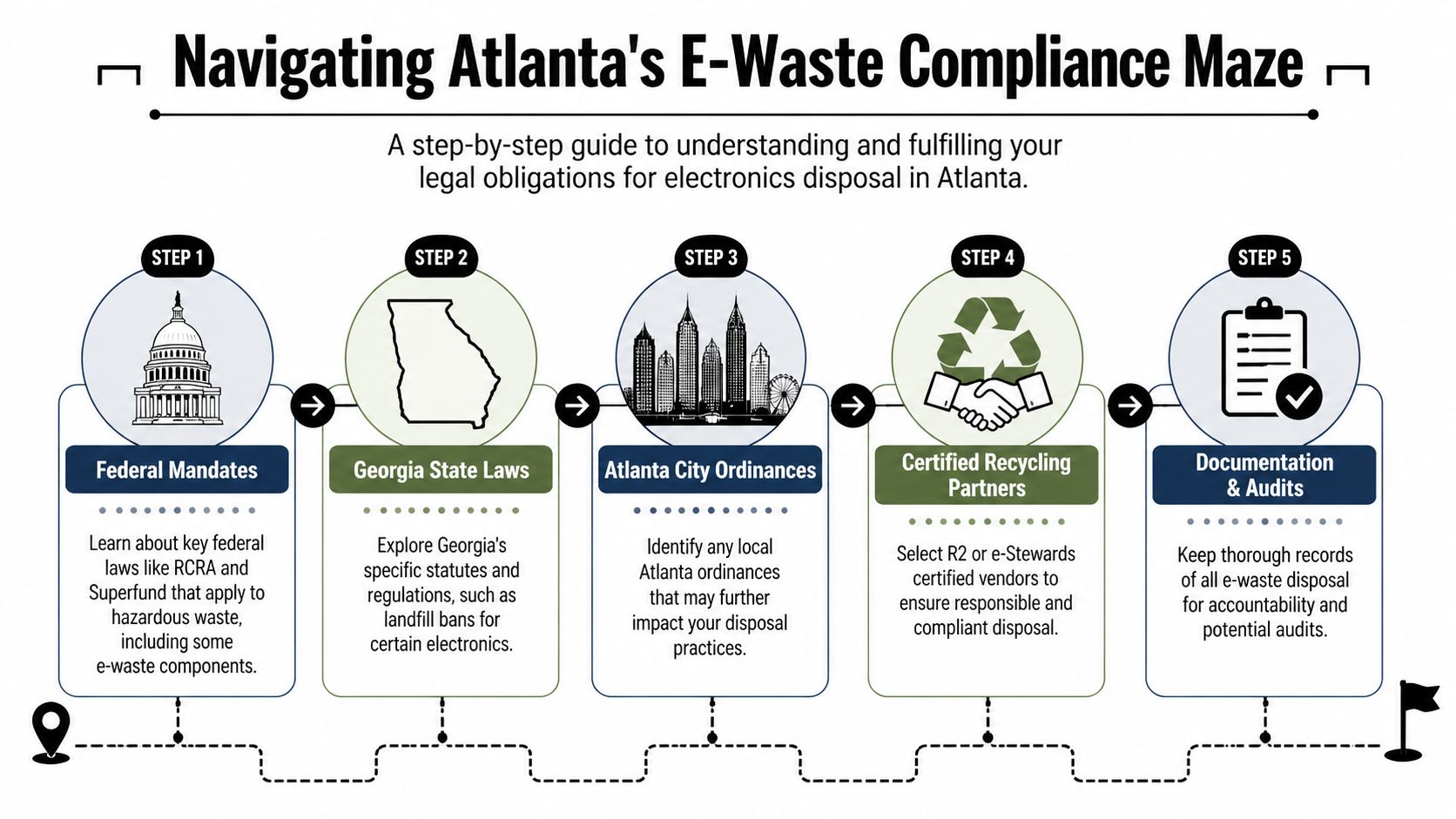
Compliance is layered. Federal hazardous waste rules shape how certain materials must be managed. Georgia law adds disposal restrictions for covered devices. Your own retention, audit, and information security policies often create stricter expectations than the law alone.
The practical takeaway is straightforward. If your business is retiring computers, monitors, laptops, or printers, treat them as controlled assets until final disposition is documented.
What Georgia businesses need to know
Georgia’s Computer Equipment Disposal and Recycling Act is the right starting point for office electronics. The law restricts disposal of covered computer equipment in solid waste landfills, which is why standard trash service is the wrong outlet for many office cleanouts. The Georgia Environmental Protection Division’s electronics recycling guidance is a better reference point for state requirements than general recycling blogs.
For an Atlanta office, that usually includes:
- Desktop computers and towers
- All-in-one computers
- Flat-panel and CRT monitors
- Laptops
- Printers and multifunction devices
That list catches a large share of routine refresh-cycle equipment. It also creates a real operational choice. A fast office cleanout may save a few days, but if covered electronics are mixed into general debris, the business loses control over documentation, downstream handling, and ESG reporting value.
The compliance framework companies actually use
The companies that handle this well assign ownership before pickup is scheduled. In practice, that means one accountable lead, usually from IT, facilities, compliance, or procurement, with a written process the rest of the team follows.
A workable framework looks like this:
Identify covered equipment
Pull regulated electronics out of furniture, scrap, and general junk removal loads.Match devices to your asset records
Reconcile what is leaving the site against inventory, lease schedules, and retirement approvals.Check the recycler’s operating controls
Ask how materials are sorted, where they go next, what documentation is issued, and whether downstream vendors are vetted.Record every handoff
Keep pickup dates, item counts, serial-based records where available, and disposition documents in one place.Align disposal records with ESG reporting
If your company tracks diversion, carbon, circularity, or community impact, capture that data at the time of removal instead of trying to rebuild it later.
That last point matters more than many teams expect. E-waste is usually treated as a compliance burden, but a disciplined process can also support sustainability reporting and community impact goals. Companies comparing providers should review Atlanta e-waste disposal companies for business pickups and compliance support with that broader use case in mind.
Federal rules still shape the process
State landfill restrictions are only part of the picture. Office electronics can contain materials that require careful end-of-life handling, and federal standards still influence how responsible recyclers manage storage, transport, and downstream processing.
That is why certifications matter. R2 and e-Stewards are not a guarantee of perfect execution, but they are a strong screening tool. They show that a recycler has invested in documented processes, environmental controls, and downstream accountability. For a business with audit exposure or formal ESG commitments, that discipline is often worth more than the lowest pickup quote.
Where companies get into trouble
The failures are usually ordinary process failures, not rare legal edge cases:
- E-waste gets mixed into a general office cleanout
- Departments send devices out without a central approval process
- Asset records are not reconciled after pickup
- The team keeps only a truck receipt instead of final recycling documentation
I have seen another missed opportunity in Atlanta projects. Companies often stop at “compliant disposal” and leave value on the table. A better program documents lawful recycling, tracks diversion, and connects retired electronics to a social impact model that employees and clients can witness. That turns a necessary disposal project into something more useful. It supports ESG reporting, keeps regulated material out of the wrong waste stream, and can contribute to veteran support and reforestation outcomes instead of ending as a forgotten line item in facilities spend.
Secure Data Destruction Your Top Priority
A laptop leaves your Midtown office during an upgrade project. It looks clean because the user deleted files and ran a factory reset. Six months later, your team is trying to prove what was on that device, who handled it, and whether the data was destroyed. That is the point where disposal turns into a security incident.
Data destruction deserves its own workflow because retired business equipment usually holds more than obvious files. Browsers keep credentials. Email clients store local archives. Collaboration tools leave cached documents and tokens behind. Phones, laptops, servers, copiers, and network gear can all carry data or provide a path back into business systems.
Deletion is not destruction
A reset prepares a device for the next user. It does not create an auditable sanitization record. Reformatting has the same problem. For Atlanta businesses with client data, employee records, financial information, or regulated files, the standard has to be higher.
The benchmark many organizations use is NIST SP 800-88. It gives practical guidance for media sanitization based on the type of storage and the condition of the device, as outlined by the National Institute of Standards and Technology in SP 800-88 Rev. 1. That distinction matters in real projects. A functional hard drive may be eligible for software sanitization with verification. A failed drive or inaccessible SSD usually needs physical destruction because you cannot reliably confirm a wipe on media you cannot fully access.
Comparison of Data Destruction Methods
| Method | How It Works | Best For | Security Level |
|---|---|---|---|
| Software wiping | Overwrites drive sectors using approved sanitization protocols | Functional HDDs that can still be accessed and processed | Strong when performed under controlled, documented procedures |
| Degaussing | Uses magnetic force to disrupt magnetic media | Certain magnetic storage environments where operational requirements support it | High for applicable magnetic media, but not a universal fit |
| Physical shredding | Destroys media into small particles | SSDs, failed drives, damaged media, and highly sensitive storage devices | Highest practical option when forensic recovery must be prevented |
Which method fits which device
The right method depends on the media, the asset condition, and the risk tolerance of the organization.
For standard office refreshes, wiping can be a sound choice for working hard drives if the recycler verifies the process and ties the result to the asset record. That preserves more downstream recovery value and can support reuse or materials recovery without carrying avoidable data risk.
SSDs require more caution. Wear leveling and controller behavior make them less predictable than traditional hard drives from a sanitization standpoint. In practice, many businesses choose shredding for failed SSDs, encrypted drives with uncertain key status, and any media tied to legal, healthcare, or financial records. It costs more and reduces reuse value, but it lowers residual risk and simplifies the audit story.
That trade-off is worth discussing before pickup, not on the loading dock.
Questions you should ask any recycler
Good vendors answer these questions clearly and without sales language:
What sanitization standard do you follow
Look for a direct reference to NIST SP 800-88 and a usable explanation of when wiping, degaussing, or shredding applies.How do you handle SSDs, failed drives, and encrypted media
The answer should match the technical limits of each device type.Will you provide Certificates of Destruction tied to serial numbers or asset IDs
A general receipt is not enough for audits or internal reviews.How is chain of custody documented from pickup through final processing
You need names, dates, locations, and custody records.Can destruction happen on-site when policy requires it
Some hospitals, law firms, and financial organizations need that control.
If a provider cannot explain why a functional HDD may be wiped while a failed SSD should usually be shredded, the process is not mature enough for business data.
Documentation is part of security
A destruction program is only complete when your company can prove what happened to each data-bearing asset. That means custody logs, serialized intake records, destruction dates, method details, and final certificates stored with the rest of your compliance files.
This is also where disposal can support ESG goals instead of sitting in a risk-only bucket. Once data-bearing devices are handled correctly, the remaining equipment can move into documented recycling, parts harvesting, or approved reuse channels. At Atlanta Green Recycling, that creates a cleaner chain of evidence and a better social outcome. Secure processing protects the business first, then the project can support veteran-focused initiatives and reforestation rather than ending as an opaque haul-away job. Businesses that want a closer look at process controls can review this Atlanta secure data destruction service guidance for business IT assets.
What works and what does not
The strongest approach starts before pickup. Classify assets into three groups: media that can be sanitized, media that must be physically destroyed, and non-data-bearing equipment that can go straight into the recycling stream. Assign one owner to reconcile serial numbers and review final paperwork.
The weakest approach is mixed pallets, vague instructions, and missing asset records. That is how companies lose both audit visibility and the chance to turn a risky disposal event into a documented ESG win.
Targeted Disposal Solutions for Atlanta Industries
Different industries retire similar devices, but they don’t carry the same risk when those devices leave service. A law firm’s concern isn’t identical to a hospital’s. A university surplus program doesn’t look like a financial institution’s branch hardware turnover.
That’s why disposal policies should reflect the records, regulations, and audit habits of the industry using them.

Healthcare and HIPAA disposal controls
Healthcare organizations need tighter disposal controls because retired devices may contain or provide access to protected health information. Verified guidance for this article highlights a major gap in many disposal resources: HIPAA-specific compliance, including retaining audit trails for 6 years post-disposal and ensuring chain-of-custody for PHI. It also notes that disposal errors contributed to 12% of recent healthcare data breaches, based on the source used for this guide, which is why specialized disposal protocols matter for hospitals and clinics. See the Atlanta healthcare recycling compliance discussion.
For healthcare, practical disposal controls usually include:
- Chain-of-custody discipline from department collection through final destruction
- Retention-ready documentation that can support internal reviews and HIPAA audits
- Clear separation of PHI-bearing devices from ordinary peripherals
- On-site destruction options when risk tolerance or internal policy requires it
A hospital IT closet often contains more than laptops. Think medication carts, nurse-station terminals, imaging workstations, and decommissioned server hardware. The disposal process needs to account for that complexity.
Finance and legal workflows
Financial firms and legal practices may not operate under HIPAA, but they face equally serious confidentiality expectations. Client files, account records, deal documents, and privileged communications often live on endpoints long after active use ends.
The best disposal workflows in these sectors tend to be conservative. They favor documented pickup windows, narrow custody handoffs, and destruction records that legal, risk, and IT can all review without translation.
In regulated offices, the disposal record should be understandable to three groups at once. Security, compliance, and outside auditors.
Education and public institutions
Schools, colleges, and universities often face a different challenge. They may retire large batches of similar devices from labs, classrooms, libraries, or administrative offices. The pressure point is scale and consistency, not just sensitivity.
Useful practices include:
- Batch-based asset lists for district or campus refreshes
- Staging by building or department to avoid pickup-day confusion
- Review of student and staff data exposure risks before devices leave campus
- Coordination with facilities teams when removal overlaps with renovations or summer turnover
For larger infrastructure retirements, specialized support may be needed. Organizations handling racks, storage systems, and high-density hardware often require server recycling and data center equipment removal in Atlanta rather than a basic office electronics pickup model.
What changes by sector and what doesn’t
The controls vary. The fundamentals don’t.
Every industry still needs a few basics:
- A device inventory.
- A decision on wipe versus shred.
- A chain-of-custody process.
- Documentation retained according to policy.
- A recycler that understands business-grade, not consumer-grade, disposal.
Industry-specific disposal succeeds when it respects the records environment the equipment came from. That’s the difference between removing clutter and closing out risk.
Planning Your Electronics Disposal Project Logistics
A good disposal project is usually won before collection day. The teams that run into trouble aren’t always careless. They’re often rushed. They schedule a pickup before they know what’s being picked up, where it sits, what contains data, and who needs the final records.
Project discipline fixes that.
Start with an asset and access review
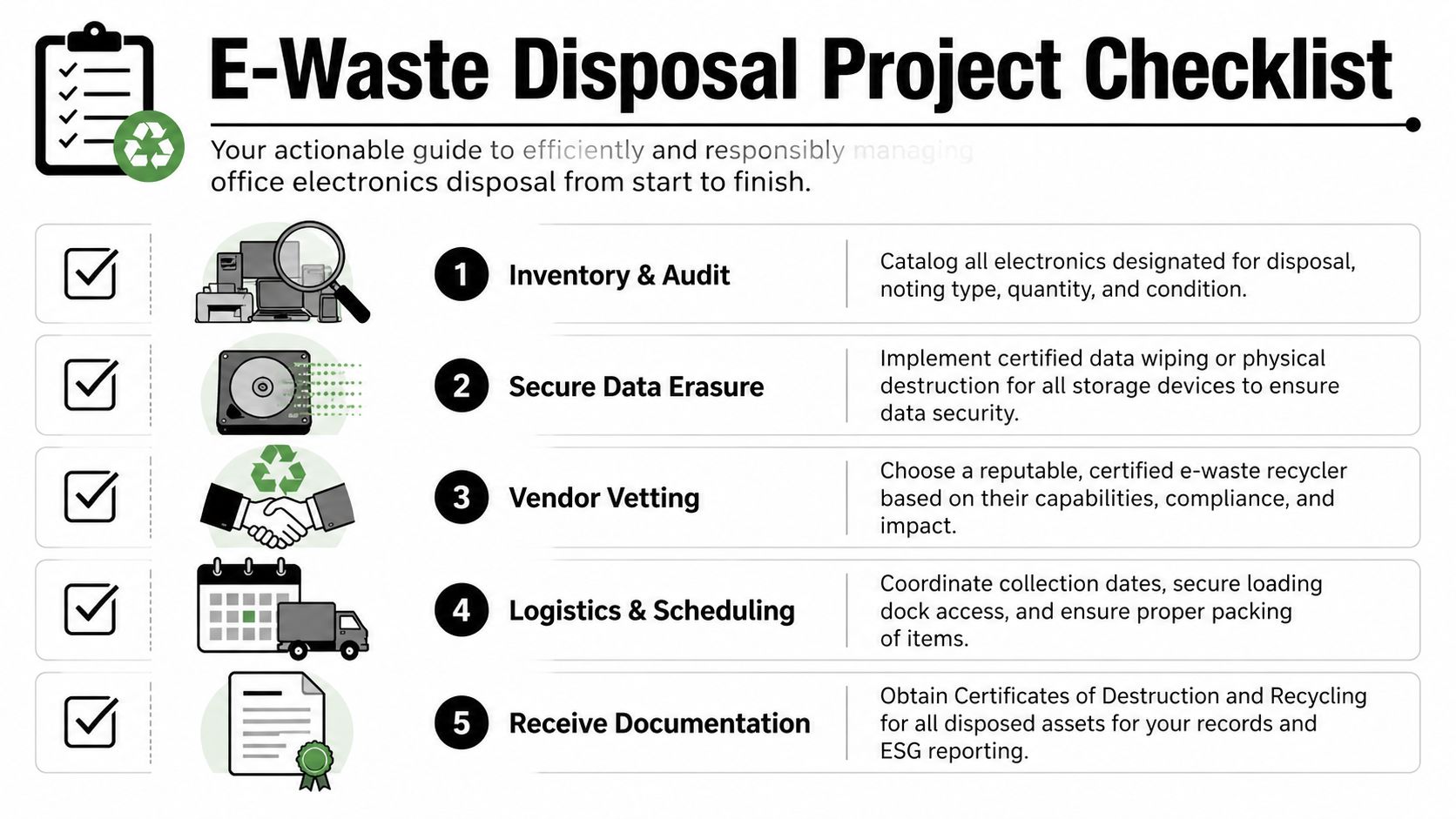
Before anybody moves equipment, build a working list. It doesn’t have to be fancy. It does need to be accurate enough that IT, facilities, and compliance are all referring to the same universe of assets.
A practical pre-pickup review should cover:
- Device type such as desktops, laptops, monitors, servers, printers, networking gear, drives, and accessories
- Condition including working, non-functional, damaged, or incomplete
- Data-bearing status so storage media receives the right handling path
- Location because loading dock access, elevators, and room clearances affect labor and timing
- Ownership questions if departments keep separate equipment records
Stage equipment in a way that helps processing
Mixed piles slow everything down. If you want a smoother project, sort before pickup.
Try a simple staging approach:
- Put computers and laptops together.
- Group monitors by type and size.
- Separate printers and multifunction devices because they’re heavier and often awkward to move.
- Isolate hard drives, SSDs, and loose media for direct security control.
- Flag special handling items early so there’s no confusion at the dock.
This doesn’t just help the recycler. It helps your own team verify what left the building.
Plan the handoff like an operations task
Pickup day should feel like a scheduled facilities project, not a scramble.
Use a short internal checklist:
- Confirm who will release assets.
- Reserve dock or freight elevator access.
- Make sure security knows the vendor is expected.
- Decide whether your team or the vendor will pack and palletize.
- Identify who receives final paperwork and where it will be stored.
If your building has dock restrictions, tenant access rules, or strict move windows, account for that up front. Those details cause more delays than most disposal managers expect. For businesses that need more controlled building-side logistics, loading dock coordination for electronics removal projects is often part of the planning conversation.
The cleaner the staging area, the cleaner the paperwork tends to be. Disorder at pickup usually turns into ambiguity in the final records.
Documentation you should expect
The disposal project isn’t complete when the truck leaves. It’s complete when your records package is complete.
That package often includes:
- Pickup records showing transfer date and custody
- Asset lists or serialized references where applicable
- Certificates of Destruction for media or devices processed under destruction protocols
- Recycling documentation for environmental and internal reporting use
What doesn’t work is treating these documents as optional follow-up. If your team needs records for audits, breach review, internal controls, or sustainability reporting, request them as part of the scope before the project starts.
For large cleanouts, de-installations, or office moves, this planning step is what separates a manageable project from a disruptive one.
Transforming E-Waste into a Powerful ESG Asset
Most businesses still treat electronics disposal as a cost center. That’s understandable, but it’s too narrow. Once your compliance and security controls are in place, old office technology becomes something else. It becomes a documented part of your environmental and social story.
That shift matters more as sustainability reporting expectations become more formal.

Why policy matters now
Verified guidance for this article notes that with 2026 SEC climate disclosure rules and expanding local ordinances, formal e-waste policies are critical for ESG reporting. The same source also notes that a partnership offering measurable impact, including “1 ton e-waste = 10 trees + veteran support,” can help businesses document positive outcomes for frameworks such as GRI 306 and SASB. That guidance appears in the zero-landfill and ESG reporting discussion for Atlanta businesses.
The practical takeaway is straightforward. If your company already tracks waste, vendor standards, or social impact, electronics disposal belongs in that reporting structure. It’s tangible, recurring, and operationally defensible.
From disposal event to CSR asset
A strong e-waste program gives communications and sustainability teams material they can use:
- Diversion and zero-landfill positioning when supported by your recycler’s documentation
- Impact certificates that connect disposal activity to tree planting or veteran support
- Internal campaign content for Earth Day, Arbor Day, and Veterans Day
- Website and report-ready proof points that show action, not just intention
Cause-based recycling creates a genuine business advantage. “Recycle for a Cause” works because it translates a technical back-office task into something employees and stakeholders understand. An old fleet of laptops isn’t only scrap. In the right program, it can be framed as support for veterans and reforestation.
What the strongest programs do differently
The most effective ESG-minded disposal programs usually add three layers that ordinary cleanouts miss.
Formal policy ownership
Someone owns the policy. Usually IT governs asset disposition, facilities manages movement, compliance reviews records, and sustainability or marketing receives the reporting package.
Reusable reporting assets
One pickup shouldn’t create one email and disappear. It should create assets your organization can use again:
- a recycling confirmation,
- an impact summary,
- a certificate for reporting files,
- and a digital badge or internal announcement if your brand team wants one.
Employee-facing storytelling
Employees respond to work they can see. If your company runs office cleanouts, refresh projects, or community collection events, tie those actions to visible impact. Seasonal drives around Veterans Day or Earth Day work well because they align operations with community involvement.
A disposal program becomes an ESG asset when the evidence is easy to carry from operations into reporting.
A practical local model
For Atlanta businesses, one available option is Atlanta Green Recycling, which offers business electronics recycling, secure data destruction workflows, pickup logistics, and a cause-based model built around veteran aid and tree planting. In practice, that kind of model can help companies turn an unavoidable disposal project into something finance, compliance, HR, and CSR teams can all use.
That matters because the best ESG initiatives aren’t abstract. They’re embedded in ordinary business processes. Office electronics disposal is one of the easiest places to prove your company can act responsibly without creating a separate program from scratch.
Partnering with Atlanta Green Recycling A Simple Guide
If your office has equipment waiting for pickup, the right next step is a controlled process, not a rushed cleanout. The goal is simple. Move the assets out, protect the data, and keep the paperwork in order.
A workable engagement path should feel straightforward from the start.
Step one request a real scope review
Start with the basics:
- what equipment you have,
- where it sits,
- whether storage media is involved,
- and whether the project is an office pickup, a server room cleanout, or a broader decommissioning effort.
This first conversation should also surface building access issues, timing constraints, and any industry-specific documentation needs. If your organization is in healthcare, finance, education, or government, say that early so the custody and recordkeeping expectations are clear.
Step two schedule collection around your operations
A good pickup plan works around the building, not against it. Some projects need loading dock coordination. Some need after-hours service. Others need devices removed floor by floor while operations continue.
Before pickup, confirm:
- Who is approving the release of assets.
- Whether drives require wiping or shredding.
- How serialized devices will be tracked.
- Who receives final destruction and recycling records.
This is also the point to decide whether the project includes recurring pickups or a one-time event tied to a move, refresh, or consolidation.
Step three receive the records and impact materials
Once the equipment has been processed, your team should receive the documentation needed for internal files. Depending on the project, that may include destruction records, recycling documentation, and materials that support ESG or CSR reporting.
For companies that want more than basic compliance, the dual-impact model becomes useful. A disposal program can support internal sustainability records while also giving your team a concrete community story tied to veterans and tree planting. That’s the idea behind messaging such as “Recycling That Restores Lives and the environment” and “Turning E-Waste into Hope.”
What a smooth partnership looks like
The best outcomes usually share a few traits:
- Clear internal ownership
- Accurate asset staging
- Defined security requirements
- Expected documentation before pickup
- A reporting plan that doesn’t stop at removal
If your Atlanta office is holding retired laptops, obsolete servers, old monitors, printers, or loose storage media, don’t let the project drag out. The longer equipment sits, the harder it is to maintain visibility and confidence in the final outcome.
Atlanta businesses that want a cleaner disposal process can contact Atlanta Green Recycling to schedule a consultation, discuss secure pickup options, and set up a program that supports compliance, data protection, and purpose-driven recycling.