
Secure IT Equipment Disposal Atlanta GA

Your office manager opens the storage closet to find old laptops stacked beside retired monitors, a box of loose hard drives, and a few mystery cables nobody wants to touch. Your IT lead says some of it probably still holds company data. Your operations team wants the space back. Your compliance person worries that one forgotten device could become a reportable incident.
That’s the moment secure IT equipment disposal stops being a housekeeping task and becomes a business decision.
In Atlanta, companies across healthcare, education, government, legal, and tech run into the same problem. Devices age out faster than internal processes do. A server gets replaced, but the old one sits in a back room. Laptops from a staff refresh get tagged for “later.” Phones from departed employees pile up in drawers. The longer that old equipment sits, the harder it is to track, secure, and dispose of responsibly.
There’s also a second truth that often gets missed. That pile of obsolete electronics isn’t just a risk. Managed well, it can support compliance, strengthen sustainability reporting, and become a visible community impact project. That’s part of why many Atlanta organizations are rethinking what happens after a device reaches end of life, instead of treating disposal like an afterthought.
That Old Tech Closet A Ticking Time Bomb or a Hidden Opportunity
A Midtown office administrator once described her storage room as “our graveyard of maybes.” Maybe those laptops were wiped. Maybe the old copier hard drive was removed. Maybe the retired firewall still had logs on it. Nobody knew for sure.
That uncertainty is what makes old tech dangerous.
When businesses hold onto obsolete devices, they often assume the risk is low because the equipment is powered off. But data risk doesn’t disappear just because a machine is unplugged. If a hard drive still exists, the information may still exist too. And if the business can’t document where the asset is, who handled it, and how it was destroyed, then compliance becomes a guessing game.
A closet full of aging hardware also creates environmental and operational problems. It eats up valuable space, makes inventory messy, and delays office moves or upgrades. Worse, some teams eventually “solve” the problem by tossing electronics into general waste or giving them away without a documented sanitization process.
Old devices don’t become harmless with age. They become harder to account for.
There’s a practical reason to deal with this now. The longer equipment is hoarded, the more likely labels fall off, staff changes happen, and institutional memory disappears. That’s one reason businesses looking at why you shouldn't hoard your old and used electronics often realize the issue isn’t clutter. It’s unmanaged liability.
What smart organizations see instead
The strongest teams look at disposal as a chance to do three things at once:
- Reduce risk: Remove dormant devices before they become a data problem.
- Improve documentation: Create a clean paper trail for audits and internal controls.
- Support ESG goals: Turn routine asset retirement into a visible sustainability action.
That shift matters. Secure IT Equipment Disposal Atlanta GA isn’t only about keeping bad things from happening. It’s also one of the simplest ways to show employees, clients, and leadership that your company takes security and environmental responsibility seriously.
The High Stakes of IT Disposal Compliance in Atlanta
Improper disposal creates two kinds of damage. The first is immediate and obvious: exposed data. The second is slower, but often just as expensive: compliance failure, damaged trust, and weak audit defensibility.
The larger market tells you how serious this has become. The global IT Asset Disposition market was valued at over $17 billion and is projected to more than double by 2032, driven by data security threats and tighter environmental rules, according to this ITAD market overview. That growth reflects a simple reality. Organizations can’t afford to treat end-of-life electronics casually anymore.

Why Atlanta organizations face real exposure
Atlanta has a dense mix of hospitals, clinics, schools, finance teams, law offices, public agencies, and data-heavy businesses. Many of them handle regulated information every day. That means disposal isn’t just about removing hardware. It’s about controlling what happens to patient records, employee files, financial data, customer records, internal communications, and stored credentials.
Think about a few common scenarios:
- A medical office replaces nurse workstations but sends the old devices to general recycling without a destruction record.
- A finance department upgrades desktops and assumes a factory reset is enough.
- A school district clears out old laptops without confirming whether browser-stored information or local files were removed.
- A law firm relocates and leaves retired devices with a building cleanout vendor that doesn’t specialize in secure media handling.
In each case, the mistake isn’t only the disposal choice. It’s the absence of documented control.
What compliance looks like in plain language
Regulations like HIPAA and FACTA matter because they expect organizations to protect sensitive information beyond active use. Data security duties don’t end when a device becomes obsolete. They continue until the information is properly sanitized or the media is physically destroyed.
For office managers, here’s the simplest analogy. Think of an old hard drive like a locked filing cabinet. If you move offices, you wouldn’t leave the cabinet on the curb and assume nobody will open it. You’d empty it, destroy the contents correctly, and keep records showing what happened.
Practical rule: If your team can’t prove how data left the device, assume you can’t prove compliance.
The costs aren’t only legal
Even when a company avoids formal penalties, improper disposal can still hurt in ways leadership notices quickly:
| Risk area | What it looks like in practice |
|---|---|
| Operational risk | Staff spend time searching for missing assets or reconstructing old disposal decisions |
| Audit risk | The organization has no certificate of destruction or chain-of-custody record |
| Reputation risk | Clients question whether the company protects information responsibly |
| Environmental risk | Electronics end up in channels that don’t align with sustainability commitments |
That’s why Secure IT Equipment Disposal Atlanta GA needs a compliance lens, not just a recycling lens. A recycler may move items off your floor. A compliant ITAD process gives you documented accountability from pickup through final disposition.
Annihilating Your Data Your Guide to Destruction Methods
Most confusion in IT disposal starts with one question. “Was the data destroyed?”
That depends on the method used, the kind of media involved, and whether the process matches the security need. The standard many organizations look to is NIST SP 800-88, which defines three sanitization levels: Clear, Purge, and Destroy. It also matters because a factory reset can leave 20-40% of data recoverable, while shredding media to less than 2mm particles makes data irrecoverable even under forensic analysis, according to this explanation of NIST-aligned disposal methods.
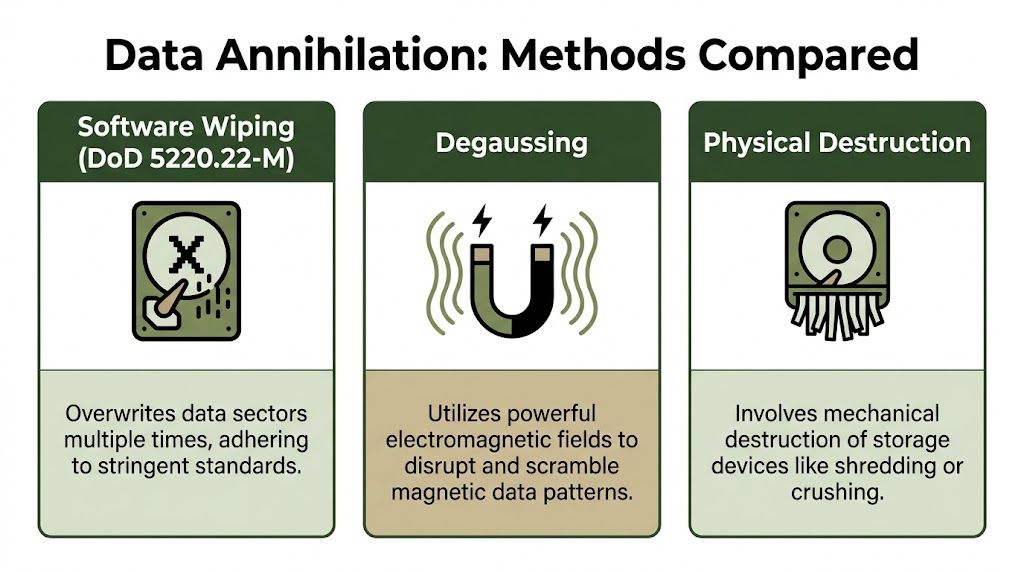
Clear means overwrite the data
Software wiping is the most familiar option. Picture a book filled with sensitive notes. Instead of tearing it up, you write dense nonsense over every page until the original text can’t be read. That’s the basic idea behind overwriting.
This method can work well for functional hard disk drives when the goal is to reuse or resell equipment. It’s often the choice when an organization wants data removal plus possible value recovery from the device itself.
But people frequently err here. A quick delete, formatting a drive, or factory resetting a laptop is not the same thing as verified wiping.
Purge goes deeper
Degaussing fits under the “Purge” level. You can think of it as scrambling the magnetic pattern on the media so the stored information becomes unreadable. It’s useful for certain magnetic media, but it isn’t a universal answer for every modern storage device.
If your team isn’t sure what type of drive you have, ask before approving a disposal plan. The right method depends on the media, not just the security policy.
If a vendor can’t clearly explain the difference between wipe, purge, and destroy, keep asking questions.
Destroy is physical destruction
Shredding is the confetti option. Instead of rewriting the book or scrambling the ink, you turn the whole book into pieces so small that reconstruction isn’t realistic. For high-risk data, obsolete media, failed drives, or heavily regulated environments, physical destruction is often the cleanest route.
That’s especially useful when equipment is broken and software methods can’t run. In those cases, physical destruction removes the uncertainty.
When each method makes sense
- Use wiping when the drive works, reuse is possible, and you need verified sanitization.
- Use degaussing when the media is magnetic and your policy allows purge-level treatment.
- Use shredding when the asset is defective, highly sensitive, or designated for destruction without reuse.
A good provider should also explain what happens when data is needed before disposal. Sometimes organizations discover an old drive holds records they still need for legal, operational, or archival reasons. In those situations, it may make sense to consult professional data recovery services before approving destruction, especially when the media has failed but the information may still matter.
For organizations seeking secure disposal after recovery or after internal retention review, secure hard drive destruction services in Atlanta GA are one example of the kind of service that combines media handling with documented destruction.
Choosing Your IT Disposal Service Onsite Bulk or Decommissioning
Not every organization needs the same disposal model. A dental office replacing ten laptops has a different need than a university clearing multiple departments or a colocation tenant retiring racks of hardware. Choosing the right service usually comes down to three variables: volume, sensitivity, and how much labor your team can spare.

Onsite service for maximum control
Onsite service works well when your organization wants assets handled at your location. That can include de-installation, packing, serialized handling, and onsite media destruction. Healthcare and government teams often prefer this model because they can watch the process and keep tighter physical control over assets from the first touch.
It’s a strong fit when your internal policy says devices shouldn’t leave the premises until data destruction occurs.
Bulk pickup for routine office cleanouts
Bulk pickup is the practical option for offices with accumulated equipment from refresh cycles, moves, remote worker returns, or storage-room buildup. The key question here isn’t just “Can someone take this away?” It’s “Can someone take it away with inventory control and documentation?”
This model usually makes sense when:
- Your volume is moderate to high: Too much for staff to move safely, but not a full infrastructure retirement.
- Your team needs convenience: Pickup scheduling matters more than onsite witnessing.
- The devices are mixed: Laptops, desktops, monitors, accessories, printers, and networking gear.
For Atlanta businesses comparing providers, IT asset disposition services in Atlanta GA are the kind of offering to look for when you need logistics plus secure processing.
Decommissioning for server rooms and data centers
Decommissioning is its own category. It usually involves planning, un-racking equipment, disconnecting cabling, tracking assets, data sanitization, packaging, transport, and final reporting. It’s less like junk removal and more like a controlled retirement project.
That distinction matters financially too. In Atlanta’s data center market, servers can have resale values ranging from $50-200 per unit, and strategic ITAD partners may recover 20-30% of original asset value, according to this overview of data center equipment disposal in Atlanta.
A simple decision guide
| Situation | Best-fit service | Why it usually works |
|---|---|---|
| Small but sensitive batch | Onsite service | Keeps handling visible and controlled |
| Office refresh with mixed devices | Bulk pickup | Efficient for routine accumulation |
| Server room shutdown or migration | Decommissioning | Supports planning, labor, tracking, and possible value recovery |
Some companies also use a hybrid approach. They’ll shred failed media onsite, then send reusable hardware through a documented downstream process for refurbishment or recycling. That can balance security with cost recovery, which is often the most sensible path for mature IT teams.
The Atlanta Green Recycling Difference Turn E-Waste into Hope
Most disposal companies talk about risk. Fewer talk about what your retired technology can build.
That’s where mission changes the conversation. Instead of framing Secure IT Equipment Disposal Atlanta GA as a grim compliance chore, a cause-based model turns it into one of the easiest ESG actions a company can take. The same pickup that clears a closet and closes a security gap can also support veteran aid and reforestation.

Compliance is the baseline. Meaning is the differentiator.
Many office managers are under pressure to show progress on sustainability without launching a massive new program. Secure disposal is unusually attractive because the work already needs to happen. The business already has obsolete devices. The compliance need already exists. The budget conversation already exists.
When disposal is tied to a broader mission, the same routine process can produce materials that support internal storytelling and CSR reporting. That may include impact certificates, internal communications, employee engagement campaigns, or a visible badge that shows your company chose a purpose-driven recycling path.
One option in this space is e-waste recycling in Atlanta GA, where services can combine secure electronics handling with documented environmental outcomes for business clients.
What a purpose-driven program can look like
A company doesn’t need to reinvent its operations to make this work. It can layer cause-based marketing and ESG reporting onto disposal activities it already has to perform.
Examples include:
- Veterans Day recycling drives: Retire old electronics while supporting veteran-focused initiatives.
- Earth Day or Arbor Day campaigns: Tie office cleanouts to tree planting and employee participation.
- CSR-ready reports: Give sustainability teams something concrete to include in annual summaries.
- Partner badges: Let companies show they “Recycled with Purpose” on a website or social channel.
The author brief also calls for impact counters such as 1,245 veterans supported and 3,700 trees planted. Those numbers belong in a clearly labeled campaign or reporting context because they speak to mission visibility and transparency, not just disposal logistics.
A disposal project becomes more valuable when leadership can point to both risk reduction and community benefit.
Why this matters beyond marketing
This isn’t just branding language. It changes internal adoption. Employees respond differently when they understand that clearing obsolete electronics doesn’t only protect data. It also contributes to something human and local.
For teams exploring broader operational partners in sustainability and waste workflows, directories of specialized waste management services can also help compare how vendors position environmental responsibility within larger business operations.
The strongest mission-based disposal programs do one thing very well. They make it easier for a company to say yes. Security gets handled. Environmental obligations get addressed. Social impact becomes visible. That’s a rare combination in a single vendor decision.
Your Vendor Selection Checklist for Secure ITAD in Atlanta
A vendor should never get your retired devices just because they offer pickup. They should earn that trust with process, documentation, and clear answers.
If you’re comparing providers, use a checklist that forces specifics. The most important benchmark is R2v3 certification, which requires a zero-landfill approach and adherence to NIST 800-88 data destruction standards. It also matters environmentally because audited providers are expected to prevent hazardous materials from contaminating places like the Chattahoochee watershed, as described in this summary of R2v3 and e-waste compliance.

The non-negotiables
- Certification proof: Ask whether the provider holds certifications relevant to secure disposal and downstream environmental handling. Don’t settle for vague claims.
- Chain of custody: Every asset should be traceable from pickup through final disposition.
- Certificates of destruction: If a provider destroys media, they should issue documentation your auditors can use.
- Defined destruction methods: The vendor should explain when they wipe, when they degauss, and when they shred.
- Downstream transparency: Ask where equipment goes after pickup. “We recycle responsibly” isn’t enough.
- Insurance and accountability: Confirm they carry appropriate liability coverage and can document incident procedures.
Questions office managers should ask out loud
Some providers sound credible until you ask direct operational questions. Use plain language.
- What happens to a non-working hard drive?
- Can you provide serial-number-level reporting if we need it?
- Do you offer onsite destruction, offsite destruction, or both?
- How do you document handoff between your staff and ours?
- What proof do we receive after the job is complete?
These questions reveal whether the company runs a true ITAD process or just a hauling service.
A quick scorecard
| Checklist item | What a strong answer sounds like |
|---|---|
| Certifications | Specific, current, and easy to verify |
| Documentation | Chain of custody, reporting, and destruction records are standard |
| Security methods | The provider explains media-specific handling clearly |
| Environmental handling | Zero-landfill and downstream controls are defined |
| Project fit | They can handle your actual volume and asset type |
If a proposal focuses on fast pickup but says little about documentation, keep looking.
A good checklist protects your company before the truck arrives. That’s where the key decision happens.
From Atlanta Offices to Restored Forests Real-World Impact Stories
A good disposal program should make sense on paper. It should also make sense in daily business life.
Take a healthcare organization in Midtown. Its compliance team needed old laptops, nursing-station devices, and retired storage media removed without creating uncertainty around protected health information. That concern is well founded. In Georgia, HIPAA-related fines for data breaches exceeded $6.8 million in 2025, and healthcare organizations need providers that can support onsite shredding and detailed audit trails, as noted in this discussion of secure tech disposal and HIPAA risk in Atlanta. For that kind of organization, the value isn’t only in removing equipment. It’s in being able to show exactly how sensitive media was handled.
A different example is a growing tech company in Alpharetta. Its challenge wasn’t medical compliance. It was speed. New hires kept arriving, old devices kept rotating out, and the company wanted one organized process instead of random cleanouts every few months. What helped most was turning the disposal event into an internal sustainability story. Employees could see that getting old gear out of circulation wasn’t a back-office task. It was part of how the company acted on its values.
A third case looks more like a legal or public-sector workflow. The organization had aging desktops, a few servers, and a strict internal expectation for inventories and final records. Leadership didn’t want vague verbal assurances. They wanted documented disposition by asset category and a clear audit trail. That’s where a mature ITAD process earns its keep. It reduces friction between operations, security, and compliance because everyone gets the same answer to the same question: what happened to each device?
What these stories have in common
- Someone owned the decision: Usually an IT manager, facilities lead, compliance officer, or office administrator.
- The risk started with uncertainty: Nobody was fully comfortable with devices sitting around.
- The solution included documentation: Removal alone wasn’t enough.
- The outcome reached beyond cleanup: The organization gained security clarity and a stronger story around responsibility.
That’s the part many businesses underestimate. Disposal can feel like the end of an asset’s life. In practice, it often becomes the start of a better internal process.
Your Next Step Schedule a Compliant and Purposeful Pickup
Old devices rarely become easier to manage by waiting. They become harder to inventory, harder to secure, and harder to explain later.
If your business has a closet full of retired laptops, shelves of old networking gear, boxed-up hard drives after a refresh, or a larger decommissioning project on the horizon, the next step is to get a documented plan in place. That plan should identify what you have, how it will be handled, which destruction method applies, what records you’ll receive, and how environmental processing will be managed.
What to do this week
You don’t need a massive internal initiative to start. A practical first move looks like this:
- Gather your asset types: Laptops, desktops, servers, loose drives, monitors, phones, printers, and accessories.
- Mark anything sensitive: Especially devices from healthcare, finance, HR, legal, or executive teams.
- Decide whether onsite handling matters: Some organizations need to witness destruction.
- Ask for documentation in advance: Know what reports or certificates you’ll receive.
- Schedule pickup before the next office churn event: Moves, renovations, and refresh cycles usually make tracking harder.
For organizations that want a straightforward next action, free business electronics pickup in Atlanta GA is the kind of starting point that helps move a disposal project from “we need to deal with this” to an actual scheduled workflow.
Why this decision matters
Secure disposal protects more than data. It protects credibility. It gives your compliance team supportable records, your operations team usable space, your leadership team a cleaner ESG story, and your staff confidence that sensitive information won’t resurface later.
If your company also cares about visible community impact, disposal can do more than close a risk loop. It can become a practical way to support veteran aid, reforestation, and local responsibility without creating an entirely new program from scratch.
The best compliance decisions are the ones that also make your organization more useful to the community around it.
Frequently Asked Questions
| Question | Answer |
|---|---|
| What counts as IT equipment for disposal? | Most business programs handle items such as computers, laptops, servers, hard drives, monitors, networking gear, and related electronics. Confirm accepted items before scheduling. |
| Is deleting files or doing a factory reset enough? | No. As covered earlier, a factory reset can still leave recoverable data. Sensitive devices need a documented sanitization or destruction process. |
| Should we choose onsite or offsite service? | It depends on your security requirements, asset volume, and internal policy. Onsite is often preferred when witnessing destruction matters. |
| Can old equipment have resale value? | In some decommissioning situations, yes. Functional hardware may be evaluated for reuse or resale instead of being treated as pure waste. |
| What documents should we ask for? | Ask for chain-of-custody records, inventory reporting when needed, and certificates of destruction for destroyed media. |
| Why does zero-landfill processing matter? | It supports environmental compliance and helps ensure electronics don’t enter irresponsible disposal channels. |
| Who usually leads this project internally? | Often IT, facilities, operations, compliance, or office management. The best results usually come when those teams coordinate early. |
If your organization needs a practical next step, Atlanta Green Recycling offers business-focused electronics pickup, secure data destruction workflows, and compliance-minded IT asset handling across the Atlanta metro area. It’s a simple way to clear obsolete tech, strengthen documentation, and turn end-of-life equipment into meaningful environmental and community impact.