
Planning Disaster Recovery: An Atlanta Business Guide


A lot of Atlanta organizations think about disaster recovery only when a storm knocks out power, a ransomware note lands on a server, or a move forces a rushed shutdown of a server room. By then, the backup conversation is already behind schedule.
What gets missed is the physical side of recovery. When systems fail, offices flood, racks overheat, or endpoints get compromised, someone has to decide what happens to laptops, drives, network gear, retired servers, badge readers, copiers, and storage media. If those assets hold regulated data, the recovery plan isn’t complete until those devices are tracked, sanitized, destroyed, or recycled through a documented process.
That gap matters in Atlanta. Healthcare groups, schools, logistics firms, local governments, and growing companies across the metro all run mixed environments with cloud apps, aging hardware, and compliance obligations that don’t pause during a crisis. Planning disaster recovery well means protecting uptime, preserving evidence, maintaining chain of custody, and keeping damaged or obsolete equipment out of both landfills and the wrong hands.
Why Your Atlanta Business Needs a Resilient DR Plan Now
An Atlanta summer storm doesn’t need to be historic to disrupt operations. One hard hit to the power grid, one flooded equipment room, or one internet outage affecting a key office can force teams into manual workarounds fast. In a cyber event, the disruption is worse because nobody wants to reconnect equipment until they know what’s clean, what’s encrypted, and what’s compromised.

The usual response starts with backups, cloud failover, and user access. That’s necessary, but it’s incomplete. The moment you have damaged servers, soaked desktops, failed storage arrays, or suspect laptops, recovery becomes a physical asset problem too. Teams need a record of where assets are, who handled them, which ones contain sensitive data, and which ones can be redeployed versus destroyed.
The overlooked pile after the outage
In practice, recovery scenes get messy fast. A hospital may replace endpoints before investigators finish review. A school district may stack old devices in a closet during a building restoration. A corporate office may move retired gear from one floor to another with no formal custody log because everyone is focused on getting people back to work.
That’s where compliance risk starts. Data doesn’t stop being regulated because the device is broken.
Practical rule: If a device held protected data before the incident, treat it as a controlled asset after the incident until sanitization or destruction is fully documented.
The business stakes are high. In a 2025 survey, 100% of senior technology executives reported revenue losses from IT outages in the previous year, and FEMA data indicates that approximately 25% of businesses that close due to a major disaster never reopen (Invenio IT disaster recovery statistics).
Why Atlanta businesses need the full lifecycle view
Planning disaster recovery in Atlanta has to account for more than restoration scripts. It has to cover:
- Regional disruption risk from severe weather, power instability, and site access issues.
- Compliance exposure when devices contain PHI, financial records, HR files, law enforcement data, or student information.
- Operational bottlenecks when replacement hardware, movers, de-install teams, and recyclers all get called at once.
- Reputation risk if discarded assets surface later without proof of secure destruction.
That’s especially relevant during a facility closure, office relocation, or data center event, where recovery and decommissioning often overlap. Teams dealing with servers, racks, and storage infrastructure can use a local reference point like this overview of data center services in Georgia to understand how physical recovery work intersects with disposition.
Resilience includes responsible disposal
A resilient DR plan restores systems. A mature one also controls what happens to failed and retired hardware. That means secure wiping, physical destruction when needed, documented transport, and environmentally responsible downstream processing.
It also creates a better ESG story. If your organization already reports on sustainability or community impact, the recovery process can support those goals instead of working against them. Responsible electronics recycling, veteran-support initiatives, and tree-planting campaigns aren’t a substitute for controls. But when paired with strict chain of custody and verified sanitization, they turn a painful operational event into a cleaner, more accountable response.
Building Your Plan's Foundation Risk Assessment and Asset Inventory
Most weak recovery plans fail before an incident ever happens. The problem usually isn’t effort. It’s that the team built the plan around generic threats and a spreadsheet that only lists device names.
A usable plan starts with two disciplined tasks. First, identify what can realistically disrupt your Atlanta operation. Second, build an asset inventory that tells you what matters, what depends on what, and what must be handled under compliance controls.
Start with a risk assessment grounded in your actual environment
Generic threat lists don’t help much during a real outage. Your risk assessment has to reflect your building, your vendors, your users, and your workflows.
For Atlanta organizations, the threat picture often includes severe weather, flash flooding, long power interruptions, HVAC failure in server rooms, ransomware, accidental deletion, equipment failure, and bad handoffs during office moves or decommissions. If your business has multiple sites across the metro, include transportation and access delays too.
One issue many teams still underestimate is replacement delay. Post-disaster supply chain disruptions can delay server replacements by 6 to 12 months, and FEMA’s 2025 report found this affected 40% of data centers in the U.S. Southeast after Hurricane Helene in 2024 (NCDOT research report).
That changes the planning math. You can’t assume failed hardware will be replaced on demand.
A practical way to assess risk
Use a simple structure and force specificity:
List business services first
Don’t begin with hardware. Begin with what the business must keep running, such as EHR access, warehouse scanning, payroll processing, admissions, dispatch, or records retention.Map the systems behind each service
Include servers, storage, network gear, cloud applications, identity systems, backup repositories, and endpoint groups.Assign realistic disruption scenarios
Example scenarios might include a ransomware lockout, a storm-related power loss, or water damage in a telecom closet.Document what makes each scenario worse
Common amplifiers are single internet providers, no spare hardware, undocumented admin credentials, and no approved vendor for emergency device removal.
A useful reference for structuring this thinking is a technology risk management framework that helps teams tie technical exposure back to operational impact.
The best risk assessments don’t try to predict every disaster. They make sure the team can act clearly when something bad happens.
Build an inventory for recovery, not accounting
A finance asset register won’t get you through a disaster. Recovery teams need a live inventory that supports triage, restoration, and compliant disposition.
That inventory should answer questions like these:
- Which assets are mission critical
- Which systems have regulatory data
- Which devices support other systems
- Which equipment can be swapped
- Which assets need secure destruction if they fail
For most organizations, the inventory should cover more than servers and laptops. Include firewalls, switches, wireless gear, copiers with storage, NAS devices, backup appliances, mobile devices, removable media, and any specialty equipment tied to operations.
What to tag in the inventory
Use tags that help people make decisions under pressure.
Criticality tier
Mark whether the asset supports a must-run service, an important but deferrable function, or a low-priority process.Data sensitivity
Flag assets that may contain PHI, financial records, employee files, student records, legal documents, or confidential customer data.Dependency chain
Note what breaks if this asset goes down. Identity, DNS, storage, and network dependencies are often missed.Recovery location
Record whether the asset is on-site, in colocation, remote, or distributed across user homes and branch offices.Disposition path
Mark whether the asset can be wiped and reused, requires physical destruction, or should go directly into certified recycling.
For organizations tightening internal controls, it also helps to compare your inventory process against operational guidance around IT asset management best practices.
Don’t ignore chain of custody during inventory
Inventory work should also prepare you for the recovery aftermath. If a server fails during an incident and contains regulated data, the team needs to know who can authorize removal, who logs serial numbers, who approves destruction, and which vendor receives the asset.
That sounds administrative until an auditor asks where a damaged drive went.
A strong inventory does three jobs at once. It speeds up recovery, reduces guesswork, and prevents the organization from treating sensitive hardware like ordinary scrap.
Setting Your Recovery Goals RTO RPO and Backup Plans
The importance of RTO and RPO is widely recognized, but these metrics are frequently set in reverse. They start with whatever the backup platform can do, then call that the target. The right approach starts with business impact.
A rigorous disaster recovery methodology starts with a Business Impact Analysis, or BIA, to classify systems and define recovery goals. For high-value workflows, an RTO of 2 hours and an RPO of 15 minutes can be achieved through continuous replication (IBM disaster recovery strategy guidance). That standard is especially relevant when a workflow involves sensitive data and tightly controlled handoffs.
What RTO and RPO actually mean in practice
Recovery Time Objective is how long the business can tolerate a system being unavailable.
Recovery Point Objective is how much data loss the business can tolerate between the last recoverable point and the disruption.
Those aren’t technical vanity metrics. They shape architecture, staffing, backup schedules, runbooks, and budget.
If your admissions system can’t be down for long, the recovery design has to support that. If your records team can tolerate restoring from the prior evening, the design can be simpler.
Example RTO and RPO targets for Atlanta industries
| Industry / System | Example Criticality | Sample RTO Target | Sample RPO Target |
|---|---|---|---|
| Hospital EMR access | Mission critical | Minutes to a few hours | Very short, near-real-time if feasible |
| City or county records system | High | A few hours | Short interval |
| K-12 student information platform | High during enrollment and grading cycles | Several hours | Short to moderate interval |
| Corporate identity and file access | High | A few hours | Short interval |
| Finance back office archive | Moderate | Same day | Daily backup may be acceptable |
| Facilities archive or legacy imaging repository | Lower | Next business day | Longer interval |
The exact target comes from the BIA, not from habit.
A simple decision method
Use three questions for every system:
- What stops if this system is unavailable
- How long can that stoppage last before legal, financial, safety, or customer harm starts
- How much recent data can the business afford to lose
The answers should come from system owners, not only IT. Compliance, operations, finance, and department leads need to be in the room because they understand the business consequences.
Field note: If the business says a system is critical but won’t fund replication, spare hardware, or failover testing, the stated priority isn’t real yet.
Match backup design to business need
Once you set targets, the backup strategy gets clearer.
For the most critical systems, teams often use continuous replication, cloud-based failover, or standby environments. For less time-sensitive systems, scheduled snapshots and standard backup retention may be enough. The point isn’t to make everything instant. The point is to avoid overbuilding low-value systems while underprotecting high-value ones.
A useful outside perspective on this mindset appears in Why Zero Downtime Isn't Optional, which is worth reading when your leadership team assumes every workload deserves the same recovery spend.
Different systems deserve different treatment
Consider how these categories usually behave:
- Identity and access systems often need aggressive recovery because everything else may depend on them.
- Email and collaboration platforms matter, but workarounds may exist if core operational systems are restored first.
- File shares with active departmental use usually need tighter recovery than static archives.
- Retired but regulated datasets may not need fast uptime, yet they still need controlled retention, backup validation, and disposition planning.
Physical infrastructure is a key component of these plans. If a migration, closure, or decommissioning is part of your continuity strategy, backup planning should align with how hardware will be moved, retired, or destroyed. Teams managing larger transitions can pressure-test that alignment against a data center migration checklist.
The common trade-offs
Most Atlanta organizations face the same set of real constraints:
Budget versus speed
Faster recovery costs more in replication, automation, secondary infrastructure, and testing.Complexity versus reliability
Highly customized failover can work well, but complexity often creates more places for operators to make mistakes.Retention versus sprawl
Keeping too much data for too long expands recovery scope and increases disposition risk later.Cloud convenience versus governance
Cloud backups simplify offsite resilience, but they still require ownership, validation, access control, and lifecycle discipline.
The strongest plans are usually boring in the best way. They set realistic targets, design to meet them, and document how the organization will recover both systems and the hardware those systems depend on.
Managing Recovery The Role of Secure IT Asset Disposition
Many disaster recovery plans end the moment applications come back online. That’s too narrow. Once the emergency phase settles, the organization still has to deal with failed drives, damaged endpoints, retired backup appliances, dead networking gear, and storage media that can’t safely remain in closets, loading docks, or temporary staging rooms.
That work is IT asset disposition, and during recovery it becomes a security control, a compliance control, and an environmental decision all at once.
Why this step gets missed
Most recovery playbooks are written by infrastructure and security teams. They focus on restoring operations, isolating threats, validating clean systems, and getting users working again. Fair enough.
But someone also needs to manage the physical aftermath. Devices may be partially functional, water-damaged, obsolete, or replaced out of caution. Some assets can be sanitized and repurposed. Others require shredding. All of them need documentation.
The operational cost of skipping this is real. SMBs in markets like Atlanta recover 50% slower than enterprises, partly because they lack pre-disaster agreements with e-waste firms. A 2025 GFDRR analysis also found that after 2024’s hurricanes, 25% of hospital IT assets were landfilled non-compliantly because of poor disposition planning (Wharton Impact disaster recovery discussion).
What secure disposition looks like during recovery
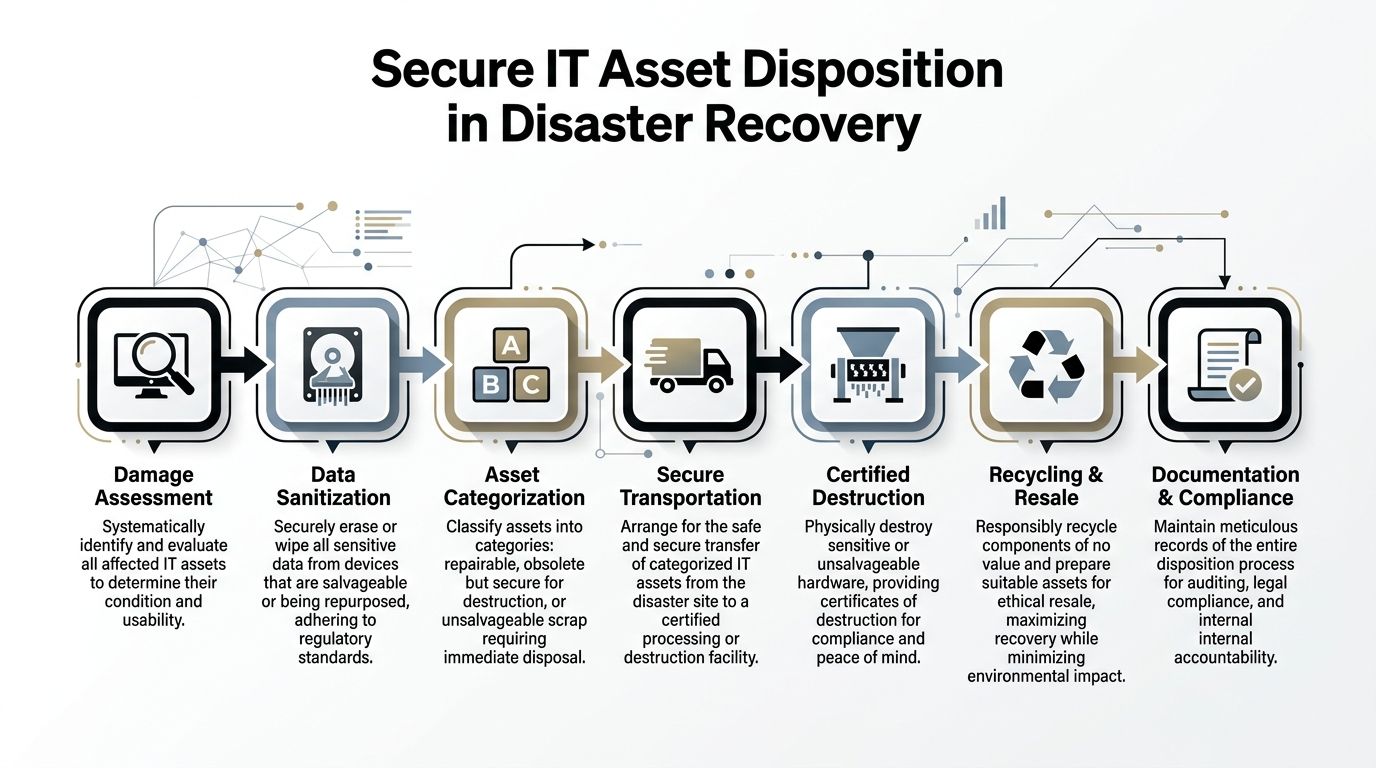
A proper disposition workflow usually follows a sequence like this:
Assess each asset
Determine whether the device is clean, suspect, failed, or physically unsafe. Don’t mix these categories on the same pallet.Preserve chain of custody
Record serial numbers, device class, location, and handler transfer points.Choose sanitization or destruction
Reusable assets may be wiped to recognized standards. Failed or high-risk media may go straight to physical destruction.Document the outcome
The record should support audit, legal review, internal accountability, and sustainability reporting.
This is especially important in healthcare, education, financial operations, and public sector environments where devices often hold regulated or sensitive data outside the main production systems.
Hardware that leaves your building without a documented disposition path is no longer an IT problem. It becomes a governance problem.
Wiping, shredding, and the compliance angle
Not every device should be treated the same way.
A healthy laptop fleet being retired after a refresh may be suitable for secure wiping and downstream reuse. A failed SSD from a compromised server may call for physical destruction. A copier hard drive, backup tape, or access control appliance can be easy to forget, but those devices often contain exactly the data auditors ask about later.
For that reason, the recovery plan should define:
- When logical wiping is acceptable
- When physical shredding is mandatory
- Who authorizes each path
- How proof is retained
- How transport is secured from site to processing facility
If your team hasn’t formalized that, the disposal decision will get made ad hoc during a stressful week. That usually means inconsistency.
Choosing the right ITAD partner in Atlanta
During a disaster or major outage, you don’t want to be searching for a vendor from scratch. Prequalify an ITAD partner before you need one.
Look for a provider that can support:
- Onsite packing and de-installation for offices, schools, hospitals, and data rooms
- Secure transportation with documented custody
- DoD-standard data sanitization where appropriate
- Physical shredding for drives and media that shouldn’t be remarketed
- Certificates and audit-friendly records
- Responsible recycling downstream, not vague promises about landfill diversion
If your organization is formalizing that part of the plan, a practical benchmark is the service scope typically associated with IT asset disposal in Atlanta.
The sustainability piece belongs in the plan too
Disposition is often discussed only as risk reduction. It should also be discussed as sustainability. Recovery events generate waste quickly. If teams replace hardware in bulk with no downstream process, usable equipment gets scrapped prematurely and nonfunctional gear can end up handled poorly.
There’s also a broader leadership opportunity here. Companies that already invest in ESG and CSR programs can align recovery operations with those commitments. Cause-based campaigns such as Recycle for a Cause give businesses a way to connect electronics recycling with support for veterans and tree-planting efforts. Done well, that message is more than marketing. It gives employees and stakeholders a tangible explanation of what responsible recovery looks like after disruption.
Seasonal campaigns around Veterans Day, Earth Day, and Arbor Day work well because they connect operational cleanup with visible community benefit. So do impact certificates, corporate recycling drives, and “Recycled with Purpose” style recognition for partner organizations. None of that replaces secure handling. It makes the secure handling mean more.
Testing Your Resiliency Drills Maintenance and Compliance
A recovery plan that hasn’t been tested is a guess. Teams may feel confident because the document looks complete, but real incidents expose missing contacts, broken dependencies, stale credentials, and steps nobody can perform under pressure.
The gap between written plans and executed plans is well documented. Untested disaster recovery plans have a 52% failure rate during actual incidents, compared to 15% for rigorously tested ones. Regular testing, including monthly tabletop exercises and quarterly failovers, can identify 20% to 30% of procedural gaps before a real crisis occurs (OneUptime disaster recovery planning analysis).
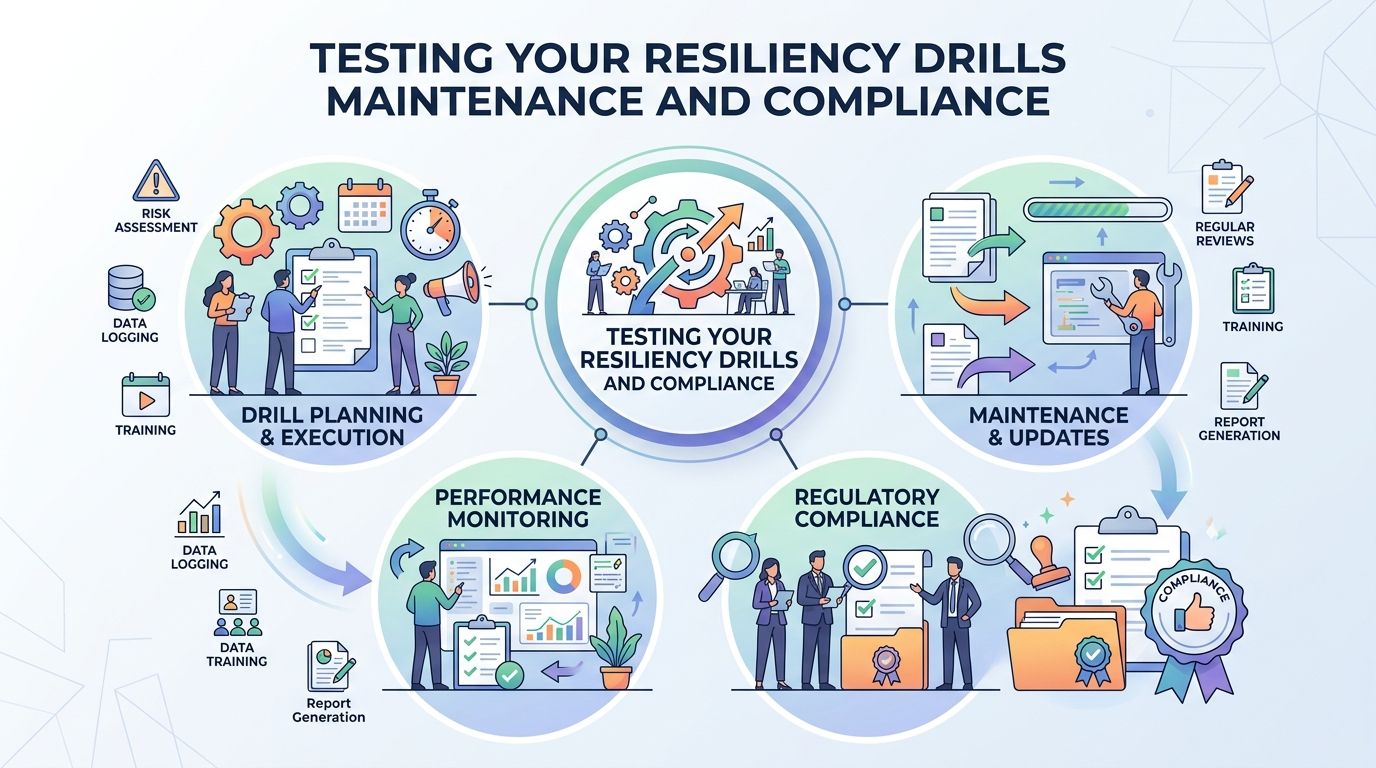
Use more than one type of drill
A mature testing program uses different formats for different kinds of failure.
Tabletop exercises
These are discussion-based sessions. The team walks through a realistic event and explains exactly what they would do.
Good Atlanta scenarios include:
- A severe storm causes building access issues and extended power loss.
- A ransomware event affects user endpoints and a file server at the same time.
- A chiller failure overheats a server room during a summer weekend.
- A hospital or school closes a site temporarily and must remove controlled devices quickly.
Tabletops reveal whether the plan is understandable. They also expose role confusion fast.
Component tests
These focus on one system, workflow, or control. A backup restore, VPN failover, storage mount, wipe process, or emergency communications run can all be tested in isolation.
They’re especially useful for validating the physical side of planning. Can your team locate retired drives? Can they produce custody logs? Can they request destruction records without scrambling?
Partial and full failover drills
These are harder, and that’s why they matter. A partial failover tests a subset of services. A full drill tests the coordination required to recover in the right order with the right approvals.
If your organization relies on disposition documentation during decommissioning or incident cleanup, include that in the drill. A mock request for destruction proof should be as easy to execute as a restore request.
What to measure after each test
Every drill should produce evidence, not just impressions.
Track things like:
- Actual recovery time compared with the planned target
- Decision bottlenecks such as delayed approvals or unclear escalation
- Dependency failures where one restored system still can’t function
- Documentation quality including asset logs and disposition records
- Training gaps where one person knew the process and nobody else did
Reality check: A plan passes only when the team can execute it cleanly, not when everyone agrees the document looks solid.
Keep the plan current
Infrastructure changes faster than most DR documents. New SaaS tools appear. Offices close. Backup jobs change. Hardware gets retired. Vendors come and go.
That means maintenance has to be attached to normal operations. Update the plan after major system changes, office moves, mergers, cloud migrations, and hardware refresh cycles. Review contact lists, vendor details, custody procedures, and recovery runbooks on a fixed cadence even when nothing dramatic happens.
For the physical disposition side, document retention matters too. If your auditors or legal team may ask for proof that storage media was destroyed, make sure the organization knows where those records live and how long they’re retained. In many environments, a formal certificate of destruction is part of that record trail.
Testing doesn’t make incidents disappear. It does make the response more orderly, more defensible, and much less dependent on memory.
Building a Disaster-Ready and Sustainable Future for Your Atlanta Organization
The strongest organizations in Atlanta don’t treat disaster recovery as a backup project. They treat it as an operating discipline. That means they know their risks, they understand which systems matter most, they set recovery goals based on business impact, and they test the plan often enough to trust it.
They also plan for the hardware.
That’s the part too many guides leave out. Servers fail. Laptops get replaced after incidents. Storage media has to be destroyed. Copiers, access systems, and backup devices can hold sensitive data long after production is restored. If those assets aren’t accounted for, sanitized correctly, and documented from handoff to final disposition, the organization can recover technically while still creating a compliance problem.
What durable planning looks like
A practical DR posture usually includes these traits:
- Business-led priorities so recovery targets reflect real operational impact
- Dependency-aware inventories so teams know what must come back first
- Defined disposition paths for reusable, destroy-only, and recycle-only assets
- Regular drills that test people, process, and documentation
- Sustainability discipline so recovery waste doesn’t become a landfill problem
That combination matters for Atlanta hospitals, schools, government agencies, corporate campuses, and data-heavy businesses that operate under public scrutiny and regulatory pressure.
Security, compliance, and community can align
There’s a useful shift happening in how organizations think about resilience. The old view separated continuity, compliance, and sustainability into different conversations. The better view ties them together.
A secure and compliant ITAD process protects data. A documented downstream recycling process supports environmental goals. A cause-based recycling program can extend that value into the community through veteran aid and tree planting. Those aren’t competing priorities. They reinforce each other when the controls are solid.
For local SEO and brand positioning, that also gives Atlanta organizations a stronger public narrative. Instead of saying only that old equipment was removed, they can show that recovery was handled responsibly, with traceability, environmental care, and visible social impact.
Planning disaster recovery isn’t only about surviving the next event. It’s about deciding what kind of organization you’ll be when the pressure hits. The teams that recover best are usually the ones that planned the entire lifecycle, including the last mile for every device.
If your organization needs help strengthening the physical asset side of planning disaster recovery, Atlanta Green Recycling can help you build a cleaner, more defensible process for secure data destruction, compliant IT asset disposition, and sustainable electronics recycling across the Atlanta metro. It’s a practical way to protect data, support audits, and turn retired technology into community impact through veteran support and tree-planting initiatives.