
Disaster Recovery Planning DRP: 2026 Resiliency Guide

A lot of disaster recovery planning drp work looks finished on paper long before it’s finished in practice.
An Atlanta hospital can fail over applications to the cloud after a burst pipe, restore key systems, and still be sitting on a row of soaked servers that hold protected health information. A school district can recover files from backup and still have carts of damaged laptops with drives that need documented destruction. A government office can bring users back online and still face the chain-of-custody problem nobody assigned to anyone.
That’s the gap most DRP content misses. Recovery isn’t complete when workloads come back. Recovery is complete when systems are restored, records are intact, hardware is accounted for, and compromised assets are securely dispositioned.
Why Your Disaster Recovery Plan Is Incomplete
A plan often fails at the exact moment leaders think the hard part is over.
The outage happens. IT triggers failover. Leadership gets the “critical systems restored” update. Operations starts breathing again. Then facilities asks what to do with the water-damaged storage arrays, desktop towers, badge readers, printers, and backup appliances sitting in a restricted room.

That moment exposes whether the DRP is real or partial.
The blind spot most teams discover too late
Many organizations build around restoration steps only. They document backups, failover order, admin contacts, vendor escalation, and communications. They don't document what happens to physical assets that are damaged, obsolete, inaccessible, or no longer trustworthy after the incident.
That matters because those assets still hold data. They still create audit exposure. They still sit inside regulated workflows.
In a 2025 survey by Cockroach Labs, 100% of senior technology executives reported revenue losses from IT outages in the previous year, and IBM’s 2023 Cost of a Data Breach Report found the average breach cost reached USD 4.45 million. Both points are summarized at Invenio IT’s disaster recovery statistics roundup. Those figures frame the primary issue. The risk isn't only downtime. It's every control that breaks down during recovery.
For a useful baseline on the IT side of Disaster Recovery, it helps to review how structured recovery services handle restoration sequencing, continuity requirements, and system availability. But if your DRP stops there, it stops short.
Practical rule: If your plan restores data but says nothing about failed drives, retired servers, damaged endpoints, and custody records, your plan is incomplete.
What a complete recovery actually includes
A complete DRP covers two tracks at the same time:
- Digital restoration: Bring applications, identity systems, storage, network services, and user access back to an acceptable state.
- Physical control: Isolate affected hardware, preserve inventory accuracy, prevent data leakage, and move assets into a compliant disposition workflow.
Teams that skip the second track create avoidable problems:
- Security exposure: Devices removed in haste get staged in unsecured rooms, hallways, loading docks, or third-party vehicles.
- Compliance friction: Audit requests arrive later, but nobody can reconstruct which assets were destroyed, wiped, stored, or transferred.
- Operational clutter: Dead gear occupies floor space, blocks rebuild work, and slows reoccupation of server rooms, clinics, branch offices, and classrooms.
Disaster recovery planning drp has matured on the software side. The physical side still gets treated like cleanup. It isn't cleanup. It's part of the control environment.
Building Your DRP Foundation Risk Assessment and Impact Analysis
Most weak DRPs don't fail because teams forgot a tool. They fail because nobody forced the business to decide what matters first.
A business impact analysis tells you which processes, systems, and records must return first. A risk assessment tells you what is most likely to interrupt them. You need both. If you skip either one, recovery priorities drift into opinion.
Start with business impact, not infrastructure
Don't begin with servers, clouds, or backup platforms. Begin with business functions.
For an Atlanta healthcare group, that may mean patient scheduling, clinical access, billing, identity services, and compliance records. For a university, it might be learning systems, payroll, directory services, and endpoint management. For a logistics or industrial firm, dispatch, inventory, and operational reporting may outrank almost everything else.
Use a working session format and ask four questions for each function:
- What stops if this function goes down?
- Who is affected first?
- What manual workaround exists, if any?
- What records or devices support that function?
That last question is where many teams improve the quality of the DRP. They stop treating the environment as only virtual. They connect each critical function to laptops, scanners, storage appliances, printers, workstations, servers, and removable media that may need secure handling after an incident.
A practical BIA worksheet
A simple model works better than a bloated template. Build a table like this and review it with department owners, not just IT.
| Business function | Supporting systems | Key records or assets | Operational impact if unavailable | Manual workaround |
|---|---|---|---|---|
| Patient intake | EHR access, identity, network, printers | Registration workstations, badge readers, print devices | Intake delays and documentation disruption | Paper forms if available |
| Finance approvals | ERP, email, MFA | Laptops, file shares | Payment and approval backlog | Temporary manual routing |
| Warehouse receiving | Inventory app, Wi-Fi, handhelds | Scanners, label printers, tablets | Shipment delays and tracking gaps | Limited paper logging |
Use plain language. If a department head can't read it quickly during a crisis, it's too technical.
A strong risk reduction program usually starts before the disaster. Operational controls, inventory discipline, and environmental safeguards matter here. If you're refining that side of the program, this overview of risk reduction is a useful companion to DRP work.
Risk assessment for Atlanta operations
Once you know what matters, evaluate threats in local terms.
Atlanta-area organizations usually need to think beyond cyber events. Severe weather, utility interruption, burst pipes, roof leaks, HVAC failures, office moves, and regional transportation disruption all change recovery assumptions. So do building access issues in multi-tenant properties.
Group risks by type rather than trying to score everything with false precision:
- Facility risks: Water intrusion, power instability, cooling failure, fire suppression discharge, physical access loss.
- Technology risks: Ransomware, storage failure, backup corruption, network dependency failure, cloud misconfiguration.
- Operational risks: Vendor delay, unclear approvals, inaccessible records, missing spares, poor labeling.
- Physical asset risks: Damaged servers, flooded desktops, broken monitors, orphaned drives, unlogged removals.
The best BIAs force a difficult truth into the open. Not every system is critical, and not every damaged device should return to service.
Where teams get this wrong
Three mistakes show up repeatedly.
First, they assign the same priority to everything. That creates a fake emergency across the entire estate.
Second, they treat hardware as interchangeable. It isn't. A damaged nurse station PC, a failed SAN shelf, and a cart of retired laptops don't carry the same recovery or compliance burden.
Third, they ignore asset disposition in the analysis stage. Then, during the incident, they improvise storage, transport, and destruction decisions under pressure.
A sharper foundation changes the rest of the plan. It tells you which services need the fastest recovery, which assets support them, and which physical items require documented removal, quarantine, wiping, or destruction after the event.
Defining Recovery Objectives and Choosing Your Architecture
Once priorities are clear, you have to set recovery targets that people can execute.
Here, RTO and RPO stop being abstract terminology and start driving budget, design, and staffing decisions.
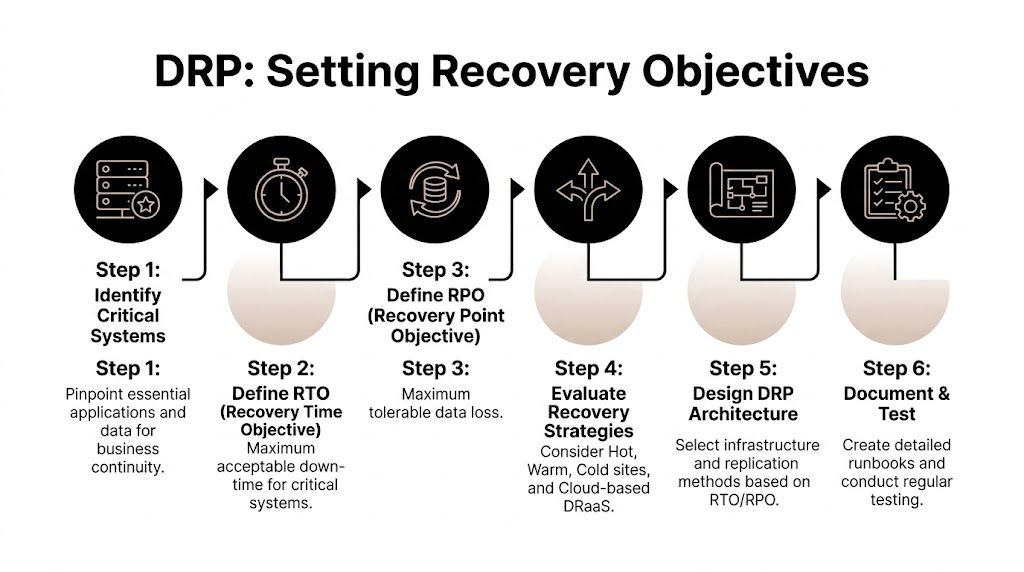
What RTO and RPO really mean
Recovery Time Objective (RTO) is the maximum acceptable downtime for a system or service.
Recovery Point Objective (RPO) is the maximum acceptable amount of data loss measured in time.
If payroll can be offline until tomorrow morning, its RTO may be longer than identity services. If a transactional database can't lose more than a small recent window of updates, its RPO must be tighter than a shared archive.
According to Quest Sys on key disaster recovery plan components, miscalibrating RTOs and RPOs is a primary cause of DRP failure. Setting them without a thorough business impact analysis leads to either overspending on infrastructure you don't need or building recovery capabilities that won't meet real business requirements.
That trade-off is where mature planning separates itself from wishful planning.
The cost and speed trade-off
Every architecture choice is really a negotiation between speed, complexity, and cost.
Here's the simplest way to frame common options:
| Recovery approach | Strength | Limitation | Best fit |
|---|---|---|---|
| Cold site | Lower standing cost | Slower to activate and restore | Lower-priority workloads |
| Warm site | Balanced recovery readiness | Requires disciplined upkeep | Mixed criticality environments |
| Hot site | Fastest restoration path | Highest operational cost and complexity | Mission-critical systems |
| Cloud-based DRaaS | Flexible failover and managed recovery | Depends on design quality and dependency mapping | Organizations needing offsite resilience |
The right answer usually isn't one option. It's a mix.
Core identity, customer-facing systems, regulated databases, and communications often deserve tighter recovery design. File archives, legacy apps, long-tail departmental tools, and print systems can usually tolerate slower recovery if the business agrees in advance.
Set targets at the application level
One organization-wide RTO is almost always a mistake.
Set objectives by application, service, and workflow. A hospital might need short recovery windows for EHR access and patient communications but accept slower recovery for training portals. A data center operator may prioritize monitoring, access control, and asset tracking before less critical internal tools.
This is also where physical lifecycle decisions belong. If a recovery design depends on reusing hardware after an incident, document the inspection standard. If a category of damaged equipment should be removed from service immediately, state that. If encrypted asset logs or destruction records must be restored within a compliance window, build that requirement into the target.
For teams handling relocation, migration, or infrastructure redesign at the same time, these data center migration best practices are closely related because migration and DR architecture often share the same dependency mapping problems.
Recovery targets should describe the business tolerance for disruption, not the vendor promise you hope will cover it.
A useful decision lens
When choosing architecture, ask these questions:
- Does this system generate revenue, safety risk, or compliance risk if unavailable?
- Can users work manually for any meaningful period?
- Would restoring stale data create legal or operational problems?
- Does the recovery path depend on physical hardware that may be damaged or untrusted after the event?
- Can the team support the architecture during stress?**
That last question matters. A beautifully designed hot failover environment still fails if nobody maintains the runbooks, replication jobs, failback sequencing, and asset inventory.
Disaster recovery planning drp isn't a technical beauty contest. It's a discipline of choosing the fastest justifiable recovery for the systems that matter, while avoiding expensive overengineering for the ones that don't.
Assembling Your DRP Team and Creating Actionable Runbooks
A recovery plan breaks down fastest at the handoff points.
IT restores infrastructure. Facilities controls access to the affected space. HR needs location and staff status. Legal and compliance need incident records. Procurement chases replacement equipment. Communications has to say something accurate before rumors fill the gap.

That isn't a side issue. According to BerryDunn’s guidance on building your DRP team, a 2025 NIST update notes that up to 60% of recovery time can be consumed by non-technical tasks like employee relocation and vendor coordination, while BerryDunn finds that 40% of outage extensions are due to poor cross-team handoffs.
Build a cross-functional recovery team
A workable DRP team usually includes these functions:
- IT recovery lead: Owns system restoration priorities, technical decisions, vendor escalations, and restoration checkpoints.
- Facilities lead: Controls room access, power isolation, environmental safety, staging areas, and movement of damaged equipment.
- Compliance or legal lead: Determines record retention requirements, breach review steps, and documentation standards.
- Operations lead: Represents business process priorities and confirms when a service is usable.
- HR and communications lead: Manages staff updates, alternate work arrangements, and message discipline.
- Asset control lead: Tracks every affected device from identification through quarantine, transport, wiping, destruction, or recycling.
Some organizations assign the last role informally. That's a mistake. If nobody owns the hardware trail, inventory accuracy collapses the moment equipment starts moving.
What belongs in a runbook
Runbooks should be short, specific, and scenario-based. They should not read like policy manuals.
Use separate runbooks for events such as:
- Ransomware affecting servers and user endpoints
- Water damage in a server room or IDF
- Office relocation after facility loss
- Data center decommissioning during emergency migration
- Compromised endpoint collection and destruction workflow
A good runbook includes:
Trigger condition
State exactly when the runbook starts.Authority to declare
Name the role, not just the team.Immediate containment steps
Include both systems and physical access controls.Recovery sequence
Put systems in priority order.Asset handling instructions
Label, scan, quarantine, move, and document affected hardware.Communication checkpoints
Specify who gets updated and when.Evidence and records required
Incident logs, inventory logs, custody forms, wipe certificates, destruction records.
Write for stress, not for elegance
Runbooks fail when they prioritize sounding complete over being usable.
Use direct language. Put commands and checks in order. Include screenshots or forms if they reduce confusion. Keep phone numbers, vendor contacts, and escalation paths current. If a procedure depends on one person’s memory, it isn’t a procedure yet.
In a real incident, teams don't need a perfect document. They need the next clear action.
One more point matters for physical recovery. The runbook should specify where damaged or retired equipment goes immediately after removal. Not later. Not after approvals circulate. Immediately.
If that staging process isn't predefined, people improvise with conference rooms, loading docks, and open cages. That's how a contained outage turns into a custody problem.
Validating Your DRP From Tabletop Drills to Full Exercises
A DRP that hasn't been tested is still a draft.
Many teams feel reassured once the document exists, the contact list is filled in, and the architecture diagram looks clean. That confidence is often misplaced. According to Info-Tech’s research on right-sized disaster recovery planning, only 38% of organizations with a complete plan felt confident it would be effective in a real crisis. The gap comes from realism. Plans that aren't tested under pressure hide faults until the outage is already live.
Use different test types for different failures
Not every exercise has to be disruptive. But every exercise should answer a real question.
| Test type | What it validates | Common miss |
|---|---|---|
| Walkthrough | Whether the documentation is understandable | Teams assume reading equals readiness |
| Tabletop | Decision-making, escalation, ownership | Scenarios stay too clean and too linear |
| Technical recovery drill | Backup integrity and restoration sequence | Dependencies get skipped |
| Full exercise | End-to-end operational execution | Business teams get left out |
The strongest programs rotate these formats. They don't rely on one annual meeting and call it testing.
A practical way to sharpen realism is to use a pre-exercise checklist such as this data center migration checklist. Migration checklists often expose the same weak points DRP tests do. Missing ownership, poor labeling, dependency blind spots, and incomplete rollback steps.
Test what actually breaks in the field
Teams often test the happy path. They restore from a known-good backup, use available staff, assume the primary vendor answers, and avoid the messy parts.
That's not a useful test.
Run scenarios where:
- the contact list is outdated
- one approver is unavailable
- facilities restricts room access
- backup data restores but application dependencies fail
- damaged hardware must be removed before rebuild work can continue
- the communications team has to notify leadership before root cause is known
Then do a blameless review. Fix ownership gaps, not just technical settings.
A test should reveal friction. If it doesn't, the scenario was probably too easy.
Testing also keeps the physical side visible. If every exercise ends once the systems boot, the organization never rehearses secure staging, chain-of-custody, or documented disposition of affected devices. That's a major omission for hospitals, schools, public agencies, and Atlanta businesses that hold regulated data on large device fleets.
The Final Mile Secure IT Asset Disposition and Compliance
Many recovery programs stop caring at this point, and some of the biggest risks begin.
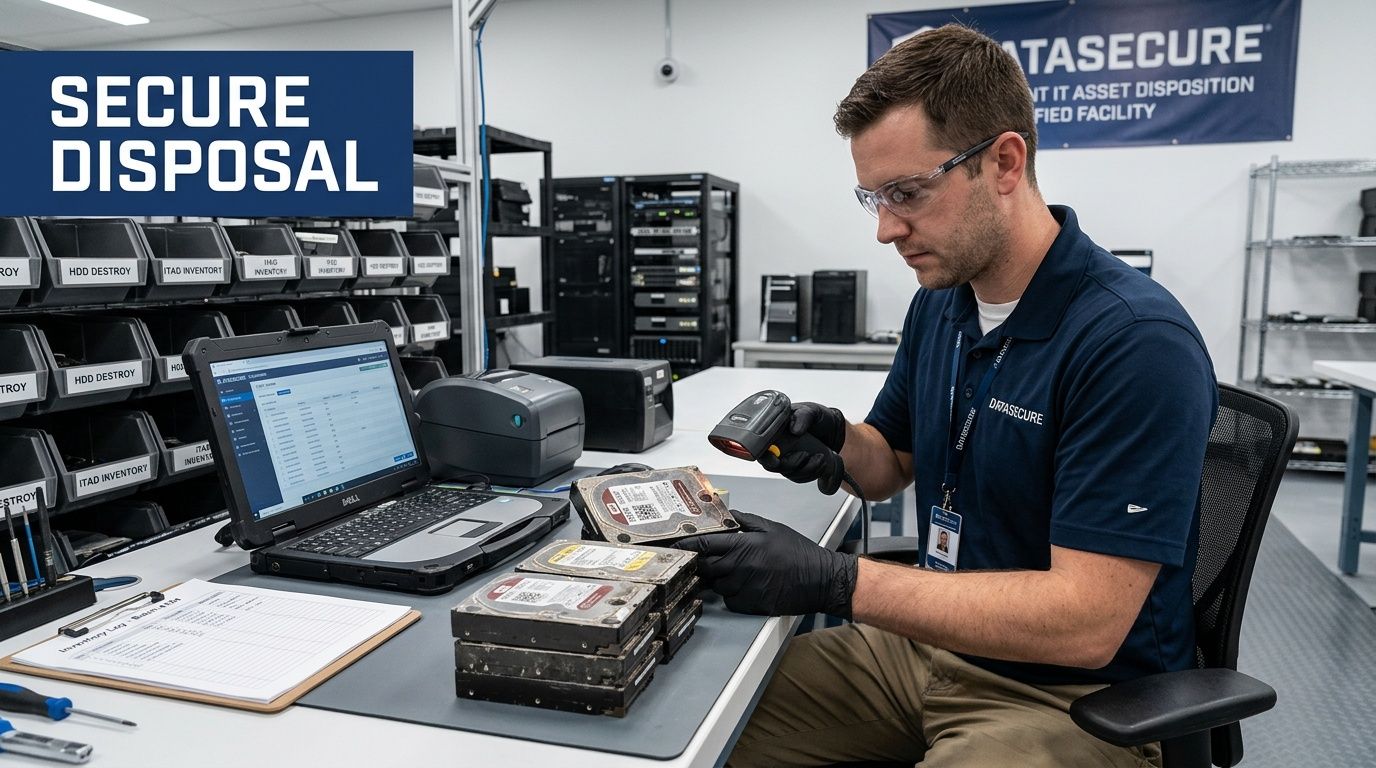
After a facility event, cyber incident, migration, or emergency shutdown, organizations often have a mixed pile of equipment. Some assets are damaged. Some are contaminated by the event. Some are obsolete and not worth redeploying. Some are technically functional but no longer trusted. All of them need handling decisions.
Why post-disaster hardware becomes a security problem fast
A Hystax article on disaster recovery planning cites a 2023 IBM report noting that 52% of data breaches involve lost or stolen devices. It also highlights that most DRP guides ignore physical asset handling after a disaster.
That omission matters most during chaotic recovery windows. Devices get unplugged quickly. Storage gets moved for cleanup. Temporary staging areas appear. Contractors, movers, facilities crews, and outside responders may all pass through the same space.
If the organization doesn't have a defined IT asset disposition path, it creates three immediate failures:
- Data control failure: Drives and media leave secured custody without documented destruction or sanitization.
- Compliance failure: HIPAA-regulated and other sensitive records remain on devices that are damaged, retired, or abandoned.
- Environmental failure: E-waste gets treated as general debris instead of managed electronics material.
For a practical grounding in the discipline itself, this overview of what is IT asset disposition is a helpful reference.
What should be in the DRP for asset disposition
Physical disposition belongs inside the DRP, not in a separate sustainability document nobody reads during an incident.
Include these controls:
- Asset identification: Every affected device gets tagged against inventory before movement where possible.
- Quarantine decision: Define when equipment is isolated for forensic review, insurance hold, or compliance review.
- Sanitization path: Specify whether media is wiped to required standards or physically destroyed.
- Chain of custody: Record who handled the asset, when it moved, and where it went.
- Onsite versus offsite handling: State what can leave the site and under what approval.
- Certificates and audit records: Require destruction, sanitization, and pickup documentation to close the incident record.
Regulated environments need more than cleanup crews
Healthcare, education, public sector, and enterprise data center environments all have this problem in different forms.
Hospitals may have flooded workstations, carts, networked imaging support devices, and storage media tied to patient data. Universities may face labs, faculty laptops, and retired storage sitting in unsecured rooms after a building event. Government and contractor environments may require stricter handling of records, media, and retired infrastructure.
A cleanup vendor removes debris. A compliant disposition process preserves control.
Secure disposition is part of recovery because untrusted hardware shouldn't drift back into circulation and sensitive hardware shouldn't drift out without records.
The operational payoff
Integrating asset disposition into disaster recovery planning drp does more than reduce risk.
It also helps teams restore order faster. Rooms get cleared methodically. Replacement planning gets easier because inventories are cleaner. Audit and compliance teams don't have to reconstruct events from memory. Sustainability reporting also improves because organizations can show that damaged and obsolete electronics were managed responsibly instead of dumped into mixed waste streams.
That last point has become more important for Atlanta organizations with ESG and CSR commitments. A recovery program can protect data and support broader corporate responsibility at the same time. The strongest organizations treat those goals as compatible, not competing.
Building Resilience Beyond the Document
A solid DRP isn't a binder, a shared folder, or a once-a-year exercise. It's an operating discipline.
The organizations that recover well do five things consistently. They assess what matters. They define realistic recovery targets. They prepare teams and runbooks. They test under real conditions. They close the loop with secure, compliant asset disposition.
That last step is still the most neglected. Yet it's often where security, compliance, and operational credibility are won or lost.
For leaders who still use the terms interchangeably, this explanation of the critical differences between disaster recovery and business continuity is worth reviewing. DR restores systems. Business continuity keeps the organization functioning. A mature resilience program needs both.
Long-term resilience also connects to broader environmental and governance priorities. A business that wants recovery planning aligned with compliance, sustainability, and responsible electronics handling should treat DRP as part of a larger business sustainability strategy, not as an isolated IT artifact.
The practical standard for 2026 is straightforward. If your plan restores applications but doesn't control the physical aftermath, you don't have full disaster recovery planning drp. You have a partial technical response.
If your organization needs a partner for secure electronics recycling, compliant IT asset disposition, data destruction, and disaster-related hardware removal in the Atlanta metro area, Atlanta Green Recycling can help. Their team supports hospitals, schools, government agencies, offices, and data centers with pickup, de-installation, documentation, and end-of-life workflows that protect both compliance and sustainability goals. They also bring a mission-driven angle that many Atlanta organizations value, connecting responsible recycling with veteran support and tree-planting impact.