
Office Relocation: Seamless, Secure ITAD & ESG

Your lease end date is approaching. Facilities is focused on floorplans and furniture. IT is trying to keep people online. Finance wants the move done without waste. Then someone asks a late, dangerous question: what are we doing with the old laptops, switches, hard drives, access points, rack gear, and dead monitors that aren’t going to the new office?
That’s where many office relocation projects start to wobble.
A move looks physical on the surface, but the highest-risk items are often digital. Retired devices still hold data. Leased equipment may need specific return handling. Surplus hardware can create unnecessary hauling costs if nobody decides early whether it should be redeployed, resold, donated, or recycled. In Atlanta, where healthcare systems, law firms, schools, logistics companies, and public agencies all move under compliance pressure, that gap matters.
The Hidden Challenge in Your Office Relocation
Most first-time move teams assume the hard part is getting people and furniture from Point A to Point B. It isn’t. The hard part is deciding, early enough, what happens to the technology that won’t make the trip.

Relocation guides usually talk about seating charts, communication plans, move labels, and walkthroughs. Those matter. If you’re also reworking the physical environment, a resource like office furniture essentials and how to design a productive and comfortable workspace can help with layout and employee comfort decisions.
What those guides often don’t cover is the equipment sitting in closets, under desks, in IDF rooms, and in storage cages. A verified relocation analysis notes that most relocation content fails to systematically address what happens to legacy IT equipment, leaving IT managers without clear guidance on secure data destruction and compliance during a move (PR Newswire).
Why legacy tech becomes the last-minute problem
Old equipment hides in plain sight.
You’ll find it in places the move checklist barely mentions:
- Server rooms: retired blades, backup appliances, rail kits, PDUs, and labeled drives from older projects
- User areas: spare docks, VoIP phones, monitors, keyboards, thin clients, and loaner laptops
- Storage rooms: printer fleets, scanners, cables, old wireless gear, and mystery boxes no one has opened in years
- Security systems: badge readers, DVRs, cameras, and access control hardware that may store sensitive information
When nobody owns disposition, teams make bad decisions fast. They stack devices in a hallway, ask movers to “take it all,” or hold onto obsolete gear for months in a new office because no one wants to deal with it.
Practical rule: If a device ever touched company data, don’t treat it like furniture.
The risk isn’t only waste
Improper handling creates three problems at once.
First, security risk. A machine that looks retired can still contain user files, cached credentials, email archives, or protected records.
Second, compliance risk. Regulated organizations can’t rely on “we deleted everything” as a defensible process.
Third, budget drag. Every pallet of obsolete tech that rides to the new office costs labor, truck space, and attention.
There’s also a missed upside. Office relocation creates a rare moment when finance, facilities, IT, procurement, and sustainability are all already at the table. That makes it one of the best times to treat IT asset disposition as part of ESG execution, not just disposal. In Atlanta, that can be more than a compliance exercise. It can become a local story about responsible e-waste handling, veteran support, and reforestation. That’s a stronger narrative than “we cleaned out the storage room.”
Your Pre-Move Blueprint for IT Asset Disposition
Good office relocation projects don’t start with packing tape. They start with asset decisions.
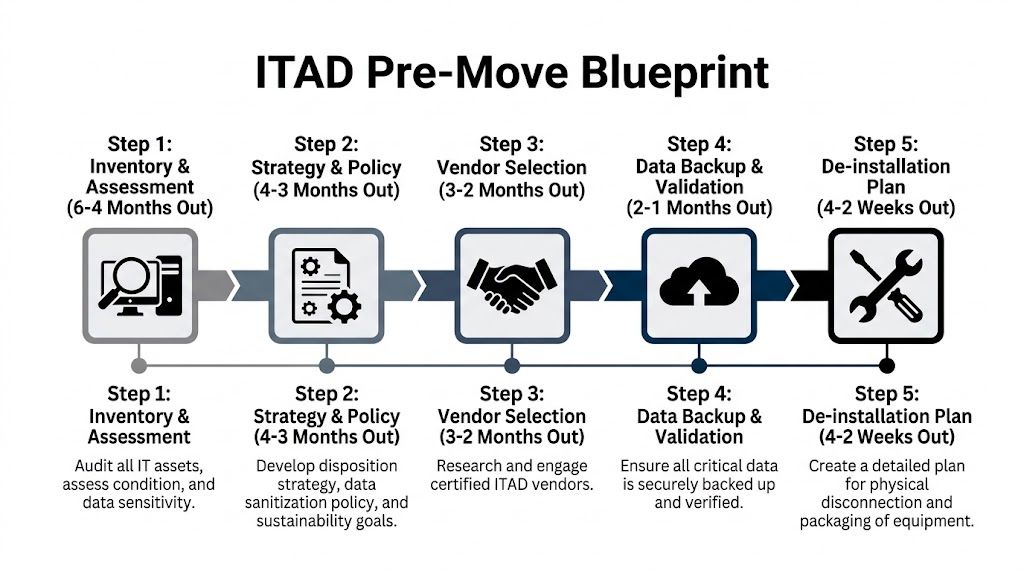
Verified planning guidance puts small office moves at 3 to 4 months and large office moves at 9 to 12 months, with critical work such as IT audits, vendor selection, and budget setup beginning 4 to 6 months out (Move Solutions). If you wait until the final month to sort legacy equipment, you’ll force rushed choices on the most sensitive assets in the building.
Start with an asset disposition map
Don’t build one giant inventory list and stop there. Build an inventory tied to action.
For each device category, assign one of four paths:
| Asset type | Typical decision path | What the team needs to confirm |
|---|---|---|
| User laptops and desktops | Redeploy, resell, donate, recycle | User assignment, data status, age, condition |
| Servers and storage | Redeploy, sanitize, destroy, recycle | Data sensitivity, application dependency, shutdown sequence |
| Networking gear | Reuse, keep as spare, recycle | Firmware relevance, support status, site dependency |
| Monitors and peripherals | Move, donate, recycle | Physical condition, cabling, quantity by department |
| Printers and copiers | Return, relocate, recycle | Lease terms, toner removal, service ownership |
This list becomes your control document. It tells movers what doesn’t travel, tells IT what must be backed up or sanitized, and tells finance what still has value.
The five planning moves that prevent chaos
A clean process is usually enough. You don’t need fancy software if ownership is clear.
Inventory what exists
Walk every room. Don’t rely only on procurement records or CMDB exports. People stash equipment everywhere during normal operations.Tag by disposition, not just by asset ID
A red tag for recycle, blue for redeploy, green for resale, yellow for lease return is simple and hard to misread on move day.Flag anything with storage media
Hard drives, SSDs, copiers, multifunction devices, backup units, and some networking appliances all need data handling decisions.Separate business-critical from business-abandoned
Teams often keep “temporary” gear running for years. Verify what still supports production before de-installation.Name an owner for each decision class
Facilities can coordinate space. IT can validate data risk. Procurement can check leases. Finance can approve disposition. Someone must own the final call.
What a solid timeline looks like
This is the timeline I’d hand to a facilities manager on a major first move.
Six to four months out
Here, the move either becomes manageable or expensive.
- Run the IT audit: Count user devices, racks, telecom closets, printers, A/V, and storage media.
- Set the move boundary: Decide what goes to the new site and what stops here.
- Review contracts: Pull lease schedules for copiers, phones, and infrastructure under managed agreements.
- Write the chain of custody plan: Decide who touches devices from disconnect through final disposition.
Four to three months out
Turn inventory into policy.
- Define sanitization requirements: Not every asset needs the same method, but every data-bearing asset needs one.
- Set sustainability goals: If you can redeploy or refurbish working equipment, decide that now.
- Align departments: Facilities, IT, security, legal, and finance need the same asset list.
Three to two months out
Choose the partner and lock the work.
A provider focused on IT asset disposal should be able to support inventory validation, logistics, secure handling, and documentation. Ask operational questions, not just pricing questions. Who de-installs? Who transports? Who records serials? Who issues destruction documentation? Who handles exceptions?
If a vendor can’t explain chain of custody in plain language, keep looking.
Two to one months out
Now protect the business.
- Complete data backups and validation
- Schedule system shutdown windows
- Coordinate packing responsibilities
- Stage assets by pickup sequence
Final weeks
The final weeks should be execution, not debate.
Use room-by-room lists. Confirm elevator access, dock times, after-hours building rules, and who signs off when each cage, closet, or server rack is cleared.
Executing the Technical Takedown and Data Sanitization
By the time the physical move starts, your biggest risk isn’t the truck. It’s the handoff.
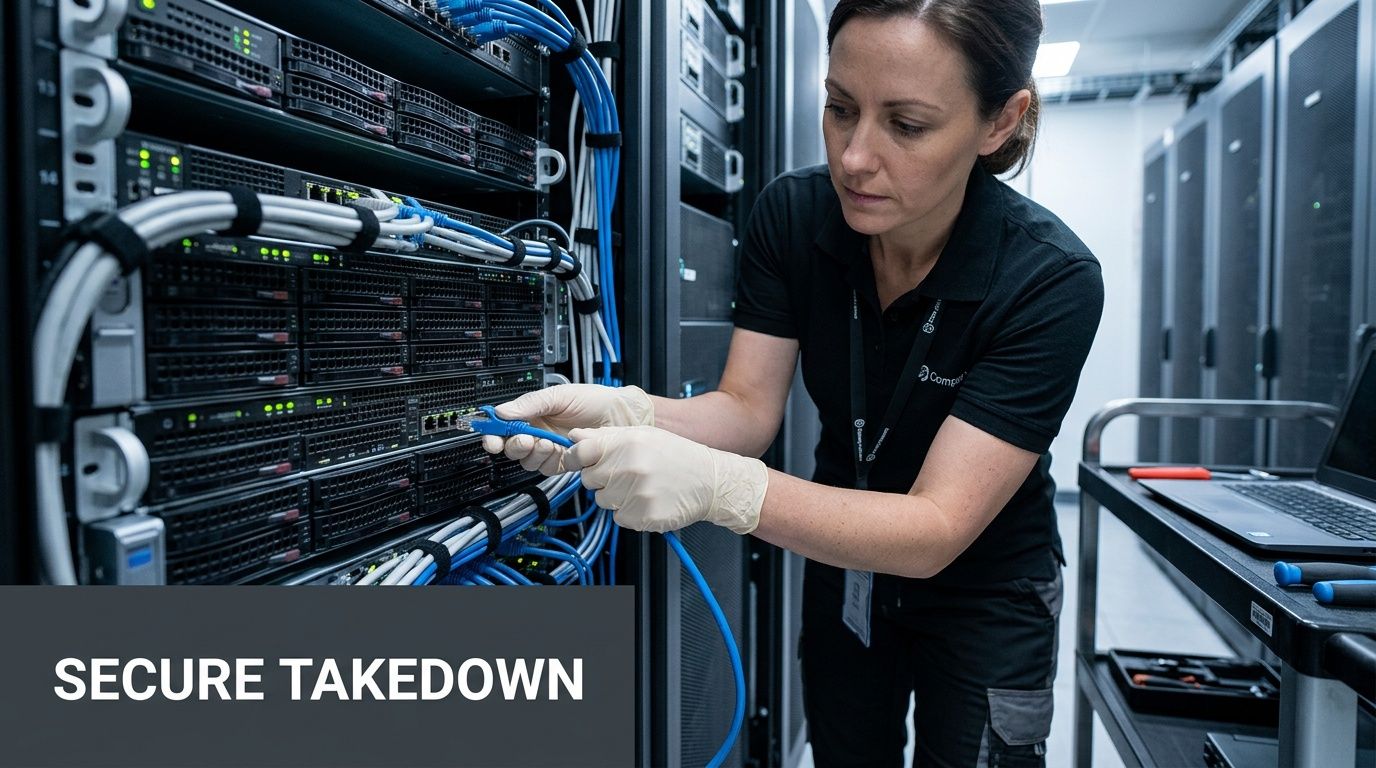
A rushed takedown invites mistakes. Someone unplugs the wrong switch. A copier with internal storage gets rolled out like a chair. A retired laptop is boxed with live equipment because nobody checked the tag. On paper, it looks like moving day friction. In reality, it’s loss of control.
Delete isn’t sanitization
A standard delete, quick format, or operating system reset doesn’t create a defensible disposition record. It may remove visibility for a normal user, but it doesn’t equal controlled sanitization.
For regulated environments, that distinction matters. Healthcare groups, financial firms, law offices, schools, and public agencies need repeatable handling for media that held sensitive information. A provider that explains what data sanitization is should also be able to explain when wiping is appropriate, when physical destruction is the better choice, and how the result is documented.
What a controlled takedown looks like
The cleanest office relocation jobs use a fixed sequence.
First, isolate and label
Before disconnecting anything, confirm each asset’s status:
- Production move asset
- Retired asset for sanitization
- Asset for physical destruction
- Leased return equipment
- Unknown asset pending review
Unknown assets are where trouble starts. If the team can’t identify ownership or data sensitivity, pull them out of the general move flow and review separately.
Next, de-install in dependency order
A workstation can usually come out late. Shared infrastructure can’t.
Use a sequence like this:
- Validate backups and application handoff
- Remove nonessential retired endpoints
- Disconnect peripheral systems and noncritical gear
- Decommission rack equipment in approved order
- Box, palletize, and secure for separate transport streams
That last step matters. Assets going to the new office should not be mixed with retired assets headed for disposition.
When to wipe and when to shred
This decision shouldn’t be emotional. It should be operational.
A functioning business laptop slated for reuse may be a wipe candidate. A damaged drive from an old server may be a destruction candidate. Equipment with uncertain integrity, failed media, or high-sensitivity history often belongs in the destruction stream because certainty matters more than salvage.
A chain of custody document is only as strong as the weakest handoff in the room.
For organizations handling protected health information, legal records, personnel data, or government information, it’s safer to decide methods by policy before move week. Don’t make those calls while a crew is waiting at the loading dock.
Common failure points during move week
Most bad outcomes don’t come from one huge mistake. They come from small shortcuts.
- Unlabeled pallets: Nobody can prove what was in them.
- Shared staging areas: Live assets and retired assets get mixed.
- Mover-led disconnects: General movers may be excellent at furniture and poor at IT chain of custody.
- No exception process: Teams discover an old NAS or copier drive and improvise.
- No signoff discipline: Rooms are “cleared” before telecom or hidden storage is checked.
A good technical takedown looks slower at first. It’s faster because it avoids rework, lost equipment, and post-move panic.
Logistics With a Conscience and E-Waste Diversion
Two office relocation stories show the difference between disposal as an afterthought and disposal as part of the plan.
In the first, a company spends months choosing the new space and almost no time on the old technology. During the final week, facilities realizes there are stacks of monitors, decommissioned desktops, broken printers, old firewalls, and loose drives still in the building. The movers don’t want liability for electronics. Building management wants the floor cleared. IT is trying to cut over users, not sort storage closets. The result is predictable: rushed decisions, confusion at the dock, and equipment that either travels unnecessarily or sits in limbo.
In the second, the company treats retired hardware like a workstream. Pickup timing is coordinated with the move-out date. Assets are staged separately. The recycler’s truck arrives in a planned window. The building gets cleared without conflict, and nobody is paying to move junk into the next lease.
That second story fits the moment many organizations are in. Verified relocation reporting found that nearly 9% of U.S. public companies relocated headquarters between March 2022 and March 2023, representing 593 companies out of approximately 6,700 listed firms, the highest annual relocation total in seven years at the time reported (Clancy Moving). More office relocation activity means more old infrastructure coming out of service, especially in technology-heavy markets.
The practical side of pickup timing
Scheduling matters more than people think.
If pickup happens too early, your team may lose access to equipment still needed for reference, spares, or final validation. If it happens too late, you risk storage fees, building access conflicts, and a move crew tripping over retired gear.
A reverse logistics provider should be able to support room-by-room removal, dock coordination, palletization, and chain-of-custody handling as part of a broader reverse logistics solutions plan.
E-waste can support more than landfill diversion
There’s also a local opportunity many teams miss. A thoughtful recycling program can do more than keep devices out of the waste stream. It can tie the move to a cause-based story employees and leadership want to share.
For Atlanta organizations, that’s where a “Recycle for a Cause” approach lands well. Old tech doesn’t have to end as a disposal line item. It can support veteran aid and tree planting. That kind of dual mission gives office relocation a human outcome employees can understand.
Your old tech can support people and restoration, not just clearance requirements.
If you’re already reviewing what happens to desks, workstations, and casegoods, it also makes sense to think through office furniture recycling alongside electronics so the entire exit is planned rather than improvised.
A cleaner move-out looks like this
- Devices are staged by disposition path
- Pickup windows match building rules and mover schedules
- Data-bearing assets stay in a controlled stream
- Working equipment with reuse potential is separated early
- The old office is cleared without dragging obsolete tech into the new one
That isn’t just cleaner logistics. It’s better project management.
The Post-Move Payoff and Leveraging Your ESG Wins
Once the old office is empty, teams often want to close the file and move on. Don’t.
The post-move paperwork is where your office relocation becomes defensible. It’s also where it becomes useful to leadership, procurement, compliance, and sustainability teams.

The documents that matter after pickup
At minimum, you want records that show what left, how it was handled, and how data-bearing assets were processed.
That usually includes documents such as:
- Asset lists or serialized manifests
- Certificates of data destruction
- Recycling or downstream processing reports
- Pickup records with dates and custody details
- Lease return support records, if applicable
These aren’t administrative extras. If your legal team, privacy officer, auditor, or insurer ever asks what happened to retired devices from a move, this is the file that answers them.
Why compliance documentation protects you
A lot of move teams think risk ends when the truck leaves. It doesn’t.
Liability often appears later, when someone asks whether a given drive, copier, or retired server was sanitized or destroyed. If the answer is based on memory, an email thread, or a mover’s handwritten note, you don’t have much protection.
A certificate-backed process gives internal stakeholders something they can review and retain. It also makes post-move reconciliation simpler because IT can compare the retired asset list against what was processed.
Documentation is what turns “we think it was handled” into “we can prove how it was handled.”
The circular economy value most companies overlook
There’s another payoff here. Some equipment still has life in it.
Verified guidance notes a significant opportunity to offset office relocation costs by strategically refurbishing and redeploying working IT assets, and that this circular approach can also support companies working against evolving ESG benchmarks that require sustainability metrics during major operational changes (Interactive Space).
That matters in practical terms.
If your move triggers consolidation, hybrid work adjustments, or floorplan reductions, you may not need every working device in the new office. Some assets can be refurbished and reused elsewhere in the organization. Others may support donation programs. Others belong in compliant recycling. The win isn’t just environmental. It’s operational discipline.
For organizations building sustainability reporting, benefits of e-waste recycling aren’t abstract. They show up as auditable actions tied to a real event.
Turning responsible disposal into an ESG story
Social impact can become more than branding.
A company that handles retired equipment responsibly during an office relocation can report more than “we moved.” It can show that it diverted electronics from landfill, managed data securely, and tied the process to community benefit. In Atlanta, that may include cause-based reporting around veteran support and tree planting, along with internal recognition like a “Recycled with Purpose” badge or impact certificate.
That’s useful in several places:
| Stakeholder | What they care about | What your post-move file can provide |
|---|---|---|
| Compliance and legal | Proof of proper handling | Destruction and custody records |
| Finance | Value recovery and cost control | Reuse, resale, and reduced disposal waste |
| HR and internal comms | Employee-facing story | Purpose-driven impact narrative |
| ESG and CSR teams | Documented sustainability activity | Recycling records and community impact support |
The move is over. The record of how you handled it keeps paying off.
Avoiding Common Relocation Pitfalls and Budget Traps
The biggest budgeting mistake in office relocation is thinking the budget is mostly trucks, movers, and furniture.
It isn’t. Verified relocation data shows 80% of movers underestimate total costs, while IT/AV costs rose 8.3% year over year and can make up 20% to 25% of a mid-size move budget (Bailey's Allied). Those costs get missed because they’re spread across labor, cutover planning, de-installation, disposal, downtime management, and surprise infrastructure work.
The hidden line items that catch teams late
These are the budget items I’d force onto the worksheet early:
- Specialized IT labor: Rack de-installation, cable tracing, telecom work, and after-hours cutover support
- Data disposition handling: Sanitization, destruction, serialized tracking, and compliance documentation
- Overlap costs: Paying for access, utilities, or building services in two spaces during transition
- Productivity drag: Staff time spent hunting equipment, validating setups, and fixing move-week mistakes
- Storage and staging: Temporary space for gear that should have been dispositioned before move day
- Lease return surprises: Charges tied to missing accessories, poor condition, or undocumented returns
What doesn’t work
A few assumptions sink budgets repeatedly.
One is “we’ll sort the old gear later.” That usually means later becomes more expensive.
Another is “our movers can handle the tech.” They may handle physical transport well, but office relocation involving data-bearing assets needs tighter control than a furniture move.
The third is “we’ll know what we have from procurement records.” You won’t. Real environments drift. Departments keep spares. Retired equipment lingers.
What usually works
The best budget protection comes from early clarity.
- Engage a qualified disposition partner early: If you’re comparing IT asset disposition companies, ask them to review scope before the final month.
- Run a physical inventory, not just a spreadsheet review: Real counts beat assumptions.
- Separate move costs from retire costs: New-site deployment and end-of-life handling are related, but they aren’t the same task.
- Rehearse the cutover: Downtime gets expensive fast when nobody has practiced the sequence.
- Get senior signoff on scope: Leadership needs to understand that secure tech handling is part of the move, not an optional add-on.
The short don’t-forget list
If you only carry one checklist into move planning, make it this one:
- Copiers and multifunction devices may store data
- Old network gear can still hold configuration information
- Leased equipment often has return conditions
- Storage closets are usually worse than your inventory says
- Retired equipment should not travel to the new office by default
That’s how office relocation budgets stay grounded in reality.
Frequently Asked Questions about Office Relocation ITAD
How should we handle leased IT equipment during an office relocation
Start with the lease documents, not the loading dock. Confirm return deadlines, accessory requirements, and whether the lessor expects specific packaging or condition standards.
Before return, verify whether the device contains data or internal storage. That includes copiers, laptops, desktops, and some appliances. If the lessor has a prescribed return process, match it. If they don’t, document your own chain of custody and sanitization steps before release.
What’s different about a data center decommissioning versus a normal office move
A data center decommissioning has more interdependencies and less room for guesswork. You’re usually dealing with rack order, application dependencies, cabling density, heavier hardware, and stricter downtime controls.
A standard office relocation may center on endpoints, printers, network closets, and conference room technology. A data center project adds power-down sequencing, rack extraction planning, and tighter custody procedures for drives and failed media.
We’re a small Atlanta business with fewer than 50 devices. Do we still need a formal process
Yes, just not an oversized one.
You still need an inventory, a disposition decision for each device, and a documented way to handle any media that held company data. The process can be lean. It just can’t be casual. Small offices often have less internal IT support, which makes clear ownership even more important.
What documentation should we ask for if we handle regulated data
Ask for records that match your internal compliance expectations and retention practices.
That commonly includes:
- Serialized asset reporting
- Certificates of data destruction
- Pickup and custody records
- Recycling documentation
- Exception reporting for items that couldn’t be processed as originally planned
If your privacy officer or legal team has language they want included, align that before move week.
Can we donate working equipment instead of recycling everything
Often, yes. The important part is deciding that path early.
Working equipment headed for donation still needs proper data handling, inventory control, and approval from the right internal stakeholders. Donation should be treated as a planned disposition stream, not a last-minute giveaway.
What’s the simplest way to keep office relocation ITAD under control
Use one master asset list, one disposition tag system, and one owner for every exception.
Most office relocation failures around old technology happen because teams split responsibility across too many people and make final decisions too late.
If your Atlanta organization is planning an office relocation and needs a compliant, practical way to handle retired technology, Atlanta Green Recycling can help with secure IT asset disposition, data destruction, pickup logistics, and responsible e-waste processing. Their dual mission also gives companies a stronger CSR story through veteran support and tree planting, turning a necessary move task into measurable community impact.