
Hard Drive Disposal Services Atlanta GA Businesses: Secure

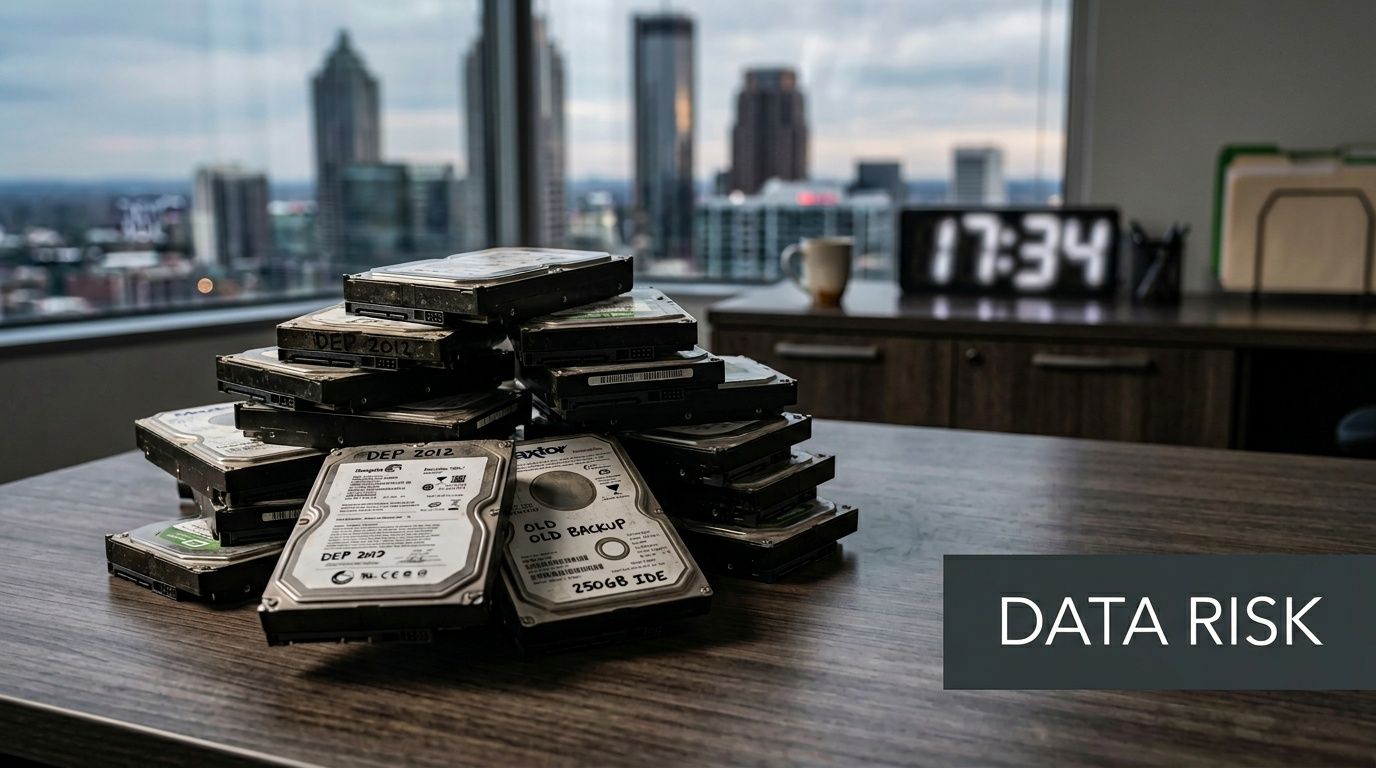
A lot of Atlanta businesses reach the same point at once. The office upgrades laptops, swaps servers, or closes a branch, and suddenly there's a pile of retired hard drives in a storage room. They look harmless. They aren't.
Those drives may still hold employee records, customer files, financial documents, saved passwords, email archives, and years of operational history. If they leave your control without proper destruction, a routine cleanout can become a security incident, a compliance problem, and an environmental mistake all at the same time.
Secure disposal matters for any business, but it's especially urgent for healthcare groups, schools, law offices, government contractors, data centers, and finance teams around metro Atlanta. The good news is that Hard Drive Disposal Services Atlanta GA Businesses don't have to be treated as a narrow compliance chore. Done right, they can protect data, support audit readiness, keep electronics out of landfills, and contribute to visible ESG and CSR goals.
Why Your Old Hard Drives Are a Ticking Time Bomb
A common scenario goes like this. An Atlanta company finishes a tech refresh. The new equipment is online, productivity is back to normal, and the old drives get boxed up "for later." Weeks pass. Then months. Nobody is quite sure what's on them, who last touched them, or whether they were ever wiped.
That uncertainty is the problem.
A hard drive doesn't stop being risky because it stopped being useful. A retired drive can still contain payroll data, HR files, contracts, tax records, or protected health information. If your team has ever explored hard drive data recovery for businesses, you already understand the flip side of that reality. Data often remains recoverable long after a device appears dead, erased, or abandoned.
Why more companies are taking disposal seriously
The demand for professional destruction services keeps growing. The global hard drive destruction service market was valued at USD 1.65 billion in 2024 and is projected to reach USD 5.05 billion by 2035, with a projected 10.7% CAGR, driven by tighter data security rules and rising corporate e-waste, according to this hard drive destruction market report.
That growth makes sense locally. Atlanta has hospitals, universities, logistics firms, government offices, data centers, and fast-growing tech companies. All of them retire storage devices. All of them need a defensible process.
Old drives are rarely "just junk." For a business, they're usually a mix of legal exposure, breach risk, and regulated data.
The risk isn't only digital
There's a second issue many teams overlook. Retired drives are also e-waste. When electronics are mishandled, companies don't just risk data exposure. They also undermine sustainability goals that leadership teams now care about in procurement, reporting, and brand reputation.
That's why disposal should be treated as a business decision, not a housekeeping task. A mission-driven recycler can help a company protect sensitive information while connecting the act of recycling to wider social impact. That makes the conversation bigger than "how do we get rid of this stuff?" It becomes "how do we close this project securely, responsibly, and in a way we can stand behind?"
Beyond Deleting Files Secure Data Destruction Methods Explained
Deleting a file doesn't destroy the file. It usually tells the system that the space can be reused later. Until that space is overwritten or the media is physically destroyed, the underlying data may still remain.
That's the part many teams get wrong. A drive can be reformatted, reset, or powered off and still hold recoverable information.
Why deletion and formatting don't solve the problem
Think of a hard drive like a whiteboard and a paper file cabinet at the same time. A normal delete is closer to removing the label from a folder than destroying the papers inside it. A proper wipe rewrites the contents. Physical shredding destroys the storage medium itself.
For businesses, the right method depends on one question. Do you need to reuse the drive, or do you need to eliminate it completely?
The three methods businesses hear about most
Some teams hear terms like wiping, degaussing, and shredding and assume they're interchangeable. They aren't.
| Method | How It Works | Best For | Allows Reuse? | Compliance Level (NIST) |
|---|---|---|---|---|
| Software wiping | Overwrites stored data across the drive | Functional drives that may be remarketed or redeployed | Yes | Clear or Purge, depending on process |
| Degaussing | Uses a strong magnetic field to disrupt magnetic media | Magnetic hard drives that won't be reused | No, in most business scenarios | Purge |
| Physical shredding | Breaks the drive into very small pieces | Nonfunctional, obsolete, or high-risk media | No | Destroy |
What DoD wiping actually means
DoD 5220.22-M 3-pass wiping overwrites data so it can't be recovered by software tools. Physical shredding that follows NIST SP 800-88 reduces drives to particles smaller than 2mm, which prevents platter reconstruction, as explained in this overview of secure data shredding methods.
That distinction matters in real operations:
- Wiping fits asset recovery plans. If a drive still works and your business wants to redeploy or remarket it, wiping can preserve value.
- Shredding fits end-of-life media. If a drive is damaged, obsolete, or too sensitive to release, shredding removes the uncertainty.
- Degaussing fits a narrower use case. It applies to magnetic media, but it also affects usability, so it's usually part of a destroy-first mindset rather than a reuse program.
For teams wondering whether magnets alone solve the problem, this guide on erasing hard drives with magnets helps explain where degaussing fits and where it doesn't.
Practical rule: If the drive contains highly sensitive business data and you don't need the asset back in service, physical destruction is usually the clearest path.
How NIST helps you choose
NIST SP 800-88 gives businesses a useful framework:
Clear
Removes data through logical techniques. This may work for internal reuse in lower-risk settings.Purge
Uses stronger methods designed to make recovery much harder. This can include advanced overwrite procedures or degaussing.Destroy
Physically damages the media so reconstruction isn't feasible. This is the category many regulated businesses prefer for retired drives.
A lot of confusion disappears once you map the method to the business outcome. If your legal, compliance, or security team needs maximum finality, "destroy" is easy to explain. If your finance team wants resale value from working hardware, wiping may make more sense for selected assets.
The plain-language takeaway
Don't judge a disposal method by how clean the office looks afterward. Judge it by whether your team can answer three questions with confidence:
- What data was on the drive
- What exact destruction method was used
- Can we prove it later
If you can't answer all three, the drive wasn't really closed out.
Staying Compliant HIPAA, FACTA, and Georgia Data Laws
For many Atlanta organizations, secure disposal isn't just good security hygiene. It's part of legal compliance.
Healthcare providers need to protect patient information. Financial businesses handle consumer records. Schools and universities store student and employee data. Government and contractor environments often hold regulated or sensitive information that can't be left to an informal cleanout process.

What these rules mean in practice
Regulations such as HIPAA, FACTA, and GLBA don't just care that data is gone. They care that your organization used a reasonable, defensible process to protect it at end of life.
In day-to-day terms, that means your business should be able to show:
- Controlled handling of devices before destruction
- A documented chain of custody
- A recognized destruction method
- Records that can be produced during an audit or investigation
For healthcare in particular, the financial stakes are high. The average cost of a healthcare data breach exceeds $9.4 million, and Atlanta providers that offer NAID AAA-certified, camera-monitored destruction with Certificates of Destruction help HIPAA-regulated businesses prove compliance, as noted in this healthcare breach and destruction compliance summary.
The Certificate of Destruction is the proof layer
A lot of businesses stop thinking once the truck leaves. Compliance teams can't.
The critical document is the Certificate of Destruction. At minimum, businesses should expect a record that identifies what was destroyed, when it was destroyed, how it was destroyed, and enough asset detail to connect the event back to internal inventory records.
That sounds administrative, but it's where many audits are won or lost.
If your business can't match retired assets to destruction records, you're relying on memory instead of evidence.
What to keep for future audits
A useful internal process usually includes these records together:
- Asset inventory logs with serial numbers or internal tags
- Pickup and transfer records that show custody changes
- Destruction certificates tied to the specific batch or devices
- Internal approvals showing who authorized disposition
- Retention rules so the paperwork stays available for future reviews
For Atlanta businesses, Georgia-specific obligations may vary by industry and data type, but the operational lesson stays the same. Regulators and auditors care about discipline, traceability, and documentation. A drive that was "probably destroyed" isn't a compliance position.
How to Choose a Hard Drive Disposal Partner in Atlanta
Price matters. It just shouldn't be your first filter.
A low quote doesn't help if the vendor can't document chain of custody, explain its destruction method, or support your audit process later. For businesses searching for Hard Drive Disposal Services Atlanta GA Businesses, the better question is this: Can this provider reduce risk in a way my IT, legal, compliance, and sustainability teams can all live with?
The shortlist every buyer should use
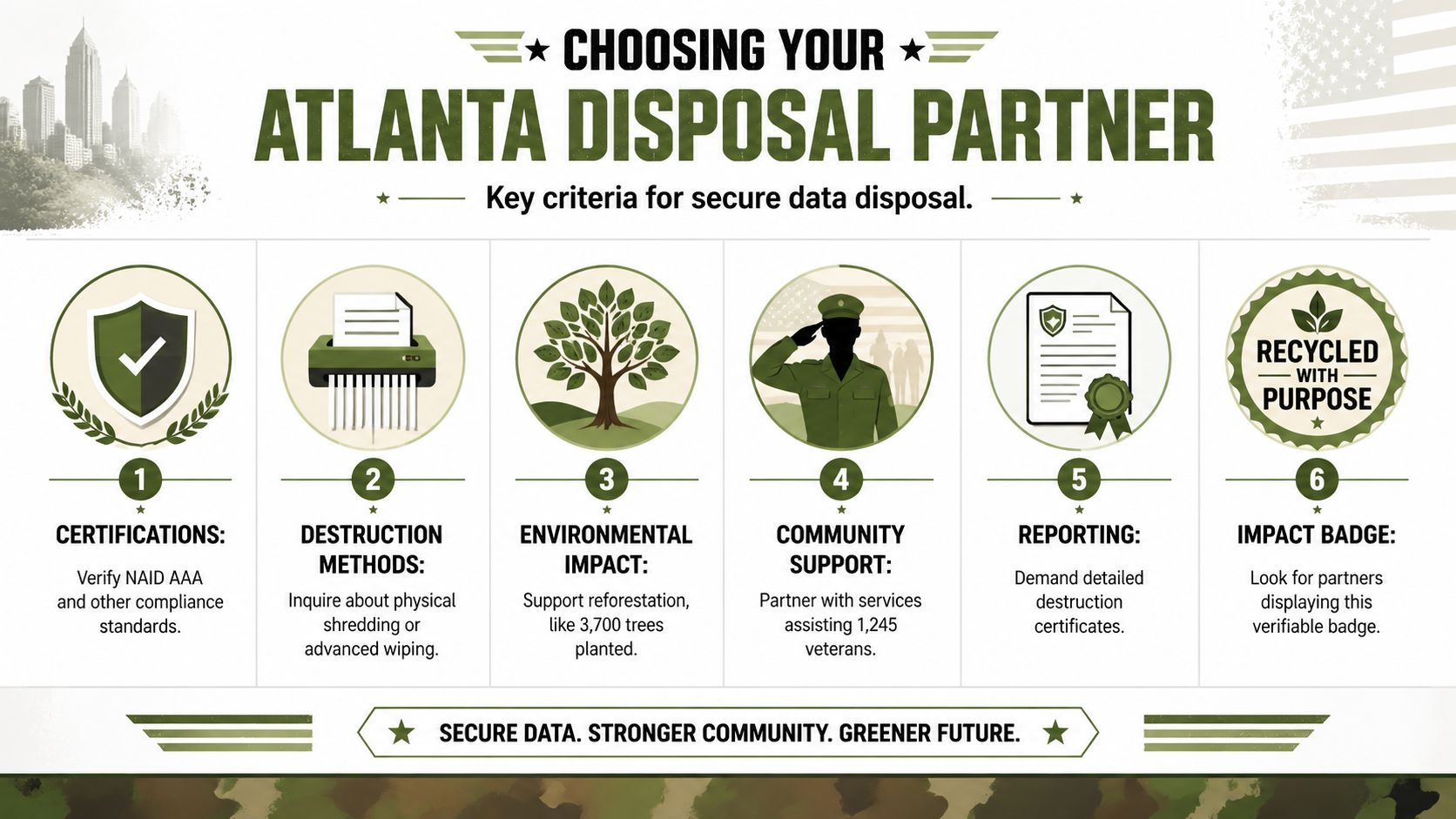
Start with the basics. A serious vendor should be able to discuss recognized certifications, secure handling, and the difference between on-site and off-site destruction without vague answers.
Use this checklist when you vet providers:
Certifications and standards
Ask whether the provider follows recognized workflows such as NAID AAA or R2-aligned practices, and how those standards show up in daily handling.Method fit
Make sure the vendor can explain when it uses wiping, degaussing, or shredding, and why.Chain of custody
Ask how devices are tracked from pickup to final destruction. Look for serialized logging, sealed containers, monitored handling, and documented custody changes.On-site versus off-site options
Some businesses want witnessed destruction at their facility. Others prefer secure transfer to a plant. The right answer depends on your risk tolerance and operational setup.Reporting quality
Don't settle for a generic "all items destroyed" note. Your records should support audits, asset reconciliation, and internal controls.Environmental handling
The vendor should explain what happens to the remaining material after data destruction, not just the destruction event itself.
For a practical reference point, this Atlanta secure data destruction services guide outlines the kinds of questions businesses often ask during vendor evaluation.
The compliance reporting gap most vendors leave open
A key gap in the market is helping businesses integrate destruction certificates into multi-year audit workflows. A stronger vendor doesn't just hand over a certificate. It gives your organization a framework for using that documentation in HIPAA, FACTA, and GLBA compliance, as described in this discussion of the certificate integration gap in Atlanta hard drive shredding.
That matters because a certificate by itself is only part of the job. Your team still has to file it, connect it to internal asset records, and retrieve it later when legal, compliance, procurement, or an insurer asks for evidence.
Choose a partner that supports ESG too
A disposal project can also support broader company goals. Many leadership teams now want vendors that help with responsible recycling, reporting, and community impact.
That changes the buying criteria. Instead of asking only "how fast can you destroy drives," companies also ask:
- Can this project support our ESG or CSR reporting?
- Can we document environmental stewardship along with data protection?
- Can this vendor help us tell a credible local impact story?
One local option, Atlanta Green Recycling, provides secure data destruction and electronics recycling while also tying recycling activity to veteran support and tree-planting impact reporting. For companies building CSR programs, that kind of model can turn a back-office disposal event into something procurement, sustainability, and communications teams can all use.
A disposal vendor should help you close risk. A better one helps you document environmental and social value at the same time.
What a stronger partnership looks like
The strongest vendors don't behave like a pickup service. They behave like an extension of your asset governance process.
That means they can help your team think through:
- How devices are inventoried before pickup
- How records flow into internal systems
- How destruction evidence is stored for future audits
- How recycling outcomes support ESG communication
- How your company can show stakeholders that retired tech was handled responsibly
That's a much better standard than "they were cheap and had a truck available."
The Hard Drive Disposal Process Step by Step
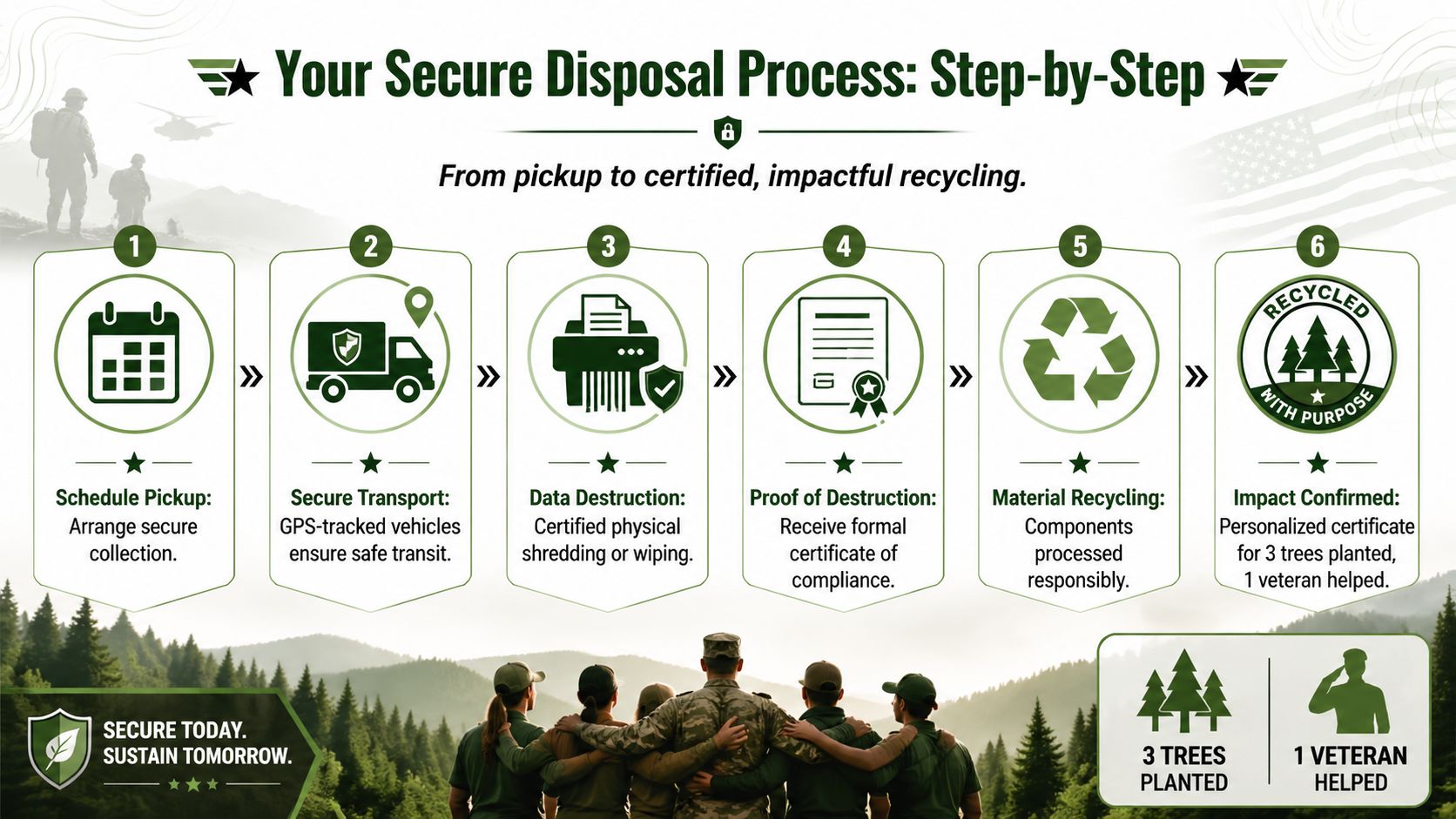
A secure disposal project feels much less intimidating once you know the sequence. Most Atlanta businesses don't need to invent the process from scratch. They need a clean handoff, clear checkpoints, and records they can trust.
Step 1 and Step 2 inside your building
Start by gathering devices that contain storage media. That includes loose hard drives, laptops, desktops, servers, and retired networking or medical equipment that may hold data.
Then separate what your team knows:
- Known functional assets that may be candidates for wiping and reuse
- Broken or obsolete assets that likely need destruction
- High-sensitivity assets that may require witnessed handling
If your company is planning a larger pickup, this business electronics recycling pickup service in Atlanta is one example of how organizations schedule collection for bulk equipment.
Step 3 and Step 4 once the project starts moving
For data center decommissioning, a turnkey process can include on-site de-installation, barcode scanning for an auditable trail, GPS-tracked logistics for less than 24-hour turnaround, and NIST-compliant destruction, while diverting over 95% of e-waste from landfills, according to this overview of secure destruction for decommissioning projects.
Even if your project is smaller than a data center shutdown, the same logic applies. The strongest process creates visibility at every handoff.
Look for these operational controls:
- Barcode or serial capture so each asset ties back to a record
- Secure packing and loading by trained crews
- Tracked vehicles and documented movement
- Controlled intake at the destruction site or mobile unit
Step 5 at the destruction event
On this topic, many businesses want clarity. What happens?
If destruction is on-site, your team may be able to witness the event directly. That's often useful for healthcare, legal, financial, or government settings where security teams want immediate confirmation.
If destruction is off-site, the vendor should still be able to show how assets remain controlled until final processing. The key isn't whether the shredder sits in your parking lot or at a secure facility. The key is whether the chain of custody stays intact.
Good disposal processes remove guesswork. At every stage, someone should be able to say where the drive is, who handled it, and what happens next.
Step 6 after the physical work is done
The project isn't complete when the media is destroyed. It's complete when your records are closed out.
That usually means receiving and storing:
- A Certificate of Destruction
- Asset-level or batch-level reporting
- Recycling documentation for the material stream
- Any internal notes needed for fixed asset, legal, or compliance records
- If offered, impact reports for veteran support or tree planting tied to the recycling event
This last part matters more than businesses realize. The destruction event protects the data. The paperwork protects the business.
More Than Hard Drives Comprehensive IT Asset Disposal
Most organizations don't retire hard drives one at a time. They retire systems.
A branch office closes and leaves behind desktops, monitors, printers, docking stations, and networking gear. A hospital refresh leaves carts, workstations, drives, and specialty devices. A data center project may involve racks, servers, cabling, power equipment, and storage arrays. That's why hard drive destruction should sit inside a broader IT asset disposition, or ITAD, plan.
What a full-scope project can include
A capable ITAD partner may handle equipment such as:
- Servers and storage arrays
- Laptops and desktop computers
- Loose hard drives and SSDs
- Monitors and peripherals
- Networking equipment
- Office electronics and accessories
- Surplus devices from schools, hospitals, and government departments
That wider view simplifies life for internal teams. IT doesn't have to manage one vendor for shredding, another for hauling, and another for recycling. Facilities, compliance, and procurement can work from one operating plan instead of three.
Why the broader strategy helps
A full ITAD approach improves more than convenience.
It helps businesses keep a consistent chain of custody across many device types. It also makes environmental handling easier to document because the project is managed as one retirement event rather than a series of informal cleanouts.
There's a community angle too. Mission-driven recyclers often support larger collection and reuse initiatives with schools, municipalities, nonprofits, and local campaigns built around responsible e-waste recovery. For Atlanta organizations, that can strengthen the local value of a project that otherwise looks purely operational.
The smarter question isn't "who can destroy these drives?" It's "who can help us retire this whole environment securely and responsibly?"
When companies think that way, hard drive disposal becomes one piece of a more disciplined end-of-life process.
Turn E-Waste into Hope and Reforestation
Businesses don't have the option to treat data destruction casually. Retired drives need secure handling, documented destruction, and responsible recycling. That's the baseline.
But the vendor choice still matters.
A mission-driven recycling program can turn a routine compliance task into something your company is proud to report. Old tech doesn't have to end as anonymous waste. In the right program, it can support veteran-focused giving, reforestation efforts, and a more credible local sustainability story.
That message is simple and memorable: your old tech can house a veteran and grow a forest.
For companies building stronger ESG and CSR programs, that creates a rare opportunity. You can protect sensitive data, keep electronics out of landfills, and connect the project to visible social impact. That's much more meaningful than checking a disposal box and moving on.
If your team wants recycling that restores lives and the environment, start with a provider built for both security and purpose. Learn more about Atlanta business electronics recycling services and turn your next IT cleanout into something larger than disposal.
Atlanta Hard Drive Disposal FAQs
Can we just delete files and recycle the computers?
No. Deleting files or reformatting a device usually isn't enough for business disposal. The drive needs an approved sanitization or destruction process, plus documentation your company can retain.
What's the difference between an SSD and a hard drive for disposal?
Traditional hard drives store data magnetically on platters. SSDs store data on flash memory chips. That difference affects how sanitization works, so your disposal partner should identify the media type before choosing wiping or destruction.
Is on-site shredding always better than off-site destruction?
Not always. On-site destruction gives immediate witnessed confirmation, which some regulated businesses prefer. Off-site destruction can still be appropriate if the vendor maintains secure chain of custody and provides strong reporting.
What should be on a Certificate of Destruction?
At a minimum, your business should expect the date, the destruction method, identifying details for the assets or batch, and enough information to connect the event back to your internal records.
How do Atlanta businesses usually handle pricing?
Pricing often depends on factors like volume, pickup logistics, whether destruction is on-site or off-site, and whether the project includes broader IT asset removal. Some programs offset costs through recycling or asset recovery, but the structure varies by provider.
Is it okay to throw business hard drives in the trash?
For any company that stores confidential, regulated, or operationally sensitive data, that's a bad idea. It creates avoidable security risk and can undermine compliance obligations. Electronics also need responsible downstream handling rather than ordinary disposal.
If your company has old drives, retired laptops, servers, or a full office cleanout to manage, Atlanta Green Recycling offers a practical next step. You can schedule a pickup, ask about secure data destruction, and build a process that protects business data while supporting responsible recycling, veteran aid, and reforestation.