
Atlanta Business IT Asset Disposal Guide: Secure ITAD


Old laptops in a locked closet don’t look dangerous. Retired servers stacked in a back office don’t look expensive. A pallet of monitors waiting for “later” doesn’t look like a compliance problem.
For Atlanta businesses, that’s usually where IT asset disposal starts. An office move is coming. A data center refresh just finished. Finance wants old equipment off the books. Security wants proof that no customer, employee, patient, or student data survives the trip out the door. Operations wants the room back.
That tension is why a strong Atlanta Business IT Asset Disposal Guide matters. ITAD isn’t just hauling away old computers. It’s a controlled process for inventorying assets, classifying risk, destroying data, documenting custody, recovering value where possible, and recycling responsibly under the right local and federal rules.
The stakes keep climbing. The global IT Asset Disposition market was valued at USD 25.79 billion and is projected to reach USD 90.06 billion by 2034, a sign that more organizations are treating end-of-life tech as a serious operational discipline rather than a cleanup task, according to IT asset disposition market projections for businesses managing retired technology.
Your Guide to Responsible IT Asset Disposal in Atlanta
If you’re managing IT, facilities, compliance, or procurement in metro Atlanta, you’re probably balancing three pressures at once. You need devices gone. You need data gone. You need the paper trail to hold up when legal, finance, or an auditor asks questions months later.
That’s why responsible disposal works best when you treat it as a business process, not a junk removal job. The companies that struggle usually wait too long, skip inventory discipline, and make disposal decisions one pile at a time. The companies that handle it cleanly decide up front what must be destroyed, what can be remarketed, what requires special handling, and who owns each approval step.
A practical plan also changes the conversation inside the business. Instead of hearing “we have to pay to get rid of this stuff,” leadership starts asking better questions: Can we recover value? Can we reduce landfill exposure? Can this support our ESG reporting? Can we simplify future refresh cycles?
For Atlanta teams building that process, business electronics recycling guidance for Atlanta organizations helps frame IT disposal as part of broader asset governance rather than an afterthought.
Practical rule: If an asset ever touched sensitive data, assume it needs documented handling from shelf to final disposition. Good intentions won’t satisfy an audit.
What works is simple, even if execution takes discipline. Start with inventory. Match destruction method to data sensitivity. Vet your vendor harder than you vet your moving company. Then close the loop with manifests, certificates, and impact reporting that procurement, compliance, and sustainability teams can all use.
The Pre-Disposal Blueprint Inventory and Classification
A disposal project usually goes off course long before pickup day. It happens when IT, facilities, and finance are all looking at the same pile of equipment and none of them can say, with confidence, what is in it, who used it, what data it touched, or whether any of it still has resale value.
That is the point where avoidable mistakes start. A server gets logged as scrap. A laptop with HR data gets mixed into a general office batch. A few working devices disappear because no one recorded serial numbers before they changed rooms. I have seen Atlanta companies spend more cleaning up those gaps than they would have spent building a disciplined intake process from the start.
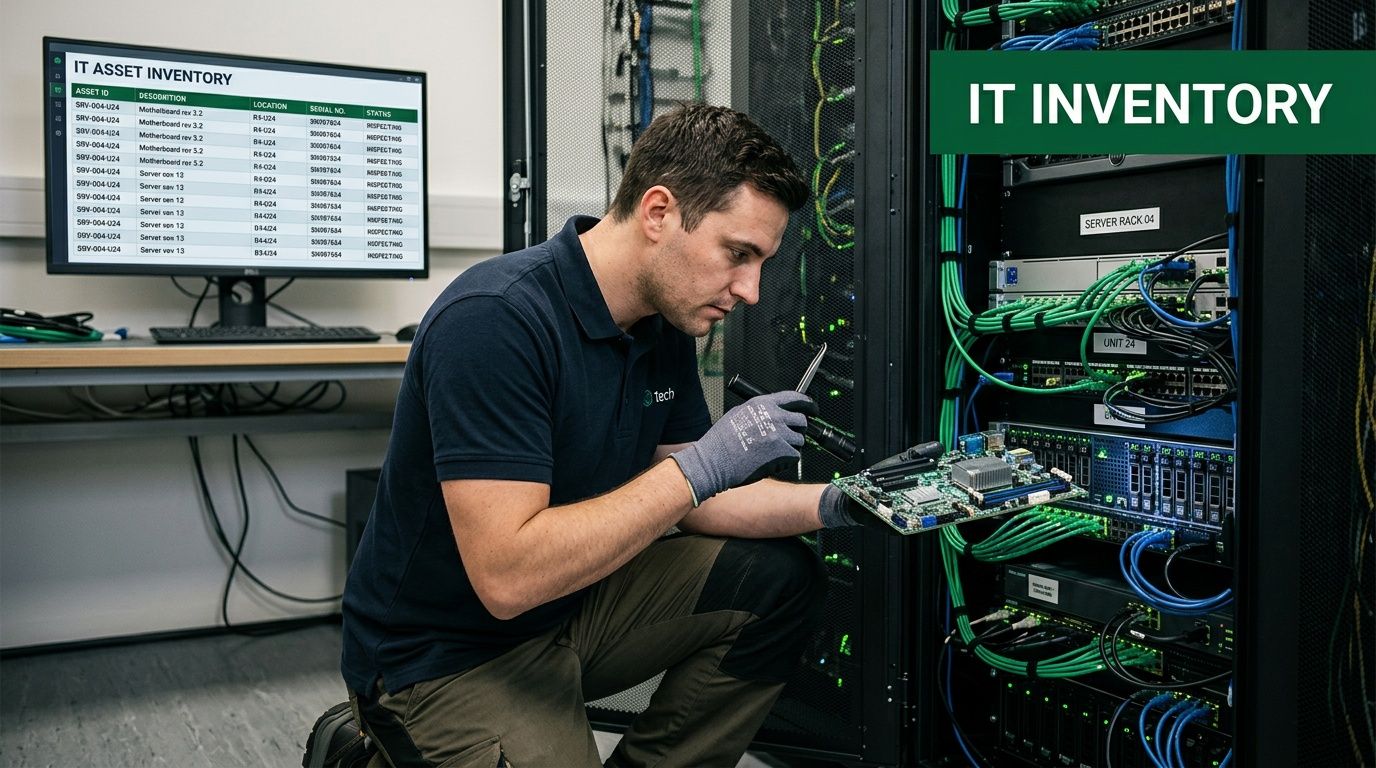
What your inventory needs to capture
A workable inventory is detailed enough to support three decisions. How the asset moves. How its data is handled. Whether it belongs in a resale stream, a recycling stream, or a destruction stream.
Record at least the following before anything leaves controlled space:
- Unique identifiers: Serial number, asset tag, hostname when relevant, and device category.
- Hardware profile: Make, model, storage media type, memory, and other details that affect wiping, reuse, or parts harvesting.
- Physical condition: Functional, damaged, incomplete, locked, or parts-only.
- Ownership and location: Department, cost center, assigned user, building, room, and rack or closet location where applicable.
- Data classification: Regulated, confidential, internal-use, or low-risk based on the highest sensitivity the device may have held.
- Planned disposition: Reuse, resale, donation, certified recycling, or physical destruction.
Teams that want cleaner audits and fewer handoff disputes usually tie this work to their broader IT asset management best practices for business operations. That keeps retirement records aligned with procurement history, user assignment, and depreciation schedules.
Classify by risk first, equipment type second
Device type matters, but data exposure matters more.
A five-year-old HR laptop and a five-year-old conference room laptop might have the same specs. They should not follow the same path. One may require tighter custody controls, stricter approvals, and destruction evidence that can stand up in an audit. The other may be a good candidate for sanitization and remarketing.
A simple classification model keeps teams out of trouble:
| Asset class | Typical examples | Disposal focus |
|---|---|---|
| High sensitivity | Servers, executive laptops, HR systems, healthcare devices | Strict chain of custody, documented destruction |
| Moderate sensitivity | Standard employee laptops, office desktops, shared workstations | Verified sanitization, possible value recovery |
| Low sensitivity | Peripherals, broken monitors, accessories without storage | Environmental handling and recycling |
This is also where Atlanta-specific planning starts to matter. If your batch includes batteries, CRTs, mercury-bearing equipment, or other regulated components mixed into general IT gear, the inventory should call that out early so downstream handling matches Georgia EPD requirements instead of forcing a last-minute sort in the warehouse.
Separate remarketing candidates from scrap at intake
Blended loads destroy value.
If reusable laptops, clean networking gear, and recent-model desktops are tossed onto the same pallet as broken printers, obsolete monitors, and damaged scrap, the whole batch usually gets handled at the lowest common denominator. That costs money twice. You lose recovery value, and you still pay to process material that could have been sold or donated.
Sort assets into practical lanes while you inventory them:
- Redeploy or donate candidates with usable life left
- Remarketing candidates that can justify testing, wiping, and resale
- Recycling-only units that are obsolete, damaged, or uneconomical to refurbish
- Destruction-required assets where data risk or device condition rules out reuse
That early sort does more than protect resale revenue. It also gives sustainability and ESG teams a cleaner story to report. Reuse, donation, and material recovery are easier to document when they were planned from the first touch, not reconstructed after the fact. For companies that care about brand reputation in Atlanta, that distinction matters.
Build the inventory where the equipment sits
Centralizing first and logging later sounds efficient. It rarely is.
Once assets start moving before they are scanned and classified, custody records get weak fast. Labels fall off. One department's gear gets merged into another batch. Loose drives show up without a parent asset. Then the disposal vendor inherits a mystery pile, and your internal team has to explain it later.
The better method is simple. Inventory in place, then move.
Scan equipment room by room, rack by rack, closet by closet, and floor by floor. Apply tags if existing labels are missing. Note damage, missing drives, and attached peripherals while the original context is still visible. For healthcare offices, schools, and multi-site corporate consolidations around metro Atlanta, this step saves a lot of rework because so many hands touch the equipment during a refresh or relocation.
A clean inventory protects two things at once. It protects data handling decisions, and it protects asset value.
Atlanta Green Recycling sees this split every week. The projects that run clean are the ones where the client knows what it has before the first pallet is wrapped. The messy projects usually start with estimates, mixed carts, and assumptions.
Inventory discipline is not paperwork for its own sake. It is the control point that makes custody, compliance, value recovery, and ESG reporting believable. If the list is wrong, everything after it gets harder to defend.
Fortifying Your Data Secure Destruction Methods
Atlanta has already seen what weak cyber and data controls can cost. A $2.7 million ransomware attack on Atlanta in 2018 destroyed years of critical city data, including legal records and police dashcam footage, according to reporting on the Atlanta data destruction and ransomware incident. That wasn’t an ITAD case study, but it’s a clear reminder that data protection failures become business failures fast.
Once you know what hardware you have, the next decision is harder than many expect. How should each storage device be sanitized? The answer depends on media type, regulatory exposure, reuse goals, and how much certainty your organization requires.
Software wiping when you want proof and residual value
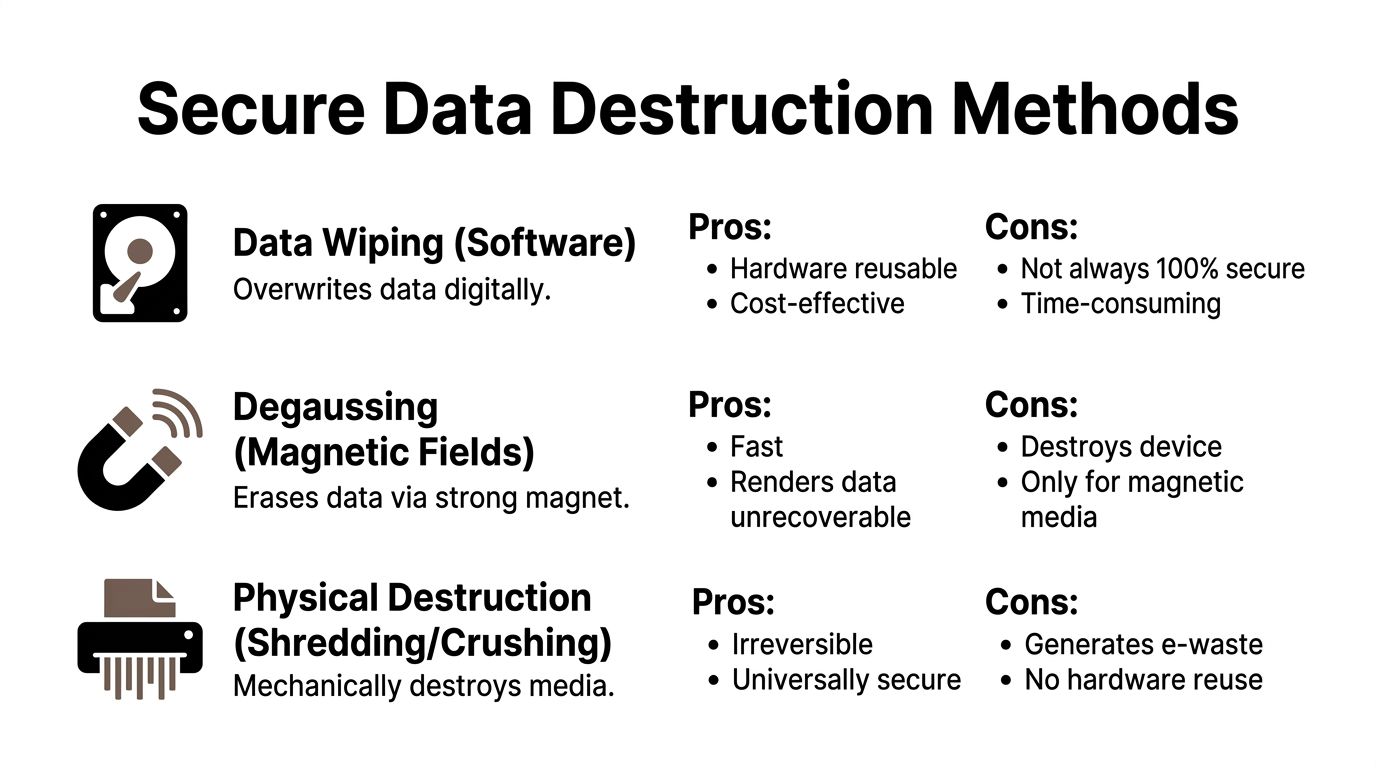
Software wiping is the right choice when the asset still has resale or reuse potential and the media supports a validated erasure workflow. In practice, this is common for newer laptops, desktops, and some servers headed toward remarketing.
The verified process guidance calls out DoD 5220.22-M software wiping as a certified method within the larger disposal workflow. The advantage is straightforward. You remove data while preserving the hardware for a second life. That matters if finance wants asset recovery and sustainability teams want reuse before recycling.
Software wiping works best when the vendor can provide:
- Drive-level verification: Evidence that each device completed the sanitization process.
- Serial-based reporting: A record tied to the exact device that left your site.
- Exception handling: A defined process for failed wipes, damaged drives, or encrypted devices that won’t verify.
This method does not work well when teams improvise. Reimaging a device isn’t the same as validated sanitization. Deleting files isn’t sanitization. Factory reset isn’t enough for many business use cases.
Degaussing for magnetic media
Degaussing uses a strong magnetic field to disrupt the stored data on magnetic media. It has a narrow but important role. If you’re handling traditional hard disk drives and need a fast path to unrecoverable data destruction without preserving the device, degaussing can make sense.
Its limitation is equally important. It’s media-specific. It won’t cover every storage format in a mixed load, and once applied, the drive itself is no longer suitable for reuse.
That makes degaussing a specialized tool, not a universal answer. It’s useful in environments with large volumes of magnetic media and strict destruction policies. It’s less useful for varied office cleanouts where laptops, SSDs, network gear, and loose drives all sit in the same project queue.
Physical shredding when certainty matters more than reuse
Physical destruction is the cleanest answer for the highest-risk scenarios. If the device held protected health information, highly sensitive legal files, proprietary designs, or government data, shredding often becomes the simplest defensible choice.
The verified disposal methodology includes physical shredding among the accepted destruction methods. It removes ambiguity. There’s no “maybe the wipe passed but the report is missing.” Once media is shredded, the reuse conversation is over, and so is the recovery question.
That trade-off matters. Shredding is ideal when your priority is certainty. It’s a poor choice when the business could have recovered value safely through documented wiping and resale.
For HIPAA-regulated devices, choose the method that gives compliance, legal, and security the easiest answer to defend later. In many cases, that’s documented destruction, not maximum salvage.
A practical decision framework
When teams freeze on method selection, I push them back to four filters:
- What kind of media is this? HDD, SSD, mobile device, removable media, or embedded storage.
- What data lived on it? General office files require a different posture than patient or legal records.
- Do we want to remarket it? If yes, wiping is usually the starting point.
- What will stand up in an audit? Pick the method that leaves the clearest record.
For businesses that need both on-site control and defensible records, hard drive destruction services for Atlanta businesses are often part of the answer, especially when loose media is the biggest risk left in the building.
The right method isn’t the most aggressive one by default. It’s the one that matches the asset, the data, and the documentation burden your organization carries.
Choosing Your Atlanta ITAD Partner An RFP Checklist
A disposal project can look controlled right up to the moment an auditor asks for serial-level tracking, certificates, and downstream documentation your vendor never had. I have seen Atlanta companies do the hard internal work, then hand the last mile to a provider that operated like a junk hauler with a data destruction brochure. That is usually where significant exposure starts.
Vendor selection deserves the same scrutiny as the destruction decision. A credible ITAD partner should be able to show how assets are received, tracked, processed, remarketed, or recycled, and what evidence your team gets at each step. Certification matters, but paperwork alone is not enough. The question is whether the provider’s daily operating process holds up when legal, compliance, finance, and sustainability all want different answers from the same project.
As noted earlier, certified vendors tend to perform better in audit and data-handling outcomes. Poor vetting does the opposite. It creates preventable gaps before the first pallet leaves your site.
The questions that separate real ITAD partners from pickup companies
Ask vendors to walk you through the work as if your project were starting tomorrow. Request sample certificates of destruction, chain-of-custody logs, asset reports, resale summaries, and exception procedures for damaged devices or hardware with missing tags. If they cannot show examples, assume you will be debugging their process during your project.
Five areas usually expose the difference between a true ITAD operator and a basic electronics pickup service:
- Certifications and standards: Ask which certifications they hold and how those standards appear in receiving, data handling, downstream vendor control, and reporting.
- Data destruction options: Confirm they support wiping, shredding, and device-specific handling based on media type and business risk.
- Chain of custody: Require serialized tracking, documented custody transfers, and clear accountability from pickup through final disposition.
- Logistics capability: Ask how they handle office towers, loading dock restrictions, data center removals, and multi-site pickups across metro Atlanta.
- Reporting quality: Make sure their reports work for audits, fixed asset reconciliation, insurance questions, and ESG reporting.
One local option businesses review is Atlanta IT asset disposition company services for secure business electronics handling. Whether you choose that provider or another, hold every bidder to the same standard.
Atlanta ITAD Vendor RFP Checklist
| Evaluation Criteria | What to Ask/Look For | Why It Matters |
|---|---|---|
| Data destruction workflow | Which destruction methods do you offer for HDDs, SSDs, servers, and loose media? | Different assets need different handling, and unnecessary destruction wipes out resale value |
| Chain of custody | Do you track assets by serial number from pickup to final processing? | Missing custody records create audit problems and raise breach exposure |
| On-site capabilities | Can you de-install, pack, label, and remove equipment from active offices or server rooms? | Internal teams usually do not want to absorb all physical handling risk |
| Documentation | What certificates, manifests, and summary reports do you provide? | Auditors and legal teams need records they can review later |
| Value recovery model | How do you decide what gets resold versus recycled? | A good partner does not default every asset to scrap |
| Local logistics | How do you schedule secure pickups in the Atlanta metro area? | Building access, timing, and transport control affect project risk |
| ESG reporting support | Can you provide reuse, recycling, and social impact documentation? | Disposal work can support sustainability reporting if it is tracked correctly |
Don’t ignore mission alignment
Procurement teams often treat this as a price exercise. That is too narrow for Atlanta companies with public ESG, community investment, or supplier responsibility commitments.
Your ITAD vendor becomes part of your reporting trail and part of your brand story. A mission-driven provider can document reuse, recycling, and measurable community benefit alongside the core disposal records. That matters if leadership wants more than a certificate in a shared drive. Atlanta Green Recycling stands out here because its model ties responsible electronics processing to veteran support and reforestation, which gives companies a cleaner way to connect routine asset retirement to broader ESG goals without forcing a separate initiative.
Cost still matters. So does pickup speed. But the cheapest bid often leaves out the reporting depth, downstream transparency, and social impact documentation that companies later wish they had.
The strongest ITAD partners reduce risk, preserve value where appropriate, and give your business records you can use.
Navigating Atlanta-Specific Logistics and Compliance
National ITAD advice often stops at broad terms like HIPAA, data destruction, and recycling. In Atlanta, that’s not enough. Local projects get messy because real compliance sits at the intersection of federal privacy expectations, Georgia environmental rules, property access constraints, and the practical realities of moving equipment through occupied buildings.
That’s where this Atlanta Business IT Asset Disposal Guide needs to be more specific than generic checklists.

Georgia EPD details many teams miss
One of the most overlooked issues is manifesting and environmental documentation for electronics that contain hazardous components. The gap isn’t usually bad intent. It’s that internal teams assume an electronics recycler will “handle all that,” without confirming what paperwork gets created and who reviews it.
That’s risky in Georgia. A frequent unanswered question for Atlanta businesses is how to create EPD-compliant manifests for bulk IT disposal to avoid fines up to $25,000 per violation, and 2025 Georgia EPD data shows 15% of Georgia business audits flagged improper e-waste manifesting, with Atlanta metro accounting for 40% of violations, according to Georgia EPD compliance concerns for Atlanta electronics disposal projects.
Items that commonly create trouble include:
- Older displays and legacy equipment: Especially anything with components requiring special downstream handling.
- Batteries and backup power units: Often pulled during decommissioning and then tracked poorly.
- Mixed loads: When reusable IT assets, scrap electronics, and hazardous components all get packed together.
Federal rules still shape the disposal plan
Georgia-specific environmental handling doesn’t replace federal obligations. It layers on top of them.
If your business handles protected health information, financial records, educational records, or consumer data, the disposal project still has to respect the rules tied to those records. That affects method selection, approvals, custody controls, and how long you retain documentation. In healthcare and public-sector settings especially, environmental compliance and data compliance need to be planned together, not handed off to different teams that never compare notes.
A practical workflow usually includes:
- Internal sign-off before pickup: Security, facilities, and compliance confirm what is leaving.
- Site-specific packing and segregation: Batteries, drives, servers, and standard office electronics don’t get mixed blindly.
- Manifest and custody review: Someone on your side checks what the vendor produced before the project closes.
- Final records retention: Certificates, manifests, and asset summaries are stored where audit teams can retrieve them later.
Logistics in Atlanta change the risk profile
A suburban office park, a downtown tower, a school district warehouse, and a healthcare campus all create different disposal challenges. Freight elevator access, loading dock windows, after-hours rules, parking restrictions, and building security can all affect chain of custody.
That’s why local planning matters. In dense parts of metro Atlanta, it often makes sense to stage assets in secured areas before pickup. In active offices, on-site de-installation and packing can reduce the number of employee touches. In larger decommissioning projects, splitting pickup by floor, rack group, or department keeps records cleaner.
For organizations that also need broader city recycling context, Atlanta recycling resources and business disposal support can help frame how electronics projects fit within local waste and diversion planning.
Compliance failures rarely come from one dramatic mistake. They usually come from small handoff errors, missing manifests, mixed loads, and assumptions nobody verified.
Atlanta projects run smoothly when one party owns the full coordination. That includes asset readiness, building logistics, manifest accuracy, and final documentation review. Anything less invites confusion.
Beyond Disposal Maximizing Value and ESG Impact
A lot of companies still treat IT disposal like a pure cost center. That’s outdated thinking. If you plan the project well, end-of-life technology can support cost recovery, environmental goals, and brand credibility at the same time.
The financial side matters first. The verified ROI benchmark is blunt: shred-only for compliance costs Atlanta businesses $45/device vs. $22 with value recovery, and FTC 2025 breach reports cite 12% from improper ITAD, hitting Georgia healthcare with $4.2M average fines, according to ROI and risk benchmarks tied to IT asset disposal decisions. The message isn’t that shredding is wrong. It’s that defaulting every device to destruction can be expensive when a more selective path would still protect the business.
The better question is what should be destroyed
Companies maximize value when they sort for outcome, not convenience. Devices that can be wiped, tested, and remarketed shouldn’t automatically be shredded just because they landed in the same project as failed drives and obsolete scrap.
That shift usually improves three things:
- Budget control: Recovered value can offset handling costs.
- Sustainability reporting: Reuse typically tells a stronger story than immediate destruction.
- Internal trust: Finance, security, and ESG teams can all see why each asset took its path.
Disposal becomes a strategic function instead of a cleanup task. Security gets documented sanitization. Finance gets cleaner accounting on retired assets. Sustainability gets diversion and impact records. Leadership gets a tighter operational story.
ESG reporting is easier when the recycler gives you proof
Many Atlanta organizations have ESG or CSR goals, but their operational vendors don’t help them document progress. ITAD can fill that gap if the recycler provides useful outputs.
The strongest programs produce more than a certificate of destruction. They also provide reuse summaries, recycling documentation, and community impact materials that a company can fold into sustainability updates, recruiting content, internal communications, and procurement reports.
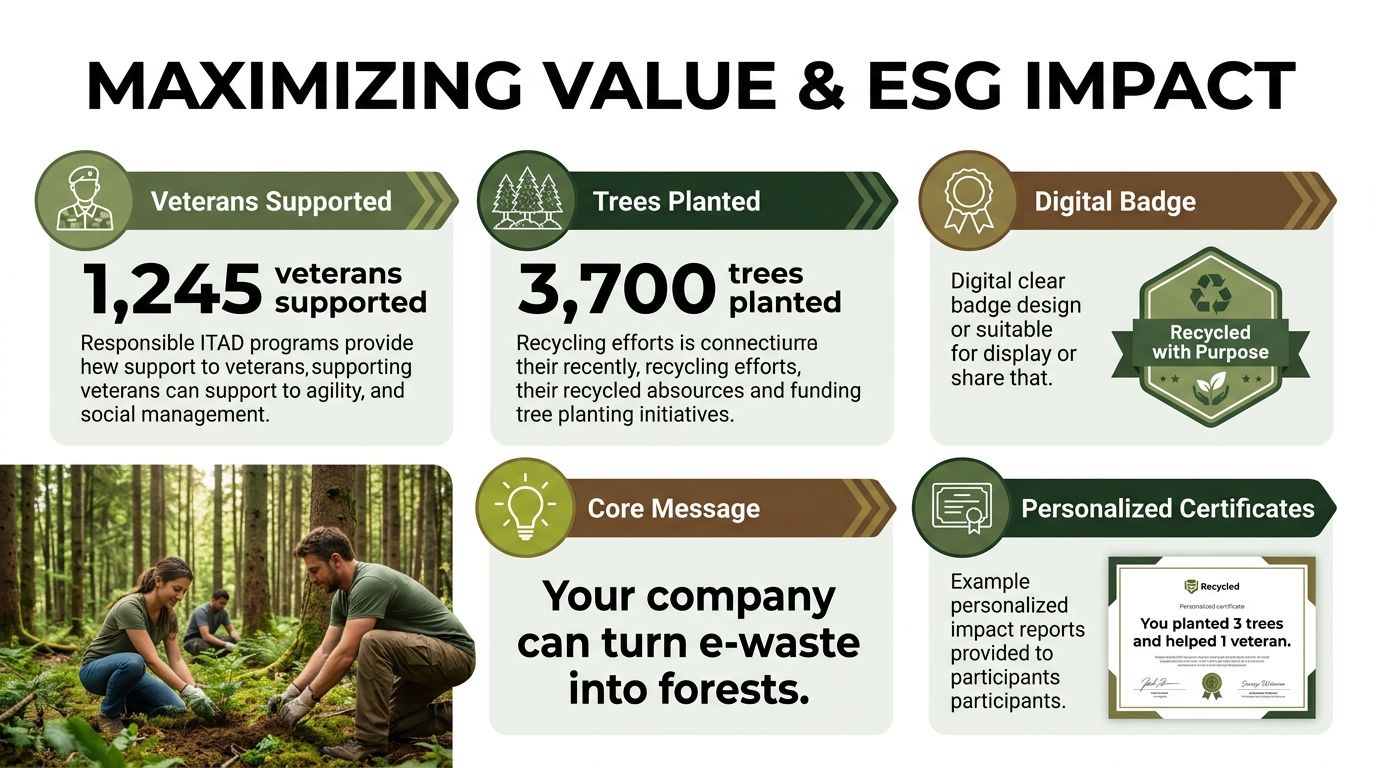
That’s where mission-driven IT disposal stands out. A “Recycle for a Cause” model connects hardware retirement to visible outcomes such as veteran support and tree planting. For businesses, that can translate into assets like:
- Plant-A-Tree certificates: Useful for CSR documentation and campaign follow-up
- Veteran support impact reports: Helpful for community impact narratives
- Digital recognition tools: A “Recycled with Purpose” badge for sustainability pages or partner materials
- Seasonal campaign hooks: Veterans Day, Earth Day, and Arbor Day give teams a reason to make disposal visible
The infographic above includes example impact counters such as 1,245 veterans supported and 3,700 trees planted, along with sample certificate language. Those are part of the campaign brief for this mission model and work best as transparent, regularly updated reporting elements rather than generic marketing claims.
Turn a backend operation into a visible company win
This matters more than many IT teams expect. Employees notice when old tech disappears responsibly instead of piling up in storage. Clients notice when your sustainability page includes concrete operational actions instead of broad promises. Procurement notices when a recycler can support both compliance and reporting.
A well-run ITAD project can also support local brand building. Corporate recycling drives, school partnerships, and city collaborations create a stronger public narrative than “we recycled some hardware.” In Atlanta, where businesses are competing for talent and public trust, that narrative has real value.
Your disposal partner shouldn’t just remove risk. They should help your company document what responsible disposal accomplished.
If you’re already spending money and staff time on tech retirement, you might as well get the security, compliance, value recovery, and ESG benefit out of the same project.
Frequently Asked Questions for Atlanta IT Asset Disposal
What if we only have a small batch of devices
Start the same way a large enterprise would. Build a simple inventory, note which devices contain storage, identify any regulated data exposure, and decide whether the assets are candidates for wiping, resale, or destruction. The batch size changes logistics, but it shouldn’t change your control standards.
How should we handle equipment that isn’t standard office IT
Treat proprietary equipment, lab gear, industrial controls, kiosks, and embedded systems as exceptions early. These devices often contain hidden storage, unusual components, or removal requirements that standard pickup crews may not expect. Flag them during inventory and ask your ITAD partner for a custom handling plan before pickup day.
What’s a realistic timeline for an office cleanout in Atlanta
The answer depends on inventory quality, building access, and how much equipment needs de-installation rather than simple pickup. Projects move faster when assets are pre-approved, grouped by type, and ready for scan-out. They slow down when teams are still debating ownership, data sensitivity, or what stays versus what goes.
Are employee-owned devices part of a corporate ITAD policy
They can be, but only if your company defines that clearly. Bring-your-own-device equipment often falls into a gray area around ownership, approved data wiping, and reimbursement. If employees used personal devices for business data, legal and security should decide what sanitization standard applies and how consent is documented.
Do we need on-site destruction every time
No. On-site destruction makes sense when your risk tolerance is low, when loose media is involved, or when stakeholders want direct visibility. Off-site processing can also be appropriate if custody controls, transportation security, and reporting are strong. The right choice depends on the asset mix and the documentation burden your organization carries.
What paperwork should we keep after the project closes
Keep the inventory, pickup records, chain-of-custody documents, certificates of destruction where applicable, and any environmental manifests or weight tickets tied to the load. Store them where compliance, legal, procurement, and internal audit can retrieve them without chasing a former employee’s email folder.
Can disposal support office moves and data center changes
Yes, and it should be planned as part of those projects rather than added at the end. Moves, consolidations, and decommissions create the most asset confusion. Folding ITAD into the relocation or shutdown plan keeps retired gear from being stranded, mixed with active hardware, or removed without records.
What usually goes wrong in business IT disposal projects
The same issues come up repeatedly. Incomplete inventory. Last-minute sorting. Unclear ownership between IT and facilities. Missing approval on high-risk devices. Vendors chosen on convenience instead of controls. None of those problems are technical. They’re process failures, and they’re avoidable.
If your organization needs a cleaner, more defensible way to retire business technology, Atlanta Green Recycling supports Atlanta-area companies with business-focused electronics recycling, secure data destruction, bulk pickup, and documentation that fits real compliance and operational needs. It’s also a practical fit for teams that want IT disposal to support broader sustainability and community impact goals, not just remove old hardware.