
How Atlanta Businesses Dispose of Old Computers

Old computers rarely leave an Atlanta office in a tidy, planned way. They collect in storage rooms, under desks, in IDF closets, or on carts after a hardware refresh. Then somebody in IT, operations, or facilities gets asked the same question: what are we supposed to do with all of this, and how do we do it without creating a data, compliance, or PR problem?
That’s the core issue behind How Atlanta Businesses Dispose of Old Computers. Disposal isn’t just hauling away old desktops and laptops. It’s an IT asset disposition decision that touches security, environmental compliance, finance, and brand reputation. In a city with major healthcare systems, law firms, schools, logistics companies, and data-heavy enterprises, the right process matters.
The volume alone explains why businesses can’t treat this casually. In 2007, the EPA reported that over 63 million computers were discarded or traded in annually across the United States, which shows the scale of the challenge for major markets like Atlanta and why structured disposal programs matter (EPA figure cited here). The companies that handle this well usually follow the same pattern: audit first, destroy data correctly, control logistics, document everything, and turn the outcome into something useful for ESG and community impact.
Planning Your Disposal Strategy The Initial IT Asset Audit
Most disposal mistakes happen before a single device leaves the building. A rushed pickup, a vague spreadsheet, or a pile of untagged laptops is how chain-of-custody problems start. The first move is always an IT asset audit.
That audit needs to answer four practical questions. What do you have, where is it, what data risk does it carry, and what should happen to it at end of life? If your team can’t answer those clearly, you’re not ready for disposal.

Build an inventory that goes beyond a headcount
A useful audit is more than “twenty laptops, six desktops, three servers.” That list won’t help you decide whether equipment should be reused, wiped, shredded, or dismantled.
Start with a working inventory that captures:
- Asset identity: manufacturer, model, serial number, asset tag, and device type.
- Location: office, floor, closet, server room, branch site, or remote employee return.
- Data profile: whether the asset may contain customer data, employee records, financial information, patient information, or internal intellectual property.
- Physical condition: working, damaged, incomplete, obsolete, or non-functional.
- Ownership status: owned, leased, assigned to a department, or pending removal from fixed asset records.
For larger offices, barcode scanning speeds this up and reduces manual errors. For multi-site organizations around metro Atlanta, standardizing the intake sheet matters more than fancy tooling. A simple, disciplined process beats a complicated one that nobody follows.
Sort assets into end-of-life paths
Once the inventory is real, divide equipment by outcome. During this division, experienced IT teams save time and avoid expensive confusion later.
Use practical categories such as:
Refurbishable assets
Working laptops, desktops, and enterprise equipment that may still have reuse or resale value after proper sanitization.Recycle-only assets
Devices that are too old, too damaged, or too incomplete to redeploy, but still need environmentally responsible processing.Immediate destruction assets
High-risk media, failed drives, and devices from regulated environments where physical destruction is the safer path.Special handling assets
Servers, network gear, storage arrays, and anything tied to a data center move, office closure, or legal hold review.
Practical rule: If your audit doesn’t separate devices by data risk and resale potential, you’re not auditing for disposition. You’re only counting leftovers.
A lot of Atlanta organizations also forget peripherals. Docking stations, monitors, keyboards, and printers may not hold the same data risk as a laptop or server, but they still affect pickup scope, truck space, labor planning, and downstream recycling paperwork.
Tag for chain of custody from the start
The moment your company decides a device is leaving service, it should enter a tracked workflow. Tagging matters because custody gaps usually happen inside the organization, not after the recycler arrives.
A sound process includes:
- Unique internal identification tied to the asset record
- Pickup staging controls so retired equipment isn’t mixed with active inventory
- Signoff by department owners when devices move from user space to disposal staging
- Clear designation of sanitization method before transport
If you want a stronger process baseline, these IT asset management best practices are a useful starting point for tightening records before disposal begins.
What works and what doesn’t
What works is boring on purpose. A current inventory, tagged assets, named owners, and a staging area with restricted access. That process scales from a law office replacing a few dozen workstations to a hospital rotating out larger fleets.
What doesn’t work is the common Atlanta shortcut. Somebody from facilities gathers miscellaneous electronics, throws them on pallets, and tells the recycler to “take everything.” That approach blurs chain of custody, weakens documentation, and makes downstream reporting harder than it needs to be.
The audit is where control begins. When the list is accurate, the rest of the project gets faster, safer, and easier to defend in front of leadership, auditors, or regulators.
Protecting Your Business Choosing the Right Data Destruction Method
An old computer isn’t just old hardware. It’s a storage container for risk. Customer files, saved passwords, financial reports, HR records, PHI, legal documents, and cached credentials can all survive on retired equipment if disposal is handled badly.
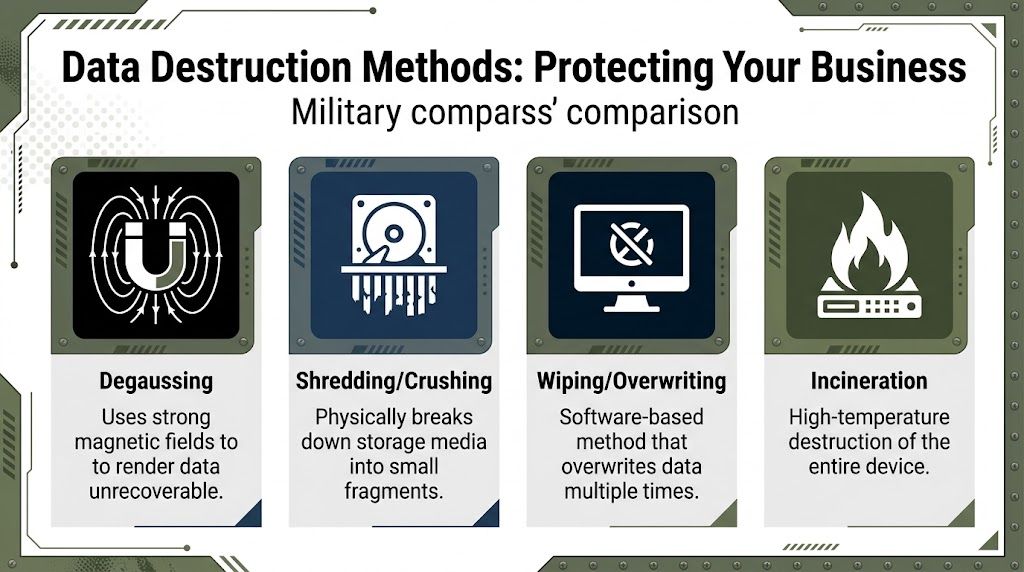
Atlanta businesses typically choose between two primary destruction paths. The verified standard process is software-based multi-pass wiping aligned with DoD 5220.22-M standards for refurbishable assets, and physical shredding to 1/4-inch particles for high-risk or non-functional drives, with the goal of 100% data destruction efficacy (process reference).
When wiping makes sense
Wiping is the right fit when the device is still functional and has realistic reuse potential. In practice, that usually means enterprise laptops, desktops, and some server drives that can be sanitized, verified, and then moved into resale, redeployment, or responsible recycling streams.
The operational value of wiping is simple. You destroy the data while preserving the hardware.
A competent wiping workflow usually includes:
- Inventory and asset tagging before the device is touched
- Controlled software erasure using tools such as DBAN or enterprise wiping platforms
- Verification reporting that confirms the sanitization completed successfully
- Release for refurbishment or resale only after the audit trail is complete
This is the method many organizations prefer when finance wants some value recovery and IT knows the hardware still has life left in it.
When shredding is the better call
Some drives should never be put through a reuse decision tree. If media is damaged, inaccessible, high-risk, or tied to sensitive workloads, physical destruction is cleaner and easier to defend.
That includes situations like:
- Healthcare devices that may have stored regulated patient data
- Finance and legal environments where risk tolerance is low
- Failed hard drives that can’t be reliably wiped
- Legacy storage media from migrations or decommissions
- Equipment that sat untracked long enough to create doubt
Shredding removes uncertainty. If a drive is reduced to particles, there’s no secondary debate about whether the overwrite completed correctly or whether the media should be remarketed.
A disposal vendor should never make you guess which drives were wiped and which were destroyed. The documentation should make that obvious.
Data Destruction Methods Compared
| Method | Best For | Data Security Level | Allows for Reuse/Resale |
|---|---|---|---|
| Multi-pass software wiping | Functional laptops, desktops, and some reusable storage media | High when verified and documented | Yes |
| Physical shredding | High-risk, obsolete, damaged, or non-functional drives | Highest practical certainty | No |
| Degaussing | Select magnetic media in specialized workflows | Strong for compatible media, but not a reuse path | No |
| Incineration | Specialized destruction scenarios | Destructive, but not a standard business reuse path | No |
How to decide without overcomplicating it
Most internal debates about destruction drag on because teams ask the wrong question. They ask, “Which method is best?” The better question is, “Which method fits this asset’s condition, data exposure, and compliance burden?”
Use this decision lens:
- Choose wiping when the hardware works, the media can be reliably sanitized, and you want reuse or resale.
- Choose shredding when the media is high-risk, broken, old, unverified, or tied to stricter compliance expectations.
- Escalate edge cases when there’s uncertainty about legal hold, ownership, or whether the drive was ever encrypted.
For regulated industries, caution usually wins. Healthcare, finance, and government environments often prefer physical destruction for selected media because it gives risk managers a simpler story and clearer evidence.
Verification matters as much as destruction
A drive that was “probably wiped” is a liability. A drive that was shredded but never documented is also a liability. Disposal is only defensible when the method, date, asset identity, and custody trail are all recorded.
Ask for:
- Certificate of Destruction
- Serialized reporting where applicable
- Chain-of-custody records
- Pickup and processing documentation
- Clear separation between wiped and shredded assets
If your team needs a deeper checklist before releasing equipment, this guide to secure destruction of data is worth reviewing internally.
The reason to be strict here isn’t theoretical. Data incidents often expand into regulatory trouble, insurance complications, and the kind of business litigation that may follow data breaches when organizations can’t show they handled retired devices responsibly.
What works is matching the destruction method to the asset. What fails is using one default process for everything, or worse, letting an office manager, intern, or facilities team improvise with drives that may still hold sensitive data.
Logistics and Compliance A Local Playbook for Atlanta
Once data is handled correctly, the next challenge is movement. Not glamorous. Still critical. Logistics is where businesses either preserve compliance or lose control of the process.
Atlanta adds its own complexity. Companies here deal with multi-floor office towers, suburban campuses, hospitals, distribution sites, schools, branch offices, and data centers spread across the metro. A recycler needs to move assets safely, document each handoff, and show what happened after the truck left.
What pickup day should look like
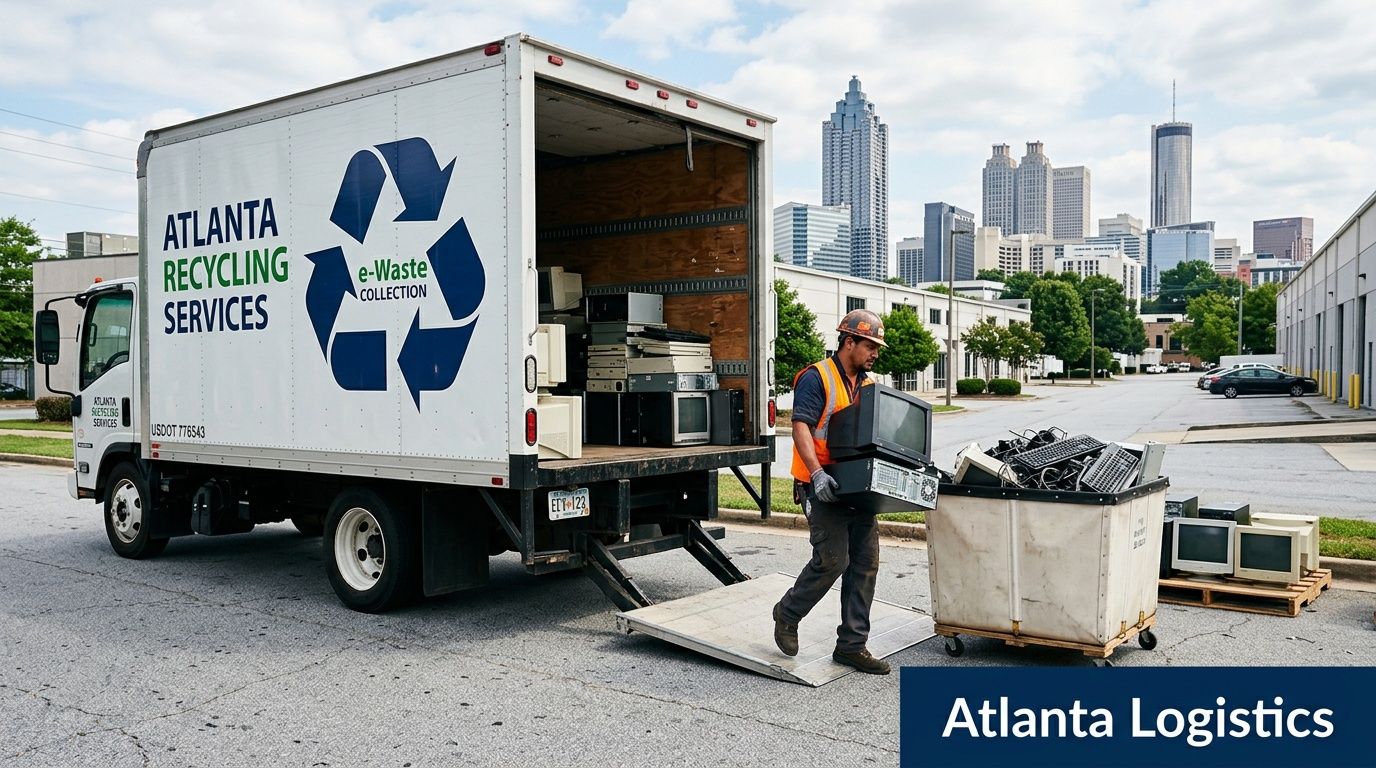
A professional pickup starts before arrival. The business and the recycler should already agree on scope, access points, contact names, equipment types, and whether onsite work includes de-installation, packing, palletizing, or drive handling.
On the day itself, strong workflows usually include:
- Staged assets matched to the audit list
- Sign-in and custody transfer documentation
- Secure loading procedures
- Separation of loose drives or specially designated media
- Immediate reconciliation of obvious count differences
Having a provider with its own fleet can help. The fewer handoffs between your building and the processor, the easier it is to maintain control and answer audit questions later.
For Atlanta companies planning office closures, tech refreshes, or recurring pickups, one option is a local service like business IT equipment recycling in Atlanta, which covers pickup and removal workflows for business equipment.
Compliance is built through paperwork
A lot of companies think compliance is mostly about certifications. Certifications matter, but documentation is what protects you when somebody asks for proof months later.
Keep a file that includes:
- Inventory list released for pickup
- Bill of lading or pickup record
- Certificates of destruction where applicable
- Downstream processing summaries
- Internal approvals for disposal
- Any sustainability or impact reporting tied to the load
Field note: The most common compliance weakness isn’t usually the destruction step. It’s incomplete paperwork that leaves gaps between internal inventory records and recycler reporting.
That file should be accessible to IT, procurement, finance, compliance, and leadership. Old computers touch all of them, even if only one department scheduled the truck.
What happens after pickup
Responsible disposal doesn’t end when the equipment reaches a warehouse. Post-sanitization, certified Atlanta recyclers may use a 7-step zero-landfill dismantling methodology that achieves 98% diversion from landfills and a 99.5% material recovery rate through activities like component harvesting, hazardous material isolation, and metal separation (process details here).
That matters because downstream handling is where environmental claims become real or fall apart. A good process sorts reusable equipment from scrap, isolates hazardous materials, separates commodities, and maintains records all the way through final processing.
The local trade-offs businesses should understand
There’s always a trade-off between speed, control, and reporting detail.
A quick cleanout may solve a space problem fast, but if the vendor can’t provide a clean asset trail, the shortcut isn’t worth it. On the other hand, overly complicated approvals can delay projects and leave retired gear sitting in offices for months, which creates its own risk.
Here’s the balanced approach most Atlanta businesses benefit from:
- For offices and campuses: schedule pickup only after assets are audited and staged
- For healthcare and regulated sites: separate media handling from general equipment removal
- For data center work: coordinate de-installation, labeling, and transport as a single controlled event
- For school systems and public entities: insist on documentation that supports both internal records and public accountability
One practical point from the field is worth repeating. If a vendor gets vague when you ask what happens after pickup, that’s a warning sign. A serious recycler should be able to describe the downstream path in plain language, including how equipment is sorted, how hazardous parts are handled, and what documents you’ll receive.
Logistics isn’t just transportation. It’s the bridge between secure retirement and audit-ready disposal.
Uncovering the Financials Cost ROI and Value Recovery
A controller in Buckhead gets a quote to clear out 240 retired laptops, monitors, and a stack of failed drives. The cheapest option looks good for about five minutes. Then finance asks the questions that matter. What can be resold, what must be destroyed, what will the project cost in staff time, and what proof will exist after pickup?
That is the right frame for this decision. Old computer disposal is a risk, cost, and recovery exercise with real downstream effects on budgets, audit readiness, and even brand value if the company plans to connect recycling to broader CSR and ESG goals later.

Start with the cost of doing it badly
Poorly managed disposal gets expensive fast. The invoice from the recycler is only one line item. The bigger costs usually show up elsewhere. IT spends hours identifying untagged devices. Facilities teams make room for gear that should have left weeks ago. Finance struggles to tie final reporting back to the original asset list. If anything sensitive falls outside the documented chain, legal and compliance teams inherit the problem.
Those costs rarely appear in the first quote.
The practical comparison is not “cheap pickup versus paid pickup.” It is controlled disposition versus avoidable rework, weak records, missed recovery, and unnecessary exposure.
Where ROI Comes From
Return on investment usually comes from stacking several modest gains instead of chasing one dramatic payout.
Cost avoidance
Well-scoped projects cut waste inside the business. Teams avoid repeat pickups, ad hoc sorting, surprise labor, and preventable storage problems. For Atlanta offices with multiple floors or satellite locations, labor savings alone can change the economics of a disposal event.
Value recovery
Some assets still hold market value. Recent business-class laptops, desktops, networking gear, and certain servers may qualify for remarketing after data sanitation and testing. Older, damaged, or highly customized equipment often does not. Good ITAD partners separate those categories early so the business does not destroy recoverable assets or spend too much processing scrap.
Budget predictability
Finance likes disposal projects that can be forecasted. Clear handling categories, documented service scopes, and defined reporting requirements make the total cost easier to approve. They also make it easier to explain why one batch generated a credit while another was a pure destruction and recycling expense.
ESG and reputation upside
A disciplined recycling program can support more than operations. It can contribute to sustainability reporting, local community impact, and communications teams looking for credible examples of responsible business practice. That value is harder to model in a spreadsheet, but it is still business value, especially for companies that report on ESG performance or want Atlanta-specific CSR stories with substance behind them.
A good disposal program pays back in more than one way.
Build a disposal business case your finance team will accept
The strongest internal case is simple, documented, and tied to decisions finance can verify.
Include:
- Device count by type: laptops, desktops, servers, monitors, loose drives, and peripherals
- Disposition path: reuse, remarket, shred, recycle-only, or de-install and remove
- Internal labor estimate: IT time, facilities coordination, and department support
- Expected recovery potential: realistic resale categories, not optimistic guesses
- Documentation requirements: asset reports, destruction records, and final settlement details
- ESG or CSR use case: whether the project supports sustainability reporting, community impact goals, or external communications
If your accounting team wants tighter tracking around disposal budgets and reimbursements, these best business expense tracking apps can help organize project costs alongside other operating expenses.
What works financially and what doesn’t
Triage works. Uniform handling does not.
Functional laptops may justify secure wiping and remarketing. Failed drives usually go straight to destruction. Low-value peripherals need efficient recycling, not expensive white-glove processing. The financial mistake I see most often is using a single method for everything because it feels easier to manage. That either destroys value or adds risk.
Another common mistake is treating “free pickup” as the whole financial story. A no-charge truck roll can make sense for the right load size, but smart buyers ask harder questions:
- What reporting is included in the base price?
- Are certificates of destruction part of the service or an extra line item?
- Who performs onsite packing or de-install work?
- How are resale credits calculated and when are they issued?
- What happens if the final count does not match the original inventory?
Businesses weighing those trade-offs should also review the business benefits of e-waste recycling for Atlanta organizations, especially if leadership wants disposal decisions to support both financial controls and broader ESG objectives.
The best outcome is usually balanced. Recover value where the market supports it. Destroy high-risk media without hesitation. Recycle the rest through a documented process that finance, compliance, and communications teams can all stand behind.
Turning E-Waste into ESG Wins and Powerful PR
A surprising number of businesses still keep e-waste decisions buried in operations. That leaves value on the table. Responsible computer disposal can support environmental reporting, community relationships, employee engagement, and local brand trust if the company treats it as more than a back-office task.
The broader need is clear. Only 15% of electronic devices and equipment are currently recycled in the United States, which makes corporate recycling programs an important way for companies to show environmental leadership and support CSR goals (recycling context here).

Treat disposal as part of your ESG story
The companies that get the most from IT disposition don’t stop at “we recycled some computers.” They connect the disposal event to a broader narrative about governance, environmental responsibility, and local impact.
That story gets stronger when the recycler supports visible community outcomes. A cause-driven model gives businesses a way to say their retired equipment did more than avoid landfill. It contributed to something people can understand and care about.
For Atlanta organizations, that can translate into messaging like:
- Recycle for a Cause: your old tech can support veterans and contribute to tree planting
- Internal employee campaigns: turn a refresh cycle into a participation moment instead of a silent facilities task
- Customer-facing sustainability proof: show that end-of-life handling is governed, documented, and mission-aligned
Why cause-based recycling resonates
Standard recycling language is usually dry. Compliance matters, but compliance alone rarely inspires employees, customers, or community partners.
A stronger approach is values-based and specific. “Recycling That Restores Lives and Natural Areas” tells a clearer story than “end-of-life electronics processing.” If your company can connect retired IT assets to veteran support and reforestation, the act of disposal becomes part of a bigger civic identity.
That opens several useful marketing and PR angles.
Corporate recycling drives
Businesses can organize office-wide collection events around scheduled refreshes, relocations, or year-end cleanouts. Those efforts are especially effective when operations, HR, and marketing coordinate instead of treating disposal as an isolated IT task.
Seasonal campaigns
Veterans Day, Earth Day, and Arbor Day give companies natural moments to communicate why responsible disposal matters. The event doesn’t need to feel promotional. It should feel accountable and local.
Community partnerships
Co-hosting drives with veteran groups, schools, nonprofits, or civic organizations can strengthen visibility while keeping the company grounded in service instead of self-congratulation.
Responsible recycling is good operations. Cause-driven recycling gives those operations meaning people remember.
What to document for ESG and CSR teams
If your company publishes sustainability updates, supplier responsibility materials, or board-level ESG summaries, retired computer handling should have a paper trail that’s easy to use.
Useful materials include:
- Certificates tied to environmental handling
- Impact reports for veteran support initiatives
- Tree-planting acknowledgment or campaign summaries
- Photos from collection drives or de-install events
- Short narratives for sustainability reports and LinkedIn posts
- A digital badge such as “Recycled with Purpose” for partner pages
For companies building out their internal narrative, these benefits of e-waste recycling can help frame the environmental and compliance side in plain business language.
Use impact carefully and credibly
Cause-based marketing only works if it feels real. That means no inflated claims, no vague promises, and no trying to turn a routine pickup into a dramatic self-congratulatory campaign.
The better approach is transparent and restrained:
- Show what was collected
- Explain how it was processed
- Tie the effort to actual community outcomes
- Give employees and stakeholders language they can trust
The brief for this article includes impact counters such as 1,245 veterans supported and 3,700 trees planted. Those numbers belong in campaign assets, partner reporting, or website counters when the business can stand behind them operationally and keep them current. In practice, the value isn’t just the number itself. It’s the proof that disposal decisions are connected to measurable social good.
A practical PR playbook for Atlanta companies
Here’s where businesses usually get traction.
Internal communications
Send a short summary after a disposal event. Tell employees what equipment was retired, why the process mattered, and what community impact came from the partnership.
LinkedIn thought leadership
A post from the CIO, operations lead, or sustainability manager often performs better than a generic corporate announcement. Keep it factual. Explain the operational need, the secure handling, and the social impact.
Website trust signals
A “Recycled with Purpose” badge, plus a short explanation of the program, can help prospects understand that your company takes both governance and community stewardship seriously.
Local media and civic visibility
A well-run recycling initiative tied to veteran support or urban greening is more newsworthy than a generic equipment disposal event. In Atlanta, that matters. Businesses want local credibility, not just internal compliance.
The point isn’t to oversell recycling. The point is to stop hiding one of the clearest, most defensible examples of responsible operations your company already has. When you retire old computers the right way, you’re protecting data, reducing landfill pressure, and creating a story your employees and stakeholders can believe.
Your Next Steps Toward Responsible Disposal
If your office has a closet full of retired computers, don’t start with pickup. Start with control. Audit the assets, separate high-risk media, decide what can be wiped versus physically destroyed, and make sure every item has a custody trail before it leaves the building.
From there, choose a recycler that can explain logistics, documentation, and downstream handling in plain English. Ask for destruction records, pickup documentation, and reporting that your IT, compliance, and finance teams can all use. If your company wants to align the project with sustainability or CSR goals, build that into the plan at the start instead of trying to reconstruct the story later.
For Atlanta organizations that are ready to move equipment out in a structured way, this page for free business electronics pickup in Atlanta is a practical next step.
Old computers shouldn’t sit around becoming a security problem or a forgotten line item. Managed correctly, they become a clean operational win for your business and a better outcome for the Atlanta community.
Atlanta Green Recycling helps Atlanta-area organizations handle old computers through secure pickup, data destruction, business e-waste recycling, and compliance-minded IT asset disposition. If you need a custom plan for offices, schools, healthcare environments, government sites, or data center equipment, Atlanta Green Recycling is a practical place to start.