
How to Dispose of Old Servers Atlanta GA: Atlanta Server

Old servers rarely leave all at once. They stack up in a cage after a refresh, sit on pallets after an office move, or get pushed to the back of a server room because nobody wants to rush the last step. In Atlanta, that delay creates more than clutter. It leaves your team holding equipment that still carries data risk, compliance exposure, and unresolved asset value.
Most IT managers already know the technical side of retirement. Power down the unit. Pull it from the rack. Remove the drives. What usually gets underestimated is everything around that moment. Who documents the serial numbers. Who signs the custody handoff. Which drives can be wiped and remarketed. Which ones need to be physically shredded. Which paperwork will matter six months later when audit, legal, procurement, or sustainability asks for proof.
That’s why How to Dispose of Old Servers Atlanta GA isn’t really a junk removal question. It’s an end-of-life governance question. In regulated environments, one bad decision can cost more than the equipment was ever worth. In a well-run program, the same decommission project can tighten compliance, support ESG reporting, and turn retired hardware into a visible corporate responsibility win.
Beyond the Decommission An Atlanta Guide to Server Disposal
A familiar Atlanta scenario looks like this. An IT manager finishes a server refresh for a healthcare practice, law firm, school, or regional headquarters. The production environment is clean, the new hardware is live, and the old equipment is no longer needed. But the retired units are still there, tagged with old asset labels, holding unknown media, and waiting for someone to “deal with them later.”
That “later” is where problems start. One server might hold old patient files, legal records, financial data, archived virtual machines, or admin credentials. A stack of retired gear can also become a reporting gap if no one can show where each asset went, how the data was destroyed, and whether the material stayed out of landfill channels.
Atlanta businesses face this constantly because the metro area has a dense mix of healthcare systems, financial firms, logistics operators, schools, and data-heavy enterprises. If your environment handles regulated or confidential information, disposal isn't a facilities task. It belongs inside IT governance and risk management, especially during data center decommissioning planning.
What old servers really represent
Retired infrastructure creates four separate issues at once:
- Security exposure because the data may still be recoverable
- Compliance liability when regulated records remain on old media
- Operational drag because storage rooms and cages become overflow zones
- Missed ESG value when disposal is treated as scrap hauling instead of managed ITAD
Most guides stop at “recycle responsibly.” That’s not enough. A corporate IT manager needs a process that can stand up to legal review, audit review, and procurement review.
Old servers don't become harmless when they go offline. They become unmonitored.
The better frame for disposal
The stronger way to handle decommissioned servers is to treat them as a controlled transition. That means deciding what gets wiped, what gets shredded, what gets remarketed, what gets recycled, and how each step will be documented.
There’s also a second layer that many technical teams overlook. Disposal can support your company’s ESG and CSR narrative. A mission-driven recycling partner can convert a routine hardware retirement into a story your sustainability, HR, and communications teams can use. That’s where cause-based language matters. “Recycling That Restores Lives and Environments” is more than branding if your disposal workflow produces documentation tied to veteran aid and reforestation support.
For Atlanta organizations trying to reduce risk and show community impact, that combination matters. The old servers in the corner aren’t just a cleanup task. They’re a chance to close a compliance loop and create a purpose-driven outcome from equipment that would otherwise sit idle.
The Pre-Disposal Blueprint Planning and Inventory
The first mistake teams make is touching hardware before they’ve defined the project. Once a server leaves its rack without proper logging, the paperwork gets messy fast. The right sequence starts before a single power cable is pulled.
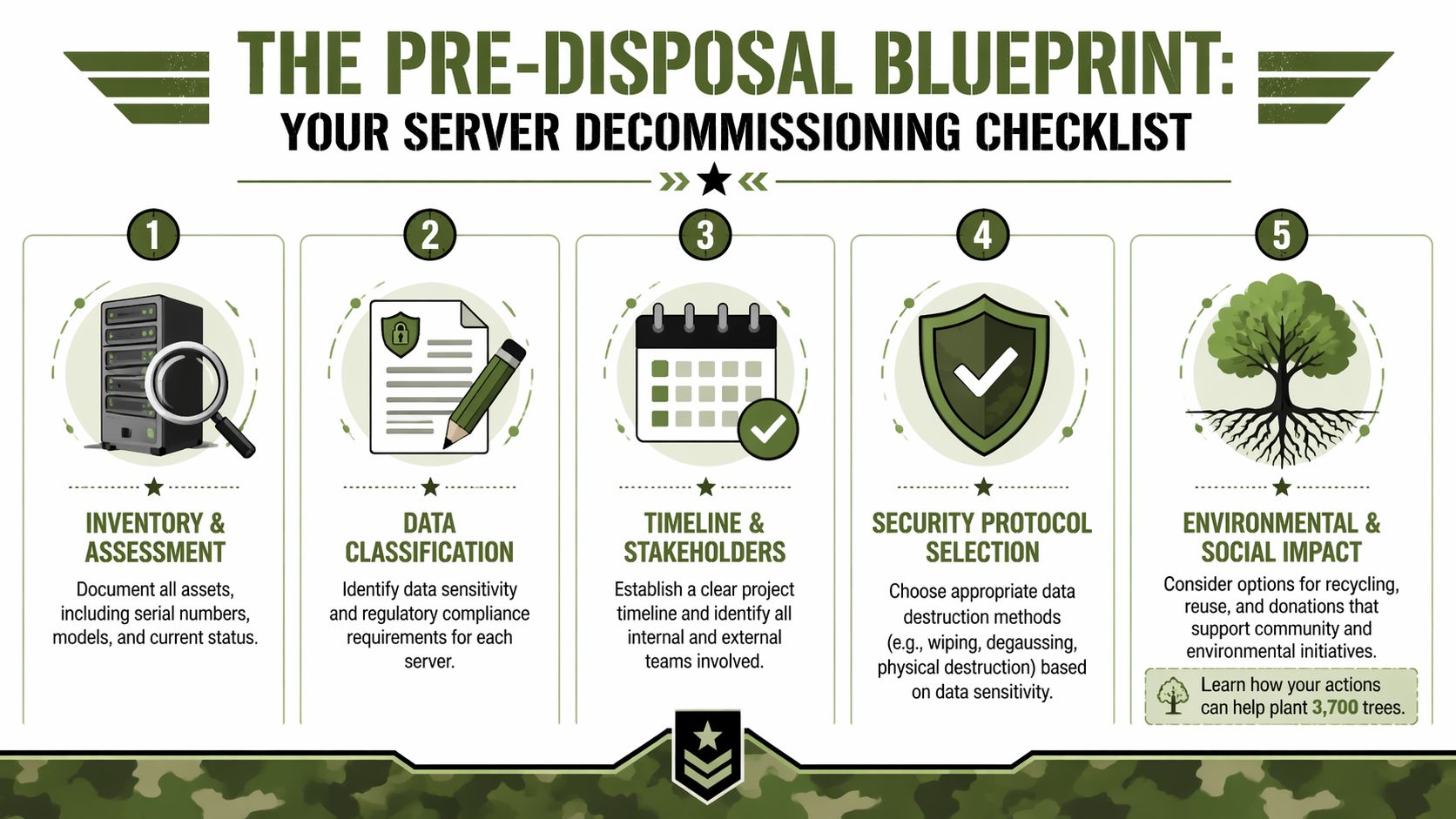
A formal IT asset disposition process starts with visibility. If you can’t identify the asset, the media, and the data sensitivity, you can’t pick the right destruction method or defend the result later.
Build an inventory that survives an audit
A useful inventory is not just a list of “old servers.” It should tie each physical unit to a business record. For every server, capture:
- Asset identifier such as asset tag, serial number, hostname, or internal inventory ID
- Physical details including rack location, office location, cage position, or storage room placement
- Hardware profile such as manufacturer, model, form factor, and visible drive type
- Media count including every HDD, SSD, SAS drive, or removable storage component present
- Last known use such as file server, virtualization host, backup target, domain controller, or application server
- Data classification including whether it held regulated, confidential, legal, HR, financial, or public information
- Disposition path marked as wipe, shred, remarket, parts harvest, or recycle
This is the document your internal stakeholders will care about later. Security wants to know what data was involved. Finance wants to know what still had value. Sustainability wants to know what was reused or recycled. Audit wants consistency.
Define scope before scheduling pickup
A one-time server room cleanout is managed differently from an ongoing retirement program. If your team is handling a merger, move, hardware refresh, or data center shutdown, project scope affects labor, staging, and timing.
Use a short planning table before you commit to dates:
| Project type | What to decide early | Why it matters |
|---|---|---|
| Rack refresh | Which servers are fully retired vs held in quarantine | Prevents accidental disposal of fallback equipment |
| Office move | Cutoff date for de-install and transport | Avoids conflicts with facilities and movers |
| Data center exit | Sequence for shutdown, removal, and records retention | Keeps technical and compliance teams aligned |
| Ongoing ITAD | Standard workflow for monthly or quarterly retirement | Reduces repeat decision-making |
A clean project scope keeps your disposal vendor from guessing and keeps your own team from improvising.
Assign chain of custody before movement
Chain of custody fails in small ways. A drive tray gets removed and set aside. A server is staged in an unsecured hallway. A loading dock handoff happens without signoff. Those moments create uncertainty, and uncertainty becomes liability.
Set these controls in advance:
- Name the internal owner. One person should authorize release of assets.
- Control who touches the equipment. Facilities, IT, security, and outside movers shouldn’t all act independently.
- Choose a staging area. Use a restricted area instead of open office space or common receiving zones.
- Require signed handoff records. Every custody transfer should be documented.
- Separate exceptions immediately. Unknown devices, loose drives, and unlabeled gear need their own review path.
Practical rule: If a server or drive can’t be matched to an inventory record, stop the process and reconcile it before transport.
Classify data before choosing destruction
Planning saves money and reduces overkill. Not every server needs the same disposition method. Some newer systems can be sanitized and sold. Some older hardware should never leave the secure destruction stream. The answer depends on what media is inside, what data lived there, and whether the platform still has market value.
A practical pre-disposal review asks:
- Does this server hold regulated data?
- Are the drives current enough to support a validated wipe workflow?
- Is the hardware old enough that resale isn’t realistic?
- Would physical destruction be simpler and lower risk than testing for reuse?
Teams that answer those questions up front move faster later. Teams that skip them usually end up paying for delays, extra handling, and last-minute legal anxiety.
Securing Your Data The Heart of Responsible Disposal
Every server disposal project becomes a data destruction project the moment storage media is involved. That’s the center of the decision, not the truck, not the pallet, not the recycling downstream. If the data isn’t handled correctly, the rest of the workflow doesn’t matter.
For Atlanta organizations in healthcare and other regulated sectors, the stakes are explicit. Data center recycling guidance for Atlanta notes that improper disposal of a single server containing patient records in Atlanta can result in HIPAA violation fines exceeding millions of dollars. The same guidance states that for older servers with outdated SAS drives holding sensitive data, physical shredding is the only risk-free method, because those assets have no resale value and must be fully obliterated to prevent breach exposure.
If you're comparing options, start with a plain-English review of secure data destruction services in Atlanta, then decide based on media type and risk tolerance.
Wiping versus shredding
This is the decision point most companies need help with. Both methods have a place. They solve different problems.
| Method | Best fit | Main benefit | Main trade-off |
|---|---|---|---|
| Data wiping | Newer servers with reusable drives and resale potential | Preserves asset value | Requires validated process and documentation |
| Physical shredding | Older media, failed drives, highly sensitive or obsolete storage | Eliminates recoverability risk | Ends resale opportunity |
A lot of confusion comes from mixing standards language with business decisions. Your security team may refer to DoD wiping practices, while your compliance team asks about NIST 800-88 sanitization levels. In practice, the useful question is simpler: Can this media be sanitized in a defensible way, or should it be physically destroyed?
When wiping makes sense
Wiping is the right path when the hardware still holds value and the storage media can be processed through a controlled sanitization workflow. This usually applies to newer, higher-performance servers, especially where SSDs or more current drives can be cleared for remarketing instead of shredded.
The benefit is straightforward. You protect data and preserve resale potential. In the Atlanta market, newer systems may justify the extra handling because value recovery can offset project cost.
Use wiping when:
- The server is relatively current and likely to be remarketed
- The media is functional enough to complete a validated sanitization process
- Your compliance team accepts sanitized reuse with proper records
- You need a documented destruction trail without destroying every component
Get a Certificate of Data Destruction for every sanitized or destroyed asset group. If the vendor can’t provide one tied to your inventory, the process isn’t complete.
When shredding is the safer answer
Shredding is often the correct answer sooner than companies expect. If the drives are old, damaged, unsupported, proprietary, or tied to highly sensitive records, physical destruction removes debate. It also reduces the chance that your team spends hours evaluating hardware that had no secondary value to begin with.
Older SAS environments are the clearest example. If the drives are outdated and the data is sensitive, shredding is the low-risk path. The source above is direct on this point.
Use shredding when:
- The drives are obsolete and not worth remarketing
- The organization handles highly sensitive information
- The drives have failed and can’t be reliably wiped
- Legal or compliance wants certainty over asset recovery
Don’t let internal wiping become a liability gap
Yes, your own IT team may be capable of wiping drives. The issue isn’t capability alone. The issue is whether the process is independently documented, consistently executed, and easy to prove later.
An internal wipe process often breaks down at the edges. Drives get missed. Failed media gets set aside. Logs sit in separate systems. Staff turnover leaves nobody able to explain what happened on a project from last year.
The safest server disposal program is the one you can reconstruct from records long after the hardware is gone.
That’s why mature organizations treat data destruction as a governed control, not an informal technical task.
Logistics and Recycling The Path to Zero Landfill
Once data handling decisions are made, the physical process needs the same discipline. A secure disposal program can still fail if the equipment is moved loosely, staged badly, or handed off without traceability. The logistics side is where good plans either hold together or unravel.
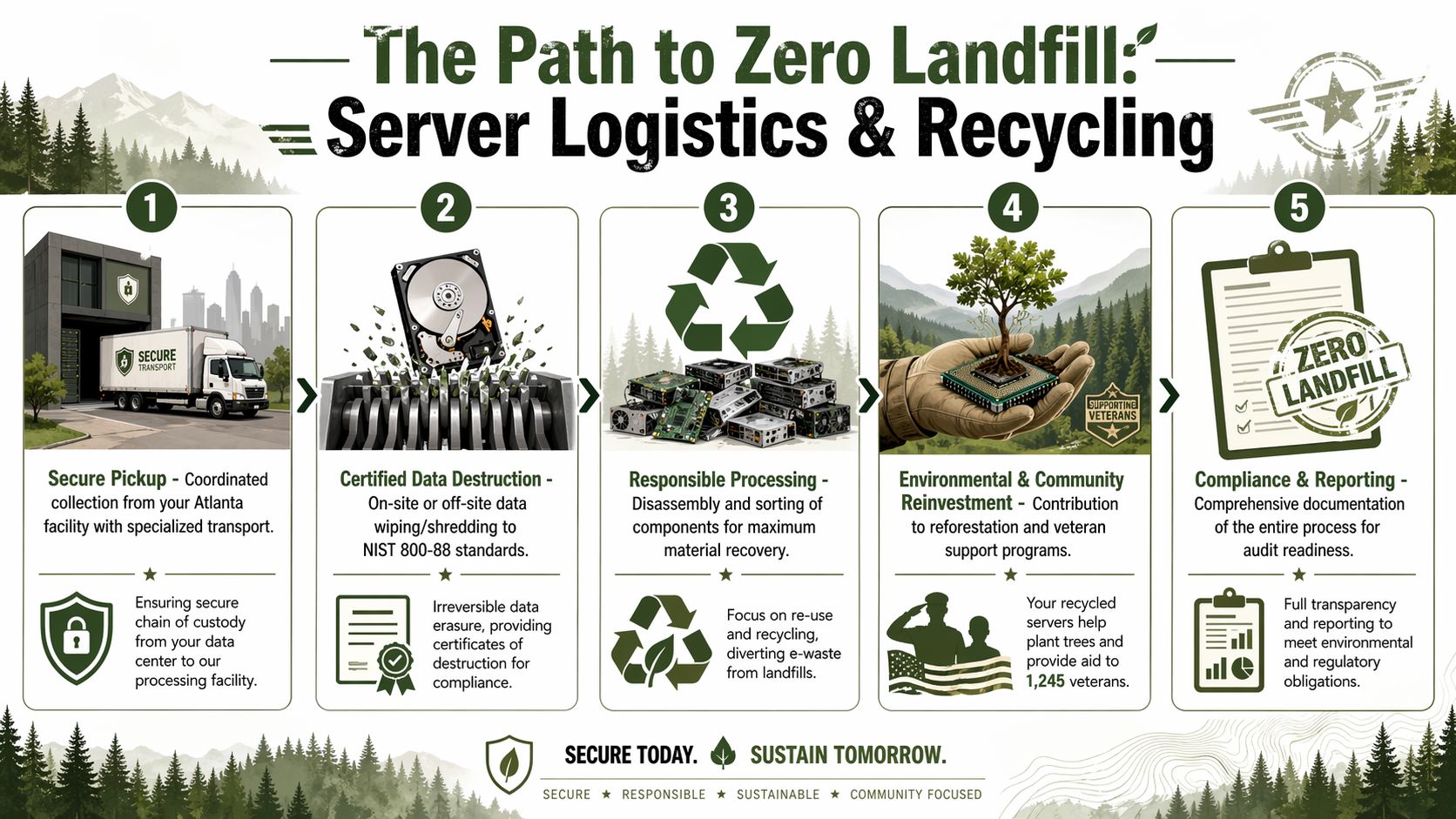
For Atlanta companies trying to avoid landfill disposal, the local benchmark is clear. Atlanta server recycling services describe zero-landfill commitments that divert 100% of decommissioned IT assets through testing, dismantling, and compliant recycling, and they often provide free pickups for bulk volumes like 50+ devices.
If your disposal plan includes pickups, de-installation, and downstream material handling, a dedicated IT asset recycling workflow is what keeps environmental claims aligned with actual process.
What secure logistics should look like
A proper pickup isn’t a generic freight stop. Servers should be handled as controlled IT assets from the moment they leave your floor.
A disciplined workflow usually includes:
- On-site de-installation if the equipment is still mounted or cabled
- Asset verification against the inventory created before pickup
- Secure packing in locked bins, sealed containers, or controlled pallets
- Documented handoff signed by both parties
- Direct transport to a processing facility without informal detours
These details matter because a server decommissioning project often involves mixed conditions. Some systems are fully intact. Some are partly disassembled. Some include loose drives, rails, or networking gear. Without a controlled pack-out, traceability breaks.
What happens after arrival
The best recycling outcomes come from sorting, not dumping. Once equipment reaches the processor, each unit should move into one of several channels based on condition and disposition decision.
- Functional components may be tested for reuse or remarketing
- Commodity parts such as RAM, CPUs, power supplies, and boards can be separated for recovery
- Non-functional material should move into compliant downstream recycling
- Hazard-bearing elements need handling that keeps them out of ordinary waste streams
That’s what zero-landfill should mean in practice. Not vague sustainability language, but an operational model where decommissioned equipment is dismantled, sorted, repurposed, or recycled through documented channels.
Reuse first, then materials recovery
Not every old server is junk. Some still have parts that matter. A chassis may be obsolete, while the memory or processors still belong in a value recovery stream. In other cases, a complete server may still fit a secondary use case for a smaller organization or non-production environment.
That matters for two reasons. It reduces waste, and it can improve financial recovery from the project.
Here’s a practical sorting view:
| Asset condition | Sensible path |
|---|---|
| Current, functional server | Sanitization and remarketing |
| Older but workable unit | Parts harvest or limited reuse |
| Failed server with recoverable components | Component recovery |
| Obsolete or damaged equipment | Compliant recycling after destruction steps |
Zero-landfill isn't a slogan if the vendor can show how each asset moved through testing, dismantling, and final processing.
Bulk pickups are useful, but only if the paperwork is strong
Free pickup for 50+ devices can make a large cleanout easier, especially for schools, hospitals, office consolidations, and data center projects. But convenience should never replace control. Before scheduling a bulk removal, confirm what records you’ll receive back.
Ask for:
- Pickup manifest tied to your inventory
- Data destruction records for wiped or shredded media
- Settlement detail if any assets go to resale channels
- Recycling documentation showing final disposition categories
This is also the one place where a provider’s mission can add value beyond operations. Atlanta Green Recycling handles secure pickup, removal, data destruction, and server recycling for Atlanta organizations, while also tying eligible projects to veteran aid and tree-planting impact records. For companies trying to connect IT cleanouts with community outcomes, that model gives sustainability and communications teams something concrete to report after the trucks leave.
Maximizing Your Return Financial and ESG Impact
A server disposal project shouldn’t be treated as a pure expense unless the hardware has no recoverable value. In many environments, the better question is not “How do we get rid of this?” but “What mix of recovery, compliance, and reporting do we want from this asset exit?”

That’s where remarketing and ESG strategy meet. According to Atlanta data center recycling analysis, Atlanta data centers can recover 20-40% of a server's original asset value through certified remarketing. The same analysis argues that a hybrid approach, combining resale with cause-based recycling tied to tree planting and veteran aid, creates a stronger total return in terms of business impact.
For teams evaluating whether to scrap or sell, that makes old electronics for cash recovery part of a broader decision, not just a side calculation.
The two returns that matter
Most IT managers already understand direct value recovery. If newer hardware can be sanitized and sold, that return offsets some of the decommissioning cost.
What often gets missed is the second return. A well-documented end-of-life program can support:
- ESG reporting through landfill diversion and reuse records
- CSR storytelling through veteran support and reforestation tie-ins
- Internal communications for employees who want visible sustainability actions
- Procurement narratives that show responsible lifecycle management
- Brand assets that marketing or investor relations can use
That second category may not hit the budget line the same way resale does, but it matters. It gives your organization a cleaner story around hardware refreshes, office moves, and data center changes.
What a hybrid program looks like
A hybrid approach doesn’t force every server down one path. It separates equipment based on actual condition and risk.
- Some units go to certified wiping and remarketing
- Some drives go to physical destruction
- Some components move to material recovery
- The whole project can still produce impact documentation for ESG or CSR files
This is especially useful for companies that want a “Recycled with Purpose” message rather than a plain disposal record. A project that ends with a destruction certificate, recycling summary, plant-a-tree certificate, and veteran support report gives several departments something useful at once.
The best disposal programs give IT, compliance, finance, and sustainability teams each a different form of value from the same project.
Why the ESG story matters
Cause-based disposal works because it turns an invisible back-office task into a visible action. “Your old tech can house a veteran and grow a forest” is memorable in a way that “surplus asset recycling complete” never will be.
That matters for companies trying to keep sustainability messaging concrete. Employees respond to real outcomes. Customers and partners respond to programs they can understand quickly. A digital badge such as Recycled with Purpose or an impact certificate tied to a device retirement campaign gives your organization something specific to show.
Seasonal campaigns can help too. A server retirement timed around Earth Day, Arbor Day, or Veterans Day creates a stronger internal and external story than a routine disposal notice. The technical work is the same. The reporting value is not.
Turn E-Waste into a Powerful ESG Story
Most retired servers enter the process as a problem. They leave it as a decision record. The difference is whether your organization treats end-of-life IT as disposal or as strategy.
A strong Atlanta disposal program protects data, preserves chain of custody, diverts equipment from landfill channels, and documents every step well enough for audit review. That’s the operational baseline. The more forward-looking view adds something else. It turns hardware retirement into a corporate responsibility action that people inside and outside your company can understand.
“Turning E-Waste into Hope” works because it connects a technical process to a human outcome. Veteran aid and reforestation aren’t side notes when they’re built into the recycling model. They become a practical way to show that your company’s infrastructure decisions carry social and environmental value even after the equipment is no longer useful to you.
For IT directors, facilities leaders, compliance officers, and operations executives in Atlanta, this is the smarter standard. Don’t let old servers sit in a closet waiting to become someone else’s emergency. Treat the next cleanout, refresh, or decommission as a chance to reduce risk, close documentation gaps, and create a purpose-driven result your team can stand behind.
Frequently Asked Questions about Server Disposal in Atlanta
Can my IT team just wipe the drives themselves?
They can, but that doesn’t automatically make it the right business decision. The weak point is usually documentation, exception handling, and long-term proof. If a drive fails, gets missed, or isn’t logged correctly, your team keeps the liability. Third-party processing adds independent records and a clearer custody trail.
Should we sell old servers or recycle them?
It depends on age, condition, and the media inside them. Newer hardware with reusable components may justify certified sanitization and resale. Older systems with obsolete drives or little market value often belong in secure destruction and recycling streams. Mixed environments usually need both.
What if we have loose hard drives with no server attached?
Treat them as higher-risk exceptions. Loose media is easier to lose track of and harder to reconcile later. Separate it from the general pickup lot, log it independently, and route it through a destruction process with its own certificate trail.
Do we need pickups, or can we drop equipment off ourselves?
Either can work, but pickups make more sense when custody matters, the volume is high, or the equipment is still installed. Bulk removals also reduce handling errors inside your own building. If you use pickup service, make sure the provider documents the transfer clearly.
What documentation should we ask for?
At minimum, ask for inventory-linked pickup records, data destruction documentation, and final disposition reporting. If your organization reports on sustainability, request recycling summaries and impact records that can support internal ESG or CSR files.
Can server disposal support sustainability goals?
Yes, if the process includes reuse, compliant recycling, and documentation your company can use. Disposal becomes more valuable when it feeds broader reporting around achieving ESG wins and net-zero goals, rather than ending as a closed facilities ticket.
What kinds of Atlanta organizations need this most?
Hospitals, clinics, law firms, schools, public agencies, financial companies, and data center operators all have strong reasons to formalize server retirement. The common factor isn’t industry prestige. It’s whether the equipment held sensitive data and whether someone may need proof later.
If your team is planning a server refresh, office move, storage room cleanout, or data center shutdown, Atlanta Green Recycling can help you map a secure, documented, and mission-aligned disposal path for old servers in the Atlanta metro area.