
Certified Atlanta Office Electronics Recycling Services

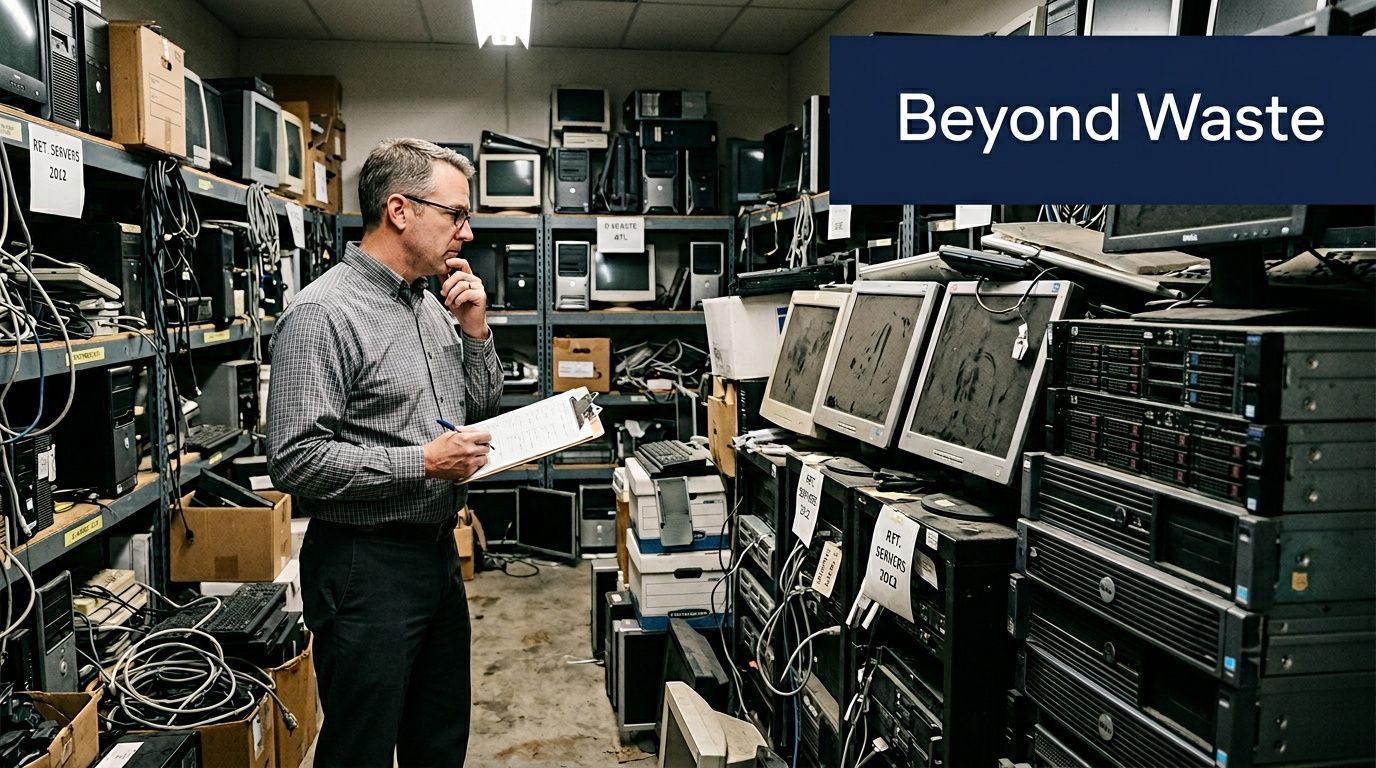
An Atlanta office manager opens a storage room after a system refresh and finds the same thing many teams do. Stacks of retired laptops, dead monitors, obsolete phones, and a few servers nobody wants to touch because they might still hold data.
That room isn’t just a cleanup problem. It’s a compliance issue, a logistics problem, and if you choose the right partner, a real chance to turn retired equipment into local and environmental good.
Beyond the Dumpster E-Waste Recycling That Rebuilds Atlanta
Most businesses don’t plan to mishandle e-waste. It happens because old equipment piles up one project at a time. A floor of employees gets new laptops. A phone system is replaced. An office move leaves a corner full of docking stations, cables, drives, and printers that nobody has authority to throw away.
That last point matters. Electronics aren’t ordinary trash, and treating them like surplus furniture creates avoidable risk. The United States generates over 3.5 million tons of e-waste annually, and the EPA estimates only 12-20% is properly recycled. The same source notes that the average American home contains 24 electronic devices, which shows how fast devices accumulate and why certified handling matters for keeping them out of landfills and incinerators, according to ReWorx Recycling’s Atlanta e-waste overview.
What changes when a business treats e-waste as a mission
A serious recycling program does more than remove clutter. It gives facilities teams a controlled way to move assets out of the building, gives IT a documented process for data-bearing devices, and gives leadership a credible story for ESG and community impact.
For Atlanta businesses, that story can be stronger than “we recycled responsibly.” A cause-based model lets the same pickup support veteran aid and reforestation. That gives office cleanouts a human result people can understand. Your retired tech stops being a liability and starts funding something constructive.
Your old tech can house a veteran and grow a forest.
That kind of message works because it connects an operational task to a clear outcome. Employees remember it. CSR teams can use it. Community partners can rally around it during Earth Day, Veterans Day, and office move cycles.
Why local context matters
Atlanta businesses don’t all have the same disposal profile. A law office may need a small but highly sensitive laptop pickup. A hospital may need a tightly documented chain of custody. A school district may have rolling batches of aging classroom devices. A data center may need de-installation, palletization, and strict scheduling around loading dock access.
That’s why Atlanta Office Electronics Recycling Services should be evaluated as an operational partner, not just a junk hauler. A provider should understand business pickups, secure handling, and what happens after the truck leaves.
If your team is comparing local options, start with a provider page that’s built around business electronics workflows, not residential drop-off language, such as this overview of Atlanta electronics recycling services. For companies also looking at device reuse trends, broader phone recycling initiatives can be useful background because they show how much value and material recovery gets lost when businesses treat phones as disposable clutter.
What to Look for in Atlanta Office Electronics Recycling Services
A lot of vendors say the right words. Secure recycling. Responsible disposal. Certified service. That language sounds fine until you ask one practical question: What standard do you use for data destruction, and how do you document custody from pickup through processing?
A real gap exists in the Atlanta market because many providers mention “secure data destruction” without identifying the specific DoD or NIST standard behind it. That lack of detail leaves regulated industries, especially healthcare, unsure about HIPAA readiness, as noted by eCycle Atlanta’s market analysis.
The checklist that actually matters
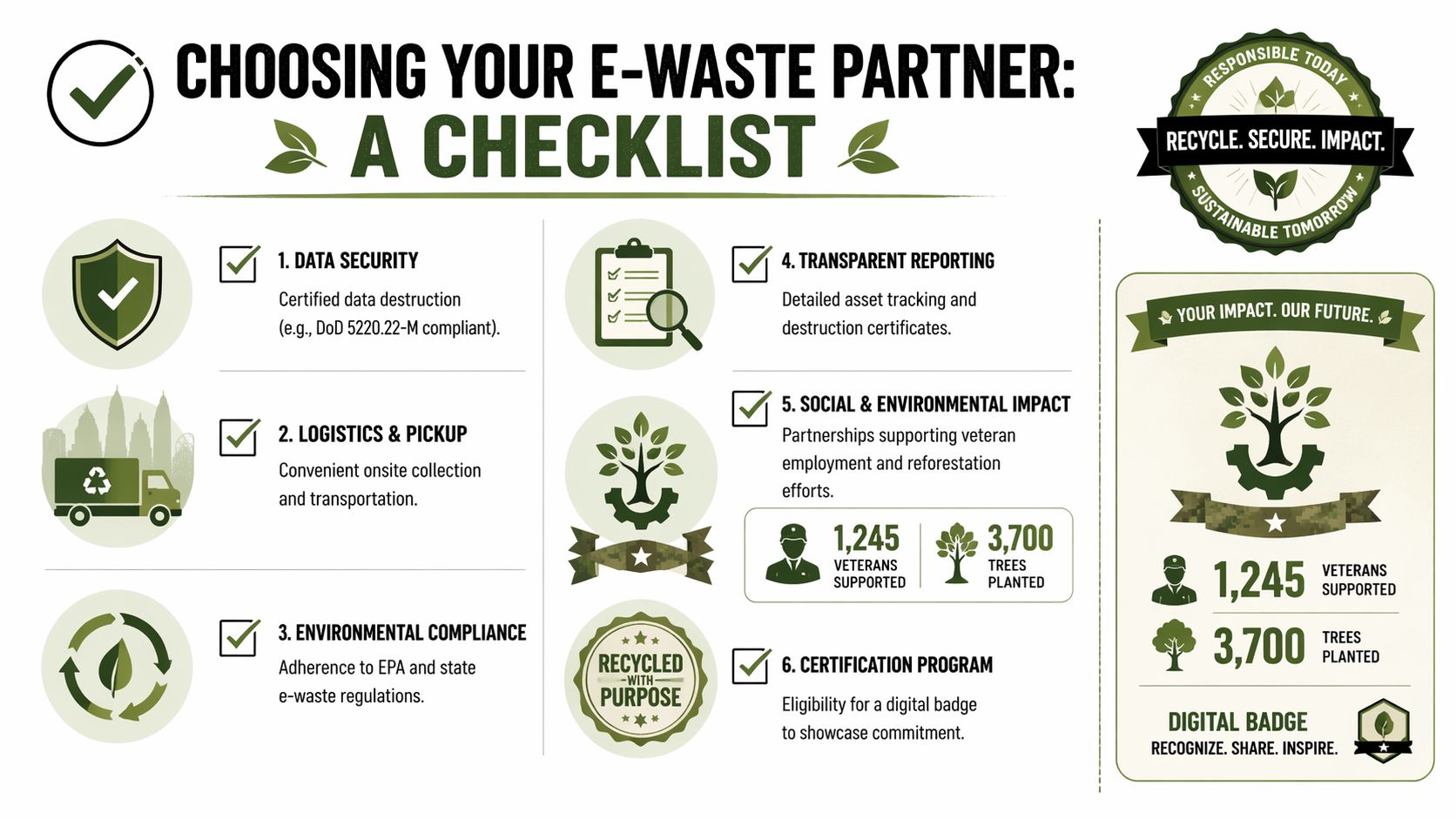
If you’re vetting Atlanta Office Electronics Recycling Services for an office, school, hospital, or agency, use this list.
- Ask for the sanitization standard in writing. “We wipe drives” isn’t enough. You want the exact method used for functioning drives and the destruction method used for failed media.
- Verify chain of custody. A provider should explain who handles devices onsite, how assets are inventoried, how they’re packed, how transportation is controlled, and what report or certificate you’ll receive.
- Look for audit-ready documentation. Your compliance team may need asset lists, serial tracking, destruction records, and pickup documentation. If the vendor can’t show sample documentation, assume you’ll be chasing paperwork later.
- Confirm business logistics. Office pickups are different from consumer drop-offs. Ask whether the team handles de-installation, stair carries, dock coordination, elevator use, and secure loading.
- Check downstream transparency. You want to know whether equipment is reused, refurbished, harvested for parts, or processed for commodity recovery. Vague answers usually signal weak controls.
- Review social impact reporting separately from environmental claims. If a recycler says your pickup supports veterans or tree planting, ask what documentation you’ll receive for internal reporting and stakeholder use.
What works and what usually fails
What works is a provider built for business disposition. That means scheduled pickups, onsite inventory control, secure containers, trained crews, and paperwork that a compliance officer can read without guessing what happened.
What fails is the hybrid model where a company markets itself like an office ITAD partner but operates like a public drop-off center. That’s where chain of custody gets fuzzy, pickup expectations change, and your team starts storing devices longer than planned.
A practical comparison helps:
| Decision point | Weak vendor signal | Strong vendor signal |
|---|---|---|
| Data destruction | Generic “secure wipe” language | Named standard and documented process |
| Pickup | “Bring it to us” or loose scheduling | Onsite collection with clear handling steps |
| Reporting | Basic receipt | Asset-level documentation and destruction records |
| ESG use | Broad sustainability claims | Usable impact reporting for internal CSR files |
| Office moves | Limited support | Coordination with facilities and loading docks |
Practical rule: If a vendor can’t explain the workflow in plain language before pickup day, they probably won’t perform it cleanly onsite.
Why office transitions expose weak vendors
Office consolidations and refresh cycles create holding problems fast. Teams often fill spare rooms because they don’t yet have approved disposal, approved movers, or approved storage. If that’s your current situation, it helps to think through temporary office storage needs at the same time you build your recycling plan, especially when furniture, boxed records, and retired electronics are all moving on different timelines.
For companies that need a business-focused vendor category rather than a simple recycler, this guide to IT asset disposition companies is the right lens. It frames the decision around security, disposition, and documentation instead of convenience alone.
Your Data Security Is Non-Negotiable
Deleting files isn’t disposal. Neither is dragging equipment into storage and assuming you’ll “deal with it later.” Old laptops, desktops, servers, and backup media often hold customer data, employee records, contracts, credentials, and internal communications long after they leave daily use.
The simplest way to explain the risk is this. Deleting files is like tearing the cover off a book and saying the story is gone. Proper sanitization is destroying every page so the contents can’t be reconstructed.

What DoD-compliant destruction actually means
One Atlanta provider description gives a rare level of specificity. It states that DoD 5220.22-M sanitization is used for hard drive wiping, with a 99.999% data destruction efficacy rate, and that non-functional media is physically shredded to less than 2mm particles. The same source ties that process to HIPAA and other compliance expectations, and notes data breaches affect 43% of organizations, according to the cited summary at STS Electronic Recycling’s Atlanta page.
That matters because there are two very different end-of-life tracks for media:
- Functioning drives can be sanitized through a defined overwrite process.
- Failed or damaged media can’t be trusted to software wiping alone, so physical destruction becomes the safe route.
If a provider can’t clearly tell you which path each asset takes, you don’t have a controlled process.
Why “good enough” wiping is a bad policy
The biggest mistake I see in office environments is treating all devices the same. Someone resets phones. Someone else reformats a laptop. A contractor unplugs servers and stacks them on a cart. That may feel efficient, but it creates inconsistent handling right where risk is highest.
Use this decision framework instead:
- For laptops and desktops with internal drives: Require documented sanitization or shredding based on device condition.
- For failed hard drives and storage media: Default to physical destruction.
- For healthcare or regulated records environments: Treat every data-bearing asset as auditable.
- For mixed office cleanouts: Separate commodity recycling from data-bearing assets before pickup day.
Superficial wiping saves a few minutes and can cost months of remediation, legal review, and reputation damage.
What an auditable process looks like
A defensible process has visible controls. Devices are identified, handled by authorized personnel, moved through documented custody, and matched to destruction records. The company doesn’t need to guess where the drive went or whether it was processed with the rest of the load.
Here’s what to expect from a mature workflow:
| Stage | What you should see |
|---|---|
| Collection | Devices counted, grouped, and secured onsite |
| Inventory | Serials or asset identifiers logged when required |
| Processing decision | Sanitization for viable media, shredding for failed media |
| Evidence | Certificates or records tied to the pickup |
| Compliance support | Documentation usable by legal, IT, and auditors |
A provider that discusses process this way is speaking the language of operations and compliance, not just marketing.
For teams writing internal disposal policy or reviewing vendors, this guide to Atlanta secure data destruction services is useful because it centers the decision on documentation, handling, and destruction method rather than broad assurances.
How Our Onsite Pickup and Logistics Work in Atlanta
Most office recycling problems aren’t really recycling problems. They’re coordination problems. Devices are on multiple floors, some are still mounted, some belong to remote departments, and nobody wants a pickup crew slowing down the office or touching the wrong equipment.
That’s why logistics should be spelled out before the first cart rolls into the building. In Atlanta, this is especially important for multi-tenant towers, medical campuses, schools, and sites with restricted dock access. The need is only getting sharper because the Atlanta data center market was reported as growing 15% in 2025, increasing pressure on decommissioning logistics and asset recovery workflows, according to Beyond Surplus.
What the pickup process should look like
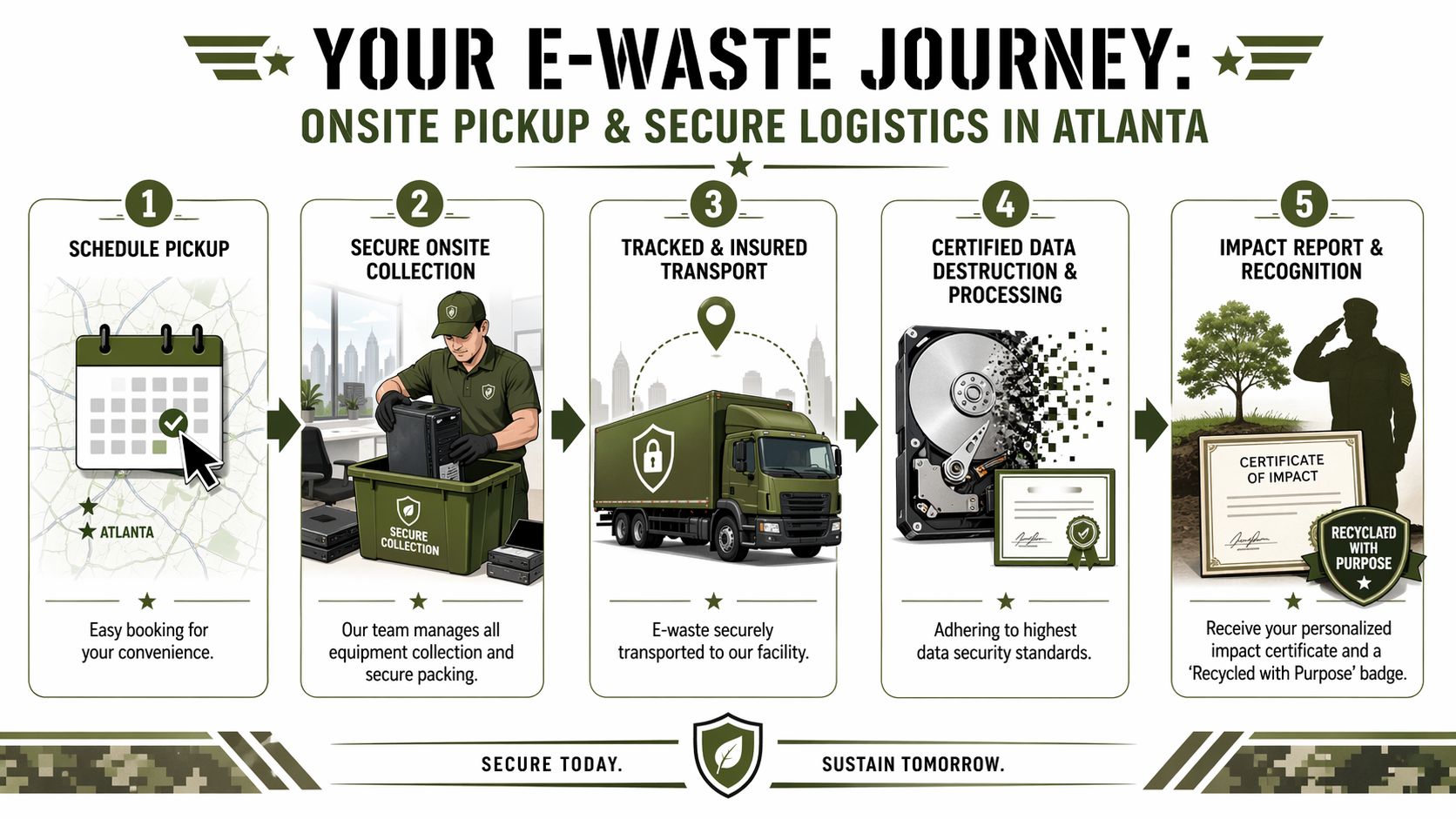
A business-ready service usually follows a clear sequence.
Scheduling and scoping
Your team identifies the site, device categories, access limits, and any sensitive assets. Good scoping prevents pickup crews from arriving with the wrong containers or the wrong labor plan.Onsite collection and de-installation
Trained staff remove retired assets, separate data-bearing devices where needed, and stage equipment for secure movement. Here, office experience is paramount. A business pickup isn’t just lifting boxes. It’s working around employees, power drops, and facilities rules.Inventory and secure packing
Equipment is cataloged to the level required by the project. Some clients need broad load summaries. Others need itemized tracking. Packing should protect both chain of custody and safe transport.Transport to controlled processing
Assets move in a tracked, managed workflow instead of an ad hoc haul-away. That matters for compliance and for simple accountability.Documentation and impact reporting
After processing, the client receives the records needed for internal files. In a cause-based model, this can also include a veteran support and reforestation impact summary.
Common friction points and how to avoid them
The trouble spots are predictable. Building access windows are short. Internal owners disagree on what can be removed. Some devices still need approval from IT. Pickup gets delayed because the loading dock wasn’t reserved.
Use this short pre-pickup checklist:
- Name one internal owner. Someone has to approve final disposition and answer day-of questions.
- Separate live assets from retired assets. Don’t make the crew guess.
- Reserve the dock or freight elevator early. High-rise pickups can fail on timing, not effort.
- Flag sensitive areas. Server rooms, nurse stations, and records zones need special handling.
- Decide reporting depth before pickup. Asset-level reporting is hard to recreate after a mixed load is processed.
One factual example of a business-focused option
Among Atlanta providers, Atlanta Green Recycling offers business services that include secure data destruction, bulk IT equipment removal, onsite de-installation and packing, and pickup using its own fleet. That matters when a company wants one vendor handling removal, transport, and compliance-minded disposition rather than splitting those steps across multiple contractors.
Clear logistics reduce risk before destruction even starts. If custody is sloppy in the hallway or at the dock, the rest of the process is already compromised.
If your building team is coordinating dock timing, access constraints, or move-day traffic, this page on Atlanta loading dock logistics helps frame the operational details that usually decide whether a pickup runs smoothly.
Turning E-Waste into Hope for Veterans and Trees
The strongest recycling programs give people a reason to care beyond compliance. That reason doesn’t have to be abstract. It can be local, visible, and easy to explain inside your company.
When a business clears out obsolete tech, the story usually stops at “disposed of properly.” That’s a missed opportunity. In Atlanta, the volume of electronic waste grew from 2,000 units in 2013 to over 55,000 in 2017, according to Montclair Computer Recycling’s Georgia electronics recycling overview. That growth represents more than a disposal burden. It’s a chance to connect structured recycling to something restorative.

Why the mission changes participation
Employees respond differently when they know where the outcome goes. “Recycle for a Cause” is stronger than a generic sustainability memo because it answers the question people naturally ask: what happens if I make the effort to participate?
A dual mission gives a clear answer. Retired technology supports veteran aid and tree planting. That makes a corporate recycling drive easier to launch and easier to repeat. It also gives HR, operations, and ESG teams a shared message instead of three separate campaigns.
A few practical ways companies use that message:
- Office cleanouts tied to moves or refresh cycles. The recycling event becomes part of a broader transition, not a side project.
- Seasonal campaigns. Veterans Day, Earth Day, and Arbor Day all give internal teams a natural reason to organize collection.
- Recognition assets. A “Recycled with Purpose” badge or impact certificate gives communications teams something concrete to share.
Why this resonates during office moves
Office relocations create the perfect moment for disposal decisions. Teams are already sorting furniture, records, and surplus equipment. If the move is rushed, electronics often become the last unresolved category.
That’s why businesses planning relocations should treat recycling coordination the same way they treat movers and storage. For the physical relocation side, guides on essential office movers can help operations teams map the broader move timeline so electronics disposition doesn’t get pushed to the final week.
The most effective recycling drives don’t ask employees to care about scrap value. They ask them to care about people and places that benefit when waste is handled responsibly.
What this looks like in practice
A cause-based recycling model works best when it’s documented. Businesses should receive an impact summary they can circulate internally and file with CSR materials. That could include a certificate tied to a pickup, a report for sustainability teams, and a digital badge for company websites or annual reporting materials.
That’s one reason pages like what to do with outdated computers matter. They help office managers move past the narrow question of disposal and toward a broader question. How can obsolete equipment be handled in a way that protects data, reduces waste, and supports something worth talking about?
Accepted Items and Your ESG Impact Report
Most businesses don’t need an encyclopedic list of recyclable devices. They need clarity on whether a pickup can handle the equipment they have, and whether the resulting documentation will be useful to IT, legal, facilities, and ESG teams.
For office environments, accepted categories commonly include computers, laptops, servers, monitors, networking gear, docking stations, phones, peripherals, storage devices, and related IT hardware. In specialized settings, the list may extend to institutional electronics used in healthcare, education, government, and industrial operations. The practical question isn’t just “do you take it.” It’s “can you process it within a documented workflow that fits our compliance needs.”
What businesses should confirm before scheduling
Some items need special handling because they store data. Others are awkward because they’re large, mounted, broken, or mixed with non-electronic material. Before pickup, confirm these points:
- Data-bearing equipment such as laptops, desktops, servers, and storage media should be identified in advance.
- Loose accessories and peripherals can usually move in bulk, but they still need staging so pickup crews aren’t sorting through office debris.
- Mounted or rack-based equipment should be disclosed if de-installation is required.
- Non-accepted materials should be clarified early so they don’t get mixed into the load on pickup day.
The truth about “free” service
Free recycling can make sense in simple situations, especially when the load is easy to process and has recoverable value. But business clients should be careful when “free” becomes the main sales pitch.
What matters more than the invoice headline is whether the service includes secure handling, records, and accountable downstream processing. If a vendor offers free pickup but can’t support audit questions later, the hidden cost shows up in staff time, risk exposure, and policy gaps.
A better way to evaluate value is to ask what the service includes:
| Service element | Why it matters |
|---|---|
| Onsite labor | Reduces internal handling and building disruption |
| Secure transport | Protects custody after equipment leaves your office |
| Data destruction records | Supports legal, IT, and compliance review |
| Asset reporting | Helps with inventory closeout and internal controls |
| Impact reporting | Gives ESG and CSR teams usable documentation |
Why the report matters to ESG teams
A proper ESG impact report turns routine disposition into documented action. Sustainability leaders need evidence they can include in internal reporting. CSR teams need something they can share with employees, boards, or community partners. Procurement and compliance teams need records that show the equipment didn’t disappear into an undocumented stream.
That’s where impact reporting becomes more than a nice add-on. It ties disposal to environmental handling, social mission, and governance discipline. For many companies, that combination is far more useful than a simple pickup receipt.
Atlanta Office Electronics Recycling FAQs
Is our company too small or too large for Atlanta Office Electronics Recycling Services
Usually no. Small offices often need occasional pickups after refreshes or moves. Large enterprises, hospitals, schools, and agencies often need recurring or phased pickups. The right scope depends less on company size and more on device volume, access conditions, and reporting requirements.
Can we track what happens to our equipment
Yes, if you choose a provider with chain-of-custody controls and reporting. Ask upfront whether the process includes asset identification, transport controls, destruction records, and final documentation tied to the pickup.
What happens to the materials after recycling
That depends on device condition and material type. Some equipment may be suitable for reuse or refurbishment. Other items are dismantled for material recovery. Failed media and obsolete components may go directly into destruction and downstream recycling streams.
Can you handle office moves and decommissioning projects
Yes, but that needs planning. Moves and decommissions often require de-installation, staging, packing, loading coordination, and timing around building access. These projects go best when facilities, IT, and the recycler agree on scope before the move date.
Do healthcare and government offices need a different level of service
They often do. Regulated sectors usually need clearer documentation, stricter data destruction controls, and a workflow that stands up to audit review. If a vendor uses broad marketing language without naming standards or records, that’s a warning sign.
Can pickups be scheduled on a recurring basis
Yes. Recurring pickups are useful for organizations with steady device turnover, multiple departments, or campus-style operations. They help prevent storage-room buildup and create a repeatable internal process.
What should we do before pickup day
Separate active equipment from retired equipment, identify sensitive devices, confirm internal approval for disposition, and make sure building access is arranged. Those steps do more to prevent problems than any last-minute scramble after the truck arrives.
If your organization needs a documented, business-focused way to remove retired IT assets, schedule a consultation with Atlanta Green Recycling. The right recycling partner should help you clear space, protect data, support compliance, and turn a routine disposal task into a measurable benefit for veterans, forests, and your own ESG reporting.