
Disaster Recovery Planning: An Atlanta Enterprise Guide

A lot of disaster recovery planning fails in the same place. The backup works, the failover starts, and everyone focuses on bringing systems back online while damaged laptops, flooded server hardware, failed network gear, and compromised drives sit in a room waiting for someone to decide what to do with them.
For Atlanta organizations, that gap matters more than acknowledged. A hospital in Sandy Springs, a school district with surplus devices, a downtown law office, and a data center in Alpharetta all face the same hard question after an incident. Which assets can be recovered, which must be isolated, and which must be destroyed under documented chain of custody before they become a security and compliance problem?
That physical layer belongs inside disaster recovery planning from day one. It also creates an opportunity. If your recovery process includes responsible electronics disposition, your DRP can support compliance, reduce environmental waste, and contribute to broader ESG and community goals instead of treating post-incident hardware as an afterthought.
Beyond Data Backups Your DRP's Missing Physical Link
A burst pipe above a server room changes priorities fast. Cloud replication may keep critical applications available, but the physical environment still has to be secured. Wet servers still contain storage media. Damaged laptops still hold regulated data. Networking gear still has to be removed, documented, and evaluated.

Many disaster recovery planning documents stop too early. They tell you how to restore from backup, where to fail over, and who approves a return to service. They typically don't tell facilities, IT, compliance, and operations how to handle a room full of affected devices that are no longer trustworthy, no longer usable, or no longer safe to leave unattended.
The gap most plans leave open
This isn't a minor operational detail. It's a security issue, a logistics issue, and for many Atlanta businesses, a regulatory issue.
Global disaster costs now exceed $2.3 trillion annually, and only 54% of organizations have documented DRPs, according to Secureframe's disaster recovery statistics roundup. That tells you two things. Disruptions are expensive, and many companies still don't have a plan developed enough to cover the full asset lifecycle.
The physical side of recovery usually breaks down in predictable ways:
- Unclear asset triage: Teams don't know whether equipment should be dried, quarantined, wiped, or destroyed.
- Weak chain of custody: Devices move from room to room with no documented handoff.
- Improvised storage: Compromised hardware gets stacked in closets, loading docks, or vacant offices.
- Facilities and IT misalignment: Building teams focus on cleanup while IT focuses on uptime, leaving retired assets in limbo.
For companies managing office towers, branch sites, server rooms, and maintenance-heavy facilities, this gets even more complicated. Building operations typically sit close to the point of failure, which is why physical risk planning has to account for infrastructure conditions, maintenance schedules, and asset exposure patterns. That work overlaps directly with facility and maintenance planning.
Practical rule: If a device touched the incident, your plan should say who evaluates it, who authorizes its next step, and how that step gets documented.
Recovery isn't finished when workloads return
Teams typically declare victory too early. The application is back. Users can log in. Email works. But if compromised drives are still unsecured on-site, recovery isn't complete.
A stronger approach treats every incident as both a digital event and a physical asset event. That means your DRP should address:
| Recovery question | What the plan should answer |
|---|---|
| Can the system come back online? | Which services restore first and under what approval path |
| Can the hardware be trusted? | Whether the device returns to service, moves to forensic hold, or exits use |
| Does the asset contain sensitive data? | What sanitization or destruction method applies |
| Who handles removal and transport? | Named owners, handoff documentation, pickup process |
| Can this support ESG reporting too? | Whether retired assets enter a documented responsible recycling stream |
That last point gets overlooked. Responsible electronics disposition can support broader corporate sustainability and community impact goals. For companies that care about ESG and CSR, disaster recovery planning doesn't have to end with containment. It can also feed a more constructive outcome, where retired technology supports initiatives tied to veteran aid, tree planting, and local environmental responsibility rather than becoming unmanaged waste.
Laying the Foundation with Risk and Business Impact Analysis
Strong disaster recovery planning starts before anyone talks about backup targets or incident scripts. It starts with knowing what matters to the business and what breaks if it goes down.
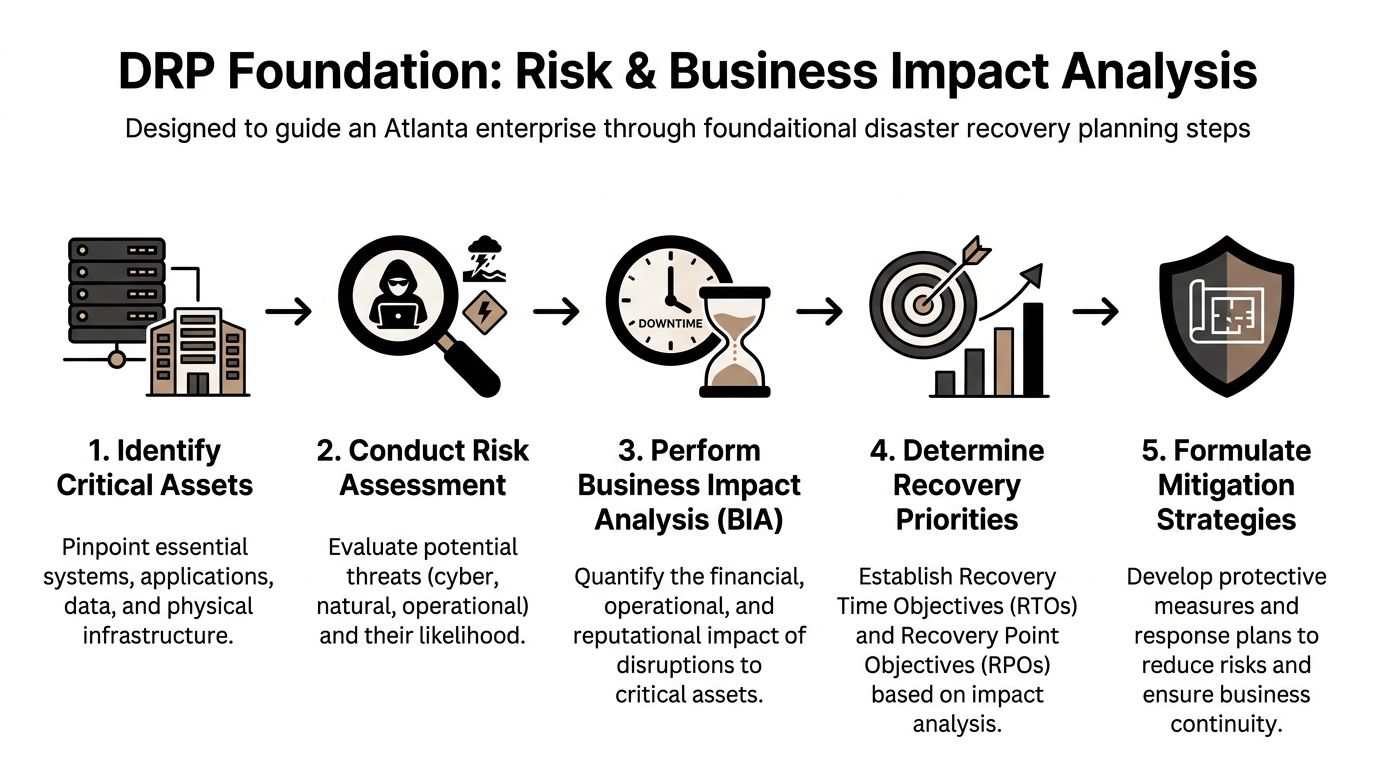
A proper business impact analysis, or BIA, identifies critical assets and the operational effect of losing them. After that, you set RTO, the maximum acceptable downtime, and RPO, the maximum tolerable data loss measured in time. Splunk notes that this is the core methodology for DRP, and also warns that 90% of companies without tested DR plans fail within 2 years of a major incident in its disaster recovery planning guide.
Start with business function, not just technology
The first mistake teams make is inventorying hardware before they inventory consequences. A rack isn't critical because it's expensive. It's critical because a business process depends on it.
Use the BIA to ask direct questions:
- Which business services stop if this system fails?
- Who gets affected first? Patients, students, citizens, employees, finance teams, or customers.
- What happens if the outage lasts hours instead of minutes?
- What physical assets support the service? Servers, laptops, switches, storage arrays, badge systems, scanners, mobile devices.
- What happens to those assets after a disaster? Recovery, quarantine, forensic review, or disposition.
A hospital's patient record environment deserves a shorter recovery target than a school's archived administrative file share. A payment processing platform may require tighter restoration sequencing than a conference room scheduling tool. The BIA forces those distinctions into the open.
Define RTO and RPO in plain language
You don't need jargon to make this useful.
- RTO answers, "How long can this be down before the business takes unacceptable damage?"
- RPO answers, "How much recent data can we afford to lose?"
Those two numbers shape architecture, staffing, vendor contracts, testing, and budget. They also shape physical decisions. If a system has an aggressive RTO, the replacement hardware path and decommissioning path both need to be preplanned.
The fastest backup in the world won't help if the affected hardware is still sitting in a damaged room with no approved handling workflow.
A practical way to run the analysis
For Atlanta enterprises, I recommend grouping assets by operational role rather than by department alone. That reveals dependencies that org charts usually hide.
Group assets into recovery tiers
Build a working list like this:
- Tier 1 systems: Direct revenue, patient care, regulated records, core communications.
- Tier 2 systems: Department operations, reporting platforms, workflow tools.
- Tier 3 systems: Archive environments, lower-priority admin tools, nonessential endpoints.
Then map the physical infrastructure attached to each tier. Include:
- Compute assets: Servers, blades, hyperconverged nodes
- Storage assets: SAN, NAS, external backup media
- Network dependencies: Firewalls, switches, wireless controllers
- User endpoints: Executive laptops, call center desktops, nursing stations, classroom carts
- Peripheral systems: Printers, scanners, badge readers, specialized devices
At this stage, many teams discover that endpoint fleets deserve more attention than they expected. A ransomware event may leave the data center intact while rendering hundreds of user devices untrusted.
Evaluate realistic threats
Risk assessment has to reflect local reality. That includes weather, building infrastructure, office moves, equipment aging, contractor activity, theft exposure, and cyber incidents.
Questions worth asking:
- Does the server room sit below water lines or aging plumbing?
- Are retired assets accumulating during refresh cycles?
- Could a move, renovation, or decommissioning event create loss of custody?
- Which systems would force immediate physical isolation if compromised?
If your organization wants a practical framework for reducing those exposures before an incident hits, it helps to build DR thinking into broader risk reduction planning.
Tie each priority to a physical action
This is the part that makes the BIA useful instead of theoretical. Every critical asset should have one of four physical statuses assigned in advance:
| Asset condition | Required action |
|---|---|
| Recoverable and trusted | Return to production after validation |
| Recoverable but untrusted | Hold for forensic review and sanitization |
| Nonfunctional with sensitive data | Secure destruction workflow |
| Obsolete during incident response | Controlled disposition and documentation |
That single exercise closes a major DRP blind spot. It stops teams from making improvised disposal decisions during a crisis, when people are rushed, tired, and more likely to skip documentation.
Building Your DRP Team and Defining Responsibilities
Plans fail when ownership gets fuzzy. Everyone assumes someone else is handling the messy part, and in a disaster that messy part is usually communication, approval, or physical asset control.
The strongest disaster recovery planning teams are cross-functional by design. IT can't carry this alone. Facilities sees site conditions first. Compliance understands recordkeeping and retention. Legal may need to preserve evidence. Operations knows which business functions hurt immediately. Procurement and vendors affect replacement timelines.

Add the role often overlooked
Many DR team charts include a coordinator, technical leads, and a communications lead. They should. But for modern resilience, there should also be an Asset Disposition Lead.
That role owns a simple but critical question. Once hardware is affected by the incident, who controls what happens next?
Without that owner, several things go wrong:
- Devices leave the room without records
- Employees store equipment in ad hoc locations
- Operations mixes salvageable gear with regulated media
- Vendors get called too late
- Compliance documentation gets reconstructed after the fact
The Asset Disposition Lead doesn't replace IT or security. This person coordinates them. They maintain the approved disposition workflow, trigger secure pickup or destruction procedures, verify chain-of-custody documents, and keep retired assets from becoming a second incident.
Build a team around decisions, not titles
A good DR team chart should make decisions obvious under pressure. It helps to define responsibilities by action.
Core decision owners
- DR Coordinator: Activates the plan, manages sequencing, tracks status.
- Infrastructure Lead: Determines system condition, recovery readiness, and technical dependencies.
- Security Lead: Identifies compromised systems, isolation requirements, and evidence preservation needs.
- Compliance or Privacy Lead: Reviews regulatory handling requirements for affected media and records.
- Communications Lead: Manages internal notices, executive updates, and external messaging where needed.
- Facilities Lead: Controls site access, environmental safety, loading areas, and building remediation.
- Asset Disposition Lead: Authorizes packaging, transport, sanitization, destruction, and disposition records.
That final role is especially important for hospitals, schools, government agencies, and enterprises with distributed offices. If your organization works with a specialist in IT asset disposition services, that vendor relationship should already be documented in the DRP with named contacts, escalation steps, and service boundaries.
A vendor isn't a line item in disaster recovery planning. A vendor is part of execution.
Community impact belongs in the charter
Disaster response doesn't happen in a vacuum. Communities already carrying infrastructure, housing, or resource gaps typically take the hardest hit after major events. The broader resilience conversation has to include that reality.
The PLOS ONE research highlighted in the verified data argues that disaster planning should consider underserved communities and that mission-driven asset recovery can support more equitable recovery outcomes. That perspective appears in the article on community disaster resilience and underserved groups.
For companies building ESG and CSR programs, that changes how the DR team should think about retired technology. Responsible recycling isn't only about environmental compliance. It can also align with community-facing commitments such as veteran support, local partnerships, and reforestation programs.
What to include in the team charter
Instead of a generic charter, include practical language around:
- Compliance responsibility: Who signs off on destruction records and retention exceptions.
- Vendor readiness: Which partners can handle secure pickup, de-installation, packing, and destruction.
- Incident storytelling: How the company documents positive environmental and social outcomes for internal CSR reporting.
- Executive visibility: Which leaders receive impact summaries after major disposition events.
A DRP team that understands both compliance and community impact makes better decisions. It also gives leadership a clearer answer when they ask what happened to affected assets, how the risk was closed, and whether the company handled recovery in a responsible way.
Integrating Secure E-Waste and Data Destruction Workflows
When a disaster leaves you with damaged or compromised equipment, indecision creates risk. Servers, storage arrays, laptops, backup devices, and removable media can all carry regulated data long after they stop working. If the disposition workflow isn't documented in advance, the organization starts improvising.
That's exactly how chain-of-custody breaks, storage rooms fill up, and breach exposure grows.
Start with triage on site
The first job isn't disposal. It's controlled classification.
Every affected asset should be sorted into one of three categories:
- Return to service if the equipment is intact, trusted, and passes validation.
- Sanitize and reuse if the hardware remains viable but data must be removed before redeployment.
- Destroy and recycle if the media is compromised, the device is nonfunctional, or the organization can't re-establish trust.
This triage needs to happen at the scene, not a week later after devices have been moved around. Labeling, segregation, and written custody records matter immediately.
A solid on-site workflow usually includes:
- Isolation of impacted assets: Keep them separate from unaffected inventory.
- Visual tagging: Mark assets by status such as forensic hold, wipe candidate, shred candidate, or recycle only.
- Serial and asset capture: Record what left service and where it came from.
- Controlled staging: Store devices in a secure holding area pending final action.
Choose the right destruction method
Not every asset needs the same treatment. The method depends on condition, sensitivity, and whether the organization intends to recover value through reuse.
When data wiping makes sense
For reusable equipment, DoD 5220.22-M standard data wiping is often the practical choice. It supports sanitization for assets that still function and can re-enter service or move into a remarketing or redeployment channel.
Use wiping when:
- The drive is readable and operational
- The asset may be reused internally
- The organization wants documented sanitization before resale or recycling
- The system wasn't physically damaged beyond trustable operation
When physical shredding is the better option
Physical shredding is the safer path when media is damaged, failed, or too sensitive to justify reuse. That's common after water exposure, fire events, severe hardware failure, or incidents where trust in the device has been lost.
Use shredding when:
- Drives are nonfunctional
- Media was exposed to environmental damage
- The incident involved compromise or forensic uncertainty
- Regulated data requires final destruction rather than reuse
If you're building this into policy, your DRP should name both methods and define approval rules for each. The secure handling process should also point to your approved secure data destruction workflow so the operational team doesn't need to invent one under stress.
If a drive can't be reliably read, it also can't be reliably wiped. That's a destruction decision, not a debate.
Document the logistics, not just the security intent
A common issue is that many plans stay too abstract. They say "dispose of equipment securely" and stop there. That's not a workflow.
A useful disaster recovery planning document should spell out the operational handoffs:
| Workflow stage | What should happen |
|---|---|
| On-site identification | Asset is tagged, logged, and assigned a disposition path |
| Packing and containment | Equipment is boxed, palletized, or containerized under supervision |
| Pickup coordination | Approved transport is scheduled with documented transfer |
| Chain of custody | Each handoff is signed or otherwise recorded |
| Processing | Assets are wiped, shredded, recycled, or held based on policy |
| Certification | Organization receives records for audit, compliance, and internal closeout |
For Atlanta metro organizations, fleet logistics matter. Your DRP should state who can authorize pickup, where pickups occur, and what documentation must accompany the load. That matters for headquarters, branch offices, schools, healthcare campuses, and data centers alike.
Build compliance into the disposition path
Disaster conditions don't suspend privacy obligations. If anything, they make them harder to satisfy because staff are moving quickly and dealing with multiple competing priorities.
A few practical controls make a major difference:
- Pre-approved forms: Keep custody and destruction templates ready before the incident.
- Named approvers: Define who can release media for wiping or shredding.
- Segregated storage: Separate regulated devices from general scrap.
- Vendor instructions: Specify whether the load contains drives, backup media, whole units, or mixed equipment.
- Retention flags: Hold any device that legal, security, or compliance wants preserved before destruction.
Common failure points to remove from the process
- Loose device collection: Staff dropping laptops or drives into generic bins
- Late inventory capture: Trying to reconstruct serial numbers after transport
- Mixed-status pallets: Reusable hardware and shred-only media packed together
- Undefined evidence holds: Destroying media before legal review
- No final reconciliation: Receiving destruction paperwork that doesn't map back to the original asset list
These aren't rare edge cases. They're the normal result of under-documented workflows.
Make the process usable during a bad day
The best disposition workflow is short enough to use under pressure. If your team needs a long policy binder to decide what to do with failed hardware, they won't use it.
A practical field checklist should fit on one page:
- Confirm site safety and access
- Identify impacted devices
- Separate by trust status
- Record asset identifiers
- Assign wipe, hold, or shred path
- Secure and package
- Transfer under chain of custody
- Reconcile certificates to asset list
That level of clarity keeps the post-incident environment from turning into a secondary compliance event. It also closes the loop between disaster recovery planning and the full lifecycle management of enterprise IT equipment.
Custom DRP Checklists for Atlanta Organizations
One DRP template won't fit a hospital, a university, a county office, and a colocation environment. The systems differ, the data differs, and the physical asset profile differs just as much.
That matters in Atlanta because many organizations operate in mixed environments. A healthcare network may have clinics, administrative offices, imaging devices, user endpoints, and off-site storage. A university may have labs, classroom carts, media centers, administrative systems, and student-facing devices all under separate operational owners. A local agency may need to coordinate IT recovery with public-facing service continuity and long-term rebuilding decisions.
Research highlighted by NOAA's Digital Coast points out that local governments often under-prepare for long-term rebuilding, and that pre-disaster recovery plans can improve resilience. That perspective is useful for any public-sector team considering how pre-disaster recovery planning supports more resilient rebuilding, including how electronics recovery fits into reconstruction and ESG goals.
Sector-specific focus areas
| Sector | Primary Compliance Focus | Key Asset Disposition Challenge | Atlanta Green Recycling Solution |
|---|---|---|---|
| Hospitals and healthcare | HIPAA-regulated data handling | Damaged drives and endpoints containing patient information | Secure pickup, documented data destruction, controlled recycling workflows |
| Data centers and technology firms | Internal security controls and contractual handling requirements | Bulk decommissioning, failed storage media, dense rack environments | Coordinated de-installation, packing, transport, and disposition records |
| Schools and universities | Student and administrative data protection | Large fleets of aging laptops, carts, lab systems, and peripherals | Batch collection, sorting, sanitization, and recycling documentation |
| Government agencies | Records control, security procedures, and procurement accountability | Mixed legacy assets, public accountability, and rebuilding coordination | Chain-of-custody reporting and structured end-of-life asset management |
Checklist for hospitals and healthcare groups
Healthcare DRPs need short decision paths. Staff can't debate whether a nursing station, physician laptop, or failed storage device should be isolated when patient care systems are under pressure.
Include these items
- Critical system mapping: Tie patient record systems, imaging workstations, nurse stations, and backup devices to named business owners.
- Media handling rules: Define which failed drives go to hold, which can be sanitized, and which require destruction.
- Clinical device separation: Keep biomedical and general IT equipment on distinct workflows if different teams own them.
- Pickup authority: Name who can release regulated hardware from a hospital, clinic, or administrative office.
- Documentation closeout: Match every destroyed device to a custody record and final certificate.
In healthcare, "we'll sort it out later" is usually the sentence that creates the audit problem.
Checklist for data centers and enterprise IT teams
Data center events create volume. Even a contained incident can leave racks of retired or untrusted equipment that need to move quickly and cleanly.
What to verify before the incident
- Rack-level inventory quality: Make sure serials and asset tags map back to cabinets and owners.
- De-installation sequence: Determine whether gear should be removed by dependency order, risk order, or physical accessibility.
- Staging space: Identify where packed assets wait before transport.
- Sanitization decision tree: Clarify when reusable storage gets wiped and when failed media gets shredded.
- Transport coordination: Confirm loading dock access, escort rules, and after-hours procedures.
If your team is preparing for a move, closure, or hardware refresh in parallel with disaster recovery planning, a data center migration checklist can help align operational sequencing with final disposition requirements.
Checklist for schools, colleges, and universities
Educational environments have a different challenge. They typically hold large numbers of distributed devices across classrooms, administrative offices, labs, and storage rooms.
Build for distributed control
- Campus-by-campus contacts: Assign local custodians for device collection and release.
- Cart and lab inventory: Track charging carts, media labs, testing devices, and shared staff equipment.
- End-of-term accumulation: Account for surplus and damaged assets that pile up during refresh periods.
- Student data controls: Apply the same handling discipline to endpoints as to servers.
- Clear staff instructions: Tell nontechnical staff where devices go and where they don't go.
A lot of school DR trouble starts when well-meaning staff gather affected equipment into unsecured rooms with no records.
Checklist for local and state government
Government DRPs need to think beyond immediate restoration. Public services, records, procurement rules, and rebuilding all intersect.
Include long-horizon recovery questions
- Which departments control surplus and retired electronics after an incident?
- How will records be preserved when systems are damaged?
- Can the asset recovery process support broader community rebuilding goals?
- Will reconstruction plans include responsible electronics disposition from the start?
That final point matters. Public-sector recovery often emphasizes roads, buildings, and permits while overlooking electronics recovery in offices, schools, field sites, and public facilities. Folding asset disposition into the DRP improves accountability and reduces cleanup bottlenecks later.
A checklist that works in real life
Good sector checklists don't read like policy manuals. They read like operational prompts. The best ones answer three things fast:
- What has priority
- Who decides
- What happens to the hardware
When those answers are written down in plain language, teams recover faster and make fewer risky disposal decisions under pressure.
Validating Your Plan with Realistic Testing and Training
A plan on a shared drive isn't readiness. It's documentation. Readiness shows up when a team can execute under pressure without stopping to debate ownership, sequence, or vendor contact details.
Many organizations fall short in this area. They review a plan once a year, call it tested, and move on. The results aren't encouraging. According to US Signal, firms using regular, biannual tests report 85% plan efficacy, versus 45% for those doing only annual walk-throughs, and 80% of plans left untested for over six months fail during real outages in its review of disaster recovery testing methods and must-haves.
Test the physical decisions, not just the failover
A realistic test shouldn't stop at "application restored." It should include the ugly parts of an actual event.
For Atlanta organizations, one useful tabletop scenario looks like this:
A cyberattack locks down core systems. The forensics team identifies several servers and a group of staff laptops as compromised. They must be isolated immediately, removed from the environment, and sent through the approved hold or destruction process. Who authorizes the move? Who records serials? Where are the devices staged? Which vendor contact gets called? Who verifies the final custody record?
That exercise exposes weak spots fast. Teams frequently discover they don't have a current contact list, the asset inventory isn't clean, or nobody can say who has authority to release devices for destruction.
Use more than one test style
Different test methods uncover different problems.
Walk-throughs
Good for reviewing logic and confirming the plan still matches the environment. Weak for proving execution.
Tabletop exercises
Best for cross-functional decision-making. These sessions force facilities, IT, compliance, and security to talk through the same event in real time.
Operational drills
Most valuable when you need to validate packaging, handoff, chain of custody, and communications under realistic conditions. Even a limited drill can reveal whether the process works outside the document.
What to measure after the test
Don't finish a drill with "went well." Record what failed, what was slow, and what was unclear.
Track items such as:
- Role clarity: Did every decision have a clear owner?
- Asset control: Were affected devices identified and segregated correctly?
- Vendor readiness: Did the team know who to call and what information to provide?
- Documentation quality: Could you reconcile the asset list to the final outcome?
- Plan freshness: Did the workflow still reflect current systems, rooms, and responsibilities?
The best test result isn't "no issues found." It's finding the issue now instead of during the outage.
Train people who don't think of themselves as DR staff
Disaster recovery planning usually fails at the handoff points. Reception may receive couriers. Facilities may grant access to rooms. Department managers may gather affected laptops. Admin staff may decide where to store equipment temporarily.
Those people need simple instructions too.
A practical training program should give them:
- Escalation contacts
- A short asset handling script
- Basic custody rules
- Do-not-do guidance, especially around storage, disposal, and unauthorized movement
- Awareness of approved sustainability and disposition pathways, including programs such as a "Recycled with Purpose" eco-badge framework for organizations that want documented resilience and responsible recycling outcomes
If your organization wants disaster recovery planning that covers both uptime and end-of-life hardware control, Atlanta Green Recycling helps Atlanta businesses, hospitals, schools, government agencies, and data centers handle secure IT asset disposition, data destruction, pickups, and compliance-minded electronics recycling. Reach out to build a recovery workflow that doesn't stop at backups and closes the loop on damaged and retired technology.