
Recycle Laptop Computers in Atlanta: A Guide to Secure & Mission-Driven Disposal

That storage closet packed with old laptops? It's not just taking up valuable space—it’s a ticking time bomb of hidden liabilities. For businesses in Atlanta, figuring out how to recycle laptop computers the wrong way can open the door to six-figure data breach fines, hefty non-compliance penalties, and a stained environmental record.
The only real way to sidestep these risks is with a professional IT asset disposition (ITAD) program. With our mission-driven approach, we help you turn e-waste into hope.
The Hidden Risks in Your Old Office Laptops
Every single retired device sitting in your office holds a treasure trove of sensitive information. We're talking about customer lists, private financial records, and even your own proprietary secrets. If you don't manage and destroy this data completely before getting rid of the hardware, you're leaving your organization wide open. It only takes one mishandled hard drive to cause a data breach that could shatter your reputation and your customers' trust.
And then there are the legal headaches. Federal laws like HIPAA for healthcare and other state-level rules are incredibly strict about how data is handled. A simple mistake in your disposal process can easily be flagged as non-compliance, leading to audits and fines that can skyrocket to over $90,000 per violation under laws like the Resource Conservation and Recovery Act (RCRA).
More Than Just a Data Problem
Beyond the digital threat, there's a very real environmental price to pay. Laptops are full of hazardous materials like lead and mercury. When they end up in a landfill, these toxins seep into the ground and can contaminate the local water supply. You can dive deeper into the harmful ways e-waste can impact our day-to-day lives in our detailed article.
This kind of environmental negligence doesn’t just cause harm; it sends a terrible message about a company's commitment to corporate social responsibility (CSR).
A closet full of old tech is a triple threat: it’s a data security risk, a legal landmine, and an environmental liability. Tackling this isn't just an IT job—it's a critical business decision.
Transforming Risk into a Powerful Brand Story
Here’s the good news: these challenges are actually a fantastic opportunity. When you choose a certified, mission-driven partner to recycle your old laptops, you can turn a major liability into a powerful asset. Instead of letting old tech become a problem, you can use it to tell a story of positive impact.
Think about promoting your company’s sustainability commitment with a message like, “Your old tech can house a veteran and grow a forest.” This isn't just about getting rid of old equipment anymore. Suddenly, it’s an authentic, cause-based marketing campaign. Partnering with a recycler that supports causes like veteran aid and reforestation allows you to solve your security and compliance issues while crushing your Environmental, Social, and Governance (ESG) goals.
This strategy delivers real, measurable benefits:
- Boosted Security: Certified data destruction gives you peace of mind that your sensitive information is gone for good.
- Assured Compliance: You'll get the official paperwork you need to satisfy any audit or regulatory check.
- Enhanced Reputation: Your business gets to be a leader in corporate responsibility, turning e-waste into genuine hope and ecological restoration.
By taking a proactive approach, you don't just avoid risks—you build a stronger, more respected brand.
Your Game Plan for a Flawless Laptop Recycling Project
The difference between a smooth laptop recycling project and a logistical nightmare comes down to one thing: planning. A haphazard approach inevitably leads to security gaps, compliance headaches, and assets getting lost in the shuffle. But when you treat it like any other critical business project, you ensure the entire process is secure, seamless, and successful.
That's why the smartest thing you can do is put one person in charge. This project manager becomes the single point of contact for your recycling partner and the person who wrangles all the internal details. Their job is to set the goals, track the inventory, and make sure everyone from IT to the legal team is on the same page.
Define Your Objectives First
It’s tempting to just start piling up old laptops, but hold on. Before a single machine gets unplugged, you need to ask: What does a “win” look like for this project? Your answer will guide every decision you make from here on out.
Are you simply trying to free up closet space, or is 100% data security the absolute top priority? Maybe the real goal is to hit your ESG targets for the year and get a great report to show for it.
Common objectives we see include:
- Maximum Security: Ensuring every single hard drive with sensitive information is physically shredded and you get the paperwork to prove it.
- Environmental Impact: Diverting 100% of your e-waste from landfills and receiving a detailed report on the positive environmental outcome, such as trees planted.
- Social Responsibility: Partnering with an Atlanta recycler who can channel the value from your old tech into community programs, like supporting local veterans.
- Financial Return: Finding a partner who can securely remarket newer, functional laptops to help you recoup some of the original investment.
Knowing your "why" from the start makes it much easier to choose the right services and measure what matters at the end. For a deeper dive, check out our guide on the essential steps for starting an electronics recycling program at work.
Create a Detailed Asset Inventory
With your goals locked in, it’s time to get your hands dirty. The next step is building a detailed inventory of every single device you plan to dispose of. This isn’t just about getting a headcount; it’s about understanding exactly what you have and where your risks are. A solid inventory is the bedrock of a secure chain of custody.
Imagine a large Atlanta-based healthcare system preparing to recycle 500 laptops. A precise inventory allows them to segregate devices containing patient data (HIPAA-protected) from standard administrative machines. This simple step is crucial for ensuring compliance and directing specific devices for on-site shredding versus standard wiping.
Think of your inventory spreadsheet as the project's single source of truth. It prevents laptops from vanishing into thin air and gives your recycling partner the exact information they need to plan the logistics and give you an accurate quote.
To make this step foolproof, use an organized checklist. This document ensures nothing is missed and every device is properly accounted for before it ever leaves your building.
Here’s a simple template to get you started.
Laptop Recycling Project Planning Checklist
| Asset Tag | Laptop Model & Serial Number | Physical Condition (Working, Damaged) | Data Sensitivity (Standard, Sensitive/HIPAA) | Designated for (Recycle, Shred) |
|---|---|---|---|---|
| US-ATL-001 | Dell Latitude 7490 / JKL4567 | Working | Standard | Recycle |
| US-ATL-002 | HP EliteBook 840 / MNO8901 | Working | Sensitive/HIPAA | Shred |
| US-ATL-003 | Lenovo ThinkPad T480 / PQR2345 | Damaged (Cracked Screen) | Standard | Recycle |
| US-ATL-004 | Apple MacBook Pro / STU6789 | Working | Sensitive | Shred |
This structured approach transforms a potentially chaotic clean-out into a manageable and transparent process. By taking these planning steps, you not only protect your organization but also set the stage for turning your e-waste into a verifiable win for your security, compliance, and social responsibility initiatives.
Ensuring Your Data Is Permanently Destroyed
It's a common mistake to think dragging files to the trash or even reformatting a hard drive makes your data disappear. In reality, these actions are a dangerous illusion of security. They don't actually erase anything; they just remove the pointers that tell the operating system where to find the files.
All that sensitive information—customer lists, financial records, employee PII—is still sitting on the drive, easily recoverable with basic software.
When you recycle laptop computers, ensuring that data is permanently and verifiably destroyed isn't just a good idea; it's the most critical step in protecting your business from devastating breaches and steep regulatory fines. It’s about choosing the right method of destruction for your specific level of risk.
Software Wiping vs. Physical Shredding
You have two main paths for data destruction: software-based wiping and physical destruction. Both are effective, but they serve different purposes and offer different levels of assurance. Understanding the difference is absolutely key to making a compliant and secure choice.
Software-Based Data Wiping: This process uses specialized software to overwrite every sector of a hard drive with random characters, often in multiple passes. The gold standard here is NIST 800-88, a set of guidelines from the National Institute of Standards and Technology for media sanitization. This is a fantastic option for functional drives that might be refurbished and resold, as it preserves the hardware.
Physical Hard Drive Shredding: This is as final as it gets. The hard drive is fed into an industrial shredder that grinds it into tiny, twisted metal fragments. There is zero possibility of data recovery because the platters it was stored on are completely obliterated. This is the ultimate proof for end-of-life drives or for any organization that can't afford even a shred of doubt.
This decision tree can help you visualize which path is right for your old laptops.
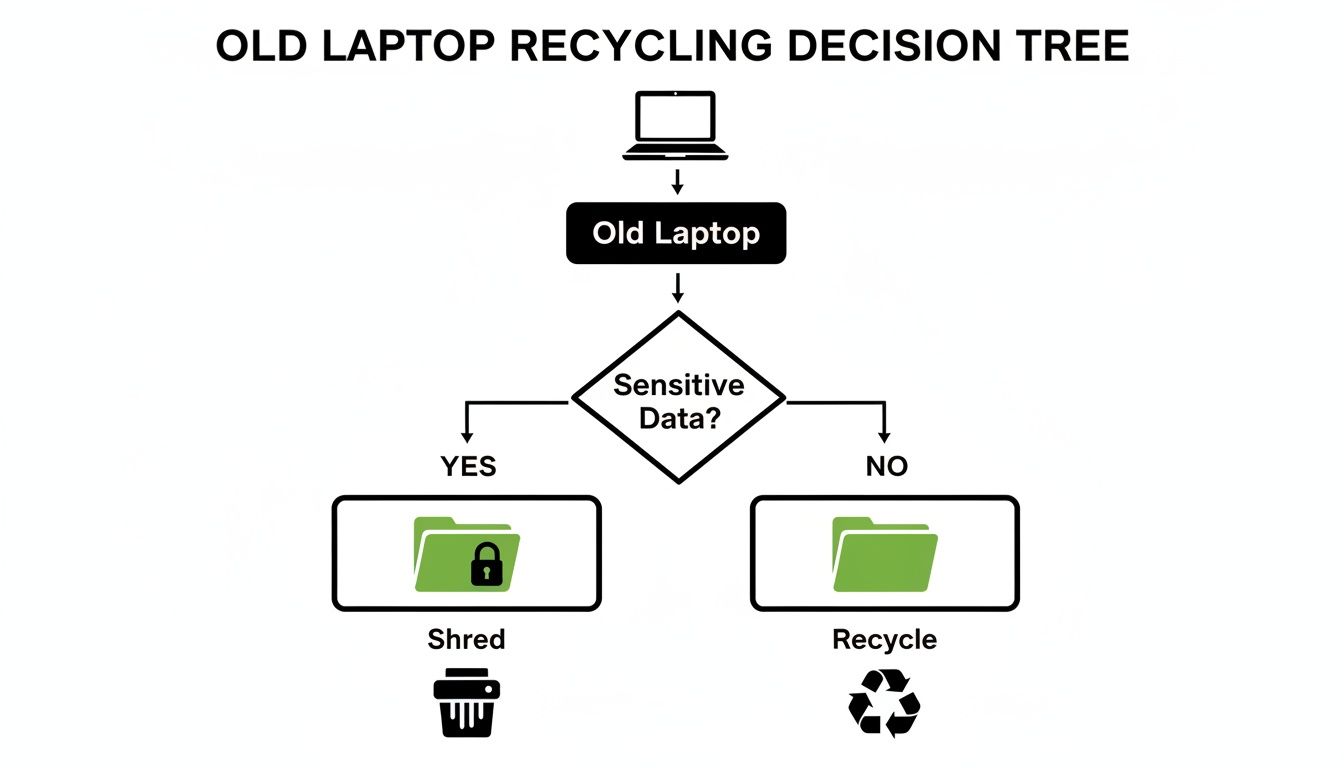
The main takeaway here is that devices holding highly sensitive or regulated data really demand the irreversible finality of physical shredding.
Choosing the Right Method for Your Industry
The choice between wiping and shredding often boils down to your industry and the specific risks you manage. A small marketing agency might be perfectly fine with a standard NIST-compliant wipe. But for organizations in highly regulated sectors, the standard of proof is much, much higher.
Real-World Scenario: A financial firm in Atlanta is retiring 200 old laptops. For their next audit, they can't just have a software log; they need undeniable proof that their client's financial data is gone forever. They would opt for on-site hard drive shredding, allowing them to witness the destruction. This provides an unbreakable chain of custody and an ironclad defense that satisfies even the most demanding compliance officers.
Industries like healthcare (HIPAA), finance (GLBA), and legal services operate under a microscope. For them, the absolute peace of mind that comes with physical destruction is non-negotiable. To develop a bulletproof plan, looking into broader data security management practices helps ensure every angle is covered before disposal.
The Power of a Certificate of Data Destruction
No matter which method you go with, the job isn't done until you have the paperwork to prove it. Any reputable ITAD partner will issue a Certificate of Data Destruction once the service is complete. Think of this as your official, legal record of compliance.
This certificate should clearly document:
- The exact date of destruction.
- The method used (e.g., NIST 800-88 Purge, physical shredding).
- A serialized inventory of every hard drive that was destroyed.
This document is your shield. It proves you performed your due diligence to protect sensitive information, defending your organization against liability in a future audit or legal challenge. If you're curious about the technical side of the process, you can learn more about how to completely clean a hard drive in our detailed guide.
Navigating Pickup Logistics and E-Waste Compliance
This is where the rubber meets the road. All your careful planning comes down to the physical process of getting old laptops out of your office and into the hands of a recycler. This stage is packed with logistical hurdles and legal fine print, and one small mistake can create a huge headache. A successful pickup all boils down to clear communication, a little prep work, and a partner who handles every single step securely.
It’s hard to overstate the scale of the e-waste problem. The world now produces a staggering 62 million tonnes of e-waste every year. Laptops and other small IT devices alone account for a massive 4.6 million tonnes of that total, yet less than a quarter of it gets properly recycled. For any business, recycling is more than just a green initiative—it’s an essential part of data security and recovering value from old tech.
Your part in this process actually starts long before the recycling truck pulls up to your building. The easiest way to guarantee a fast, smooth pickup is to get your site ready beforehand. Gather all the equipment you've inventoried and consolidate it in one secure, easy-to-reach spot. A locked conference room or a designated corner of your warehouse works perfectly. This simple step prevents last-minute scrambling and helps the recycling team get in and out quickly.
Securing the Chain of Custody
The second your laptops leave your sight, you need a documented chain of custody. Think of it as a paper trail that follows your assets from your door all the way to their final destruction or recycling. It's your official record proving that nothing was lost, stolen, or mishandled.
A flimsy chain of custody is a serious liability. It creates a blind spot where a laptop full of sensitive data could easily disappear. This is exactly why you should only partner with a recycler who uses their own vetted team and drives company-owned, GPS-tracked vehicles. It cuts out the risk that comes with unknown third-party couriers and gives you a direct, unbroken line of accountability.
A documented chain of custody is more than just paperwork; it’s your primary defense against claims of improper disposal. It proves you acted responsibly and protects your organization from potential legal and financial fallout.
Understanding E-Waste Regulations
When you recycle laptop computers, you're operating within a complex web of regulations. These rules are designed to protect both the environment and personal data, and claiming ignorance won't get you off the hook for non-compliance. Here in Atlanta, businesses have to juggle local, state, and federal laws.
Here are a few key regulations you absolutely need to know about:
- Resource Conservation and Recovery Act (RCRA): This is the main federal law that governs how hazardous waste—which includes many components inside a laptop—is handled. Fines for breaking these rules can be incredibly steep.
- State and Local Rules: Many states, including Georgia, have their own specific laws for e-waste. Working with a local expert ensures you're checking all the right boxes for your region.
- Data Privacy Laws: If your devices contain protected information, laws like the Health Insurance Portability and Accountability Act (HIPAA) impose non-negotiable rules for data destruction.
Working with a certified recycler is the surest way to know these complex compliance issues are being managed correctly. They’ll provide all the documentation you need to prove your electronics were handled in line with every applicable law. For businesses looking for a straightforward solution, you can learn more about scheduling a free and compliant electronics recycling pickup that takes care of these details for you.
At the end of the day, a seamless pickup is about more than just convenience. It’s about locking down your security, ensuring compliance, and eliminating risk from start to finish. When you pick a partner who controls the entire process with their own team and secure logistics, you can have complete confidence that your retired assets are in safe hands.
Turning E-Waste Into a Powerful ESG Win

When you responsibly recycle laptop computers, you’re doing so much more than just clearing out an old IT closet. It's a chance to turn a routine task into a genuine story that strengthens your company's Environmental, Social, and Governance (ESG) standing. It’s all about connecting the dots between your old hardware and real, positive change.
The electronics recycling market is booming, largely because of corporate IT refresh cycles and the growing pressure to hit ESG targets. By targeting keywords like "corporate sustainability electronics disposal," Atlanta companies can find partners who turn compliance into a compelling story.
Working with a mission-driven recycler lets you go beyond vague sustainability talk and start reporting on specific, measurable impacts that actually mean something to your employees, customers, and investors.
Position Your Brand as an ESG Leader
Believe it or not, your laptop recycling program can be one of the simplest and most authentic ESG wins you score all year. When you choose a recycling partner with a dual mission—like one that supports veterans and funds reforestation—your old tech suddenly becomes a force for good.
It’s not just a transaction; it’s a partnership. Imagine having 50+ devices picked up for free and, in return, receiving detailed reports. We're not just talking about a standard Certificate of Destruction. Think bigger: a Veteran Support Impact Report and Plant-A-Tree certificates. This is the kind of documentation that makes your annual CSR reports and LinkedIn case studies shine.
A powerful way to frame this story is with a tagline like: “Recycling That Restores Lives and Landscapes.” It instantly tells a story of dual impact that makes your company stand out.
To take it a step further, a good partner can provide a digital “Recycled with Purpose” badge. You can feature this on your website, in email signatures, and on sustainability reports as clear, visual proof of your commitment. It shows you’re not just recycling—you’re recycling with intention.
Launch a “Recycle for a Cause” Campaign
The best way to get real value from your recycling program is to build a narrative around it. A "Recycle for a Cause" campaign uses storytelling to connect the simple act of disposing of old laptops with tangible, positive results. It makes a logistical chore a source of pride for your whole company.
Promote powerful messaging like, “Our old tech can house a veteran and grow a forest.” This isn't just a clever line; it’s a verifiable fact when you partner with a recycler who provides transparent impact reporting.
Here’s how to bring a campaign like this to life:
- Impact Counters: Work with a partner that offers live statistics, such as “1,245 veterans supported” and “3,700 trees planted.” These numbers add a layer of transparency and social proof that builds incredible trust.
- Video Storytelling: Create and share short videos that show the real-world results of your donation—maybe footage of veterans receiving aid or USDA reforestation projects funded by recycled electronics.
- Seasonal Drives: Align your recycling initiatives with key dates like Veterans Day, Earth Day, or Arbor Day. These events provide a natural hook for PR, employee engagement, and community outreach with VFW chapters or environmental NGOs.
This approach gives your marketing and HR teams a powerful story to tell, creating a much deeper connection between your employees and the company’s mission.
Engage Your Community and Customers
This mission-driven model does more than just benefit you internally. It also creates real opportunities for community engagement and customer loyalty. When a person or a company recycles for a cause, they become part of a bigger story.
Imagine every customer who recycles getting a personalized impact certificate by email: “You planted 3 trees and helped 1 veteran.” This simple touch transforms a one-time service into a memorable experience, turning recyclers into advocates for your brand.
You can encourage this even more by:
- Implementing a referral program where anyone who refers someone else gets an extra tree planted in their name.
- Sending a monthly impact newsletter that shares real stories of veterans who have been helped and shows the progress of reforestation efforts.
By showcasing the real-world good that comes from responsible recycling, you build a loyal community around your brand. To learn more about the broader advantages of this approach, you can explore the core benefits of e-waste recycling.
Common Questions About Recycling Laptops in Atlanta
When it's finally time to upgrade your company's tech, the "what next?" question for the old equipment naturally follows. The process of recycling laptops can seem like a minefield of security, logistics, and compliance concerns.
We get it. We hear these questions all the time from businesses across the Atlanta metro area. Let's clear things up and walk through the answers to the most common queries we receive.
What Types of Laptops and IT Equipment Can We Recycle?
This is a great first question. The short answer is: almost everything. Certified IT asset disposition (ITAD) partners are equipped to handle a wide range of electronics, well beyond just laptops.
Typically, we can process all makes and models of laptops, desktops, servers, and monitors. This also includes networking gear like switches and routers, plus all the peripherals that go with them—keyboards, mice, docking stations, you name it. It doesn’t matter if it’s a pallet of ten-year-old Dell desktops or a full rack of decommissioned servers.
Giving your recycling partner a heads-up with a basic inventory list is always a good idea. It just ensures everything can be handled in a single, smooth pickup. Some items, like physically damaged lithium-ion batteries or oversized industrial equipment, might need special handling, so a quick confirmation call prevents any day-of surprises.
How Much Does It Cost to Recycle Our Company's Laptops?
This is the big one, and the answer is often a pleasant surprise. For most businesses in and around Atlanta, recycling laptops is often completely free, especially if you have a bulk quantity of 50 or more devices.
How is that possible? The value recovered from the raw materials inside the electronics—metals like copper, aluminum, and small amounts of precious metals—frequently covers the cost of transportation and processing.
However, certain specialized services will have associated fees. These typically include:
- On-site Hard Drive Shredding: For when you need to physically witness the destruction for compliance or peace of mind.
- Complex De-installations: If your equipment needs to be professionally disconnected and removed from server rooms or data centers.
- Full Data Center Decommissioning: Large-scale projects that involve detailed project management from start to finish.
Always insist on a transparent, itemized quote. A good partner will clearly outline any potential costs and will also identify opportunities for revenue sharing if you have newer, functional equipment that holds resale value.
How Do We Prove Our Sensitive Data Was Actually Destroyed?
This is the most critical part of the entire process, and there’s zero room for ambiguity. Simply taking someone's word for it just doesn't cut it in today's world of data privacy.
Any reputable ITAD provider must issue a serialized Certificate of Data Destruction when the job is done. This isn't just a receipt; it's a legal document that serves as your official audit trail, proving you took the proper steps to protect your data.
This certificate should confirm that your data was destroyed following established industry standards, like those outlined in NIST 800-88, and it must list the serial numbers of the specific hard drives that were sanitized or shredded.
For organizations where data security is paramount—like those in healthcare, finance, or the legal field—nothing provides more definitive proof than watching the destruction happen. On-site shredding offers an undeniable, tamper-proof record that your data is gone for good, completely insulating your business from future liability.
Our Laptops Still Work. Is Recycling the Only Choice?
Absolutely not! In fact, for functional equipment, recycling should be the last resort, not the first. A smart IT Asset Disposition (ITAD) strategy is all about maximizing value and finding the highest and best use for every asset.
A good partner will first evaluate your equipment for its reuse potential. Laptops that are still functional and relatively new can often be securely wiped, refurbished, and remarketed. This doesn't just keep them out of the waste stream; it can generate a financial return for your company to help offset the cost of your new hardware.
Another great option is donation. After being professionally sanitized, your old laptops could find a second life helping a veteran transition to a new career or providing essential digital tools for a local school under a "Greener Atlanta" initiative. It’s a fantastic way to turn your electronic "waste" into a genuinely positive social impact. A complete ITAD program prioritizes these options, with responsible recycling reserved only for those electronics that have truly reached their end of life.
Ready to turn your old laptops into a secure, compliant, and impactful win for your company? Atlanta Green Recycling provides turnkey solutions for businesses across the Atlanta metro area, combining certified data destruction with a mission to support veterans and reforestation. Schedule your free, no-obligation consultation today.