
How to wipe pc hard drive securely in Atlanta

Properly wiping a PC hard drive isn't just about hitting 'delete.' It’s about completely overwriting the data so it's gone for good, forever unrecoverable. This takes either specialized software or, in some cases, physically destroying the drive. Simply deleting files or running a standard format just doesn't cut it—that sensitive information is still there, just waiting for someone to find it. For Atlanta businesses, getting this right is a non-negotiable part of protecting data and staying compliant.
Why Secure Data Wiping Is Critical for Atlanta Businesses
When you decommission a company PC, the process goes way beyond just wiping the files and dropping it off for recycling. For companies all over the metro Atlanta area—especially those in tightly regulated fields like healthcare, finance, or legal—the data security stakes are sky-high. One single hard drive from a retired computer, if handled improperly, can turn into a million-dollar problem.
The real danger here is something called data remanence. This is the ghost data left on a drive even after you format it. Think of it like this: formatting a drive is like tearing the table of contents out of a book. The pages and all the words are still there, and someone with the right tools can easily piece it all back together. Basic recovery software can pull up "deleted" files, exposing everything from company financials and customer PII (personally identifiable information) to your most valuable trade secrets.
The High Cost of Non-Compliance
For businesses in Atlanta, the legal and financial fallout from sloppy data disposal is brutal. These regulations aren't just suggestions; they're mandates with serious teeth.
- HIPAA (Health Insurance Portability and Accountability Act): Healthcare organizations can be fined up to $1.5 million per violation for exposing patient health information (PHI).
- GDPR (General Data Protection Regulation): If you handle data for anyone in the EU, the penalties can be as high as 4% of your annual global turnover.
- GLBA (Gramm-Leach-Bliley Act): Financial institutions have a strict duty to protect consumer financial data, and failing to do so leads to massive fines and a shattered reputation.
These rules demand more than just wiping data; they require proof of destruction. This need for verifiable security is driving a huge shift in the industry. The global market for hard drive destruction services, already valued at USD 1.65 billion, is expected to jump to USD 5.05 billion by 2035. Why the massive growth? Because businesses are realizing that risky software wipes—where recovery tools can often still grab 30-40% of the data—aren't enough. They're moving to certified physical destruction to completely eliminate the risk of a breach.
From Liability to Corporate Responsibility
Looking beyond the fines, a solid data destruction policy is a key part of good corporate social responsibility (CSR). When you go the extra mile to protect customer data, you build trust and strengthen your brand's reputation as a secure, ethical partner. A staggering 74% of data breaches are linked to simple human error or lost devices—a statistic no one wants to be a part of. With Green Atlanta, your old tech can do more than just meet compliance; it can fuel a mission.
By prioritizing certified data destruction, you transform a compliance task into a powerful statement about your commitment to security and your community. Our tagline says it all: “Recycling That Restores Lives and Landscapes.”
To make sure your data destruction methods are up to snuff, it’s worth looking into standards like the Cyber Essentials Plus certification for guidance on best practices. At the end of the day, knowing how to properly wipe a PC hard drive isn't just some IT chore—it's a core business function. Working with professionals who provide secure data destruction services ensures your old technology won't become tomorrow's headline.
Your Pre-Wipe Checklist for Defensible Data Destruction
Jumping straight to the wipe command is a rookie mistake. It's the kind of shortcut that leads to catastrophic data loss or, just as bad, a major compliance failure. A successful, defensible data destruction process always starts with careful prep work.
Before you even think about how to wipe a PC hard drive, you need a rock-solid plan. This isn't just about deleting files; it's about protecting critical information and documenting every single action for auditors. Think of it as setting up a secure, organized workspace before a complex project—skipping this step is a recipe for disaster.
Lock Down Your Data with Backups
First things first: don't destroy the wrong data. It sounds obvious, but it happens more than you'd think. Before you decommission any asset, you absolutely must perform a complete and verified backup of all necessary files. Wiping an executive's laptop by mistake can bring business operations to a grinding halt.
Your backup strategy needs to be airtight.
- Full System Images: Don't just drag and drop files. Create a complete image of the drive. This captures the operating system, applications, and all user data, which makes restoration infinitely easier if something goes wrong.
- Cloud and Local Copies: Stick to the classic 3-2-1 backup rule—that means three copies of your data, on two different types of media, with at least one copy stored safely offsite.
- Verification is Key: A backup is totally useless if it's corrupted. Always perform a test restore of a few key files to be certain the backup is viable and the data is accessible.
Create an Indisputable Paper Trail
When it comes to compliance and legal protection, documentation is everything. A detailed inventory and chain-of-custody log serve as your proof of due diligence. This isn't just annoying paperwork; it’s your shield during an audit.
Your hardware inventory log should track:
- Asset Tag / Serial Number: The unique ID for the device.
- Device Type: e.g., Dell Latitude 7420 Laptop, HP ProDesk Desktop.
- Drive Serial Number: The specific identifier for the hard drive itself.
- Assigned User/Department: Who was responsible for the asset.
- Scheduled Destruction Date: When the wipe is planned.
A chain-of-custody log is just as critical. It tracks the asset from the moment it leaves the user's desk until its final destruction, documenting every single person who handles the drive. This creates an unbroken, accountable timeline.
This level of detailed tracking is fundamental. Without it, a misplaced drive becomes a potential data breach with no way to trace its last known secure location.
Know Your Drive Technology
Finally, you have to know what kind of drive you're dealing with. The technology inside dictates the correct wiping method, and using the wrong technique is ineffective at best and damaging at worst. Pop open the case or check the system specs to see if you have a traditional Hard Disk Drive (HDD) or a modern Solid-State Drive (SSD).
HDDs store data magnetically on spinning platters, while SSDs use flash memory chips. These are fundamentally different. A software overwrite that works perfectly on an HDD is completely inadequate for an SSD due to its wear-leveling algorithms. Trying it anyway not only fails to erase data securely but also needlessly shortens the drive's lifespan.
Once your checklist is complete, the final piece of the puzzle is proper documentation. For businesses in Atlanta, working with a certified vendor who provides a detailed hard drive certificate of destruction closes the loop on your compliance obligations. It’s the final evidence you need to prove your data was handled responsibly from start to finish.
Choosing the Right Data Destruction Method
Alright, you've done the prep work and now it's time for the main event: picking the right way to wipe those drives. This isn't a one-size-fits-all situation. The method you choose has to line up with the drive's technology (is it an old spinner or a modern SSD?), your company's security needs, and any compliance rules you're bound by. Getting this wrong can leave sensitive data lurking where you least expect it, or worse, you could accidentally brick perfectly good hardware.
First things first, let's get a visual on the decision-making process. The flowchart below walks you through the initial steps, from backing up data to figuring out exactly what kind of hardware you're dealing with.
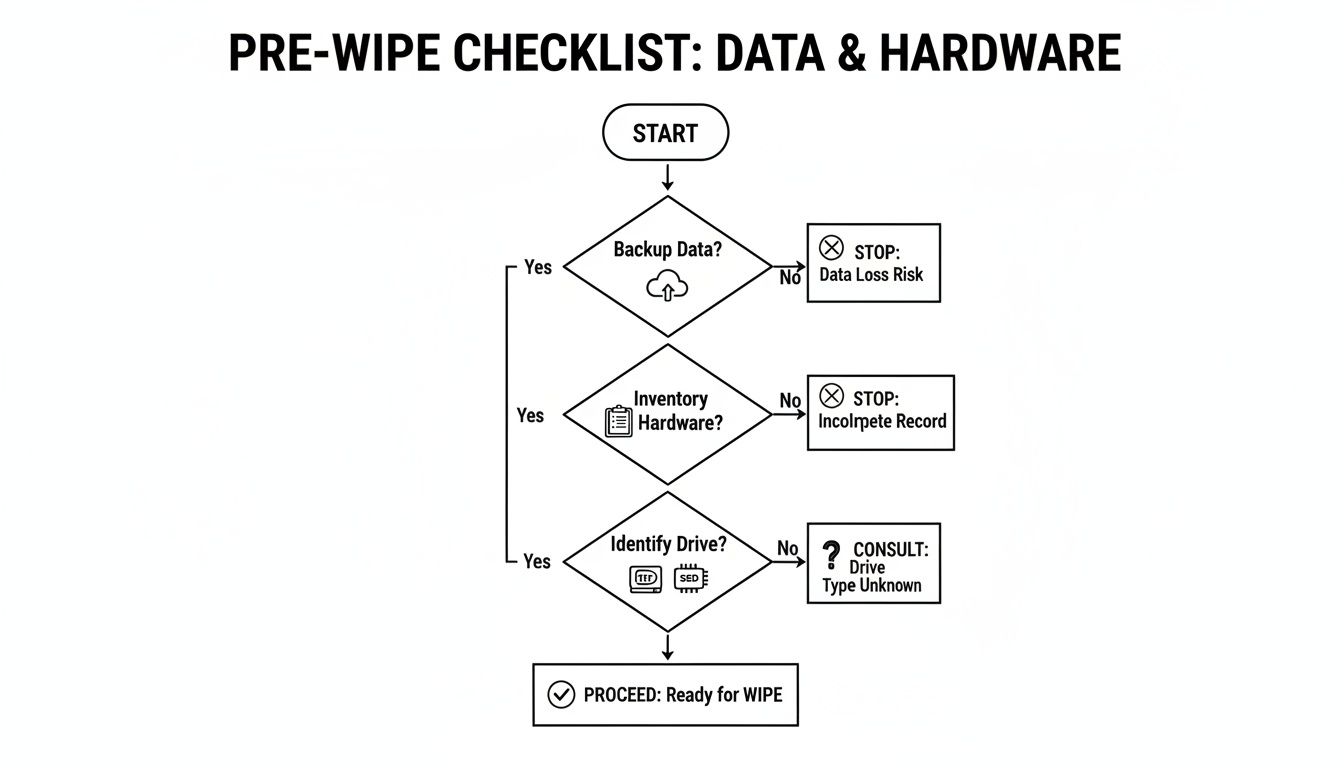
As you can see, knowing whether you have an HDD or an SSD is the fork in the road that dictates your entire strategy from here on out.
Hard Drive Wiping Method Comparison
To make the choice clearer, here’s a quick breakdown of the common methods. Think of this table as your cheat sheet for deciding what tool to pull out of the toolbox.
| Method | Best For | Effectiveness (HDD) | Effectiveness (SSD) | Pros | Cons |
|---|---|---|---|---|---|
| Software Overwriting | Reusing or donating older HDDs with non-critical data. | High | Low / Not Recommended | Low cost (often free), allows for drive reuse. | Very slow on large drives, ineffective on SSDs, can be forensically recovered. |
| ATA Secure Erase / NVMe Format | Reusing or repurposing modern SSDs. | N/A | Very High | Extremely fast, manufacturer-approved, resets drive to factory state. | Requires BIOS/UEFI support, doesn't provide a physical destruction certificate. |
| OS Reset ("Reset This PC") | Quick refresh for non-sensitive, personal-use computers. | Low | Low | Convenient and easy to access, no special tools needed. | Not a secure wipe; data is easily recoverable with basic tools. |
| Physical Destruction | End-of-life drives, damaged hardware, or highly sensitive data. | Absolute | Absolute | 100% foolproof, provides certified proof of destruction for compliance. | Drive cannot be reused, requires professional services or specialized equipment. |
Each of these methods has a time and a place. The key is matching the technique to the technology and the risk level of the data you're handling.
Software-Based Overwriting for HDDs
For those traditional, spinning Hard Disk Drives (HDDs), the go-to method has always been software-based overwriting. The concept is simple: you use a program to plaster over every single sector of the drive with new, random data. It’s like painting over a canvas multiple times—eventually, whatever was underneath is completely obscured.
There are a few well-known standards that define how this should be done:
- DoD 5220.22-M: This is the classic three-pass overwrite from the U.S. Department of Defense. For a long time, it was the gold standard for secure wiping.
- NIST 800-88: More current and widely adopted, the guidelines from NIST are what most professionals follow today. The "Clear" method is a single overwrite pass (usually enough), while "Purge" is more intensive for higher-security needs.
Tools like DBAN (Darik’s Boot and Nuke) have been a staple in IT toolkits for years. It's free and gets the job done. Just be warned: this process is slow, sometimes taking many hours for a single large drive, and it’s absolutely the wrong tool for an SSD.
The Right Way to Wipe Solid-State Drives (SSDs)
Here's a rookie mistake we see all the time: trying to use overwriting software on a Solid-State Drive (SSD). Don't do it. SSDs have a feature called wear-leveling that spreads out write operations to prolong the drive's life. This means your overwriting software has no real control over where it's writing, and it will almost certainly miss pockets of old data. You'll just be wearing down the drive for no reason.
The correct, manufacturer-approved way to sanitize an SSD is to use a command built right into its firmware.
ATA Secure Erase: This is the magic command for virtually all modern SATA SSDs. When you trigger it, you're telling the drive's own controller to flush every single memory cell, resetting it to a clean, empty state. It’s incredibly fast—often done in a few seconds—and restores the drive to its original factory performance.
You can usually find this option in the computer's BIOS/UEFI settings or by using a utility tool from the drive manufacturer itself. For the newer NVMe drives, there’s a similar command called NVMe Format that does the exact same thing.
When Physical Destruction Is the Only Answer
Sometimes, software just won't cut it. If a drive is broken, physically damaged, or if it held data so sensitive that you can't leave anything to chance, physical destruction is the only way to be 100% certain that data is gone for good. This is non-negotiable for many organizations, especially those navigating strict compliance and ESG frameworks.
The market for hard disk destruction equipment is expected to hit USD 4.23 billion by 2032, a clear sign that North American companies are taking physical destruction seriously to comply with privacy laws. For any Atlanta hospital dealing with HIPAA data or a financial firm protecting client portfolios, a software wipe is a calculated risk. A determined adversary with forensic tools might recover something, but nobody is recovering data from a pile of metal fragments.
To learn more about how this works, you can check out the process behind professional hard drive shredding services that provide certified destruction.
There are two main routes for physical destruction:
- Shredding: Think of an industrial-grade wood chipper, but for electronics. Powerful shredders grind drives into tiny pieces, utterly destroying the platters or memory chips inside.
- Degaussing: This involves hitting an HDD with an incredibly powerful magnetic field, which instantly and permanently scrambles the magnetic data on its platters. It's very effective for HDDs but completely useless on SSDs.
Opting for physical destruction gives you an ironclad end to the data lifecycle. It provides total peace of mind and, just as importantly, a clear, auditable paper trail. It also aligns beautifully with corporate ESG goals, turning a security task into a statement of responsible data management. Once your old tech is securely destroyed, the materials can be properly recycled, closing the loop on a responsible IT asset disposition process.
A Practical Walkthrough for Wiping Your Hard Drives
Alright, with the theory out of the way, it's time to roll up our sleeves. This is where we get hands-on and walk through the process of wiping different types of drives. We'll use a classic, effective tool as our example for old-school hard drives and then cover the right way to handle modern SSDs.
The goal here is to give your team the confidence to handle basic, in-house data sanitization. Just as important, though, is knowing where these methods fall short. Sometimes, the only truly secure path forward is to call in a certified pro.
Wiping an HDD with DBAN
For those traditional spinning hard disk drives (HDDs), a bootable tool like DBAN (Darik's Boot and Nuke) has been a trusted workhorse for years. It works its magic by running completely outside of the operating system, which allows it to overwrite every single sector on the drive.
Here’s the general game plan for using DBAN to wipe a PC hard drive:
- Create Your Bootable Media: First, you'll need to download the DBAN ISO file from its official source. The next step is to "burn" this file onto a USB flash drive with a tool like Rufus. This process makes the USB "bootable," meaning the computer can start up directly from it instead of its internal drive.
- Boot the Target PC: Plug the bootable USB into the computer you need to wipe. Restart the machine and get ready to jump into the BIOS/UEFI setup. This usually involves tapping keys like F2, F12, or DEL right after you power it on. In the settings, you'll need to change the boot order so the PC tries to boot from the USB drive first.
- Launch the Wipe: After the PC boots from your USB, you'll see the simple, text-based DBAN interface. At the prompt, you can just type
autonukeand hit enter. This kicks off a standard DoD 5220.22-M wipe on every drive it finds. Be absolutely certain before you do this—the process is irreversible.
This method is thorough, but it's not fast. Wiping a single drive can easily take several hours. It’s a solid option for older HDDs you plan to reuse or donate, especially when the data isn't governed by strict compliance rules.
A Critical Warning: DBAN is the wrong tool for SSDs. It does not reliably sanitize them. Because of how solid-state drives manage data with features like wear-leveling and over-provisioning, DBAN simply can't guarantee it will reach and overwrite every data block. Sensitive information could absolutely be left behind.
Securely Erasing an SSD in the BIOS or UEFI
When it comes to Solid-State Drives (SSDs), the approach is totally different—and thankfully, much faster. The correct method is to use the drive’s built-in ATA Secure Erase command. This command tells the drive's own controller to completely reset all of its memory cells. It's an incredibly quick and comprehensive way to wipe the slate clean.
You can usually find this feature inside the computer’s motherboard firmware (the BIOS or UEFI).
- Find the Security or Tools Menu: Reboot the computer and enter the BIOS/UEFI settings. From there, you'll need to poke around for a menu labeled "Security," "Tools," or sometimes "Advanced."
- Locate Secure Erase: Buried in one of those menus, you should find an option for "Secure Erase" or a similar utility. The exact name can vary a bit between motherboard makers like ASUS, Gigabyte, or MSI.
- Execute the Command: Simply select the SSD you want to wipe and confirm your choice. The whole process is usually over in just a few seconds.
If you can't find the option in your BIOS, don't worry. The SSD manufacturer (like Samsung or Crucial) almost always provides a software utility (like Samsung Magician) that can issue the Secure Erase command, often from a bootable environment. This is a core part of proper data sanitization practices for modern hardware.
Using Windows Built-in Reset Features
For situations that are less sensitive and don't involve corporate data, the "Reset this PC" feature in Windows 10 and 11 is a convenient option. It's crucial to understand what it does and, more importantly, what it doesn't do.
When you go to Settings > Update & Security > Recovery and choose "Reset this PC," you'll see two main paths:
- Keep my files: This reinstalls Windows but leaves your personal data alone. It’s not a data wipe by any means.
- Remove everything: This is the one you want. It reinstalls Windows and deletes your files. For a bit more security, you can select the "Clean the drive" sub-option, which performs a basic single-pass overwrite.
While "Clean the drive" is certainly better than just reformatting, it isn't considered a forensically secure wipe. It likely won't satisfy the compliance standards for business data. It’s perfectly fine for getting a personal laptop ready to sell on Craigslist, but it’s not sufficient for a company computer that held customer information.
At the end of the day, even the best DIY methods are missing one critical piece required for business compliance: proof. A professional service provides a serialized Certificate of Destruction. That document is your auditable proof that data was destroyed according to industry standards, and it’s your best protection against future liability. For Atlanta businesses focused on meeting ESG, CSR, and regulatory goals, partnering with a certified e-waste recycler is the only way to guarantee your old tech doesn't become a new headache.
Turning E-Waste into a Corporate ESG Win
Once you know how to wipe a PC hard drive, the job is only half done. What happens next—the physical disposal of the asset—is where Atlanta businesses can turn a simple compliance task into a powerful statement.
This is the moment to move beyond basic IT asset disposition. It's an opportunity to embrace a strategy that boosts your company's Environmental, Social, and Governance (ESG) profile.
Securely wiping or shredding a drive is a critical first step, no doubt. But partnering with a certified e-waste recycler transforms that action into a measurable ESG victory. It lets you tell a compelling story about corporate responsibility that resonates with customers, employees, and investors. This is where data destruction meets tangible community impact.
From Compliance Burden to Brand Differentiator
Instead of looking at retired IT assets as a liability, start seeing them as an opportunity. A certified recycling partner can help you build a narrative that goes far beyond ticking a compliance box. We call it our “Recycle for a Cause” campaign.
Imagine turning your annual tech refresh into a marketing campaign with a simple, powerful message like, “Your old tech can house a veteran and grow a forest.”
This approach unlocks some serious benefits:
- Boosts Corporate Social Responsibility (CSR): We provide Veteran Support Impact Reports and Plant-A-Tree certificates perfect for your annual reports.
- Enhances Brand Reputation: It positions your company as a leader in sustainability and community support, targeting keywords like "corporate sustainability electronics disposal" in Atlanta.
- Improves Employee Engagement: Host a corporate recycling drive with us—we offer free pickup for 50+ devices and give your team a real sense of purpose.
This strategy is more critical than ever, given the sheer scale of the problem. Global e-waste volumes now exceed 60 million tons annually. The commercial sector already drives over 70% of the hard disk destruction market because of strict compliance needs. By choosing a partner that documents both data security and social impact, you gain a real competitive edge.
Leveraging Your Impact for ESG Reporting
A partnership with a mission-driven recycler provides the exact documentation you need to make your ESG efforts shine. When you retire a batch of PCs, you shouldn't just get a standard certificate of destruction. We provide a full impact report.
Think of it this way: a Certificate of Destruction proves you met your legal obligations. A Veteran Support Impact Report or a Plant-A-Tree Certificate proves you exceeded them.
These documents become powerful assets for your marketing and sustainability teams. You can use them to:
- Create engaging content for LinkedIn: We can help you publish case studies showing how your company hit its sustainability benchmarks by recycling electronics for veterans.
- Add live impact counters to your website: Display real-time stats like "1,245 veterans supported" and "3,700 trees planted through our recycling efforts."
- Earn a digital “Recycled with Purpose” badge: We provide this digital certification for partners to display on their websites and in sustainability reports.
By choosing the right partner, you can explore comprehensive corporate e-waste solutions that turn every device pickup into a documented win for your ESG goals. This approach shifts the conversation from a cost center to a value-add, transforming retired hardware into a story of restoration for both people and the planet.
Your Hard Drive Wiping Questions Answered
When you're figuring out how to wipe a PC hard drive, it's completely normal for a few questions to come up. The process touches on different technologies and some pretty serious compliance standards, so getting clear answers is the only way to make the right call for your Atlanta business.
Let’s dig into some of the most common questions we hear from IT managers and business owners.
Is Formatting a Hard Drive the Same as Wiping It?
No, not even close. And this is probably the most critical distinction to understand.
Formatting a hard drive is like tearing the table of contents out of a book—all the pages (your data) are still there. The process just removes the pointers that tell the operating system where to find the files. With basic, often free, data recovery software, a motivated person could piece that information back together surprisingly easily.
Secure wiping, on the other hand, is like running every single page through a shredder. It overwrites the entire drive with random, meaningless data, often multiple times, making the original information practically impossible to recover.
Can I Reuse a Hard Drive After a Secure Wipe?
Yes, absolutely—in most cases. As long as you use a software-based wiping method, the drive remains perfectly functional and is safe to reuse within your organization or even donate.
- For HDDs: Using a tool that performs a multi-pass overwrite sanitizes the drive without causing any physical damage. It’s ready for a fresh OS install.
- For SSDs: The right move is to execute the ATA Secure Erase command. This not only wipes all the data but has the added benefit of restoring the drive to its original factory performance.
The only time a drive can't be reused is when you opt for physical destruction methods like shredding. That’s a one-way trip.
Do I Need a Certificate of Destruction for Every Drive?
For any drive that was a business asset, the answer should always be a firm yes. A Certificate of Destruction is your official, auditable proof that you followed compliant data sanitization procedures. We take it a step further: individuals automatically receive a personalized impact certificate (“You planted 3 trees and helped 1 veteran”), turning a one-time transaction into a lasting connection.
This documentation protects your business from liability by proving you took responsible steps to destroy sensitive data. It’s essential for meeting standards like HIPAA or GDPR and should be a non-negotiable part of your asset disposition process. Always partner with a vendor who provides detailed, serialized certificates for every single drive.
What Is the Best Method for Wiping SSDs vs. HDDs?
The right method comes down to the drive's technology. Using the wrong approach isn't just ineffective; it can actually damage the hardware.
- HDDs (Hard Disk Drives): These classic spinning platter drives are best sanitized with multi-pass overwriting software. Look for tools that adhere to standards like DoD 5220.22-M or NIST 800-88, which ensure every magnetic sector gets overwritten.
- SSDs (Solid-State Drives): Overwriting software is the wrong tool for an SSD because of its wear-leveling technology. The only correct method is to use the drive’s built-in firmware command—either ATA Secure Erase for SATA drives or NVMe Format for NVMe drives. This command directly tells the drive's own controller to reset every single memory cell.
When your retired IT assets need more than just a wipe, Atlanta Green Recycling provides certified, secure, and responsible e-waste solutions. We turn your end-of-life electronics into a documented ESG win that supports veterans and reforestation efforts right here in our community. Let us help you turn your e-waste into hope.
Schedule Your Free Corporate Pickup with Atlanta Green Recycling