
How to Clear a Computer Hard Drive: A Guide for Atlanta Businesses


Think dragging files to the Recycle Bin or running a quick format is enough to protect your business? That's a common and dangerous misconception.
It’s like tearing the table of contents out of a book but leaving every single page intact. For businesses handling sensitive information, this simple mistake leaves the door wide open for a costly data breach.
Clearing a business hard drive correctly involves much more than just deleting files. It requires a secure data sanitization process, such as software overwriting, degaussing, or even physical destruction. Just formatting a drive is nowhere near enough—it leaves sensitive data easily recoverable and creates massive compliance risks.
The Hidden Risks of Hitting 'Delete'
Here's the hard truth: "deleted" data is rarely gone. It just gets marked as available space, waiting for new data to eventually overwrite it. Using readily available recovery software, almost anyone with basic technical skills can resurrect those supposedly vanished files.
The Real Cost of Improper Data Disposal
For any business, this isn't just an IT oversight—it's a critical operational risk. Think about the kind of data left behind on old computers, servers, or external drives:
- Personally Identifiable Information (PII) of your employees and clients.
- Protected Health Information (PHI), which is covered by strict HIPAA regulations.
- Financial records and confidential client data subject to GLBA rules.
- Proprietary information like trade secrets, marketing plans, and internal strategies.
A single improperly wiped hard drive can lead to devastating consequences, from hefty regulatory fines to irreversible damage to your brand. Beyond the immediate financial hit, businesses need to think bigger about their overall approach to understanding compliance risk management to truly safeguard their operations.
Why Your Standard Deletion Methods Fail
Data wiping sounds like a simple IT task, but the statistics paint a grim picture. Forensic tests consistently show that standard software tools can recover data from improperly wiped drives a shocking amount of the time.
This is exactly why physical destruction is becoming the gold standard. In fact, the market for hard disk destruction equipment hit USD 2.69 billion in 2024 and is still projected to grow. For enterprises with data centers generating tons of e-waste, half-measures just aren't an option.
The core problem is that standard deletion doesn't actually erase the magnetic or electronic traces of your data. It only removes the pointers that tell the operating system where to find the file. Professional data destruction is the only way to close that security loophole for good.
To give you a clearer picture, let's break down the difference between what most people do and what security-conscious businesses should do.
File Deletion vs Secure Data Erasure At a Glance
| Action | What Actually Happens | Data Recoverability | Business Risk Level |
|---|---|---|---|
| Standard Deletion | The file's reference in the file table is removed, but the data itself remains on the drive. | High. Easily recoverable with basic software until the space is overwritten. | Very High |
| Secure Erasure | The entire drive is overwritten with random data patterns (often multiple times) or physically destroyed. | Extremely Low to Impossible. Data is rendered completely unreadable. | Minimal |
As you can see, the difference is night and day. Standard deletion is a gamble, while secure erasure is a guarantee.
This is precisely why you should use a data destruction service when disposing of your electronics. A certified partner ensures your data isn't just "deleted" but completely and verifiably destroyed, giving you the peace of mind that your business is protected.
Diving Into Your Data Sanitization Options
When it's time to retire a computer hard drive, just hitting 'delete' on the files won't cut it. Not even close. To do the job right and keep your company's data safe, your process needs to line up with proven industry standards.
The gold standard comes from the National Institute of Standards and Technology (NIST) in its Special Publication 800-88. This document is the definitive guide, and it lays out three different levels of data sanitization.
Getting to know these three options—Clear, Purge, and Destroy—is crucial. It empowers your IT team to make smart, risk-based decisions for every single asset. You'll know exactly which level of security to apply based on what kind of data is on the device and where that device is headed next.
Level 1: Clear
The first and most common method is Clear. You can think of this as a supercharged factory reset. It uses software to overwrite every last bit of the hard drive with random, meaningless data, usually in a single pass. This process effectively buries the original information, making it impossible to get back with standard data recovery software.
The Clear method is the perfect fit for drives that are staying within the four walls of your organization. For instance, if you're wiping a computer to give to a new employee, this standard is more than enough. It guarantees the previous user's files are gone for good without physically damaging the drive itself.
Level 2: Purge
Moving up a level, we have Purge. This is a more hardcore method built for devices that are about to leave your direct control. The goal here is to make data recovery practically impossible, even for someone with access to advanced forensic laboratory tools. It’s all about defending against more sophisticated threats.
There are a couple of ways to achieve a Purge-level sanitization:
- Advanced Software Overwriting: This isn't just a single pass. It involves overwriting the drive multiple times using complex data patterns, following tough standards like the Department of Defense (DoD) 5220.22-M specification.
- Degaussing: This technique is pure brute force. It blasts the drive with a powerful magnetic field that instantly scrambles the magnetic particles on a hard disk's platters, wiping everything clean. Keep in mind, this only works on magnetic media (your traditional HDDs) and will render the drive completely useless afterward.
Purge is what you need when you're donating old computers to a local school or sending equipment back at the end of a lease. It provides a much higher degree of certainty that your sensitive information is truly gone forever. You can learn more by checking out our detailed guide on what is data sanitization and why it's so vital for corporate security.
Level 3: Destroy
Finally, there's the most absolute method of all: Destroy. This is the only option for drives that have reached the end of their useful life or hardware that once held highly confidential, regulated, or top-secret data. When the risk of data recovery is simply not an option you can afford to take, physical destruction is the only answer.
Physical destruction isn't about taking a hammer to a hard drive in the storage closet. For this to be compliant and secure, it requires industrial-grade equipment that grinds, shreds, or disintegrates the media into tiny, shredded fragments that can never be reassembled.
This process ensures that no piece of the drive's platters is big enough to pull even a single byte of data from. It is the mandatory standard for getting rid of damaged drives, modern Solid-State Drives (SSDs) with sensitive data, and any media that falls under strict compliance laws like HIPAA or financial industry regulations.
Picking the right sanitization method is more than just a technical task—it's a core part of your company's data security and risk management plan. By basing your process on these three tiers, you can manage your IT assets from the day they arrive to their final disposition with total confidence.
Choosing the Right Method for Your Hard Drives
Deciding how to clear a computer hard drive isn't a one-size-fits-all task. Your strategy depends entirely on the hardware you're dealing with, the sensitivity of the data stored on it, and your specific compliance requirements. Making the wrong call can lead to an incomplete data wipe or even damage to a device you planned to reuse.
The most critical distinction is between traditional Hard Disk Drives (HDDs) and modern Solid-State Drives (SSDs). HDDs store data on magnetic platters, which respond well to methods like software overwriting and degaussing. SSDs, on the other hand, use flash memory, which renders those same methods far less effective and potentially harmful.
Matching the Method to the Media
Software wiping, which overwrites existing data with random characters, is a great option for HDDs you plan to reuse within your organization. It’s a thorough reset that leaves the hardware intact. Degaussing uses a powerful magnetic field to scramble the data on HDD platters—it's a more aggressive choice that renders the drive unusable but provides a higher level of security.
But here's the catch: these techniques don't work reliably on SSDs. Because of a process called wear-leveling, SSDs constantly move data around to prolong their lifespan. This means a software wipe can easily miss data tucked away in over-provisioned, inaccessible areas. For SSDs containing sensitive or regulated data, physical destruction is the only foolproof method.
This decision tree offers a simple framework to guide your choice between clearing, purging, or completely destroying your hard drives.
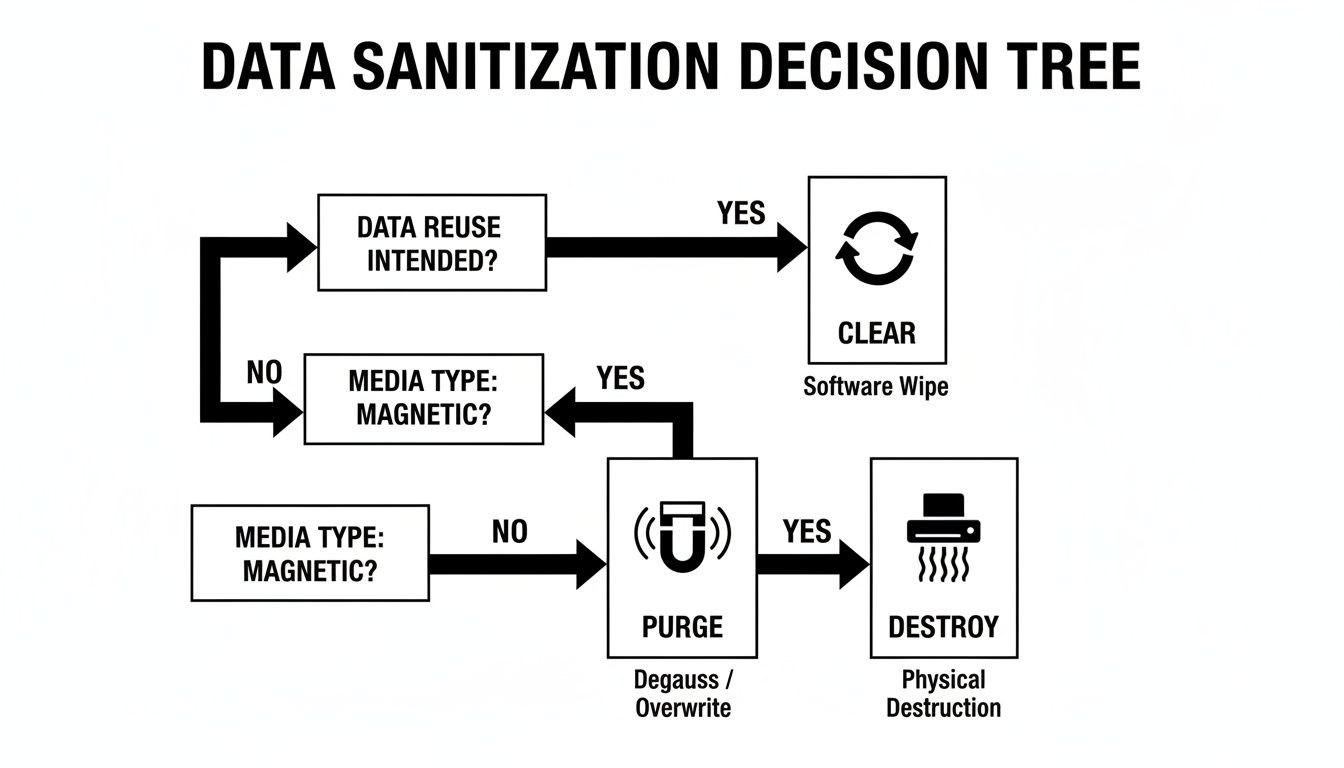
The bottom line? The drive's intended future—whether it will be reused, repurposed, or retired for good—is what should drive your sanitization approach.
Choosing the best data destruction method can feel complex, but it boils down to a few key factors: the type of drive, how sensitive the data is, and what you plan to do with the device afterward. This table breaks down the options to help you make a clear, compliant decision.
Data Destruction Method Selection Guide
| Method | Best For | Pros | Cons / Limitations |
|---|---|---|---|
| Software Overwriting | Reusing HDDs internally; low-sensitivity data on devices being resold. | Preserves the drive for reuse; cost-effective; verifiable with software logs. | Not fully effective on SSDs due to wear-leveling; can be time-consuming for large drives. |
| Degaussing | High-security data on HDDs and magnetic tapes that will not be reused. | Extremely fast and effective for magnetic media; meets high-level compliance standards. | Renders the drive unusable; ineffective on SSDs and other flash media. |
| Physical Destruction | SSDs with sensitive data; damaged or non-functional drives; highest compliance needs. | The only 100% secure method for SSDs; provides ultimate peace of mind. | Completely destroys the drive, preventing any reuse or resale; requires specialized equipment. |
Ultimately, physical destruction is the gold standard for absolute data security, especially when dealing with modern SSDs or facing strict regulatory requirements.
The Rise of E-Waste and Professional Destruction
The need for secure disposal has never been more urgent. E-waste is exploding, with global volumes projected to top 60 million metric tons in 2025. That includes 4.7 million tons from small IT devices like old hard drives alone—yet only 22.3% gets properly recycled.
This tsunami of old tech is fueling the hard drive destruction service market, which is set to hit USD 3.6 billion by 2032. Here in the Atlanta metro area, we see it firsthand as firms migrate to the cloud and decommission data centers, generating massive surpluses of old hardware. Atlanta Green Recycling handles this seamlessly by coordinating secure transport and compliant destruction, turning a complex logistics problem into a streamlined solution.
For Atlanta businesses in regulated sectors like finance or healthcare, making the right choice isn't just good practice—it's essential for avoiding steep compliance penalties and safeguarding your reputation. The ultimate security for SSDs, damaged drives, and regulated data is physical shredding.
This is where bringing in a professional partner becomes invaluable. A certified service provides the industrial-grade equipment needed for compliant destruction and the crucial documentation, like a Certificate of Destruction, that proves you handled the data responsibly. For local businesses, our hard drive shredding services offer a secure, convenient, and verifiable solution.
Why Verification and Certification Matter
Simply wiping a drive is only half the battle. The real challenge—and what protects your business during an audit or a data breach investigation—is proving you did it correctly. This is where meticulous documentation and a secure chain of custody become absolutely non-negotiable.
This process isn't just about creating more paperwork. It's about building a legally defensible record that shows you've done your due diligence. It tracks every asset from the moment it’s taken offline to its final, verified destruction, making sure no device gets lost, stolen, or mishandled along the way. Without that proof, you're leaving your company exposed.
The Anatomy of a Legitimate Certificate of Destruction
A real Certificate of Data Destruction is much more than a simple receipt. Think of it as a formal, legal document that serves as your audit trail, offering concrete evidence that you met your compliance obligations under frameworks like HIPAA, GLBA, or GDPR.
For a certificate to hold up under scrutiny, it needs to have specific, detailed information:
- Unique Serial Numbers for every single drive that was sanitized or destroyed.
- The Specific Method Used, whether that's a DoD 5220.22-M software wipe, degaussing, or physical shredding.
- The Date of Destruction to confirm exactly when the process was finished.
- A Statement of Compliance that affirms the destruction was done in accordance with recognized standards.
- The Name of the Vendor who performed the service, adding that critical layer of third-party accountability.
This documentation is your shield. In a compliance audit, regulators don't just take your word for it—they demand proof. A detailed certificate provides indisputable evidence that you took every necessary step to protect sensitive information.
Chain of Custody: The Unbroken Line of Security
Just as important is the chain of custody. This is the chronological paper trail that documents the handling and control of your IT assets from start to finish. It details every single touchpoint, from an employee signing over a device to its secure transport and final check-in at a certified destruction facility.
This unbroken line of accountability is what prevents assets from mysteriously "disappearing." It ensures that what you thought was destroyed was actually destroyed. Any gap in this chain is a massive security vulnerability that can completely undermine your entire data disposal program.
The rising stakes are precisely why the professional data destruction industry is booming. The global hard drive destruction service market was valued at USD 1.65 billion in 2024 and is projected to skyrocket to USD 5.05 billion by 2035. This explosive growth is a direct response to the increasing frequency and cost of data breaches, which now average a staggering $4.88 million per incident.
When you work with a professional service, you aren't just outsourcing a task; you're transferring risk and gaining access to a fortified, verifiable process. Our approach to secure data destruction is built around providing this exact level of assurance, giving Atlanta businesses the rock-solid documentation they need to operate with confidence.
When to Partner with a Professional Destruction Service
Thinking about clearing a computer hard drive on your own can feel like a smart, budget-friendly decision. But in reality, going the DIY route often comes with hidden costs and some pretty significant risks. The money you sink into certified equipment, the hours spent getting employees up to speed on complex compliance rules, and the fact you have no third-party proof of destruction can quickly erase any savings.
For a lot of businesses, especially those dealing with regulated data, the question isn't if they should work with a professional, but when. There are certain situations that just demand a level of security, efficiency, and accountability that an in-house team can't realistically provide.
Key Scenarios for Professional Partnership
Large-scale projects are almost always the first trigger. If your company is doing a major IT asset refresh, shutting down a data center, or just getting rid of a massive pile of old equipment, the logistics alone can be overwhelming. A certified vendor can handle it all—from secure pickup and transport to the final destruction—letting your IT team get back to their actual jobs.
The type of data you're handling is another huge factor. If your hard drives are filled with sensitive information that falls under regulations like HIPAA, GLBA, or Sarbanes-Oxley, you can't afford to guess. Professional services use compliant destruction methods and give you the official Certificate of Data Destruction you'll need to prove it in an audit. This isn't just a nice-to-have; it's a legal requirement.
Beyond Security: An ESG Win for Atlanta Businesses
For companies here in Atlanta, teaming up with a certified vendor like Atlanta Green Recycling gives you a powerful edge that goes way beyond just data security. It’s an easy win for your company's Environmental, Social, and Governance (ESG) goals. In today's world, corporate responsibility is a huge brand differentiator, and how you handle e-waste is a very visible part of that story.
Your IT asset disposition can go from being a simple compliance task to a key piece of your corporate social responsibility (CSR) narrative. This is where a partner with a real mission transforms a routine job into something meaningful.
By choosing a partner with a dual-impact model, you can turn your old tech into tangible good. Imagine messaging like, “Your old tech can house a veteran and grow a forest.” This connects the act of recycling with real, emotional outcomes that resonate with customers, employees, and stakeholders.
This approach makes your CSR reporting a breeze and gives you fantastic content for your sustainability reports. When you're disposing of 50 or more devices, a professional service can offer free pickup and follow up with Plant-A-Tree certificates and Veteran Support Impact Reports. This kind of documentation makes it simple to show off your company's positive impact. You can even get a digital “Recycled with Purpose” badge for your website and reports, cementing your commitment to the community and the planet.
Choosing the Right Partner
Picking a professional destruction service is a big deal. It affects your data security, your compliance standing, and even how people see your brand. It's crucial to vet potential partners carefully.
When you're looking at your options, check for a solid track record, industry certifications, and a process that’s completely transparent. If you want to broaden your search or get some expert guidance, there are helpful directories for vetting IT security consulting firms that can point you in the right direction.
The right partner doesn’t just destroy hard drives; they deliver a complete solution that reduces your risk and adds real value. They offer a secure chain of custody, detailed reporting, and the peace of mind that comes from knowing your data was handled responsibly from beginning to end. For a deeper dive into picking the perfect vendor, check out our guide on what to look for in IT asset disposition companies.
By strategically bringing in a professional service, you turn a potential liability into a verified, secure, and socially responsible process. It's the smartest way to clear a computer hard drive while making your business stronger on multiple fronts.
Common Questions About Clearing Hard Drives
When you get to the final step of clearing out old hard drives, a few questions always seem to pop up. We hear these all the time from Atlanta businesses, so let's get you some clear, practical answers to help you make the right call.
Can I Just Smash an Old Hard Drive with a Hammer?
While taking a hammer or a drill to an old hard drive might feel like a good way to let off some steam, it's a surprisingly insecure way to destroy data. That DIY approach almost always leaves large chunks of the magnetic platters intact. Give those pieces to someone with the right forensic tools, and they can absolutely pull sensitive data off them.
Real security comes from professional shredding. We're talking about industrial-grade machinery that grinds the entire drive—platters, casing, the whole nine yards—into tiny, confetti-like pieces. That's the only way to be 100% certain your data is gone for good and to meet tough compliance standards.
Is a Software Wipe Good Enough for SSDs?
This is a huge one, and the short answer is usually no. Solid-State Drives (SSDs) are built differently than their spinning-platter cousins. They use a technology called wear-leveling to spread data across memory cells, which is great for the drive's lifespan but creates blind spots for software wiping tools.
Because of wear-leveling and over-provisioning (extra storage space you can't even see), a standard software wipe can easily miss entire pockets of data. If an SSD ever held sensitive or regulated information, the only truly reliable method—and the one recommended by NIST—is physical destruction. It’s the only way to guarantee every last bit of data is obliterated.
The way SSDs store data makes them fundamentally resistant to traditional wiping methods. Thinking a software wipe is enough for an SSD is a common and dangerous mistake that can leave sensitive information exposed.
What Exactly Is a Certificate of Data Destruction?
Think of a Certificate of Data Destruction as your official, legally defensible audit trail. It's the formal proof that your company’s data was destroyed securely and in line with all relevant regulations. This isn't just a simple receipt; it's a critical piece of your risk management strategy.
Any legitimate certificate should include these key details:
- The unique serial number of every single hard drive destroyed.
- The specific method used for destruction (e.g., shredding, degaussing).
- The date the destruction took place.
- The name and signature of the certified vendor who did the work.
In an audit, this document is your shield. It proves you took every required step to protect your data.
How Does Using a Service Help with Our ESG Goals?
This is where a routine compliance task can turn into a great story. When you partner with a mission-driven electronics recycler like Atlanta Green Recycling, you transform IT asset disposition from an operational expense into a verifiable win for your Environmental, Social, and Governance (ESG) goals.
You get tangible outcomes that you can feature in your annual sustainability reports and marketing. For instance, recycling your old tech with us directly funds initiatives that support local veterans and help with reforestation. We even provide our corporate partners with Veteran Support Impact Reports and Plant-A-Tree certificates, making it easy to show the world the positive impact you're making.
It's a straightforward way to turn e-waste into hope and build a compelling narrative that connects with customers, employees, and stakeholders.
Ready to clear your hard drives with confidence and purpose? Atlanta Green Recycling offers secure, compliant, and mission-driven electronics recycling and data destruction services for businesses across the Atlanta metro area. We turn your retired IT assets into a positive impact for veterans and the environment. Schedule your free pickup today.