
Atlanta: Expert Disaster Recovery Planning Guide


Your backup failed over. Email is running from the cloud. Teams can message. Leadership thinks the disaster recovery plan worked.
Then facilities opens the server closet.
Water got into spare laptops, failed switches, dock stations, retired drives waiting for pickup, and a cabinet full of devices that still hold employee records, customer files, or protected health information. The outage may be under control, but the exposure isn't. For many Atlanta organizations, that physical layer is where disaster recovery planning breaks down.
That gap matters because downtime is constant, not exceptional. In 2025, 100% of surveyed organizations reported revenue losses due to IT outages, with an average of 86 outages per year according to the 2025 State of Resilience coverage summarized by Invenio IT. A plan that restores applications but ignores damaged hardware, removable media, and disposal chain-of-custody is incomplete.
The Unseen Aftermath Why Your DRP Needs an Asset Plan
Atlanta businesses build disaster recovery planning around systems. That’s necessary, but it’s only half the job.
A burst pipe in Midtown, a roof leak in Buckhead, a power event in an Alpharetta office park, or storm damage near a warehouse in South Fulton can leave you with a stack of devices that are no longer safe to reuse and no longer safe to leave sitting around. Once equipment is physically compromised, your priorities change fast. You need containment, inventory, secure handling, data destruction, and documented downstream recycling.

What gets missed in real incidents
Teams think in terms of restore order. Few think through the physical aftermath with the same discipline.
Common blind spots include:
- Wet or heat-damaged laptops: Staff may try to power them on for “one last export,” which increases both failure risk and handling risk.
- Failed drives in storage rooms: These sit untagged after the event, even though they may still contain regulated data.
- Network gear and edge devices: Firewalls, switches, wireless controllers, badge systems, and local appliances hold logs, credentials, or configuration data.
- Retired assets awaiting pickup: A disaster can hit the pile of old equipment just as easily as production equipment.
A good DRP answers one more question after “How do we restore operations?” It asks, “How do we secure and retire compromised assets without creating a second incident?”
Add an ITAD lane to the plan
That’s where IT asset disposition belongs inside disaster recovery planning, not after it. If your written plan doesn’t define how hardware is quarantined, inventoried, transferred, wiped, shredded, and recycled, you have an operational plan but not a full recovery plan.
If your team needs a practical baseline on that process, this overview of IT asset disposition is the right place to start.
Practical rule: Any device touched by water, smoke, fire suppression residue, or uncontrolled access should move into a documented disposition decision, not an informal “we’ll look at it later” pile.
A mature plan treats damaged hardware as both a security issue and an environmental responsibility issue. That’s how you prevent cleanup chaos from turning into a data exposure, an audit problem, or a landfill mistake.
Laying the Foundation Risk Assessment and Core Metrics
Most disaster recovery planning fails before the first test because the scope is too narrow. Teams assess application uptime and ignore the physical systems, third-party logistics, and compliance obligations that decide whether recovery is orderly or messy.
The right starting point is simple. Treat disaster recovery as a business risk exercise, not a server exercise.
Start with business impact, not equipment lists
Global disaster costs exceed $2.3 trillion annually, which is why disaster recovery planning now belongs in core business strategy, not just IT operations, as summarized by Secureframe’s disaster recovery statistics roundup. For Atlanta organizations, that means evaluating severe weather, building access interruptions, utility instability, cyber events, and the downstream handling of damaged devices.
A useful way to frame this work is to pair your internal workshops with a more general guide to modern risk analysis for businesses. The strongest plans borrow from enterprise risk management, then get specific about systems, people, locations, and recovery dependencies.
Your business impact analysis (BIA) should identify:
- Critical operations: Payroll, patient scheduling, student systems, dispatch, finance, customer support, production, and regulated record access.
- Dependency chains: Identity systems, cloud connectivity, local network closets, endpoint fleet availability, and physical site access.
- Compliance-sensitive assets: Drives, backup media, multifunction devices, and retired hardware that still contain data.
Define RTO and RPO in plain language
A rigorous disaster recovery plan begins with a business impact analysis and then defines Recovery Time Objective (RTO) and Recovery Point Objective (RPO) to measure acceptable downtime and data loss, as outlined by Splunk’s disaster recovery planning guide.
Those terms get overused, so keep them practical:
| Term | What it means in practice | Question to ask |
|---|---|---|
| RTO | How long the business can tolerate a process being unavailable | How quickly must this service be restored? |
| RPO | How much data loss the business can tolerate | How current must the recovered data be? |
For physical assets, add parallel operational targets. They may not be formal industry metrics, but they belong in your plan:
- Containment target: How quickly must damaged devices be isolated from staff access?
- Disposition decision target: How fast must IT and compliance decide reuse, forensic hold, wipe, or shred?
- Removal target: How quickly must affected hardware leave the site or move into locked staging?
Regional risk assessment has to include facilities and disposal
Atlanta businesses separate facilities risk from IT risk. That split creates blind spots.
Use a cross-functional review and ask:
- Which rooms matter most? Server closets, IDF/MDF spaces, records areas, imaging rooms, labs, and staging cages.
- What can physically damage assets? Water intrusion, HVAC failure, heat, smoke, sprinkler discharge, accidental power loss, and rushed relocation.
- What creates data handling risk during cleanup? Unlabeled carts, third-party movers, open loading docks, mixed scrap, and undocumented media removal.
A practical scoring method helps. This discussion of the absolute risk reduction formula is useful because it pushes teams to compare current-state exposure against the reduced exposure created by a control, not just to list threats in a vacuum.
The best DRP metrics aren’t abstract. They tell your team exactly how much time they have to restore, isolate, decide, and document.
If your current plan says “replace damaged equipment as needed,” that isn’t a strategy. It’s a placeholder.
Building Your DRP Team and Defining Responsibilities
A document doesn’t recover anything. People do.
The teams that execute well during a disruption have already assigned authority, decision rights, and handoff points. They know who approves failover, who communicates with leadership, who validates restored systems, and who takes custody of hardware that can’t safely return to service.
The roles that usually exist
Many Atlanta organizations already have some version of these recovery roles:
- IT infrastructure lead: Owns restoration order for servers, networks, endpoints, and backup validation.
- Security or compliance lead: Decides whether affected assets require evidence preservation, data handling restrictions, or regulatory review.
- Facilities lead: Controls site access, utilities, cleanup sequencing, and contractor coordination.
- Operations lead: Prioritizes business functions and confirms what must come back first.
- Legal or privacy lead: Reviews obligations around regulated data, notices, and chain-of-custody records.
That structure is necessary. It still leaves a gap.
Add an asset disposition coordinator
Someone must own the physical side of secure retirement during recovery. Call the role Asset Disposition Coordinator if you don’t already have a title for it.
This role handles:
| Responsibility | Why it matters |
|---|---|
| Quarantine affected devices | Prevents uncontrolled access and accidental reuse |
| Maintain asset inventory | Preserves serial, user, location, and status records |
| Coordinate pickup or onsite service | Keeps damaged equipment from lingering in unsecured areas |
| Manage chain-of-custody documents | Supports audits, internal review, and regulated workflows |
| Confirm wipe, shred, or destruction path | Prevents guesswork on media handling |
| Reconcile final certificates and reports | Closes the loop after the incident |
In smaller organizations, this may be an IT manager with a named vendor counterpart. In larger healthcare systems, universities, or data centers, it may be shared between infrastructure, security, and procurement. What matters is ownership.
A simple responsibility model that works
Use a responsibility matrix before the incident, not during it. Keep it short enough that people will use it.
A workable model looks like this:
- Decision authority: Who can declare an asset non-recoverable?
- Custody authority: Who can move drives, laptops, and failed equipment?
- Documentation owner: Who records serial numbers, locations, and disposition status?
- Vendor trigger owner: Who makes the call for emergency pickup, onsite shredding, or de-install support?
- Audit record owner: Who stores destruction certificates, wipe records, and recycling documentation?
Many teams benefit from reviewing broader IT asset management best practices. Asset management isn’t separate from disaster recovery planning. It provides the naming discipline, ownership records, and lifecycle control that make recovery actions defensible.
If two departments believe the other one is tracking damaged devices, nobody is tracking them.
What doesn’t work under pressure
A few patterns fail every time:
- Shared inbox ownership: Emergency decisions stall when requests go to a generic mailbox.
- Informal storage: Devices get stacked in conference rooms, loading docks, or unsecured cages.
- Cleanup before inventory: Facilities removes “junk” before IT documents what was there.
- Vendor scrambling: Procurement starts searching for a recycler after the incident has started.
Write names into the plan. Add backups for those names. Include after-hours contact paths. A DRP team should be boring on paper. That’s a sign it will work.
The Complete DRP Workflow from Data to Destruction
A pipe bursts on the 14th floor at 2:10 a.m. By sunrise, your backup environment is restoring core systems, facilities has cordoned off the server room, and a stack of soaked laptops is sitting in rolling bins outside the suite. Recovery has started, but risk is still active. Those devices may hold protected data, cached credentials, or drives that can no longer be trusted.
That is why a DRP needs an asset disposition workflow, not just a restore sequence. Atlanta organizations in healthcare, legal, education, logistics, and public administration face the same hard question after a physical incident. Which assets return to service, which go into evidence or review, and which must move directly into controlled destruction?
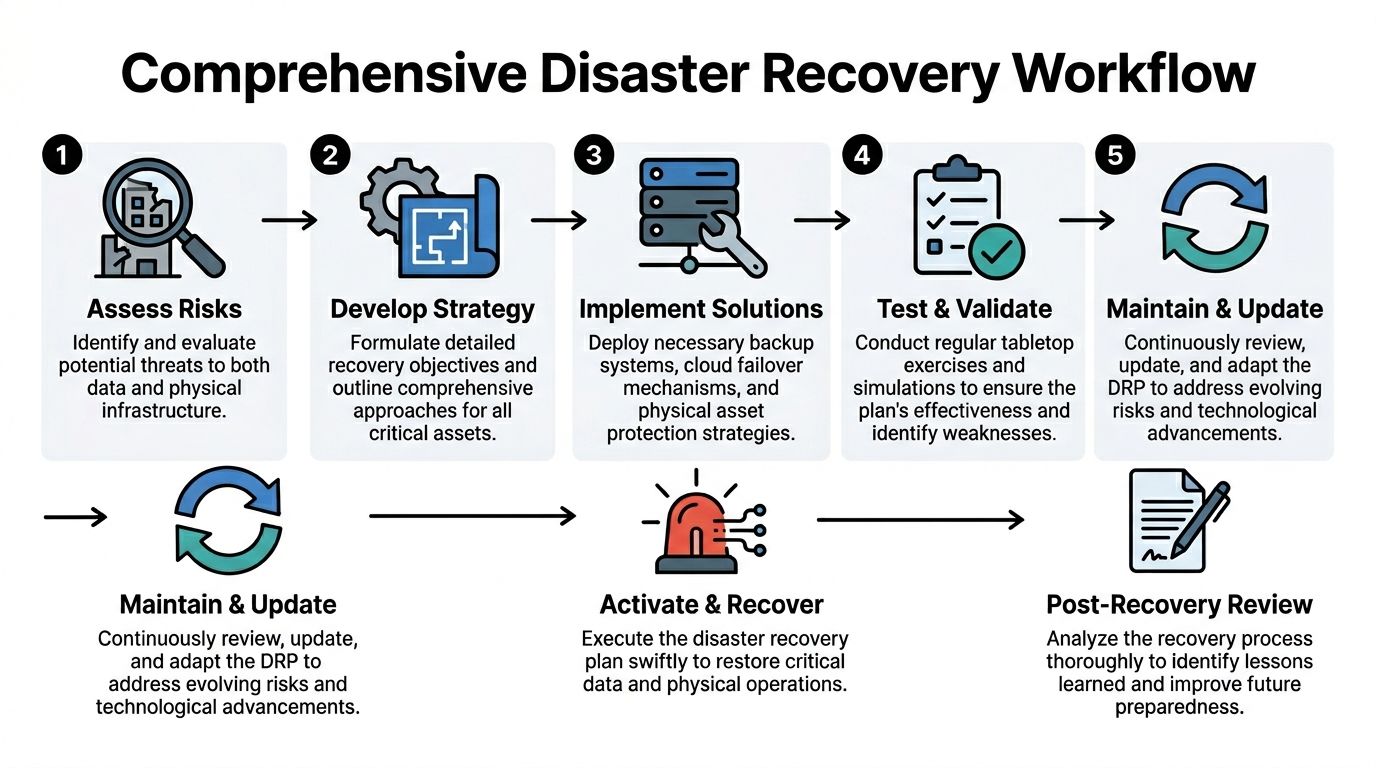
The workflow that closes the operational gap
Use a seven-stage workflow that treats data recovery and hardware disposition as one process.
| Stage | Operational focus | Physical asset focus |
|---|---|---|
| Assess risks | Confirm outage scope and affected functions | Identify damaged rooms, racks, endpoints, and media |
| Develop strategy | Set restore priorities and fallback methods | Decide containment, triage, and disposition paths |
| Implement solutions | Restore systems, connectivity, and access | Tag, stage, and secure affected devices |
| Test and validate | Confirm services work as intended | Confirm custody controls and documentation flow |
| Maintain and update | Revise procedures and contact lists | Update inventory and vendor instructions |
| Activate and recover | Execute the plan during the event | Move assets through approved wipe or shred channels |
| Post-recovery review | Capture lessons learned | Reconcile certificates and environmental reporting |
The sequence matters. If teams restore systems first and sort hardware later, they create a second incident. Lost media, undocumented drive swaps, and untracked staging areas cause audit trouble long after production is back online.
The first hours decide whether the process holds
After water, smoke, impact, theft, or uncontrolled access, start with control. Do not let damaged devices circulate through normal help desk or facilities cleanup channels.
The first three actions are straightforward:
- Stabilize the area. Restrict access, isolate unsafe power, and stop informal handling.
- Create a damage inventory. Record asset tag, serial number, assigned user, location, and visible condition.
- Assign a disposition path. Mark each item as restorable, pending technical review, evidence hold, or destroy.
That last decision is where many plans break down. A wet laptop with an encrypted drive may still be a destruction candidate if the chain of custody failed. A cracked monitor has environmental handling requirements but no data risk. A failed SAN drive often needs immediate controlled destruction, even if the application has failed over.
Recovery metrics still set the pace
RTO and RPO still drive the order of work. They should not be limited to applications and backups.
If a Tier 1 system has a four-hour recovery target, the hardware tied to that system needs the same level of urgency on the physical side. That means containment, labeling, transport approval, and destruction routing happen early, not after the technical team declares the restore complete. NIST's contingency planning guidance supports this broader view by treating equipment, media, coordination, and recovery procedures as part of incident response and system restoration planning in the same program (NIST SP 800-34 Rev. 1).
In practice, I advise clients to split the queue this way:
- Tier 1 assets: Immediate restore support, immediate custody controls
- Tier 2 assets: Restore after core operations stabilize, with documented staging
- Retired or peripheral assets affected by the incident: Hold for inventory reconciliation, then process through approved recycling or destruction channels
That approach reduces confusion under pressure and gives compliance, legal, and operations teams a shared sequence.
Tools help. Process discipline matters more.
Many companies use orchestration, ticketing, CMDB, and incident platforms to coordinate recovery steps. That is useful, especially across multiple sites or business units. If your team is reviewing process support, this roundup of tools and software for business continuity planning can help you compare options against your current stack.
Software alone does not solve the asset side. Someone still has to verify serial numbers, approve disposition, arrange secure pickup, and preserve records that can stand up to customer scrutiny, insurer questions, and regulatory review.
The last stage is where resilience becomes defensible
A DRP is not finished when replacement hardware arrives and users log back in. It is finished when every affected asset has a documented final status.
Close the incident with four records:
- Disposition record: The final outcome for each device or media item
- Chain-of-custody log: Who handled it, where it moved, and when
- Destruction or sanitization proof: The wipe, shred, or destruction record tied to that asset
- Environmental reporting: Confirmation that downstream recycling met policy and ESG commitments
For many Atlanta enterprises, this is also where disaster recovery planning connects to sustainability in a real, auditable way. Secure processing guidance for certified data destruction and media handling belongs inside the DRP, beside backup recovery steps and incident communications.
At Atlanta Green Recycling, we see the difference this makes after office floods, warehouse fires, urgent decommissions, and insurance-driven cleanouts. Companies recover faster when the plan includes secure ITAD, compliant e-waste handling, and documented downstream reporting. They also get a second benefit. The same workflow that reduces data exposure can support ESG reporting, veteran-focused community impact, and reforestation commitments instead of sending damaged equipment into an opaque disposal stream.
Recovery is complete when systems are restored, assets are accounted for, and damaged hardware no longer creates security, compliance, or environmental risk.
Testing Your Plan Tabletop Exercises for Atlanta Enterprises
It is 7:10 a.m. on a Monday in Atlanta. A burst pipe on the 18th floor has pushed water into a server closet, several employee laptops were left on docking stations over the weekend, and Facilities wants the area cleared before remediation crews arrive. The true test begins there. Can the team identify affected assets, control access, preserve evidence where needed, and route damaged hardware into an approved destruction or recovery path without slowing business restoration?
That is what tabletop exercises are for. They expose the gap between a written plan and the decisions people make under pressure.
The Federal Emergency Management Agency outlines tabletop exercises as discussion-based sessions built to validate roles, assumptions, coordination, and decision-making before an actual incident forces those choices under time pressure. For Atlanta enterprises, the useful version is not a generic cyber scenario. It is a business-specific event that combines system recovery with physical asset control, because flooded drives, failed laptops, and smoke-damaged network gear create compliance risk the moment someone starts moving them.

What a useful tabletop exercise looks like
A useful exercise is narrow enough to feel real and specific enough to force decisions.
Set a start time. Name the location. Identify the affected systems and the classes of hardware involved. Add two or three constraints that teams regularly face in Atlanta operations, such as limited building access, after-hours vendor response, or uncertainty about whether damaged media is subject to legal hold. Then require every participant to answer from the current plan, current vendor contracts, and current staffing model.
Ask participants to bring:
- Current contact lists
- Asset inventory access
- Vendor escalation information
- Communication templates
- A copy of the current DRP
During the session, stop at the points where plans often get vague. Ask who has authority to release equipment, who documents serial numbers, who approves destruction, and where compromised devices go if the normal storage room is inside the impacted area.
Atlanta scenarios worth running
Different sectors in Atlanta fail in different ways. Your exercise should reflect your buildings, regulators, customers, and equipment mix.
Hospital or clinic
A power disturbance damages diagnostic workstations and local imaging storage in one department. Clinical care shifts to another area, but the failed devices remain in place until Biomed, IT, Compliance, and Facilities agree on next steps.
Test questions:
- Who classifies the devices as hold, wipe, or shred?
- Who records media that may contain protected health information?
- Where are those devices staged before pickup?
- How does compliance verify final destruction records?
School district or university
A roof leak floods an IT room two weeks before exams. Network gear, staff laptops, and spare drives are affected, and several departments are already waiting on a scheduled surplus pickup.
What this scenario should reveal:
- Whether academic continuity and device custody are managed together
- Whether one team owns both routine surplus equipment and incident-damaged equipment
- Whether older devices queued for disposal can be kept separate from the incident stream
Data center or tech firm
A fire suppression event affects several racks and nearby storage media. Client workloads fail over, but operations also need to identify damaged assets, preserve evidence where required, and control who touches what hardware.
Questions to force clarity:
| Issue | What the team must answer |
|---|---|
| Rack-level inventory | Which assets were in the affected footprint? |
| Access control | Who can enter the area and remove equipment? |
| Evidence hold | Which assets need preservation before destruction? |
| Logistics | Who coordinates packing, transport, and serial reconciliation? |
For technical environments, a data center migration checklist for asset sequencing and custody control is a practical reference because migrations and disaster events both break down when labeling, handoff discipline, and rollback decisions are loose.
What to score after the exercise
Do not close the meeting with “good discussion” and move on. Score the exercise against execution.
Start with plain questions:
- Was ownership clear?
- Did anyone assume another team was handling damaged devices?
- Could the team identify where affected assets would physically go?
- Were communication and documentation steps explicit?
- Did the plan account for off-hours pickup and locked storage?
Then capture the harder lessons. Which approvals created delay? Which vendors were named but not reachable? Which teams could restore systems but could not account for failed hardware? Those findings matter because recovery breaks down at handoff points.
Run at least one exercise each year that includes wet hardware, failed drives, or compromised media. Otherwise, the organization is only testing system restoration. It is not testing control of the assets that can trigger privacy, contractual, and environmental exposure after the event.
Why this gives Atlanta enterprises an advantage
The companies that recover cleanly are usually not the ones with the longest plan. They are the ones that have already practiced the messy parts. Who tags the devices. Who approves pickup. Who keeps damaged assets out of general trash or informal recycling. Who provides destruction evidence that stands up to audit review.
At Atlanta Green Recycling, we see this repeatedly in office floods, facility shutdowns, and urgent cleanouts tied to insurance and remediation timelines. Enterprises that build secure ITAD and compliant e-waste handling into tabletop exercises make faster decisions during an actual incident. They also get a second benefit. The same workflow that reduces data exposure can support ESG reporting, veteran-focused community impact, and reforestation goals instead of treating damaged electronics as a disposal problem with no broader outcome.
Resilience includes uptime, custody, documentation, and responsible disposition. Tabletop exercises are where those disciplines either hold together or fail in public.
Beyond Recovery DRP as a Pillar of Corporate Responsibility
A mature disaster recovery plan protects systems. A smarter one also reflects what kind of company you are when operations are under pressure.
That matters more now because there is growing policy focus on community disaster resilience, while a meaningful gap remains in how regulated organizations such as hospitals and data centers align IT asset recovery and secure decommissioning with broader resilience goals, as discussed by Enterprise Community Partners. For Atlanta businesses, that gap creates a real opportunity. The way you handle damaged hardware during and after a disruption can support both compliance and visible ESG leadership.
Why responsible recovery belongs in ESG
A physical disaster creates a wave of forced IT decisions. Some devices return to service. Some are redeployed. Some must be destroyed. Some become e-waste immediately.
If those choices happen through ad hoc cleanup, the business absorbs risk and loses the chance to show disciplined stewardship. If they happen through a documented recovery process, the business can connect resilience to measurable governance habits:
- Governance: documented chain-of-custody, approved decision paths, and retained destruction records
- Environmental stewardship: responsible electronics recycling instead of rushed landfill-bound disposal
- Social value: mission-aligned programs that turn routine disposition into broader community benefit
Such an approach makes cause-based recovery messaging credible. “Your old tech can house a veteran and grow a forest” only works if the underlying handling is compliant, documented, and operationally sound. Otherwise it’s branding without substance.
Practical ESG uses for the DRP disposition lane
Many organizations issue sustainability reports, vendor questionnaires, or CSR updates. Disaster recovery planning can feed those efforts when physical asset handling is documented from the start.
Use the recovery process to support:
- CSR documentation: internal reports showing how retired or disaster-damaged electronics were handled responsibly
- Seasonal engagement: Earth Day, Arbor Day, and Veterans Day recycling drives tied to business continuity refresh cycles
- Employee communication: post-incident summaries that explain not just what was restored, but how equipment was securely and sustainably processed
- Partner recognition: digital badges or impact certificates that connect compliance-minded disposal to broader organizational values
LinkedIn thought leadership also works better when it starts from real operations. A company can talk about secure recovery, community support, and environmental responsibility only if it has a process strong enough to survive legal, privacy, and procurement scrutiny.
Sector-Specific DRP and ESG Alignment Checklist
| Sector | Key DRP Consideration for IT Assets | ESG/CSR Opportunity |
|—|—|
| Healthcare | Separate devices needing evidence hold from assets ready for destruction. Maintain strict custody on media with patient data. | Show responsible recovery practices that protect sensitive records while avoiding unnecessary e-waste. |
| Higher education | Inventory lab equipment, staff devices, classroom tech, and storage media by location. | Pair refresh and recovery events with campus sustainability campaigns and community collection drives. |
| Government | Document chain-of-custody and approved destruction methods for damaged endpoints and drives. | Strengthen public trust through transparent, compliance-minded recovery workflows. |
| Data centers | Tie decommissioning decisions to rack-level inventory and customer obligations. | Demonstrate disciplined infrastructure retirement and responsible downstream recycling. |
| Corporate offices | Prevent mixed piles of damaged, retired, and reusable devices after office incidents or relocations. | Turn office cleanouts and recovery events into visible ESG wins for employees and stakeholders. |
| Schools and districts | Secure student and staff devices quickly after leaks, outages, or relocations. | Build “Greener Atlanta” style campaigns that combine responsible disposal with civic education. |
What works and what doesn’t
What works is boring, repeatable, and document-heavy:
- named owners
- approved vendors
- secure pickup paths
- retained certificates
- internal reporting that ties operational recovery to sustainability outcomes
What doesn’t work is last-minute storytelling after an unstructured cleanup.
Community resilience gets stronger when private organizations handle their own recovery in a way that reduces data risk, controls waste, and contributes something useful back to the region.
For Atlanta businesses, that’s the bigger point. Disaster recovery planning isn’t only about getting back to normal. It’s about deciding what “responsible normal” looks like after a disruption.
Building a More Resilient Atlanta Together
Good disaster recovery planning does three jobs at once. It restores operations, controls data risk, and gives damaged hardware a secure end-of-life path.
For Atlanta organizations, the practical checklist is short:
- Map critical operations first.
- Include physical assets and disposal decisions in the DRP.
- Assign one owner for damaged-device custody and documentation.
- Test scenarios that involve wet hardware, failed drives, and emergency removals.
- Keep records that support audits, privacy reviews, and CSR reporting.
If you’re responsible for IT, facilities, compliance, or office operations, don’t wait for a building incident to discover that your plan ends at system failover. Add the physical recovery layer now.
The strongest plans protect your business and improve the city around you. When Atlanta companies recover with discipline, recycle responsibly, and connect asset disposition to broader community impact, the region becomes safer, cleaner, and more resilient.
Plan with purpose. Recover with integrity. Recycle for a cause.
Frequently Asked Questions About DRP and Asset Disposition
Does disaster recovery planning need to include damaged laptops and drives
Yes. If the plan only covers backup restoration and replacement purchasing, it leaves out the devices most likely to create a security or compliance problem after a physical incident. Damaged laptops, failed hard drives, backup media, printers, and network appliances all need a documented path for containment, inventory, and final disposition.
What should we do first with hardware exposed to water or smoke
Secure the area and stop casual handling. Then inventory affected devices before cleanup crews, movers, or internal staff start relocating equipment. The goal is to preserve custody and avoid mixing recoverable assets with media that should be destroyed.
Should damaged media be wiped or physically shredded
That depends on the condition of the media and your internal requirements. If a device can’t be processed through an approved sanitization workflow, physical destruction is the cleaner path. The key is that the decision should exist in your DRP, not get invented during the incident.
Who should own asset disposition during a disaster
One named person or one named function should own it. In some organizations that’s an IT asset manager. In others it’s an infrastructure lead working with compliance and procurement. What matters is clear authority over quarantine, vendor coordination, records, and final reconciliation.
How often should we test the asset disposition part of the plan
Test it whenever you test the rest of the disaster recovery process. If your exercise restores applications but never asks who secures damaged drives or where failed equipment goes, you haven’t tested the full plan.
Can disaster recovery support CSR and ESG reporting
Yes, if the process is documented. Responsible electronics recycling, chain-of-custody records, destruction certificates, and mission-driven disposition programs can all support internal ESG, procurement, and stakeholder reporting. The documentation has to come from real operations, not marketing retrofits.
What should we ask a recycling or ITAD partner before adding them to our DRP
Ask how they handle emergency pickups, chain-of-custody, serial reconciliation, onsite versus offsite destruction options, and downstream documentation. Also ask how they coordinate with facilities teams during access restrictions or site damage. A vendor that only handles routine cleanouts may not be ready for disaster conditions.
Atlanta organizations that want disaster recovery planning to cover the full lifecycle of compromised IT assets can work with Atlanta Green Recycling for secure electronics recycling, compliant data destruction, decommissioning support, and mission-driven disposition programs that turn e-waste into broader community impact through veteran aid and tree-planting initiatives.