
Disaster recovery and planning: Disaster Recovery & Planning


A lot of disaster recovery plans look complete until the day a real incident hits.
A clinic in Atlanta loses access to patient files after ransomware spreads through shared drives. A finance office in Buckhead deals with a burst pipe above a network closet. A regional company moving out of a data center discovers that the systems it must retire for recovery still hold regulated data. In each case, the first reaction is the same. Restore operations fast.
That’s necessary, but it’s not enough.
Disaster recovery and planning has to cover more than backups, failover, and cloud restore. In regulated environments, the job also includes what happens to damaged laptops, failed arrays, encrypted hard drives, legacy servers, and decommissioned networking gear. If those assets leave your control without proper sanitization, chain of custody, and documentation, the disaster keeps going. It just shifts from outage to compliance exposure.
Atlanta businesses have another layer to think about. Recovery work here often spans hospitals, campuses, office parks, warehouses, suburban branches, and facilities across multiple jurisdictions. A plan that works only inside the server room won’t hold up across the footprint of your organization.
Why Your Atlanta Business Needs a Plan Beyond Data Backup
A backup restores data. It doesn’t answer what your team does with a rack of soaked servers, a stack of dead laptops from an office shutdown, or encrypted endpoints that can’t be trusted back into production.
That gap matters most when people are under pressure. In a real incident, teams make fast decisions. They unplug systems, move equipment, call vendors, and start cleanup. If asset handling isn’t already part of the recovery plan, someone will improvise. In healthcare or finance, that’s where small operational mistakes turn into legal and reputational problems.
What the first day of a disaster looks like
Consider a common Atlanta scenario. A medical office loses systems after a building issue damages local infrastructure. Clinical staff need access to records. Leadership wants a timeline. IT starts restore work from backups and cloud platforms.
At the same time, someone has to answer practical questions:
- Which devices are recoverable: Can this server be rebuilt, or does it need secure destruction?
- Which media still contains protected data: Did that backup appliance or workstation cache regulated information?
- Who authorizes removal: Is facilities calling a general hauler, or is IT controlling disposition?
- What gets documented: Can you prove where each failed drive went and how it was sanitized?
Those questions don't sit outside disaster recovery. They are disaster recovery.
Practical rule: If a device held sensitive data before the incident, treat its post-incident handling as part of your recovery workflow, not as an afterthought.
The business stakes are hard to ignore. Approximately 25% of businesses that close due to a major disaster never reopen, according to FEMA. For over 90% of mid-sized and large enterprises, downtime costs exceed $300,000 per hour, which is why disciplined planning matters long before an incident starts (Invenio IT disaster recovery statistics).
Why backup-only thinking breaks down
Many teams still define disaster recovery too narrowly. They focus on restore points, replication, and alternate infrastructure. Those are core pieces, but they don't address the full lifecycle of equipment affected by the event.
A stronger plan connects three tracks:
- Operational recovery so critical systems return in the right order.
- Compliance control so affected assets are tracked, sanitized, or destroyed properly.
- Business continuity decisions so leaders know what to retire, replace, relocate, or document.
That broader view is one reason disciplined organizations invest in upstream planning. The same logic behind early planning to prevent commercial crises applies here. Pressure exposes every unclear ownership line and every missing procedure.
For Atlanta organizations handling relocations, consolidations, or recovery after infrastructure disruption, this gets even more important during physical transitions. Teams dealing with relocation scenarios often benefit from reviewing practical guidance on data center migration best practices because migration mistakes and disaster recovery mistakes often come from the same source. Unclear sequencing, weak documentation, and poor asset control.
Recovery now includes ESG and reputation
There’s also a business reputation angle many firms miss. Boards, clients, and procurement teams increasingly notice how organizations handle retired technology. Sending damaged equipment into an opaque disposal chain can undermine the same risk controls your recovery plan is supposed to protect.
A complete recovery strategy does more than get systems back online. It shows that your company can respond to disruption responsibly, protect regulated data to the very end of an asset’s life, and make decisions that hold up in audits, client reviews, and public scrutiny.
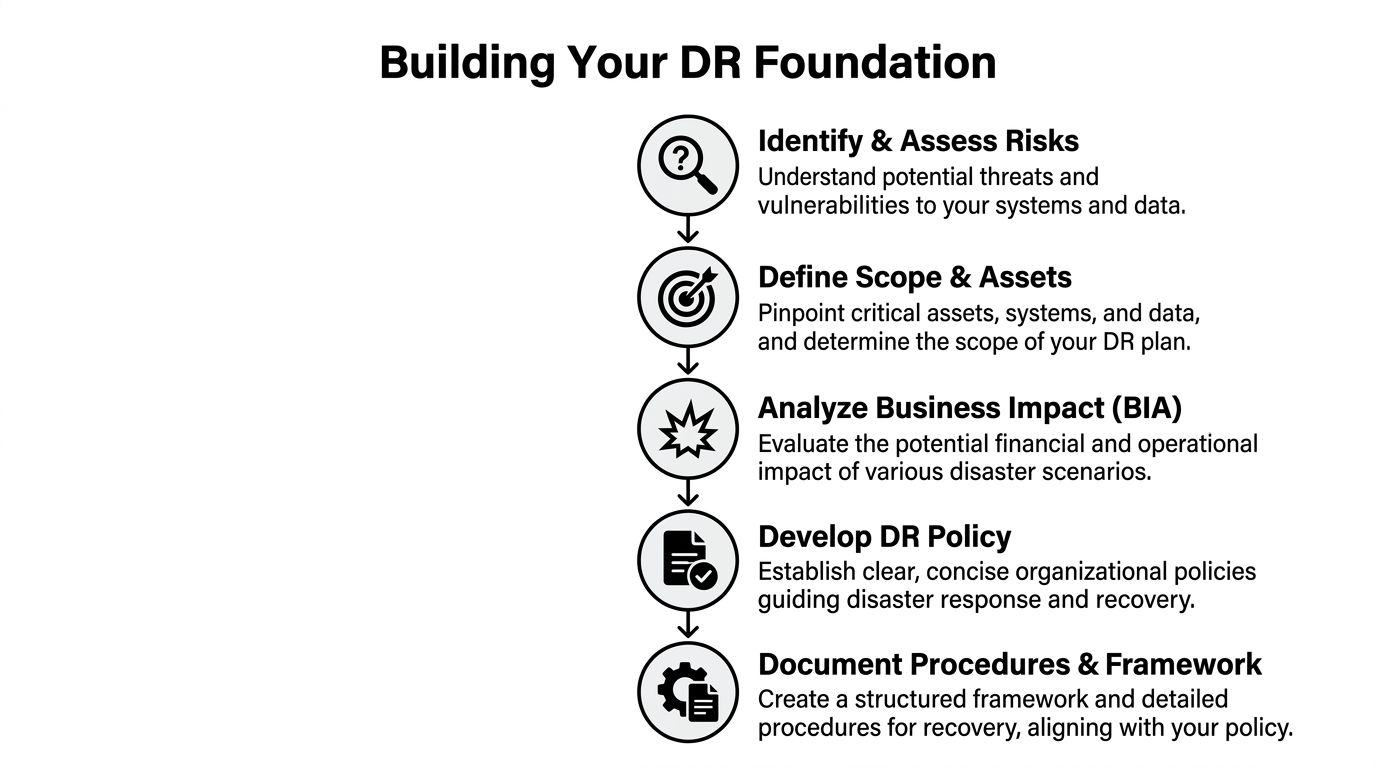
Building Your DR Foundation with Risk Assessments and Policy
You can't build a usable plan until you decide what you're protecting, what can interrupt it, and what the business can tolerate.
In Atlanta, that means looking beyond a generic list of threats. The right assessment reflects your footprint. One office in Midtown. A records room in Decatur. A data center contract in another county. Remote users across the metro. Third-party software. Legacy systems nobody wants to touch until they're the reason recovery stalls.
Start with a real risk assessment
A useful assessment is specific enough to drive action. It doesn't just say "cyberattack" or "weather event." It identifies which systems, locations, vendors, and workflows would fail first.
Work through the environment in layers:
- Facilities and power risks: Building access, localized water intrusion, cooling failures, utility issues, and branch-office outages.
- Technology risks: Ransomware, failed storage, identity platform lockout, backup corruption, and network dependency failures.
- Operational risks: Key-person dependency, undocumented procedures, after-hours escalation gaps, and vendors with vague response terms.
- Compliance risks: Devices holding protected data, insecure temporary storage during cleanup, and uncontrolled removal of failed media.
The output should be a ranked list, not a brainstorm. If your team can't tell which systems must return first, the assessment isn't finished.
Use the four pillars as your operating model
A strong policy usually becomes easier to write once leadership agrees on the framework. The cleanest one is the four pillars of disaster recovery: Preparedness, Response, Recovery, and Mitigation. The urgency is real. Less than 10% of businesses survive major cybersecurity incidents without a solid DRP, and the cloud disaster recovery market is projected to reach $23.3 billion by 2027 (Cutover on essential elements of a disaster recovery plan).
Each pillar should show up in policy language:
| Pillar | What it means in practice | Common policy mistake |
|---|---|---|
| Preparedness | Inventories, recovery roles, backup strategy, vendor contacts, training | Treating preparedness as an IT-only responsibility |
| Response | Incident declaration, escalation, communications, containment actions | No authority defined for urgent decisions |
| Recovery | Sequenced restoration of systems, validation, user access restoration | Recovering in technical order instead of business order |
| Mitigation | Post-incident fixes, architecture changes, process corrections | Closing tickets without changing the underlying weakness |
Set RTO and RPO before you write procedures
Two terms shape the entire plan.
Recovery Time Objective (RTO) is the maximum tolerable downtime for a system or process.
Recovery Point Objective (RPO) is the maximum acceptable data loss.
Those sound abstract until leaders have to choose. Can payroll be down until tomorrow? Can a patient scheduling system lose several hours of data? Can a trading support workflow run manually for part of a day? These are business decisions first, technical decisions second.
The best DR plans don't ask IT to recover everything at once. They force the business to decide what matters most.
A board-approved policy should state who sets RTO and RPO, who signs off on exceptions, and how those targets change when systems change. If an application becomes customer-facing or falls under stricter retention rules, the policy should trigger review.
Write policy that people can use
Many disaster recovery policies fail because they read like compliance artifacts. They define intent but not authority.
Your policy should answer these points plainly:
- Who can declare a disaster
- Who owns technical recovery
- Who owns communications
- Who controls affected equipment and media
- What documentation is mandatory
- When third parties may be engaged
- How exceptions are approved
For organizations tightening resilience and governance, broader operational controls often overlap with DR discipline. That's one reason teams revisiting continuity standards also review adjacent practices around risk reduction.
Make the policy durable
A durable policy leaves room for change without becoming vague. It should stay stable while procedures underneath it evolve.
Use appendices for contacts, vendor lists, and system-specific steps. Keep the policy itself focused on rules, roles, and thresholds. That way the plan won't become obsolete every time infrastructure changes.
Creating Your Actionable Recovery and Asset Playbook
Once policy is set, your team needs a playbook that works under stress.
Many organizations, at this point, discover that their "plan" is really a collection of backup settings, old contacts, and a few runbooks. A real playbook maps systems to owners, dependencies, recovery order, communications, and end-of-life decisions for hardware that may not return to service.

Inventory assets like you expect to lose them
An asset inventory used for finance tracking isn't enough. Recovery needs a more practical inventory.
For each critical asset, document:
- Business function: What service does this system support?
- Owner: Which person can approve restore, replacement, or retirement?
- Dependencies: Identity systems, databases, network paths, cloud connectors, third-party tools.
- Data sensitivity: Regulated, confidential, internal-only, or low-sensitivity.
- Recovery method: Restore, failover, rebuild, replace, or retire.
- Disposition path: Reuse, sanitization, physical destruction, or secure recycling.
That last field is usually missing. It shouldn't be.
A failed storage array from a healthcare office and an obsolete switch from a branch closure don't need the same handling. Add disposition rules now, not when the loading dock is full of equipment and nobody can remember what each drive contains.
Assign recovery objectives by business function
Not every workload deserves the same urgency.
A practical playbook groups systems by operational impact. The point isn't to create bureaucracy. The point is to avoid spending premium effort on systems that can wait while high-impact services sit idle.
Use a simple tiering model:
| Tier | Typical examples | Recovery expectation |
|---|---|---|
| Mission-critical | EHR access, payment systems, identity, core file services | Restore first with the tightest recovery target |
| Important | Email, collaboration platforms, reporting systems | Restore quickly after core platforms stabilize |
| Deferred | Test environments, archive systems, nonessential internal tools | Recover later or rebuild as needed |
This is also where self-reliance matters. Federal mitigation funding often favors wealthier communities because grant applications are complex, which means businesses can't assume prompt or equitable public aid will support recovery (Wharton on improving disaster recovery).
That has a direct planning consequence. Your playbook should assume your organization is responsible for early execution. If outside help arrives, that's useful. It shouldn't be the foundation.
Build the playbook around decisions, not documents
A good playbook helps teams make decisions in sequence.
Use sections that mirror the flow of an incident:
- Declare and classify the event
- Stabilize affected systems
- Trigger communications
- Restore priority services
- Quarantine or remove affected hardware
- Validate data integrity
- Document retirement, destruction, or redeployment
- Review and update
If your runbook tells engineers how to restore a server but says nothing about who approves destruction of a failed encrypted drive, the playbook is incomplete.
Include partners before the incident
Corporate clients often pick recovery vendors too late. During a crisis, every provider promises speed. Very few can also meet chain-of-custody, regulated data handling, local logistics, and documentation requirements in a disciplined way.
Prequalify partners by asking for:
- Sanitization methods: Can they support data wiping standards and physical destruction where required?
- Documentation: What proof do they issue after pickup, destruction, or recycling?
- Logistics model: Do they control transport or subcontract it?
- Escalation access: Who answers after-hours calls during a real event?
- Regional familiarity: Can they handle multi-site pickups across metro Atlanta without confusion over site control?
At this stage, disaster recovery and planning becomes operational rather than aspirational. The organizations that recover cleanly usually don't have better intentions. They have better playbooks.
Managing Secure IT Asset Disposition During a Crisis
The most overlooked part of recovery is often sitting in a hallway, a storage cage, or the back of a truck.
After a cyber incident, flood, fire, office shutdown, or infrastructure replacement, companies are left with physical devices that still contain data. Some are damaged. Some are obsolete. Some are no longer trustworthy enough to reconnect. If your plan doesn't define how to secure, sanitize, transport, and document those assets, you're leaving a compliance gap right in the middle of your recovery process.
Treat damaged hardware as sensitive until proven otherwise
Teams often make a dangerous assumption after an outage. If equipment no longer works, they treat it as scrap.
That's the wrong standard.
A failed laptop may still hold patient information. A dead SAN shelf may still contain readable media. A server retired after ransomware may still be under legal hold or internal investigation. Physical condition and data condition are not the same thing.
Use a controlled triage process:
- Segregate affected devices from ordinary surplus equipment.
- Tag each asset with origin site, owner, date, and incident reference.
- Restrict handling so facilities, cleaning crews, or movers don't remove equipment informally.
- Choose disposition based on risk, not convenience.
Choose the right destruction method
Different assets require different handling. The method should reflect whether the media is functional, whether data must be preserved temporarily for investigation, and what your compliance team will accept.
| Method | Description | Best For | Compliance Level (HIPAA/DoD) |
|---|---|---|---|
| Software data wiping | Logical sanitization of functional drives using approved overwrite processes | Reusable hard drives and devices that still operate properly | Strong option when documented and validated for regulated environments |
| DoD-standard sanitization | Data wiping aligned with DoD 5220.22-M expectations for media sanitization workflows | Organizations that require stricter documented wiping procedures before reuse or recycling | Suitable where DoD-aligned handling is required and documentation is maintained |
| Physical shredding | Destruction of media so it can't be reused | Failed, obsolete, or high-risk drives and storage media | Strong option for HIPAA-sensitive media and drives that can't be reliably wiped |
| Secure decommissioning and recycling | Controlled removal, tracking, and downstream recycling after sanitization or destruction | Servers, network gear, endpoints, and mixed IT loads after an incident | Works when paired with chain of custody and destruction documentation |
A general office cleanout vendor won't manage this correctly. You need a provider that understands data-bearing assets, not just electronics hauling.
Logistics in Atlanta are more complicated than they look
Metro Atlanta recovery work often crosses city limits, counties, campuses, medical offices, branch locations, and industrial sites. That matters because site access, emergency coordination, and pickup authority can vary widely.
This gets harder in areas near jurisdictions with limited local government structure. One-third of U.S. residents live in unincorporated areas without a local municipal government, creating barriers in regional coordination and disaster communication (University of Colorado Natural Hazards Center on equitable recovery for unincorporated areas). For business operations around greater Atlanta, that means your recovery partner needs to understand local logistics, site control, and who can authorize removal at each location.
A secure chain of custody doesn't start when the truck leaves. It starts when someone decides a device will be removed from the site.
Use chain of custody like a compliance control
For healthcare, finance, education, and government clients, documentation is part of the service, not paperwork after the fact.
Your plan should require:
- Asset-level tracking: Serial numbers, device types, source locations, and custody handoff records.
- Authorized release procedures: Named approvers for removal from branches, clinics, or data rooms.
- Certificates and records: Proof of sanitization or destruction for audit files.
- Exception handling: A defined process when labels are missing, drives are inaccessible, or ownership is unclear.
If you're building or refreshing your procedures, a well-structured business continuity plan template can help teams organize the continuity side of the workflow so asset handling isn't left outside the main response process.
Operationally, many Atlanta organizations also need a formal workflow for IT asset disposal because the disposition phase often spans IT, compliance, legal, security, and facilities. If no one owns that workflow in advance, the process breaks down when time pressure peaks.
Why this phase can also support ESG and reputation
There’s a business upside to doing this right.
When retired assets are processed through a documented, sustainability-focused program, recovery work doesn't have to end as a pure loss event. It can support broader environmental and social reporting. For Atlanta companies with active CSR or ESG commitments, secure electronics recycling can align with cause-based campaigns, employee engagement, and local community partnerships.
That may mean framing post-project recycling around veteran support, tree-planting initiatives, seasonal recycling drives, or internal "recycle for a cause" programs. It may also mean issuing sustainability-friendly documentation that procurement, marketing, or ESG teams can use later. The key is sequence. Security and compliance come first. Social impact only counts if chain of custody and destruction controls are already solid.
Testing Your Plan with Drills and Tabletop Exercises
The fastest way to expose a weak disaster recovery plan is to test it with people who weren't in the room when it was written.
A lot of organizations still treat testing as optional because the plan looks thorough on paper. That's a mistake. 71% of organizations admit to skipping full failover testing, and 62% neglect to regularly test backup restorations, which leaves plans outdated when a real event occurs (Rcor disaster recovery statistics).

Tabletop exercises reveal coordination failures
Start with a tabletop before you run a technical drill. It's cheaper, faster, and very good at uncovering confusion.
Use a realistic scenario. Ransomware in a healthcare group. Water damage in a branch office. A regional power event that knocks out a key facility while employees are remote. Then walk through the first hours in order.
Listen for these failure points:
- Unclear authority: Nobody knows who can declare the event.
- Bad contact data: Critical numbers are outdated or tied to a dead system.
- Broken sequencing: Teams try to restore dependent applications before core services.
- Communication gaps: Compliance, legal, or operations are informed too late.
- Asset handling blind spots: Everyone discusses restore. Nobody discusses failed devices leaving the site.
A tabletop should produce decisions and revisions, not a sign-in sheet.
Technical drills should prove recovery, not just activity
A test isn't successful because people worked hard. It's successful when the environment meets the target state you defined.
That means your team should validate:
| Test type | What it proves | Common mistake |
|---|---|---|
| Backup restoration test | Data can be restored and used | Verifying job success but not file integrity or application usability |
| Partial failover drill | Specific systems can move to an alternate environment | Testing one component in isolation without dependent services |
| Full failover exercise | End-to-end recovery under realistic pressure | Scheduling a drill so carefully that nothing unexpected can happen |
| Communication drill | Stakeholders get the right message at the right time | Forgetting vendors, executives, or affected business units |
An untested recovery plan is usually a collection of assumptions with formatting.
Include documentation and disposition in every drill
Many teams still stop short here. They validate restore but never simulate the downstream handling of affected equipment.
Add these tasks to at least one exercise cycle:
- Generate a sample asset quarantine list
- Assign approval for equipment removal
- Complete mock chain-of-custody records
- Review a sample destruction certificate
- Confirm audit storage for those records
For regulated industries, even a basic rehearsal helps teams connect technical recovery to defensible documentation. A formal certificate of destruction form also helps organizations understand what evidence they should expect when media is destroyed after an incident.
Run post-test reviews that lead to change
The after-action review should be blunt. Don't ask whether the exercise was useful. Ask where the plan failed.
Capture:
- Missed dependencies
- Role confusion
- Timing gaps
- Vendor issues
- Documentation gaps
- Policy conflicts
- Asset disposition omissions
Then update the plan quickly. Testing only works when revisions follow. Otherwise, you're just rehearsing the same mistake.
Frequently Asked Questions About Disaster Recovery Planning
Leaders usually ask the same questions once the framework is in place. The answers matter because they shape budget, scope, and ownership.
What's the difference between a DRP and a BCP
A Disaster Recovery Plan focuses on restoring IT systems, applications, infrastructure, and data after a disruption.
A Business Continuity Plan is broader. It covers how the organization keeps operating while recovery is underway. That includes staffing workarounds, communications, temporary processes, alternate locations, vendor contingencies, and customer response.
If you're in healthcare or finance, the two should connect tightly. The DRP gets systems back. The BCP keeps the business functional until they are.
How should we budget for disaster recovery and planning
Start with business impact, not product shopping.
Budget decisions usually fall into these buckets:
- Core recovery capability: Backups, replication, alternate environments, identity resilience, and recovery tooling.
- People and process: Plan maintenance, tabletop exercises, technical drills, and policy governance.
- Third-party support: Specialized incident response, recovery orchestration, and secure handling of affected hardware.
- Documentation and compliance: Recordkeeping, audit support, and proof of destruction or sanitization.
The common budgeting mistake is buying technical tools while underfunding testing and execution. Most failures happen in process gaps, ownership gaps, and undocumented dependencies.
How much of our strategy should rely on the cloud
Cloud services can strengthen resilience, but they don't remove the need for planning.
Cloud-based recovery still requires:
- clear RTO and RPO targets
- dependency mapping
- tested failover and restoration steps
- communication procedures
- asset retirement procedures for on-premises equipment you replace or abandon during recovery
Cloud is part of the answer. It isn't the answer by itself.
How often should we test and update the plan
Test on a recurring schedule and update whenever material changes occur.
Material changes include office moves, mergers, platform replacements, new regulated workloads, major vendor changes, and infrastructure redesigns. A plan that isn't updated after those changes becomes unreliable fast.
A simple cadence many teams can sustain includes regular tabletop sessions, scheduled restoration tests, and a formal review after any meaningful operational or architecture change.
Who should own the plan
IT usually owns technical recovery, but not the whole plan.
A workable governance model includes:
| Role | Primary responsibility |
|---|---|
| Executive sponsor | Sets risk tolerance and approves major investments |
| IT leadership | Owns technical recovery design and execution |
| Security and compliance | Defines control requirements and documentation expectations |
| Business unit leaders | Prioritize services and approve recovery targets |
| Facilities and operations | Coordinate site access, space, utilities, and physical handling |
| Legal and communications | Manage notifications, contractual exposure, and external messaging |
If only IT owns the document, you'll usually end up with a technically detailed plan that doesn't hold up operationally.
Where does IT asset disposition fit in
It belongs inside the recovery lifecycle, not after it.
Any plan for regulated businesses should address:
- quarantine of affected hardware
- approval workflow for removal
- sanitization or destruction decisions
- chain of custody
- recycling or final disposition
- document retention
Teams that want a plain-language overview often start with a clear explanation of what is IT asset disposition because it helps nontechnical stakeholders understand why retired equipment still creates risk after a disruption.
What usually goes wrong first during a real event
Not backups. Not storage. Not even the runbooks.
The first problems are usually human and procedural. Outdated contacts. Conflicting authority. Poor recovery order. Unclear status reporting. Missing vendor coordination. No process for handling failed devices. The technical problem starts the incident. The organizational problem makes it worse.
Can disaster recovery support ESG and CSR goals without weakening compliance
Yes, if you keep the order right.
Security, privacy, and documentation come first. Once those controls are in place, end-of-life IT handling can support broader sustainability and community goals. For Atlanta organizations, that may include responsible electronics recycling, cause-based messaging, employee drives tied to Earth Day or Veterans Day, and sustainability reporting that reflects both environmental stewardship and local community impact.
Done correctly, that doesn't dilute disaster recovery. It strengthens the business case for doing it thoroughly.
Atlanta businesses don't need another generic DR checklist. They need a plan that covers restoration, compliance, logistics, and end-of-life asset control in one workflow. If you're building a stronger recovery program for a hospital, financial firm, school, government office, or data center in the metro area, Atlanta Green Recycling can support the secure disposition side of that strategy with compliant electronics recycling, data destruction, pickup logistics, and documentation suited to regulated environments.