
How Do You Delete a Hard Drive Securely? A Guide for Atlanta Businesses

To truly wipe a hard drive clean, you have to do more than just hit "delete." The only ways to guarantee data is gone for good are to overwrite it with specialized software, use a cryptographic erase, degauss it with powerful magnets, or physically shred the device to pieces.
Simply dragging files to the trash only removes the pointer to that data. The information itself sticks around, easily recoverable until something new is written over it. This is exactly why a certified, professional process is non-negotiable for secure data removal, especially when that process can also benefit your community.
Why Hitting Delete Is Not Enough
When your Atlanta business upgrades its technology, the easiest path always seems to be dragging old files into the recycle bin. It feels final, but it's a massive security risk. Deleting a file doesn't actually remove the data from the hard drive; it just tells the operating system that the space is now available to be used.
Until new information happens to overwrite those specific sectors, your original files are still there, just waiting to be recovered with widely available software. This lingering data, often called "data remanence," can include everything from confidential client lists and financial reports to proprietary trade secrets.
The Real-World Consequences of Improper Deletion
Picture this: an Atlanta-based financial services firm gets rid of old office computers through a standard municipal pickup. They think the drives were wiped because their IT intern reformatted them. A few months later, a client calls in a panic—their personal financial data has shown up online.
An investigation traces the leak back to those old computers. The drives were bought at a surplus auction, and the new owner easily recovered all the "deleted" information. Now the firm is facing a costly data breach, crippling regulatory fines, and a reputation that's been shattered.
This isn't just some far-fetched story; it's a very real risk for any business that handles sensitive information. It's why knowing how to prevent data loss in the first place is so critical, and it directly ties into the need for secure hard drive destruction when equipment is retired.
Simply put, if your data falls into the wrong hands, the cost of remediation, legal fees, and lost customer trust can be catastrophic. The initial convenience of hitting delete is not worth the long-term risk.
The Problem of Persistence
Data sticks to storage media with surprising stubbornness. Even methods that seem thorough, like reformatting a drive, often aren't enough to stop a determined data thief. Other techniques, like using magnets, are frequently misunderstood and improperly applied. We dive deep into the complexities of erasing hard drives with magnets and its actual effectiveness in another guide.
Ultimately, professional data destruction is the only guaranteed way to ensure your company's information is gone forever. This isn't just a best practice—it's an essential layer of security for protecting your business, your clients, and your peace of mind.
So, you understand that just hitting 'delete' on a file doesn't actually delete it. That's a huge first step. But what's next? How do you actually make sure the data on an old hard drive is gone for good?
The answer isn't a one-size-fits-all solution. The best method really boils down to what kind of drive you have (an old spinning HDD or a modern SSD), your company's security policies, and whether you want to reuse the hardware or just get rid of it.
Getting this choice right is everything. It’s the difference between having certified, audit-proof data sanitization and just hoping for the best. Let's walk through the four main ways to handle this so you can make the right call for your organization.
Software Wiping for Data Sanitization
This is probably what most people think of first. Software wiping uses special programs to overwrite every single part of a hard drive with random data—usually patterns of zeros and ones. Instead of just removing the signpost that points to your data, it completely paves over the road.
This approach is perfect if you plan to reuse, donate, or resell your old hard drives. The hardware stays perfectly functional, preserving its value, but the sensitive data is history. A big plus is that most professional wiping tools can spit out a report afterward, giving you a paper trail for your records.
The catch? It takes time. A lot of time. Wiping a single high-capacity drive can take hours, which just isn't practical if you're decommissioning an entire office worth of computers. You also have to manage the process closely to make sure every wipe completes successfully without any errors.
Cryptographic Erase for Self-Encrypting Drives
Here’s a much, much faster way to do it, but it only works on specific hardware. Cryptographic erase (CE) is a feature built into most modern self-encrypting drives (SEDs), which are standard in today's business laptops and data center equipment. These drives are always encrypting data in the background using a secret key stored on the drive itself, called the media encryption key (MEK).
To wipe the drive, you just send a simple command that instantly deletes that key. Poof. Without the MEK, all the data on the drive is just a useless, encrypted mess.
- Speed: It’s almost instantaneous. We're talking seconds, not hours.
- Security: This method is considered a top-tier, highly secure form of data purging by organizations like NIST.
- Limitation: The big one—it only works if the drive is a self-encrypting drive.
If your hardware supports it, CE is a game-changer for quickly sanitizing drives. But you absolutely have to verify that your devices are SEDs first.
Degaussing and Physical Destruction
Sometimes, a drive is at the end of its life or held data so sensitive that you can't take any chances. When you need a 100% guarantee that the data is gone forever, it's time to destroy the device itself.
Degaussing is one way to do that for traditional spinning hard drives (HDDs). A degausser blasts the drive with an incredibly powerful magnetic field—often exceeding 10,000 gauss—that completely scrambles the magnetic platters where data is stored. It’s fast, and it permanently destroys not just the data but the drive's firmware, too.
But here’s a critical point: degaussing does absolutely nothing to Solid-State Drives (SSDs). SSDs use flash memory, not magnetic storage, so a giant magnet has zero effect on them.
The only method that is truly foolproof for every type of drive is physical destruction. This means shredding, crushing, or completely disintegrating the drive into tiny pieces. Industrial-grade shredders can turn a hard drive into metal fragments smaller than 25mm, making it physically impossible to reassemble the platters or memory chips.
What works for one type of media can be useless on another. While degaussing is a great solution for old HDDs, only physical destruction gives you that universal, zero-chance-of-recovery outcome for both HDDs and SSDs.
For Atlanta businesses that need absolute, verifiable proof of destruction, looking into secure hard drive shredding is the most direct path to peace of mind. It removes all doubt and provides the compliant, auditable documentation you need.
Data Destruction Methods Compared
Choosing the right data destruction method can feel complex. This table breaks down the options to help you align the right technique with your specific needs, whether that's reusing hardware or ensuring maximum security for end-of-life drives.
| Method | Best For | Works on HDD? | Works on SSD? | Drive Reusable? | Security Level |
|---|---|---|---|---|---|
| Software Wiping | Reusing or donating drives with low-risk data | Yes | Yes | Yes | High |
| Cryptographic Erase | Rapidly sanitizing modern Self-Encrypting Drives | Yes (if SED) | Yes (if SED) | Yes | Very High |
| Degaussing | Quick, secure disposal of end-of-life HDDs | Yes | No | No | Very High |
| Physical Destruction | Highest security needs; end-of-life for all drives | Yes | Yes | No | Absolute |
Ultimately, the goal is to make a conscious choice based on the data's sensitivity and the hardware's next destination. For reusable assets with low-risk data, a software-based method might be perfect. But for retired drives that held confidential information, nothing beats the finality of physical destruction.
Navigating Data Destruction Standards and Compliance
Picking a destruction method is only half the battle. For Atlanta businesses, especially in sectors like healthcare, finance, or government contracting, you must ensure your process meets regulatory requirements. Compliance isn't just a good idea—it’s the law.
Understanding the official language of data destruction is key. Without a documented, compliant process, your business is wide open to risk. Imagine a single, improperly discarded hard drive with patient data on it. That one mistake could trigger severe HIPAA violations, leading to fines that can cripple a small medical practice or even a hospital.
This flowchart gives you a quick visual for that initial decision.
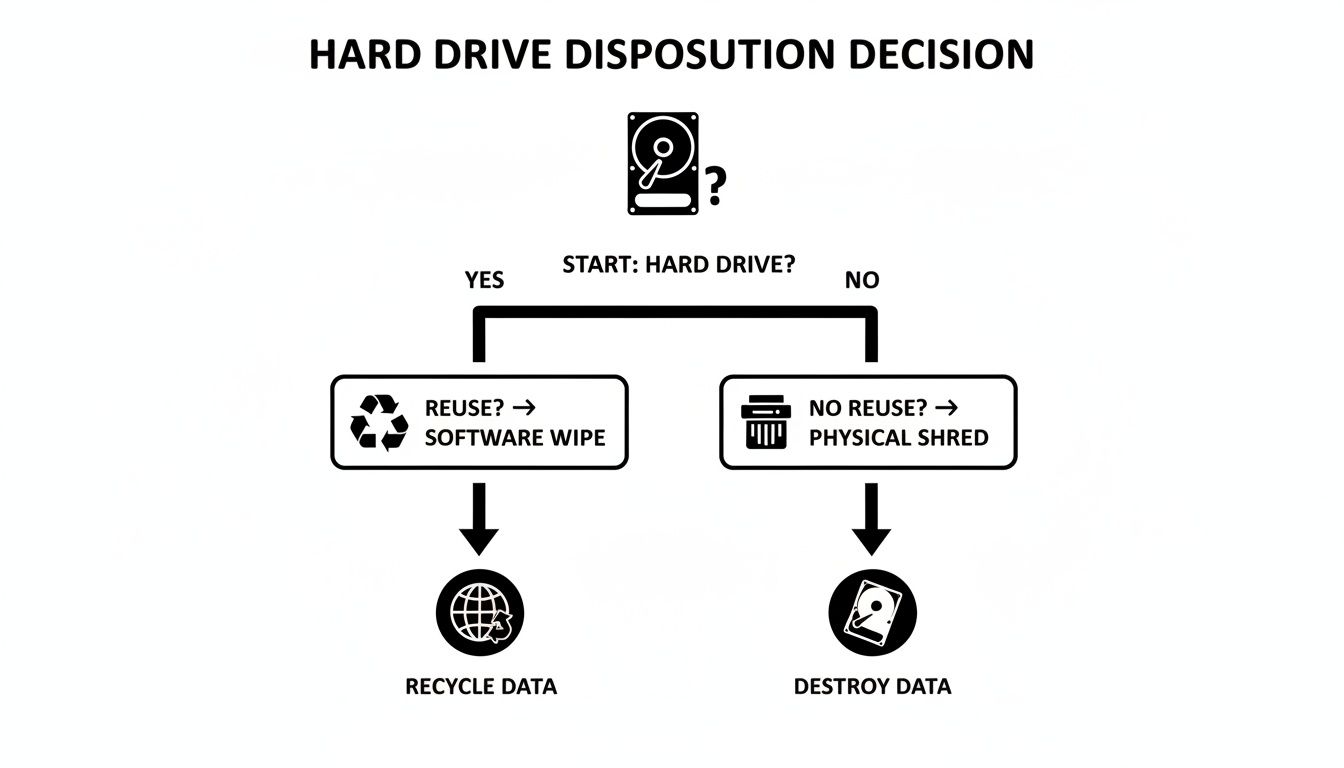
Ultimately, the choice comes down to one question: will the drive be reused or retired for good? That answer points you down the right path for data destruction.
The Gold Standard: NIST SP 800-88
Today, the go-to framework for data destruction in the U.S. is the National Institute of Standards and Technology (NIST) Special Publication 800-88. It's a more modern approach than older, rigid standards like the DoD 5220.22-M because it focuses on the outcome—verifiable data sanitization—instead of just prescribing a set number of overwriting passes.
NIST breaks down media sanitization into three distinct levels:
- Clear: This involves using software-based techniques to overwrite data. Think of a standard drive wipe or a factory reset. This method is fine for low-risk situations where the device is staying within your organization.
- Purge: Stepping up the security, this level uses physical or logical methods that make data recovery infeasible, even with advanced lab techniques. Degaussing and cryptographic erasure are great examples.
- Destroy: This is the end of the line. It renders the media completely unusable through methods like shredding, melting, or disintegration. When you need absolute, irreversible proof that data is gone, this is your only option.
For a closer look at these techniques, our guide on what data sanitization entails breaks it all down. Choosing the right level is a critical, risk-based decision.
Why Compliance Demands Verification
It’s not enough to just say you destroyed the data. You need ironclad proof. This is where a Certificate of Destruction (CoD) becomes your most important document. This legal audit trail confirms your data was destroyed according to recognized standards, detailing everything from the method used to the specific serial numbers of the destroyed assets. This isn't just paperwork; it's your defense in an audit.
Partnering with a certified Atlanta recycler who understands NIST guidelines is a core part of a smart risk management strategy. They provide the defensible documentation you need to satisfy auditors and position your data security as an easy ESG win for your corporate responsibility goals.
To get a broader sense of how data disposal fits into the bigger picture of frameworks like SOC 2 and ISO 27001, you can learn more about cybersecurity compliance services. A certified partner handles the complexities of how you delete a hard drive, letting you focus on your business, confident that your data obligations are fully met.
Onsite Versus Offsite Destruction: Which Is Best for You?

Once you've figured out how to destroy your hard drives, the next big question is where to do it. This choice really boils down to two paths: destroying the drives right at your location (onsite) or having them securely transported to a specialized facility for destruction (offsite). There’s no single right answer—it all depends on your company's security policies, budget, and day-to-day operations.
For many, onsite destruction offers the ultimate level of assurance. A mobile shredding truck pulls up to your Atlanta office, and you can physically watch every single hard drive get fed into the shredder. It’s that unbroken chain of custody that makes it the go-to choice for organizations handling incredibly sensitive data.
Think about a law firm with confidential case files or a healthcare provider protecting patient records under HIPAA. They simply can't risk even a tiny chance of a data breach while drives are in transit. Being able to witness the process from start to finish provides undeniable peace of mind and creates an airtight audit trail.
The Case for Onsite Destruction
The main draw for onsite service is immediate, verifiable security. There’s zero doubt about the outcome because you see it happen with your own eyes. This is absolutely critical for meeting tough internal security policies or regulatory mandates that demand a strict chain of custody.
- Maximum Security: The drives never leave your property, which completely eliminates any risk associated with transportation.
- Immediate Verification: You witness the destruction in real-time and often receive a Certificate of Destruction on the spot.
- Compliance Peace of Mind: It's the ideal solution for industries like healthcare, finance, and legal, where proving due diligence isn't just a good idea—it's a requirement.
If your business needs this kind of direct, visual confirmation, looking into Atlanta onsite hard drive shredding is your best bet. It’s the most straightforward way to handle compliance and security right at your doorstep.
The Efficiency of Offsite Destruction
While onsite provides maximum visibility, offsite destruction is often the more practical and cost-effective route, particularly for large-scale projects. In this scenario, a certified vendor picks up your IT assets in secure, locked containers and transports them to their facility for destruction.
Imagine a major data center decommissioning or a university refreshing hundreds of computers across campus. The logistics of shredding thousands of drives onsite could seriously disrupt operations. Offsite services streamline the whole thing by taking care of the process efficiently behind the scenes.
A reputable partner will maintain a strict chain of custody every step of the way, using GPS-tracked vehicles, secure containers, and 24/7 facility surveillance. You still get a detailed Certificate of Destruction with serialized reporting, ensuring all your audit requirements are met.
Offsite is a great choice for businesses that trust their certified partner's security protocols and need to balance security with operational efficiency and budget. You get the same compliant result without having to personally oversee the physical destruction process.
Ultimately, the decision comes down to balancing your risk tolerance with logistics. For the absolute highest-stakes data, onsite is unbeatable. But for larger volumes where a trusted, documented process is sufficient, offsite delivers secure, efficient, and cost-effective results.
The Final Step: Verifying Destruction with a Certificate
Once the shredder grinds to a halt or the degausser powers down, you might think the job is done. But for any business, there's one last, absolutely critical step: getting undeniable proof that your data is gone for good.
This proof comes in the form of a Certificate of Destruction (CoD). This isn't just a receipt; it's a legal document that transforms the service you paid for into a defensible, auditable event. Without it, you’re essentially left with just a vendor's handshake and a promise. A proper CoD is your shield in an audit and your proof of due diligence, creating an unbroken chain of custody from the moment the drives leave your sight to their final disposition.
What to Look for in a Legitimate CoD
Not all certificates are created equal, and a flimsy one won't stand up to scrutiny. Think of a CoD as the official record of your drive's end-of-life—every key detail has to be there and be accurate.
A comprehensive certificate should always include:
- Unique Serial Numbers: A detailed inventory listing every single hard drive that was destroyed, identified by its unique serial number. No exceptions.
- Date and Location of Destruction: The exact date and physical address where the destruction happened. This is crucial for both onsite and offsite services.
- Method of Destruction: A clear, specific description of the method used, like "physical shredding to 25mm particle size," which aligns with standards like NIST SP 800-88.
- Authorized Signatures: The signature of a representative from the certified vendor, legally attesting that the information is accurate and the service was completed as described.
This detailed audit trail is what you'll need to satisfy HIPAA, SOX, or GDPR compliance auditors. It proves your organization took every necessary step to protect its sensitive information. If you're weighing your options, you can explore services that provide certified hard drive destruction near you in Atlanta.
The High Cost of Skipping Verification
The real value of a CoD becomes painfully obvious when you compare its small cost to the catastrophic expense of a data breach. Time and again, industry reports show that a huge number of breaches trace back to improperly retired IT assets.
Many enterprises have calculated the average cost of a single data breach in the millions of dollars. When you put that staggering figure next to the minor per-drive cost of certified destruction, the decision is a no-brainer.
The question isn't whether you can afford certified destruction; it's whether you can afford not to. A single improperly discarded drive could lead to fines, lawsuits, and reputational damage that far exceed the cost of an entire IT asset disposition project.
A Certificate of Destruction officially closes the loop on your data security responsibilities. It’s the final handshake that confirms the job was done right, protecting your business from future liability and giving you the concrete evidence needed to sail through any compliance audit. Ultimately, it's about peace of mind.
Turn Your E-Waste Into a Force for Good

Knowing how to securely delete a hard drive is an absolute must in any IT asset management plan. But the story doesn't have to end with a shredded piece of metal. What if that final, responsible step could also become a powerful tool for your company's social responsibility goals? At Green Atlanta, we believe in recycling that restores lives and landscapes.
That’s where recycling with a purpose comes into play. Instead of just getting rid of old equipment, your company can turn those retired assets into something that creates a dual impact. Imagine a process where your e-waste directly helps local Atlanta veterans and contributes to critical reforestation efforts at the same time.
More Than Recycling—It's a Mission
This approach completely changes the conversation around e-waste. It stops being a simple compliance checkbox and becomes a meaningful part of your company’s Environmental, Social, and Governance (ESG) strategy. When you partner with a mission-driven recycler, you're making a difference you can actually see and measure with live impact counters showing veterans supported and trees planted.
This isn't just about feeling good, either. It’s about creating a tangible impact that resonates with your employees, customers, and stakeholders.
Your old tech can house a veteran and grow a forest. This powerful message connects a routine business function to a story of restoration, turning end-of-life electronics into a source of hope.
For businesses here in Atlanta, this offers an incredibly straightforward and authentic way to hit sustainability targets. A corporate recycling drive can do more than just clear out a storage room; it can deliver real results you can proudly feature in your CSR reports, complete with Veteran Support Impact Reports and Plant-A-Tree certificates.
Building Your Brand with Purpose
When you tie your brand to a cause, you build a much deeper connection with your community. This dual-impact model gives you a unique story to share.
- Veteran Aid: Your recycled electronics can directly fund programs that provide housing, job training, and vital support for veterans right here in our community. We partner with local VFW chapters and veteran shelters to make it happen.
- Reforestation: Every batch of recycled gear can also fund the planting of new trees through USDA reforestation programs, helping to restore landscapes and fight climate change.
The entire process is fully documented. Individuals receive personalized certificates ("You planted 3 trees and helped 1 veteran"), and corporate partners get a digital “Recycled with Purpose” badge to display on their website. By choosing a partner for electronics recycling for veterans and sustainability, you’re not just securely wiping a hard drive; you’re investing in a greener, more supportive Atlanta.
Your Hard Drive Deletion Questions, Answered
When it comes to getting rid of old hard drives, Atlanta businesses often have the same core questions. We get it. You need clear, direct answers to make sure your company's data is handled correctly and your compliance is locked down. Let's tackle some of the most common ones we hear.
What Is the Most Secure Way to Delete a Hard Drive?
For absolute, 100% certainty, nothing beats physical destruction.
While methods like software wiping, degaussing, and cryptographic erasure are incredibly effective for most situations, physically shredding a drive into tiny, confetti-like pieces is the only method that guarantees data is gone forever. It works on every type of drive (both old-school HDDs and modern SSDs) and leaves zero chance for recovery. This is the gold standard, especially for drives that held highly sensitive information.
Can I Just Take a Hammer to a Hard Drive?
It might feel like a good stress reliever, but smashing a hard drive with a hammer is nowhere near a secure or compliant method for data destruction. A few good whacks might dent the casing and crack the platters, but a determined data thief with access to a lab could still potentially recover fragments of your information.
Professional shredding, on the other hand, reduces the entire drive to particles of a specific, uniform size, making data retrieval physically impossible. Plus, you get a Certificate of Destruction afterward—that’s your proof of compliance. A hammer can't give you that.
Do I Get Proof That My Hard Drives Were Destroyed?
Yes, and you should never work with a vendor who says otherwise. Any reputable, certified data destruction partner will provide a Certificate of Destruction (CoD) as soon as the job is done. Think of this as a critical legal document for your audit trail.
A proper CoD will list the serial numbers of every single drive destroyed, the date and method of destruction, and a signature from the vendor. This is non-negotiable for proving you've met compliance standards like HIPAA or for satisfying internal security audits.
Key Takeaway: Choosing a partner who provides this documentation is essential. Without a CoD, you have no verifiable proof that your data was handled responsibly, leaving your business exposed.
What Happens to the Drives After You Shred Them?
Once your hard drives are turned into fragments, the raw materials—mostly aluminum, steel, and circuit board components—enter a secure and responsible recycling stream. These are valuable commodities that get sorted, processed, and eventually used to manufacture new products.
When you work with a recycler that has a strong environmental mission, this final step becomes even more meaningful. Your old e-waste can be part of a “Recycle for a Cause” program. For instance, the value recovered from your old tech can be used to fund initiatives like planting trees and providing aid to local Atlanta veterans. It turns a routine compliance task into a powerful act of corporate social responsibility.
Ready to turn your e-waste into a force for good while ensuring total data security? At Atlanta Green Recycling, we provide certified, compliant hard drive destruction that supports local veterans and reforestation. Learn more about our mission-driven services.